
NeuroTPR
Overall description
NeuroTPR is a toponym recognition model designed for extracting locations from social media messages. It is based on a general Bidirectional Long Short-Term Memory network (BiLSTM) with a number of additional features, such as double layers of character embeddings, GloVe word embeddings, and contextualized word embeddings ELMo.
The goal of this model is to improve the accuracy of toponym recognition from social media messages that have various language irregularities, such as informal sentence structures, inconsistent upper and lower cases (e.g., “there is a HUGE fire near camino and springbrook rd”), name abbreviations (e.g., “bsu” for “Boise State University”), and misspellings. We tested NeuroTPR in the application context of disaster response based on a dataset of tweets from Hurricane Harvey in 2017.
More details can be found in our paper: Wang, J., Hu, Y., & Joseph, K. (2020): NeuroTPR: A Neuro-net ToPonym Recognition model for extracting locations from social media messages. Transactions in GIS, 24(3), 719-735.
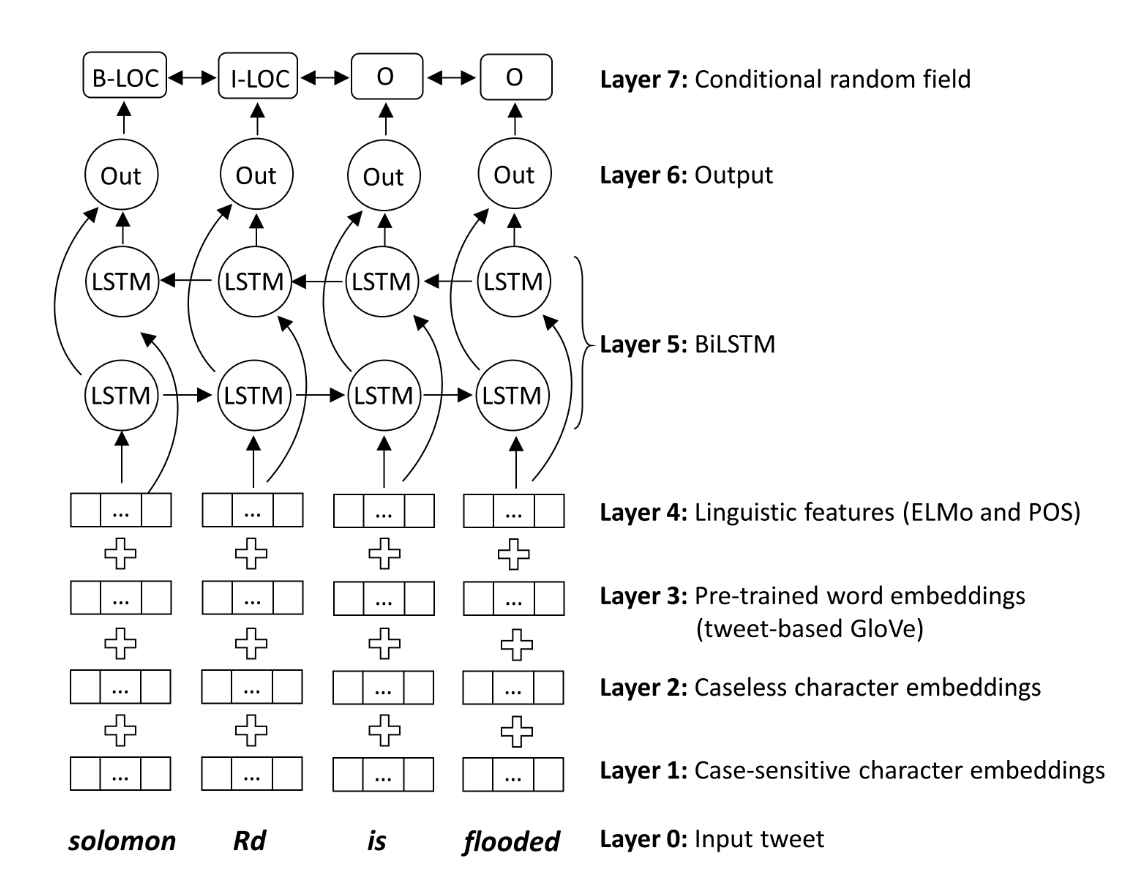
Figure 1. The overall architecture of NeuroTPR
Use the pretrained NeuroTPR model
Using the pretrained NeuroTPR model for toponym recognition will need the following steps:
- Setup the virtual environment: Please create a new virtual environment using Anaconda and install the dependent packages using the following commands (please run them in the same order below):
   conda create -n NeuroTPR python=3.6
   conda activate NeuroTPR
   conda install keras -c conda-forge
   pip install git+https://www.github.com/keras-team/keras-contrib.git
   pip install neurotpr
-
Download the pretrained model, and unzip it to a folder that you would prefer.
-
Use NeuroTPR to recognize toponyms from text. A snippet of example code is below:
from neurotpr import geoparse

geoparse.load_model("the folder path of the pretrained model; note that the path should end with /")
result = geoparse.topo_recog("Buffalo is a city in New York State.")
print(result)
The input of the "topo_recog" function is a string, and the output is a list of JSON objects containing the recognized toponyms and their start and end indexes in the input string.
Combine NeuroTPR with a geolocation service
NeuroTPR is a toponym recognition model, which means that it will not assign geographic coordinates to the recognized toponyms. If you would like to add coordinates to the recognized toponyms, you could use the geocoding function from GeoPandas, Google Place API, or other services. Note that these services are not doing place name disambiguation for you, since they don't know the contexts under which these toponyms are mentioned. However, it would be fine to use one of these services if the toponyms in your text are not highly ambiguous.
Project dependencies:
- Python 3.6
- Keras 2.3.1
- Tensorflow 1.14.0
- Keras-contrib (https://github.com/keras-team/keras-contrib)
- Tensorflow Hub (https://www.tensorflow.org/hub)
- NLTK 3.5
- emoji 0.6.0
1 maintainer

Metadata
1 maintainer
Release files for neurotpr 0.0.9
For a detailed explanation of source distributions (sdists) and built distributions (wheels), please see the package formats documentation.
Source distribution (sdist)
| File | Size | Uploaded | |
|---|---|---|---|
| neurotpr-0.0.9.tar.gz | 13.0 kB | Details |
Built distribution (wheel)
| File | Interpreter | ABI | Platform | Reset |
|---|---|---|---|---|
| neurotpr-0.0.9-py3-none-any.whl | Python 3 | none | any | Details |
Total release size: 40.1 kB
Release files / neurotpr-0.0.9.tar.gz
| Download URL | neurotpr-0.0.9.tar.gz |
|---|---|
| Size | 13.0 kB |
| Tags | Source |
|
SHA-256 checksum How to use checksums |
1726acd6f6e6074bf8939bcf221a18f9a7b3b774a4f1aeb361594f2cb70ed198
|
|
BLAKE2b-256 checksum How to use checksums |
83e5ed3c6d4f0d4a3c463510b5c963ef2c68f7758f39bf6f0f3417ad19c72985
|
| Upload date | |
|
Uploaded using Trusted Publishing? What is trusted publishing? |
No |
| Uploaded via |
twine/3.2.0 pkginfo/1.5.0.1 requests/2.24.0 setuptools/50.3.1 requests-toolbelt/0.9.1 tqdm/4.47.0 CPython/3.8.3
|
Release files / neurotpr-0.0.9-py3-none-any.whl
| Download URL | neurotpr-0.0.9-py3-none-any.whl |
|---|---|
| Size | 27.1 kB |
| Tags | Python 3 |
|
SHA-256 checksum How to use checksums |
68b4f21620d3b6670f161a1457fcf98ac5586e8a34d19defab0078d017391d20
|
|
BLAKE2b-256 checksum How to use checksums |
ffc7e27e427e5e72348ad88f727e90e5d89fc78ca487e021e100e97671ff539c
|
| Upload date | |
|
Uploaded using Trusted Publishing? What is trusted publishing? |
No |
| Uploaded via |
twine/3.2.0 pkginfo/1.5.0.1 requests/2.24.0 setuptools/50.3.1 requests-toolbelt/0.9.1 tqdm/4.47.0 CPython/3.8.3
|














