
Nexus is a pluggable admin application in Django. It's designed to give you a simple design and architecture for building admin applications.


This project has been archived.
The maintainers of this project have marked this project as archived. No new releases are expected.
Project description
Nexus


Nexus is a pluggable admin application in Django. It’s designed to give you a simple design and architecture for building admin applications.
It was originally created by Disqus, but due to the inactivity we at YPlan have taken over maintenance on this fork.
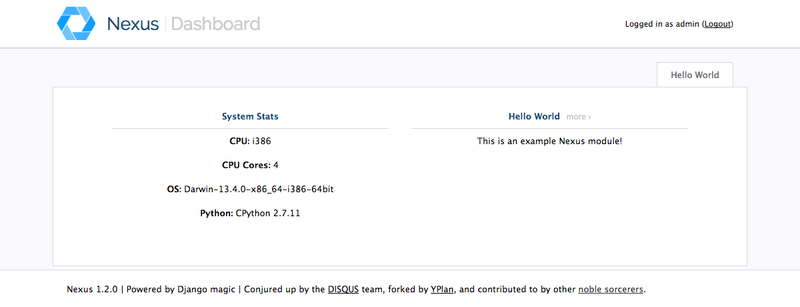
Screenshot
Requirements
Tested with all combinations of:
Python: 2.7, 3.4, 3.5
Django: 1.7 (up to Python 3.4 only), 1.8, 1.9
Install
Install it with pip (or easy_install):
pip install nexus-yplanMake sure you pip uninstall nexus first if you’re upgrading from the original to this fork - the packages clash.
Config
You’ll need to enable it much like you would django.contrib.admin.
First, add it to your INSTALLED_APPS setting:
INSTALLED_APPS = (
    ...
    'nexus',
)
Now you’ll want to include it within your urls.py:
import nexus

# sets up the default nexus site by detecting all nexus_modules.py files
nexus.autodiscover()

# urls.py
urlpatterns = patterns('',
    ('^nexus/', include(nexus.site.urls)),
)
By default Nexus requires django.contrib.auth and django.contrib.sessions. If you are using a custom auth system you can skip these requirements by using the setting NEXUS_SKIP_INSTALLED_APPS_REQUIREMENTS = True in your django settings.
Settings
Nexus’ behaviour can be customized by adding some values to your Django settings.
Login
Until Version 1.1, Nexus included a login/logout functionality. Unfortunately these were copied and adapted from an old version of the code in Django Admin, and were thus not up to date with security changes in newer Django versions. Since keeping them up to date would be a burden, and most sites use Django Admin for adminstrator login, the login/logout functions have been removed.
Nexus now relies on Django Admin login, or for users to visit it having logged in through another route.
Media
By default Nexus serves its media files itself through Python, avoiding any configuration to integrate with your project. This is convenient but can be slow. You can control where the media files are served from with the setting NEXUS_MEDIA_PREFIX, for example:
NEXUS_MEDIA_PREFIX = '/served/here/'Modules
Applications which provide Nexus modules:
N.B. Those that have not been forked by YPlan probably aren’t up to date to work with newer Django versions.
If you want to write a module, see HelloWorldModule in tests/testapp/nexus_modules.py, plus its templates, for a simple hello world implementation. Also the source code shouldn’t be too hard to understand.
History
Pending Release
New release notes here
1.1.0 (2016-01-13)
Removed support for old Django versions
Fixed all deprecation warnings on Django 1.7 and 1.8
Added Django 1.9 support
Added Python 3.4 and 3.5 support
Historically Nexus had a module that embedded Django Admin; this has not worked since Django 1.3 due to removal of the adminmedia template tag that the templates were still using. Because it seems that no one has been using it, it has been removed. Users are encourage to just use the normal Django Admin instead. Nexus thus ships with no modules included.
Removed the login/logout pages, which were copied and adapted from an old version of Django Admin, and likely no longer secure. If you are not logged in Nexus will now redirect you to Django Admin - thus Django Admin is now required by Nexus.
Fixed Nexus CSRF protection to work if you have changed the CSRF cookie name, thanks to a PR on the original Nexus from Github users @karech and @graingert.
Removed all inline javascript, thanks @graingert.
1.0.0 (2015-12-09)
First publication on PyPI as nexus-yplan
Django 1.8 compatibility
Release history Release notifications | RSS feed


Download files
Download the file for your platform. If you're not sure which to choose, learn more about installing packages.
Source Distribution
Built Distribution
Filter files by name, interpreter, ABI, and platform.
If you're not sure about the file name format, learn more about wheel file names.
Copy a direct link to the current filters
File details
Details for the file nexus-yplan-1.1.0.tar.gz.
File metadata
- Download URL: nexus-yplan-1.1.0.tar.gz
- Upload date:
- Size: 84.5 kB
- Tags: Source
- Uploaded using Trusted Publishing? No
File hashes
| Algorithm | Hash digest | |
|---|---|---|
| SHA256 |
a78fa0b3d5888a59c7f8af492f238a51391df686149fb5d96ff6074c44125b12
|
|
| MD5 |
bb9d60db0dd4e0c59dccce3c003614ed
|
|
| BLAKE2b-256 |
3e2aeeab248e1528d7482fe38cbd66ad2e016d5224796863c44297316102b7ef
|
File details
Details for the file nexus_yplan-1.1.0-py2.py3-none-any.whl.
File metadata
- Download URL: nexus_yplan-1.1.0-py2.py3-none-any.whl
- Upload date:
- Size: 86.3 kB
- Tags: Python 2, Python 3
- Uploaded using Trusted Publishing? No
File hashes
| Algorithm | Hash digest | |
|---|---|---|
| SHA256 |
39f5d5cee2cd15ac5bc5833d2a01e973463f2a662f125eeb725b011e1113dcc1
|
|
| MD5 |
4c5fe98291d1ddcd3be0e801a1fb9b2d
|
|
| BLAKE2b-256 |
0e225829d5fd9844b3ae5cda2aacd7763b30d82ac6957eb6980d02d038f288c1
|






