
nf












IN SHORT
nf is a tool to make notification for user that its command finish work. For example “make” program that takes long time to finish.
SPDX-License-Identifier: 0BSD
Project name: nf License: 0BSD / Free Public License 1.0.0 More information about license: https://opensource.org/licenses/0BSD
CHANGELOG
- From 1.3.2:
–detach for run command as detached process (stdout is still the same, but parent of process is system dependant)
–wait-for-pids wait for one or more processes then run cmd
add new backend: win10toast-persist
fix backends priorities on Win
fix ‘null’ dbus interface on some Linux configurations
detect WSL (Win) but do not support it yet
SCREENSHOTS
Screenshot from KDE:
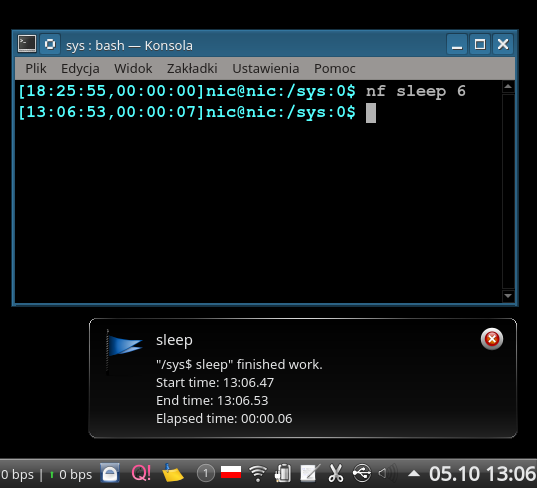
Screenshot from KDE:
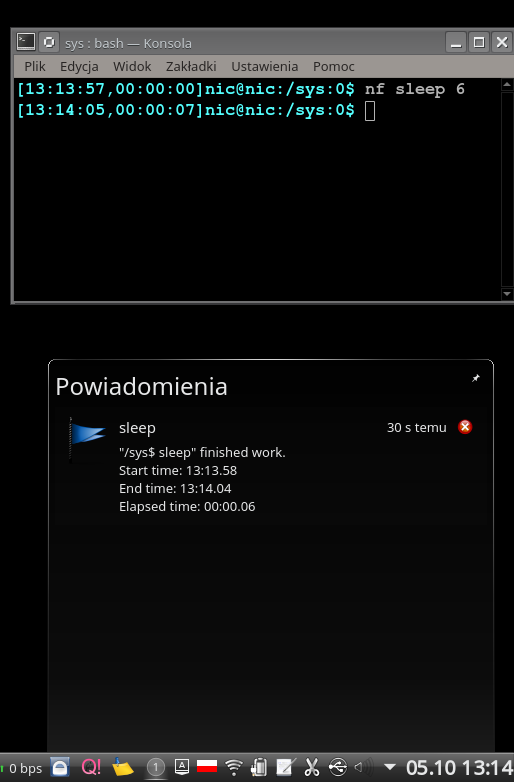
Screenshot from KDE:
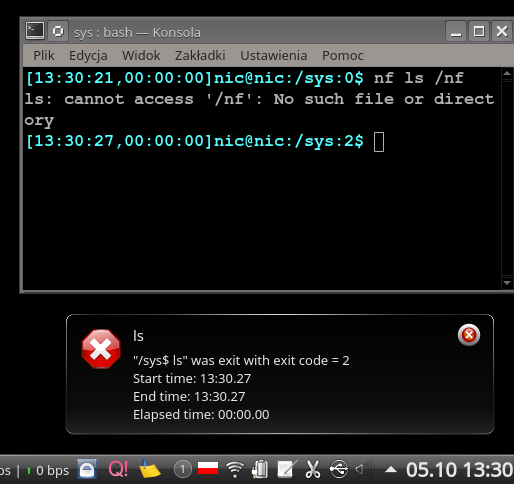
Screenshot from Android:
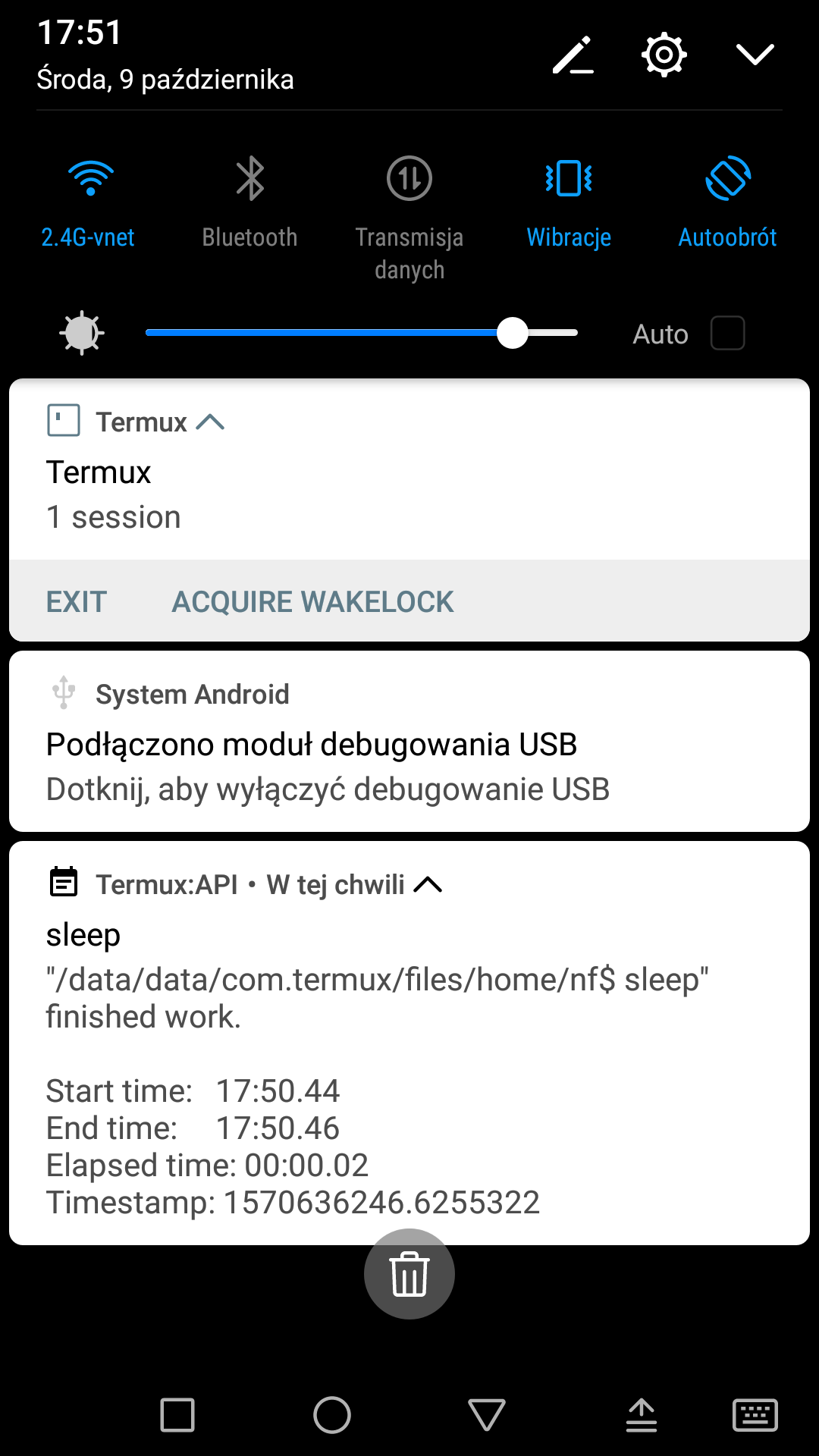
NON-INSTALL
It is one-file script so you can download and use it. You can also run it from sources without any dependancies* (need only python and maybe some modules delivered with it [or not])
* - Windows needs some modules to work, see setup.py for details. On 2020-03-08 they are: python -m install psutil win10toast-persist
Latest developement version:
wget -c https://github.com/NIC-MichalLabedzki/nf/raw/master/nf.pyor
curl https://github.com/NIC-MichalLabedzki/nf/raw/master/nf.py -f -L -o nf.pyor put link into your browser
https://github.com/NIC-MichalLabedzki/nf/raw/master/nf.py
or
git clone git@github.com:NIC-MichalLabedzki/nf.gitpython ./nf.pySee:
python ./nf.py --helpSee CLI section for more details.
Previous stable versions:
wget -c https://github.com/NIC-MichalLabedzki/nf/raw/v1.4.0/nf.py
wget -c https://github.com/NIC-MichalLabedzki/nf/raw/v1.3.2/nf.py
wget -c https://github.com/NIC-MichalLabedzki/nf/raw/v1.2.0/nf.py
wget -c https://github.com/NIC-MichalLabedzki/nf/raw/v1.1.1/nf.py
wget -c https://github.com/NIC-MichalLabedzki/nf/raw/v1.0.1/nf.py
INSTALLATION
python -m pip install nfor
python -m pip install nf --useror
python -m pip install nf --user --proxy=YOUR.PROXY.IP.v4:YOUR_PORTor
python -m pip install -e git+https://github.com/NIC-MichalLabedzki/nf.git#egg=masteror
git clone https://github.com/NIC-MichalLabedzki/nf.git
cd nf
python setup.py # or python -m pip install -e .
or
git clone git@github.com:NIC-MichalLabedzki/nf.git
cd nf
python setup.py # or python -m pip install -e .
To update:
python -m pip install nf -UINTERFACE
There are one kind of interfaces: CLI.
If you think there is a need to have lib/module to please let me know why. Maybe there is a reason.
CLI
CLI is Command Line Interface. So you have tool called: nf
$ python nf.py --help
usage: nf.py [-h] [-l LABEL] [-p] [-n] [-s] [-w WAIT_FOR_PID] [--detach]
            [-b {paramiko,ssh,dbus,gdbus,notify-send,termux-notification,win10toast-persist,win10toast,plyer,plyer_toast,stdout}]
            [-v] [-d] [--debugfile DEBUGFILE]
            [--custom_notification_text CUSTOM_NOTIFICATION_TEXT]
            [--custom_notification_title CUSTOM_NOTIFICATION_TITLE]
            [--custom_notification_exit_code CUSTOM_NOTIFICATION_EXIT_CODE]
            cmd ...

Simple command line tool to make notification after target program finished work

positional arguments:
cmd
args

optional arguments:
-h, --help            show this help message and exit
-l LABEL, --label LABEL
                        Add humn readable text to custom job identification
-p, --print           Print notification text in stdout too
-n, --no-notify       Do not do annoying notifications
-s, --save            Save/append command and stat to .nf file
-w WAIT_FOR_PID, --wait-for-pid WAIT_FOR_PID
                        Wait for PID aka wait for already run process finish
                        work. This option can be used multiple times.
--detach              Run command or wait for pid in detached process
-b {paramiko,ssh,dbus,gdbus,notify-send,termux-notification,win10toast-persist,win10toast,plyer,plyer_toast,stdout}, --backend {paramiko,ssh,dbus,gdbus,notify-send,termux-notification,win10toast-persist,win10toast,plyer,plyer_toast,stdout}
                        Notification backend
-v, --version         Print version
-d, --debug           More print debugging on stdout
--debugfile DEBUGFILE
                        More print debugging save into file
--custom_notification_text CUSTOM_NOTIFICATION_TEXT
                        Custom notification text
--custom_notification_title CUSTOM_NOTIFICATION_TITLE
                        Custom notification title
--custom_notification_exit_code CUSTOM_NOTIFICATION_EXIT_CODE
                        Custom notification exit code

Examples:
nf make
nf ls
nf ls not_exist_file
nf sleep 2
nf -l sleeping sleep 2
nf -l `tty` ls
nf "ls | grep .py"
nf --detach sleep 15
nf -w 55555 ls
nf -w 55555 --detach echo Finished
nf -w 55555 -w 55556 echo Done

"/home/nic/src/nf$ nf.py -p ls
LICENSE  nf.py  pytest.ini  README  README.dev  requirements-dev.txt  setup.cfg  setup.py  tox.ini
-----------------------------------------------------------
"/home/nic/src/nf$ ls" finished work.

Start time:   17:32.50
End time:     17:32.50
Elapsed time: 00:00.00
-----------------------------------------------------------
LIMITATIONS
Work with Jython: it does not have dbus module, fallback to command line.
Observed in KDE: notification with the same body (text) can be dropped. To avoid that I add timestamp text to make nofitications unique.
FEATURES
Support Android notification by termux-notifications (of course by termux)
Support dbus by python module or fallback to notify-send (part of libnotify 0.7.7 or 0.7.8)
Option to print notification on stdout.
Option to save full command line and stat to file into working directory.
Support whole python implementations/versions (at least not crash and print on stdout)
Case SSH: If you are over SSH send notification over backward-SSH connection to your native system (force password)
Supported notification backends: paramiko (ssh), ssh, dbus, notify-send, termux-notification (Android), win10toast (Windows),plyer, plyer_toast, stdout
yakuake/konsole terminal tab name in label
screen/tmux session/window/pane title/name in label
Python module aka library interface “import nf;nf.nf([‘ls’])”
TMUX/SCREEN used by nf or how to test it
1. tmux session name: .. code-block:: bash
tmux rename-session sesja tmux list-sessions -F “#{session_name}”
2. tmux window name: .. code-block:: bash
tmux rename-window okno tmux list-window -F “#{window_name} #{window_active}”
3. tmux pane name: .. code-block:: bash
printf ‘033]2;%s033' ‘this is a title’ tmux list-pane -F “#{pane_title} #{pane_active}”
4. client pid to get parent (for example: yakuake) .. code-block:: bash
tmux display-message -p “#{client_pid}”
5. screen sessions: .. code-block:: bash
screen -list There are screens on: 7842.pts-30.nic (Attached) 6981.pts-25.nic (Attached) 2 Sockets in /tmp/screens/S-nic.
6. screen window title .. code-block:: bash
screen -S 6981.pts-25.nic -Q title terefere
7. screen windows: .. code-block:: bash
screen -S 6981.pts-25.nic -Q windows 0* terefere 1 bash 2 bash 3- bash
TODO
nf 1.5.0
–try-version=1.3.2 - download (need Internet connection), put in home directory and use it instead of installed version
–try-version=dev - latest git version to tests
$HOME/.nf directory and “versions” subdir to downloaded versions
WSL support
1 maintainer

Metadata
1 maintainer
Release files for nf 1.4.0
For a detailed explanation of source distributions (sdists) and built distributions (wheels), please see the package formats documentation.
Source distribution (sdist)
| File | Size | Uploaded | |
|---|---|---|---|
| nf-1.4.0.tar.gz | 305.6 kB | Details |
Built distribution (wheel)
| File | Interpreter | ABI | Platform | Reset |
|---|---|---|---|---|
| nf-1.4.0-py2.py3-none-any.whl | Python 2, Python 3 | none | any | Details |
Total release size: 324.2 kB
Release files / nf-1.4.0.tar.gz
| Download URL | nf-1.4.0.tar.gz |
|---|---|
| Size | 305.6 kB |
| Tags | Source |
|
SHA-256 checksum How to use checksums |
4873ae2099d0384c33dcb555bc474c82245f0079cd5e3e0d9aed429924d0881e
|
|
BLAKE2b-256 checksum How to use checksums |
b75e1cad06930550f42d42d7f6159e9a3d54ebc98eba06826997be707619d158
|
| Upload date | |
|
Uploaded using Trusted Publishing? What is trusted publishing? |
No |
| Uploaded via |
twine/3.1.1 pkginfo/1.5.0.1 requests/2.22.0 setuptools/45.2.0 requests-toolbelt/0.9.1 tqdm/4.32.2 CPython/3.7.3
|
Release files / nf-1.4.0-py2.py3-none-any.whl
| Download URL | nf-1.4.0-py2.py3-none-any.whl |
|---|---|
| Size | 18.6 kB |
| Tags | Python 2 Python 3 |
|
SHA-256 checksum How to use checksums |
73345bfdd753fc242ec8e926cba12958537906d5221682ddbb9fc2062ef6ac6f
|
|
BLAKE2b-256 checksum How to use checksums |
30fa05eb8f12640d446d2d43c6f887d5d8f328fd2d09d6fdad7d4c1dc398d183
|
| Upload date | |
|
Uploaded using Trusted Publishing? What is trusted publishing? |
No |
| Uploaded via |
twine/3.1.1 pkginfo/1.5.0.1 requests/2.22.0 setuptools/45.2.0 requests-toolbelt/0.9.1 tqdm/4.32.2 CPython/3.7.3
|














