
master branch status |
|
|||
GitHub status |
|
|||
Versions |
Name |
Driver Version Tested Against |
PyPI Version |
Supported Python Version |
NI-DCPower |
17.6.0 |
|||
NI-DMM |
17.1.0 |
|||
NI-FGEN |
17.0.0 |
|||
NI-SCOPE |
17.0.2 |
|||
NI-SWITCH |
17.0.0 |
|||
NI-ModInst |
17.0.0 |
|||















Info |
Python bindings for NI Modular Instrument drivers. See GitHub for the latest source. |
Author |
National Instruments |
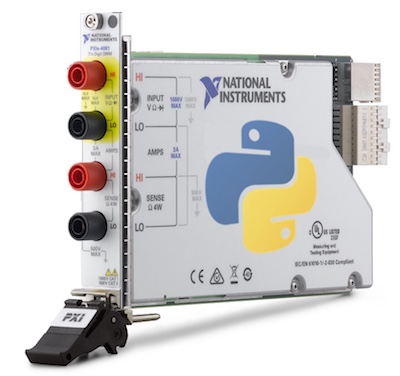
About
The nimi-python repository generates Python bindings (Application Programming Interface) for interacting with the Modular Instrument drivers. Currently, the following drivers are supported:
NI-DCPower (Python module: nidcpower)
NI-DMM (Python module: nidmm)
NI-FGEN (Python module: nifgen)
NI-SCOPE (Python module: niscope)
NI-SWITCH (Python module: niswitch)
NI-ModInst (Python module: nimodinst)
It is implemented as a set of Mako templates and per-driver metafiles that produce a Python module for each driver. The driver is called through its public C API using the ctypes Python library.
nimi-python supports all the Operating Systems supported by the underlying driver.
nimi-python supports Python 2.7, 3.4 and later using CPython or PyPy.
Installation
As a prerequisite to using nimi-python modules, you must install the corresponding driver runtime on your system. Visit ni.com/downloads to download the driver runtime for your devices.
The nimi-python modules (i.e. for NI-DMM) can be installed with pip:
$ python -m pip install nidmm
Or easy_install from setuptools:
$ python -m easy_install nidmm
Contributing
We welcome contributions! You can clone the project repository, build it, and install it by following these instructions.
Usage
The following is a basic example of using the nidmm module to open a session to a DMM and perform a 5.5 digits of resolution voltage measurement in the 10 V range.
import nidmm
with nidmm.Session("Dev1") as session:
    session.configureMeasurementDigits(nidmm.Function.DC_VOLTS, 10, 5.5)
    print("Measurement: " + str(session.read()))
Additional examples for each driver are located in src/<driver>/examples/ directory.
Support / Feedback
The packages included in nimi-python package are supported by NI. For support, open a request through the NI support portal at ni.com.
Bugs / Feature Requests
To report a bug or submit a feature request, please use the GitHub issues page.
Information to Include When Asking for Help
Please include all of the following information when opening an issue:
Detailed steps on how to reproduce the problem and full traceback, if applicable. Code samples are encouraged!
The python version used:
$ python -c "import sys; print(sys.version)"
The module (i.e. nidmm) and its version:
$ python -m pip list
The version of the driver used (i.e. NI-DMM 17.1). Follow this KB article to determine the version you have installed.
The operating system, version, and bitness. For example 64-bit Windows 7.
Documentation
Documentation is available here.
Additional Documentation
Refer to your driver documentation for device-specific information and detailed API documentation.
License
nimi-python is licensed under an MIT-style license (see LICENSE). Other incorporated projects may be licensed under different licenses. All licenses allow for non-commercial and commercial use.
5 maintainers


Metadata
5 maintainers
Release files for nimodinst 0.6.0
For a detailed explanation of source distributions (sdists) and built distributions (wheels), please see the package formats documentation.
Source distribution (sdist)
| File | Size | Uploaded | Provenance | Actions |
|---|---|---|---|---|
| nimodinst-0.6.0.tar.gz | 10.4 kB | Without provenance | Details for nimodinst-0.6.0.tar.gz |
Built distribution (wheel)
| File | Interpreter | ABI | Platform | Actions Reset |
|---|---|---|---|---|
| nimodinst-0.6.0-py2.py3-none-any.whl | Python 2, Python 3 | none | any | Details for nimodinst-0.6.0-py2.py3-none-any.whl |
Total release size: 25.3 kB
Release files / nimodinst-0.6.0.tar.gz
| Download URL | nimodinst-0.6.0.tar.gz |
|---|---|
| Size | 10.4 kB |
| Tags | Source |
|
SHA-256 checksum How to use checksums |
261dbce7051eb2bfd6cf2a5a220f22a8c7eb250854d0cf6afecd83ed8e49d753
|
|
BLAKE2b-256 checksum How to use checksums |
f1532dcaca0fe07040f393b65fc81b711037a1f7989b205804a3e2e3057d274f
|
| Upload date | |
|
Uploaded using Trusted Publishing? What is trusted publishing? |
No |
Release files / nimodinst-0.6.0-py2.py3-none-any.whl
| Download URL | nimodinst-0.6.0-py2.py3-none-any.whl |
|---|---|
| Size | 14.9 kB |
| Tags | Python 2 Python 3 |
|
SHA-256 checksum How to use checksums |
f5793a191b4894bff728c03df2bb36827ef4e72f57c76fe8477321683c974572
|
|
BLAKE2b-256 checksum How to use checksums |
fa3138d2ea0a2c4d65e0bb1666c840f97198120658a30b60b8524df9488bfe13
|
| Upload date | |
|
Uploaded using Trusted Publishing? What is trusted publishing? |
No |
Security for nimodinst 0.6.0
Provenance
Provenance describes where a file came from. On PyPI, provenance is shared via attestations, which provide a verifiable record of the build or publishing details. View details, limitations and caveats.
No provenance found
None of the files in this release were uploaded with provenance metadata.
A note on package security
PyPI is a repository for distributing packages, not a service for auditing them. While third-party security researchers and our staff do their best to detect and remove malicious packages, PyPI cannot guarantee the quality, security or suitability of any given package.
To learn more about protecting yourself from malicious actors, visit our package security documentation.














