
Novamud
A very simple and flexible text-based online multiplayer framework. Dungeons can be built with pure python in very simple classes. The required python knowledge to work with this is:
- Native python data types (integers, strings, numbers)
- Basic data structures such as lists, dictionaries
- Defining and calling functions
- Running a script
- The basics of OOP
- Creating classes
- Overriding functions and how to call
super()
Check out the API for a functionality reference.
Tutorials
Overview
API overview
The novamud api provides a way to build Room based Dungeons. It cannot be
stressed enough that everything that goes on here is centered around Rooms.
Rooms decide everything, hold everything, where functionality is defined,
and can be connected to other Rooms.
Although the Rooms contain the heart of the functionality, the Dungeon is
the master coordinator of it all. The Dungeon is the where you initially
create the rooms and connect them.
You can find each of the tutorial dungeons in the tutorials/ section
of the repo.
Playing the game
The Dungeons themselves just runs a websocket server. After you have written
the code for a new Dungeon and have it running on your local machine,
you can go to the novamud client
and enter ws://localhost:8080 and hit the connect button to start playing
the game. By default it listens on all IP addresses so anyone on your
local network should be able to connect to it if they know your internal IP
address.
Chat functionality
The novamud framework comes with builtin chat functionality. You can either chat to everyone that is in the same room that you are in OR you can chat with everyone that is in the other rooms.
say ...is how you chat to everyone in the same room as you. Examples:say hello everyone!And everyone will seehello everyone!show up on their screen next to your name.say hey guys, how are you today? for lunch I had a bitoque and it was magicaland everyone will seehey guys, how are you today? for lunch I had a bitoque and it was magicalshow up on their screen next to your name.
say_dungeon ...- works the same assaybut everyone in the Dungeon will see your message rather than just everyone in your room. Be careful using this one because you don't want to be spamming the entire dungeon...
Baby's First Dungeon
# in tutorials/babys_first_dungeon.py
from novamud import Dungeon, Room


class BabyRoom(Room):
    pass


class BabyDungeon(Dungeon):
    def init_dungeon(self):
        hr = BabyRoom(self)
        self.start_room = hr


if __name__ == '__main__':
    BabyDungeon().start_dungeon()
You can run this dungeon by executing python examples/babys_first_dungeon.py.
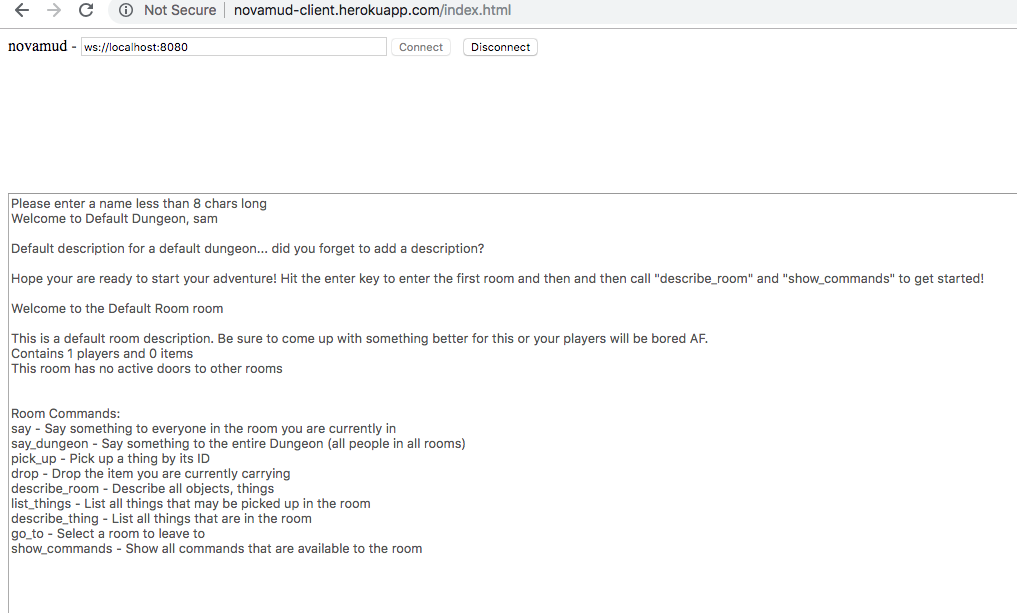
Now with this Dungeon you can get all of the default basic functionality of the novamud framework up and running. So go ahead and run this file and you can get the following experience:
Please enter a name less than 8 chars long
At this point I enter my name sam and hit the enter key
Welcome to Default Dungeon, sam
Default description for a default dungeon... did you forget to add a description?

Hope your are ready to start your adventure! Hit the enter key to enter the first room and then and then call "describe_room" and "show_commands" to get started!
Now that I have read about the two most important commands I can hit to go onto the very first room!
Welcome to the Default Room room
Okay cool, I know the name of the room that I am in but not much else, so I
will use the describe_room command
This is a default room description. Be sure to come up with something better for this or your players will be bored AF.
Contains 1 players and 0 items
This room has no active doors to other rooms
Okay, looks like a coder forgot to do some work. Whatever though, let's see
what I can do by using the show_commands command
Room commands
say - Say something to everyone in the room you are currently in
say_dungeon - Say something to the entire Dungeon (all people in all rooms)
pick_up - Pick up a thing by its ID
drop - Drop the item you are currently carrying
describe_room - Describe all objects, things
list_things - List all things that may be picked up in the room
describe_thing - List all things that are in the room
go_to - Select a room to leave to
show_commands - Show all commands that are available to the room
All together it looks like this:
ToddlerDungeon
So all we did with BabyDungeon was write the absolute minimum code needed to make something run. We didn't really learn anything at all about what you can do with the framework so let's dip our toes into something that has a few more interesting things in it with a ToddlerDungeon:
from novamud import Dungeon, Room


class ToddlerRoom(Room):

    def register_commands(self):
        return ['hello_toddler']

    def hello_toddler(self, player):
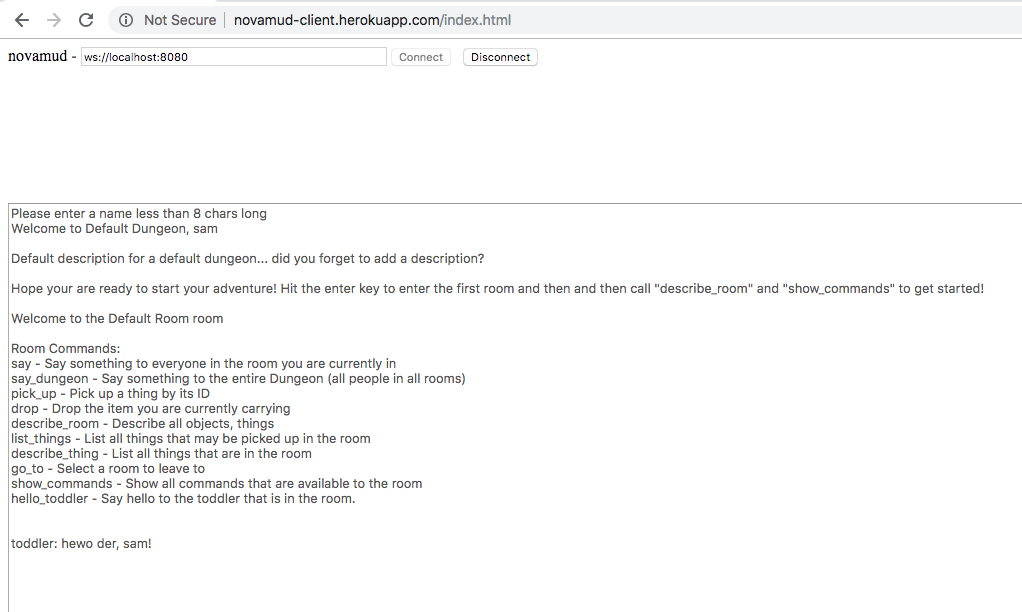
        player.tell('toddler: hewo der, {}!'.format(player.name))

    def hello_toddler_describe(self):
        return 'Say hello to the toddler that is in the room.'


class ToddlerDungeon(Dungeon):
    def init_dungeon(self):
        tr = ToddlerRoom(self)
        self.start_room = tr

if __name__ == '__main__':
    ToddlerDungeon().start_dungeon()
What's new here?
So the ToddlerDungeon looks pretty much the same as the BabyDungeon, no
big thing there. However, there's now some stuff going on inside the
ToddlerRoom that we didn't see before. Let's take a closer look at that.
ToddlerRoom
There are now 3 new functions defined on the ToddlerRoom that we haven't
seen before.
register_commands- Remember when we said that everything isRoombased including functionality? Theregister_commandsfunction is how you tell theToddlerRoomwhich of the commands should be available. The reason that we need to do this is that we may have other helper functions that we define on theToddlerRoomthat we don't want to give to the players as commands.hello_toddler- Remember how we registered commands? Well here is where we define exactly what it does. All commands get one required argument which is the player that executed the command. On the player, there is a function calledtellwhich takes a string as an argument and sends it to them. Notice that the player has an attribute callednameon it which contains the name that the person gave us when they entered the dungeon.hello_toddler_describe- Any time that we register a new command, we must write another function that has the same name with an_describethat returns a string. It is this function that is called with someone calls theshow_commandscommand.
So if we run the ToddlerDungeon and use the basic functionality, we get
the following:
TeenageDungeon
Now that we have learned how to add new commands and are starting to grow up, let's take a look at a few more concepts, namely
- Adding descriptions and names to everything
- Adding a
Thing
from novamud import Dungeon, Room, Thing


class ColdplayPoster(Thing):
    name = 'ColdplayPoster'
    description = "Much angst, such coldplay"


class TeenagerRoom(Room):
    name = 'TeenagerRoom'
    description = ("A room full of angst. You find a few coldplay posters on"
                   "the wall and it smells slightly of disdain for authority.")

    def init_room(self):
        cp1 = ColdplayPoster()
        cp2 = ColdplayPoster()
        self.add_thing(cp1)
        self.add_thing(cp2)

    def register_commands(self):
        return ['hello_teenager']

    def hello_teenager(self, player):
        player.tell(
            'teenager: ugh. why are you bothering me, {}?'.format(player.name)
        )

    def hello_teenager_describe(self):
        return 'Say hello to the teenager that is in the room.'


class TeenagerDungeon(Dungeon):
    name = 'TeenagerDungeon'
    description = "A dungeon that is as dark as the average teenage soul."

    def init_dungeon(self):
        tr = TeenagerRoom(self)
        self.start_room = tr


if __name__ == '__main__':
    TeenagerDungeon().start_dungeon()
Descriptions and names
First thing to notice is that the TeenagerDungeon and the TeenagerRoom
have a few new variables defined on them which are the name and the
description. These are both used to help the user understand where they are
as well as give you (the game designer) a bit of creative freedom in setting
the tone and feeling of your game.
Run this dungeon and execute the following commands to see what the output looks like:
describe_room
Notice the differences and where the descriptions show up.
Things
Notice the new class ColdplayPoster that inherits from Thing. It doesn't
have anything except for a name and description. True this is quite spartan
but this will actually get you quite far.
Inside of the newly introduced init_room function, we are creating two
different ColdplayPosters. This is something that is quite different
about things as compared to Dungeons and Rooms. Each instiantated
Thing will have its own id which is how you can keep track of which
one is which.
When you call the list_things command, you will now notice that there
are two coldplay posters, each with it's own id. This is how you can
tell which one you want to pick up.
Interacting with things
You can pick up and drop things! Try the following commands to get a sense
for how to interact with the new ColdplayPoster things that you have
created:
list_things
pick_up ColdplayPoster_1
list_things
pick_up ColdplayPoster_2
list_things
drop
list_things
Ask yourself: how many things can you carry at a time? when you pick one up is it still available in the room? After you drop it again, does it become available in the room?
YoungAdultDungeon
Now that we have a sense for all of the important elements of the novadungeon system, let's make them interact with each other in a way that actually produces some incentives and a very simple puzzle:
from novamud import Dungeon, Room, Thing


class CarKeys(Thing):
    name = 'CarKeys'
    description = "You need to have the car keys before you can leave"


class ApartmentRoom(Room):
    name = 'ApartmentRoom'
    description = ("Spartan but functional. Not particularly clean but that "
                   "can be taken care of before your parents come by for "
                   "your Sunday dinner that you normally hold at your house.")

    def init_room(self):
        self.add_thing(CarKeys())

    def go_to(self, player, other_room_name):
        if not player.carrying or player.carrying.name != 'CarKeys':
            player.tell("You ain't going anywhere without those CarKeys!")
        else:
            super().go_to(player, other_room_name)


class TascaRoom(Room):
    name = 'TascaRoom'
    description = ("Your friendly local Tasca. The wine is cheap and passable "
                   "but certainly nothing special. The bitoque is fantasic.")

    def register_commands(self):
        return [
            'eat_bitoque',
            'drink_wine',
        ]

    def add_player(self, player):
        player.drink_level = 0
        super().add_player(player)

    def eat_bitoque(self, player):
        if player.drink_level > 0:
            player.drink_level -= 1
            player.tell(
                "Much better! Your drink level is now down to {}".format(
                    player.drink_level)
            )
        else:
            player.tell("mmmmmmmm, bitoque!")

    def eat_bitoque_describe(self):
        return "Have a bitoque in case you are getting a bit too tipsy."

    def drink_wine(self, player):
        player.drink_level += 1
        if player.drink_level == 1:
            player.tell('The price makes it taste okay!')
        elif 1 <= player.drink_level < 2:
            player.tell(
                "Your drink level is {}, you're still in the good zone".format(
                    player.drink_level
                )
            )
        elif player.drink_level >= 3:
            player.tell(
                "It might be good to have some food in order to bring that"
                "drink level down a bit... you're currently at drink "
                "level {}".format(player.drink_level)
            )

    def drink_wine_describe(self):
        return ("Have some wine! If you have a bit too much, you can always "
                "eat some food to bring yourself down")


class YoungAdultDungeon(Dungeon):

    name = 'YoungAdultDungeon'
    description = ("You are now a young adult. You have a crappy apartment"
                   "and a car with which you can go to meet up with your "
                   "friends at a TascaRoom.")

    def init_dungeon(self):
        ar = ApartmentRoom(self)
        tr = TascaRoom(self)
        ar.connect_room(tr, two_way=True)
        self.start_room = ar


if __name__ == '__main__':
    YoungAdultDungeon().start_dungeon()
Woah, now there's a much bigger pile of code! What the hell is going on here! Don't worry your young adult head because although there's more code here there isn't anything very complicated going on. There's just quite a few examples of how to make the objects in the system interact with each other.
Multiple rooms
Notice we now have several Rooms! This makes sense as Dungeons with only
a single room can get very boring very quickly. Notice that in the
init_dungeon function we instantiate both rooms and set one of them as
the start_room.
connect_room
The single most important new concept in this Dungeon is the demonstration
of how we can connect rooms to each other. After instiantiating two rooms,
we can connect them with the Room.connect_room function. Notice the second
keyword argument two_way=True which indicates that there should be a door
from the ApartmentRoom into the TascaRoom AND a door from the TascaRoom
to the ApartmentRoom. two_way defaults to True and although we haven't
demonstrated what it looks like to make a one-way door it is something
that you can use to create different and interesting puzzles later on.
leaving the ApartmentRoom
Here we have our first meaningful interaction with a Thing as well as an
augmenting of Room functionality by overloading the go_to method. Let's
take a closer look at it:
def go_to(self, player, other_room_name):
    if not player.carrying or player.carrying.name != 'CarKeys':
        player.tell("You ain't going anywhere without those CarKeys!")
    else:
        super().go_to(player, other_room_name)
go_to is a command just like the other commands that we've learned about
earlier but since it's already defined on the base Room class, we need to
take the same two parameters that it takes. Remember that the player is
always the first argument passed to any command so we can take advantage of
this to see if they are carrying their CarKeys by checking the carrying
attribute to make sure that they aren't leaving the apartment without their
CarKeys.
This is a very important thing to know because any command that is available
on rooms (except for the say and say_dungeon commands) can be overridden
in this same fashion to impose limits on them or augment their functionality.
When playing the game, you'll notice that you can't leave the room unless you have your keys. Pretty cool that we get this functionality with a 4 line function, right?
In the TascaRoom
Once you manage to get out of the ApartmentRoom and into the TascaRoom
you now have the chance to hang out for a while and enjoy yourself. Go ahead
and drink some wine and eat some bitoque and see what happens when you do.
Spoiler alert, if you drink you'll get a bit tipsy and if you eat some bitoque
it will bring your buzz-level back down.
This is a significant development because we are now keeping custom state
on the Player itself and we are doing this by overloading some base Room
functionality as well as with our own commands. This combination is very
powerful so let's take a closer look:
First let's look a the overriding of the add_player function:
def add_player(self, player):
    player.drink_level = 0
    super().add_player(player)
We can see that we are defining a new attribute on the player which is called
drink_level. We can now be confident that any player that enters the
TascaRoom will have a drink_level of 0. Remember to make the call to
super() or you'll break the whole framework!
Now let's have a look a the drink_wine command:
def drink_wine(self, player):
    player.drink_level += 1
    if player.drink_level == 1:
        player.tell('The price makes it taste okay!')
    elif 1 <= player.drink_level < 2:
        player.tell(
            "Your drink level is {}, you're still in the good zone".format(
                player.drink_level
            )
        )
    elif player.drink_level >= 3:
        player.tell(
            "It might be good to have some food in order to bring that"
            "drink level down a bit... you're currently at drink "
            "level {}".format(player.drink_level)
        )
Remember how all players enter the TascaRoom with a drink_level of 0? Well
now we can bump that up! Plus we can add a bit of fun to the game by sending
the player different messages depending on how much wine they have had to
drink. Notice that a player can have an arbitrarily high drink_level... not
the mot realistic thing but we can easily fix that with a few lines of code
if we wanted to.
Finally, let's see how we can get that drink_level down a bit by eating some
bitoque:
def eat_bitoque(self, player):
    if player.drink_level > 0:
        player.drink_level -= 1
        player.tell(
            "Much better! Your drink level is now down to {}".format(
                player.drink_level)
        )
    else:
        player.tell("mmmmmmmm, bitoque!")
As you can see we can easily implement a rule by which we check to see if
the drink_level is > 0 and then bring it down if so. If they don't have
any drink in them at all then they will just enjoy their bitoque!
TavernDungeon
So far everything is just single-player which makes you wonder why the framework as 'mud' in the name! MUD stands for Multi User Dungeon after all.
To see a dungeon that actually requires at least 5 people to play, check
out the TavernDungeon in example_dungeon.py. It is made using all of the
concepts that have already been introduced in the above tutorials and nothing
radically different.
1 maintainer

Download files
Download the file for your platform. If you're not sure which to choose, learn more about installing packages.
Source Distribution
File details
Details for the file novamud-0.0.8.tar.gz.
File metadata
- Download URL: novamud-0.0.8.tar.gz
- Upload date:
- Size: 18.7 kB
- Tags: Source
- Uploaded using Trusted Publishing? No
- Uploaded via:
twine/1.12.1 pkginfo/1.4.2 requests/2.20.0 setuptools/40.4.3 requests-toolbelt/0.8.0 tqdm/4.28.1 CPython/3.6.7
File hashes
| Algorithm | Hash digest | |
|---|---|---|
| SHA256 |
234555ab848dab4919433ec7d24d7b3259094c695cd9af5304a8bd8fba7fffac
|
|
| MD5 |
49d21c552becf47fca89adf806366e35
|
|
| BLAKE2b-256 |
82ded9ac66b3e5ab3a891c2ac1f10f4babf959a536d783c5b495c432410fe1c7
|














