
obniz.py: sdk for python
This sdk is currently out of maintenance.
- You can use this on obnizOS 1.X.X or 2.X.X, but cannot use 3.X.X.
- You can use only with obniz board / obniz Board 1Y. Other devices is not supported.

obniz sdk for python. You can use obnizBoard or obnizOS.
Control obniz from python.
This sdk works with obniz api.
Compatible with Python 3.8+.
Usage
    import asyncio

    from obniz import Obniz


    async def onconnect(obniz):
        obniz.io0.drive("5v")
        obniz.io0.output(True)
        obniz.io1.pull("3v")
        obniz.io1.drive("open-drain")
        obniz.io1.output(False)
        obniz.io2.drive("3v")
        obniz.io2.output(True)

        def callback(voltage):
            print("change to {} v".format(voltage))

        obniz.ad3.start(callback)

        pwm = obniz.get_free_pwm()
        pwm.start({"io": 4})
        pwm.freq(1000)
        pwm.duty(50)

        uart = obniz.getFreeUart()
        uart.start({"tx": 5, "rx": 6, "baud": 9600})

        def onreceive(data, text):
            print(data)

        uart.onreceive = onreceive

        uart.send("Hello")


    obniz = Obniz('0000-0000')
    obniz.onconnect = onconnect

    asyncio.get_event_loop().run_forever()
Installation
Install obniz via pip
pip install obniz
and import it on python file.
from obniz import Obniz
Connect
Details on doc/connection
To use obniz, instantiate obniz with obniz id. and set onconnect callback function. It will be called when connected to obniz successfully.
    import asyncio


    async def onconnect(obniz):
        pass


    obniz = Obniz('0000-0000')
    obniz.onconnect = onconnect

    asyncio.get_event_loop().run_forever()
You are able to use everything on obniz after connect.
    async def onconnect(obniz):
        obniz.io0.drive("5v")
        obniz.io0.output(True)
        obniz.io1.pull("3v")
        obniz.io1.drive("open-drain")
        obniz.io1.output(False)
        obniz.io2.drive("3v")
        obniz.io2.output(True)

        def callback(voltage):
            print("change to {} v".format(voltage))

        obniz.ad3.start(callback)

        pwm = obniz.get_free_pwm()
        pwm.start({"io": 4})
        pwm.freq(1000)
        pwm.duty(50)

        uart = obniz.getFreeUart()
        uart.start({"tx": 5, "rx": 6, "baud": 9600})

        def onreceive(data, text):
            print(data)

        uart.onreceive = onreceive

        uart.send("Hello")
Example
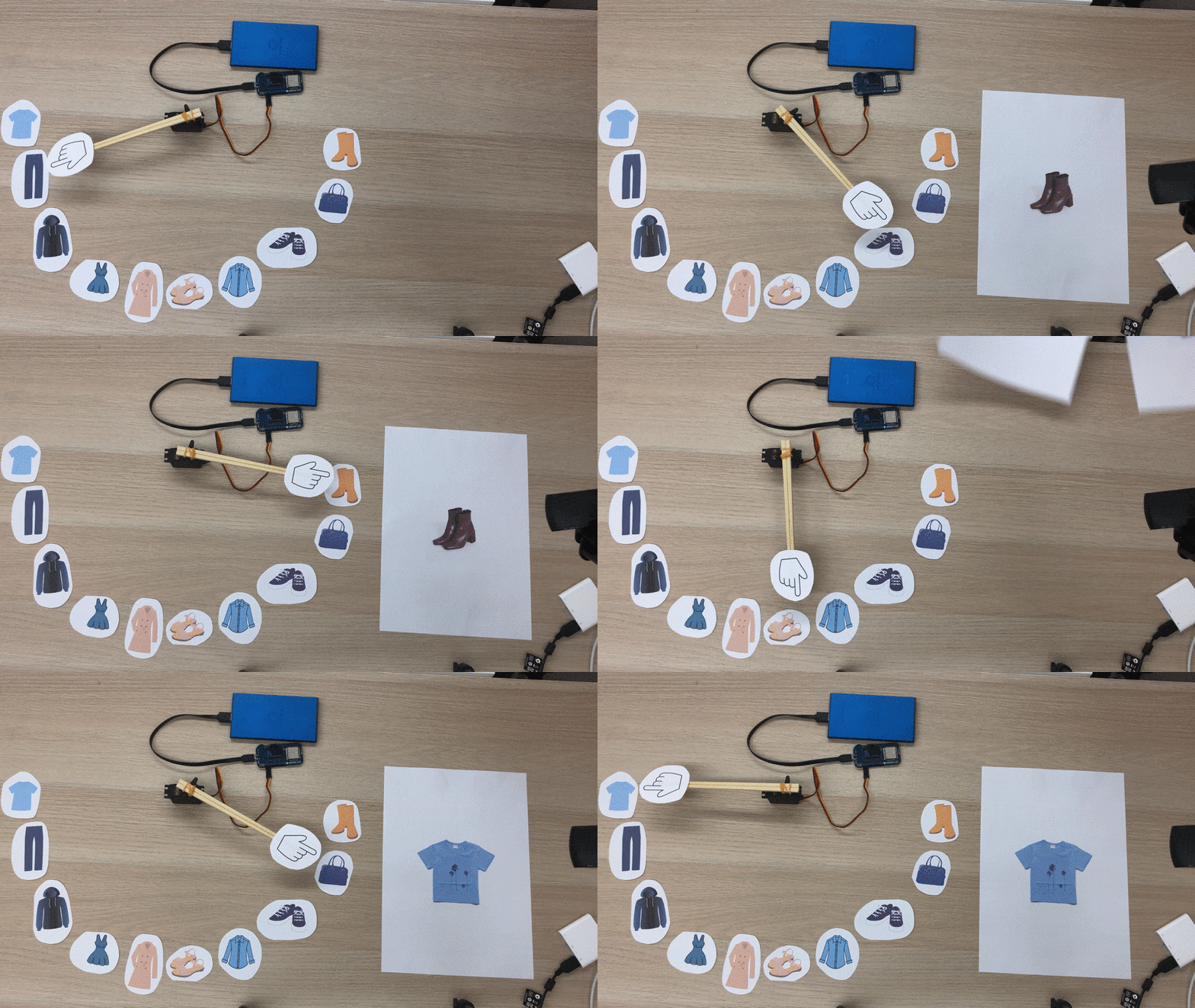
Easy to integrate python libraries like TensorFlow.
(need to install tensorflow and opencv-python)
    import asyncio

    from obniz import Obniz

    import cv2
    import numpy as np
    import tensorflow as tf
    from tensorflow import keras

    class_names = ['T-shirt/top', 'Trouser', 'Pullover', 'Dress', 'Coat',
                'Sandal', 'Shirt', 'Sneaker', 'Bag', 'Ankle boot']

    fashion_mnist = keras.datasets.fashion_mnist

    (train_images, train_labels), (test_images, test_labels) = fashion_mnist.load_data()

    train_images = train_images / 255.0

    test_images = test_images / 255.0

    model = keras.Sequential([
        keras.layers.Flatten(input_shape=(28, 28)),
        keras.layers.Dense(128, activation=tf.nn.relu),
        keras.layers.Dense(10, activation=tf.nn.softmax)
    ])

    model.compile(optimizer=tf.train.AdamOptimizer(),
                loss='sparse_categorical_crossentropy',
                metrics=['accuracy'])

    model.fit(train_images, train_labels, epochs=5)

    test_loss, test_acc = model.evaluate(test_images, test_labels)

    print('Test accuracy:', test_acc)

    def set_angle(pwm, angle):
        max = 2.4
        min = 0.5
        val = ((max - min) * angle) / 180.0 + min
        pwm.pulse(val)


    async def onconnect(obniz):
        obniz.io0.output(False)
        obniz.io1.output(True)

        pwm = obniz.get_free_pwm()
        pwm.start({"io": 2})
        pwm.freq(50)

        cap = cv2.VideoCapture(0)

        prev = None

        while True:
            ret, frame = cap.read()

            frame = cv2.cvtColor(frame, cv2.COLOR_BGR2GRAY)

            ret, frame = cv2.threshold(frame, 127, 255, cv2.THRESH_BINARY_INV)

            height, width = frame.shape
            x = height if height < width else width
            y = height if height < width else width
            square= np.zeros((x, y), np.uint8)

            x1 = int((width-x)/2)
            x2 = int(width-(width-x)/2)
            y1 = int((height-y)/2)
            y2 = int(height-(height-y)/2)
            square = frame[y1:y2, x1:x2]

            cv2.imshow("frame", square)

            img = cv2.resize(square, (28, 28), interpolation = cv2.INTER_AREA)

            img = (np.expand_dims(img / 255.0, 0))

            predictions_single = model.predict(img)

            answer = np.argmax(predictions_single[0])

            if prev != answer:
                print("answer: {}".format(class_names[answer]))
                set_angle(pwm, answer / 9 * 180)

            prev = answer

            if cv2.waitKey(1) & 0xFF == ord('q'):
                asyncio.get_event_loop().stop()
                break

            await asyncio.sleep(0.1)

        cap.release()
        cv2.destroyAllWindows()

    obniz = Obniz('0000-0000')
    obniz.debugprint = True
    obniz.onconnect = onconnect

    asyncio.get_event_loop().run_forever()
Documentation
You can find the documentation on the website.
1 maintainer

Metadata
1 maintainer
Release files for obniz 0.7.0
For a detailed explanation of source distributions (sdists) and built distributions (wheels), please see the package formats documentation.
Source distribution (sdist)
| File | Size | Uploaded | Provenance | Actions |
|---|---|---|---|---|
| obniz-0.7.0.tar.gz | 13.8 MB | Without provenance | Details for obniz-0.7.0.tar.gz |
Built distribution (wheel)
| File | Interpreter | ABI | Platform | Actions Reset |
|---|---|---|---|---|
| obniz-0.7.0-py3-none-any.whl | Python 3 | none | any | Details for obniz-0.7.0-py3-none-any.whl |
Total release size: 27.9 MB
Release files / obniz-0.7.0.tar.gz
| Download URL | obniz-0.7.0.tar.gz |
|---|---|
| Size | 13.8 MB |
| Tags | Source |
|
SHA-256 checksum How to use checksums |
08ece906ed6846ff205a1ef621dd8802c7e53002bdad1234d292e6dcd9097e60
|
|
BLAKE2b-256 checksum How to use checksums |
bf1e1158715f3f79bb6340c20e311e2796ddf99a015153f9ae3e71a766e682fe
|
| Upload date | |
|
Uploaded using Trusted Publishing? What is trusted publishing? |
No |
| Uploaded via |
twine/6.2.0 CPython/3.13.13
|
Release files / obniz-0.7.0-py3-none-any.whl
| Download URL | obniz-0.7.0-py3-none-any.whl |
|---|---|
| Size | 14.1 MB |
| Tags | Python 3 |
|
SHA-256 checksum How to use checksums |
47364efced69076dd0be6f3d81e2d616b09c9df6b9e0097016b3b689b698bc88
|
|
BLAKE2b-256 checksum How to use checksums |
888e81f49bc0e8181944064d7663a51e44f4ef61634b3e97b77f4654c65f9852
|
| Upload date | |
|
Uploaded using Trusted Publishing? What is trusted publishing? |
No |
| Uploaded via |
twine/6.2.0 CPython/3.13.13
|
Security for obniz 0.7.0
Provenance
Provenance describes where a file came from. On PyPI, provenance is shared via attestations, which provide a verifiable record of the build or publishing details. View details, limitations and caveats.
No provenance found
None of the files in this release were uploaded with provenance metadata.
A note on package security
PyPI is a repository for distributing packages, not a service for auditing them. While third-party security researchers and our staff do their best to detect and remove malicious packages, PyPI cannot guarantee the quality, security or suitability of any given package.
To learn more about protecting yourself from malicious actors, visit our package security documentation.














