
OEIS


Project
This project is the implementation of a few sequences from the OEIS.
Usage
To install it, run: pip install oeis.
Command line usage
oeis can be used from command line as:
$ oeis --help
usage: oeis [-h] [--list] [--start START] [--stop STOP] [--plot] [--random] [--file] [--dark-plot] [sequence]

Print a sweet sequence

positional arguments:
  sequence       Define the sequence to run (e.g.: A181391)

optional arguments:
  -h, --help     show this help message and exit
  --list         List implemented series
  --start START  Define the starting point of the sequence.
  --stop STOP    End point of the sequence (excluded).
  --plot         Print a sweet sweet sweet graph
  --random       Pick a random sequence
  --file         Generates a png of the sequence's plot
  --dark-plot    Print a dark dark dark graph
Need a specific sequence?
$ oeis A000108
# A000108

Catalan numbers: C(n) = binomial(2n,n)/(n+1) = (2n)!/(n!(n+1)!).
    Also called Segner numbers.

[1, 1, 2, 5, 14, 42, 132, 429, 1430, 4862, 16796, 58786, 208012, 742900, 2674440, 9694845, 35357670, 129644790, 477638700, 1767263190]
Lazy? Pick one by random:
$ oeis --random
# A000045

Fibonacci numbers: F(n) = F(n-1) + F(n-2) with F(0) = 0 and F(1) = 1.

[0, 1, 1, 2, 3, 5, 8, 13, 21, 34, 55, 89, 144, 233, 377, 610, 987, 1597, 2584, 4181]
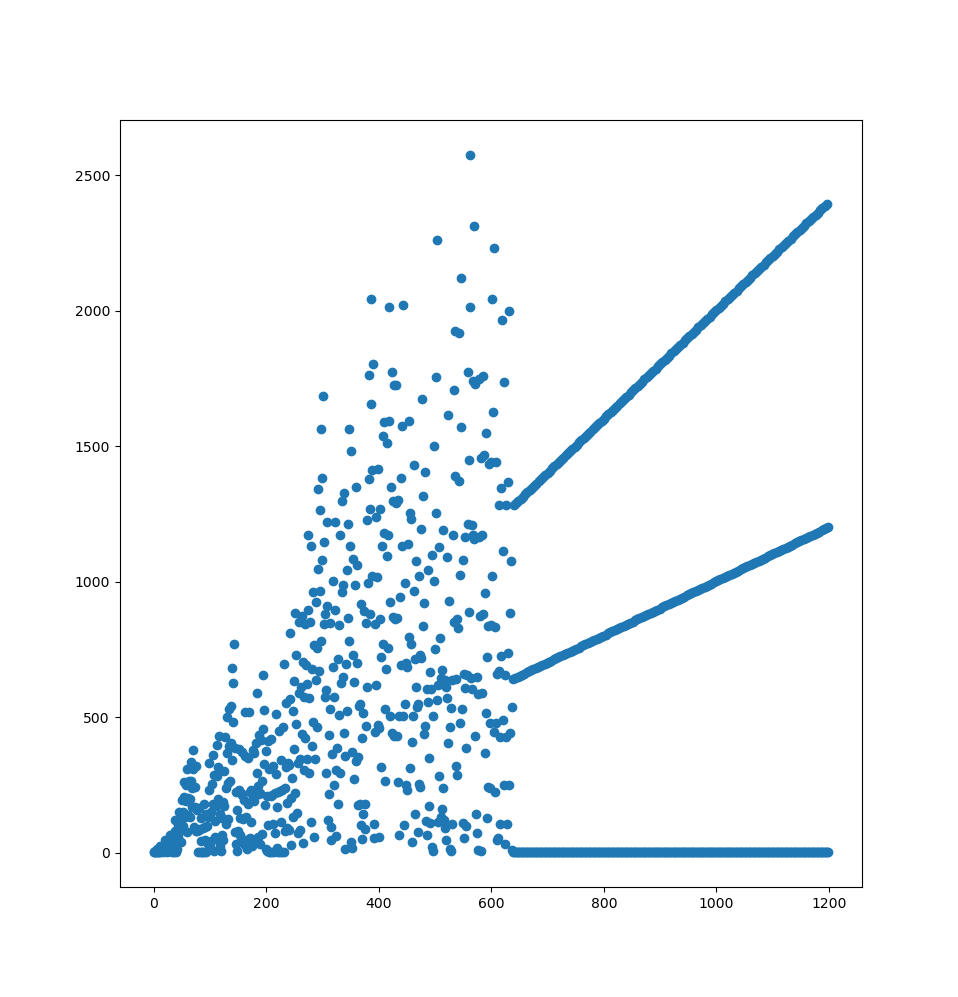
Want to see something cool?
$ oeis A133058 --plot --stop 1200
Library usage
The oeis module expose sequences as Python Sequences:
>>> from oeis import A000045
>>> print(*A000045[:10], sep=", ")
0, 1, 1, 2, 3, 5, 8, 13, 21, 34, 55
>>> A000045[1] == A000045[2]
True
>>> A000045[100:101]
[354224848179261915075]
Contributing
We are using the black coding style,
and tox to run some tests, so after creating a venv and having
installed tox in it, run tox -p auto it should look like this:
$ tox -p auto
✔ OK mypy in 11.807 seconds
✔ OK flake8 in 12.024 seconds
✔ OK black in 12.302 seconds
✔ OK py37 in 15.344 seconds
✔ OK py38 in 21.041 seconds
✔ OK py39 in 21.042 seconds
______________________________________ summary ________________________________________
  py37: commands succeeded
  py38: commands succeeded
  py39: commands succeeded
  flake8: commands succeeded
  mypy: commands succeeded
  black: commands succeeded
  congratulations :)
There's two ways to implement a serie: by implementing it as a function, or by implementing it as a a generator.
Implementing a serie from a function
For serie where the result only depend of the its position, like
A004767 which is a(n) = 4*n + 3, it's straightforward as a function,
use the @oeis.from_function() as a decorator to setup the plumbing:
@oeis.from_function()
def A004767(n: int) -> int:
    """Integers of a(n) = 4*n + 3."""
    return 4 * n + 3
It has the advantage of having fast direct access:
print(A004767[1_000_000])
can be done by calling your function a single time.
Beware: No "offset correction" is done magically. If the offset is 1,
don't expect your function to be called with n=0.
Implementing a serie from a generator
Some series need the previous (or previouses) values to be computed,
they can't easily be implemented as functions, you can implement them
as generators, in this case use the @oeis.from_generator()
decorator:
@oeis.from_generator()
def A000045() -> Iterable[int]:
    """Fibonacci numbers: F(n) = F(n-1) + F(n-2) with F(0) = 0 and F(1) = 1."""
    a, b = (0, 1)
    yield 0
    while True:
        a, b = b, a + b
        yield a
Beware: Just yield the actual serie values, don't care about the
offset by trying, for example, to return None or 0 to shift the
results.
Comparison
So, to be clear, those two implementations are strictly equivalent:
@oeis.from_generator()
def A008589() -> Iterable[int]:
    """Multiples of 7."""
    return (n * 7 for n in count())
@oeis.from_function()
def A008589(n: int) -> int:
     """Multiples of 7."""
     return n * 7
And if the offset were 1, only the generator would change to start at 1 (the function does not need to change, as 1 would be given as a parameter):
@oeis.from_generator(offset=1)
def A008589() -> Iterable[int]:
    """Multiples of 7."""
    return (n * 7 for n in count(1))
Why requirements are not pinned?
There's two kind of requirements projects usually pin:
- The actual project dependencies (numpy, ...).
- The test dependencies (pytest, ...).
Anyway users will just pip install (or apt install or whatever)
the project and expect it to work. If there's an incompatiliby with a
dependency we need to know it and restrict it explicitly in
install_requires.
Pinning project dependencies is a lie: it works in the CI, but may not work in users environments.
Pinning test dependencies looks comfortable as if the tests pass today they'll pass tomorrow, but it also mean running outdated linters most of the time.
Finally pinning dependencies may just not be possible: there could be no set of frozen dependencies that work on every version of Python you want to test.
So the idea is: Let's not pin anything and learn issues the hard way before the users find them.
Yes it means the CI could break anytime. But it's better than a end user finding the bug.
2 maintainers


Metadata
2 maintainers
Release files for oeis 2023.3.10
For a detailed explanation of source distributions (sdists) and built distributions (wheels), please see the package formats documentation.
Source distribution (sdist)
| File | Size | Uploaded | Provenance | Actions |
|---|---|---|---|---|
| oeis-2023.3.10.tar.gz | 18.7 kB | Without provenance | Details for oeis-2023.3.10.tar.gz |
Built distribution (wheel)
| File | Interpreter | ABI | Platform | Actions Reset |
|---|---|---|---|---|
| oeis-2023.3.10-py3-none-any.whl | Python 3 | none | any | Details for oeis-2023.3.10-py3-none-any.whl |
Total release size: 30.2 kB
Release files / oeis-2023.3.10.tar.gz
| Download URL | oeis-2023.3.10.tar.gz |
|---|---|
| Size | 18.7 kB |
| Tags | Source |
|
SHA-256 checksum How to use checksums |
2f535f6cc733d37e9fb8c0772178d074268dba1ab41522f956f641c5129b136a
|
|
BLAKE2b-256 checksum How to use checksums |
eba8b365a53a68a77792b808dc83d86445ee158f163005ee0df3eeb06470983b
|
| Upload date | |
|
Uploaded using Trusted Publishing? What is trusted publishing? |
No |
| Uploaded via |
twine/4.0.2 CPython/3.11.2
|
Release files / oeis-2023.3.10-py3-none-any.whl
| Download URL | oeis-2023.3.10-py3-none-any.whl |
|---|---|
| Size | 11.5 kB |
| Tags | Python 3 |
|
SHA-256 checksum How to use checksums |
05c77d1d7ef4fe33f64670e13c33c729e35c7c8234908ad4fab6a7c5b3425b7c
|
|
BLAKE2b-256 checksum How to use checksums |
db1710f167dc14d194aae4ec4ce479419d66053c98743290dc1e1e31617fa50b
|
| Upload date | |
|
Uploaded using Trusted Publishing? What is trusted publishing? |
No |
| Uploaded via |
twine/4.0.2 CPython/3.11.2
|
Security for oeis 2023.3.10
Provenance
Provenance describes where a file came from. On PyPI, provenance is shared via attestations, which provide a verifiable record of the build or publishing details. View details, limitations and caveats.
No provenance found
None of the files in this release were uploaded with provenance metadata.
A note on package security
PyPI is a repository for distributing packages, not a service for auditing them. While third-party security researchers and our staff do their best to detect and remove malicious packages, PyPI cannot guarantee the quality, security or suitability of any given package.
To learn more about protecting yourself from malicious actors, visit our package security documentation.














