






Overview
OKadminFinder is a powerful, open-source tool designed to help administrators and penetration testers discover admin panels, directories, and subdomains of a website.
Built with Python 3.x, OKadminFinder offers a robust set of features to ensure effective and secure scanning.
Features
- Multi-Platform Support: Works on Windows, Linux, and macOS.
- Easy Installation and Updates: Simple commands to install, update, and remove the tool.
- Extensive Admin Panel Database: Over 1600 potential admin panels.
- Command-Line Interface: Works with parameters for flexible usage.
- Target URL: Specify the target URL for scanning.
- URLs File: Specify a file containing a list of URLs to scan.
- Random User Agents: Helps avoid detection by using random user agents.
- Proxy Support: Supports HTTP/HTTPS proxies.
- Socks4/5 & Tor: Enhanced anonymity with Socks4/5 and Tor support.
- Custom Wordlists: Use your own wordlists for more targeted scanning.
- DNS Mode: Use DNS mode for wordlist scanning.
- Subdomain Discovery: Equivalent to fuzz.URL for finding subdomains.
- Fuzzing Mode: Use fuzzing mode for more dynamic URL testing.
- File Extensions: Search for specific file extensions.
- Status Codes: Specify valid HTTP status codes or ranges.
- Custom Cookies: Set custom cookies for requests.
- Support for Authentication: Use custom username and password for secure access during scans.
- Output File: Save results to an output file.
- Cache Management: Clear and disable the cache for fresh scans.
- Timeout Settings: Customize timeout settings for requests.
- Connection Pools: Adjust the number of connection pools for better performance.
- Threading: Control the number of threads for concurrent processing.
- Retry Mechanism: Set the number of retries for failed requests.
- Delay Customization: Fine-tune delay between requests to control response times.
- Debug Mode: Detailed logging for debugging purposes.



-
Linux
❯ sudo apt install tor
❯ sudo service tor start
-
Windows
Download tor windows expert bundle
-
Installation
-
PyPi
# Install
❯ pip install okadminfinder
# Update
❯ pip install --upgrade okadminfinder
# Remove
❯ pip uninstall okadminfinder
-
Git Clone
# Download and Usage
❯ git clone https://github.com/mIcHyAmRaNe/okadminfinder.git
❯ cd okadminfinder
❯ pip3 install -r requirements.txt
❯ chmod +x okadminfinder.py
❯ ./okadminfinder.py -h
-
Preview
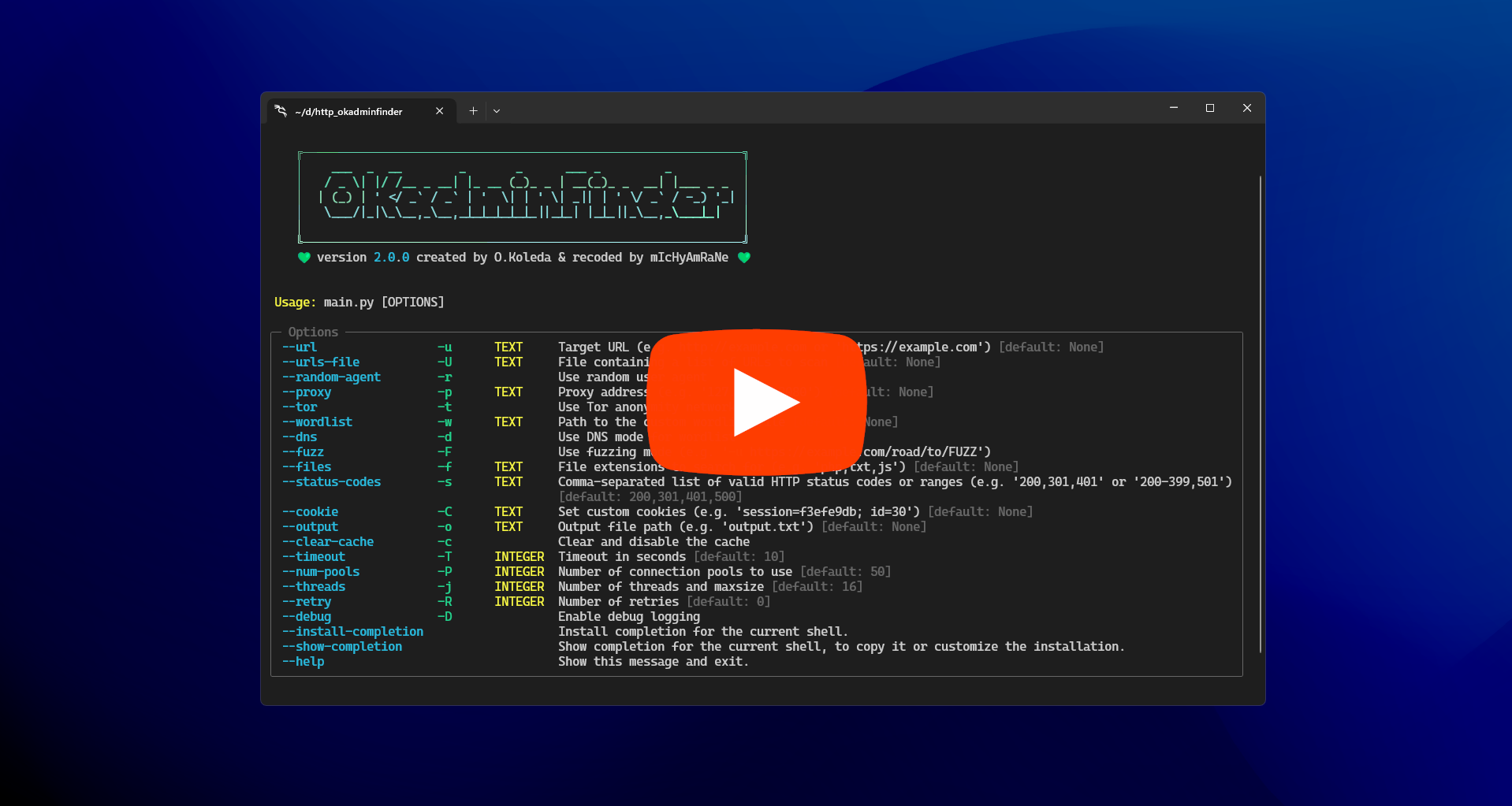
Usage
-
Basic Usage
# Scanning a Single URL
❯ okadminfinder --url https://example.com

# Scanning Multiple URLs from a File
❯ okadminfinder --urls-file urls.txt

# Using a Custom Wordlist
❯ okadminfinder --url https://example.com --wordlist custom_wordlist.txt

# Using Random User Agents
❯ okadminfinder --url https://example.com --random-agent

# Using a Proxy
❯ okadminfinder --url https://example.com --proxy 127.0.0.1:8080

# Using Tor for Anonymity
❯ okadminfinder --url https://example.com --tor
[!IMPORTANT] Parameter Conflicts:
Proxy and Tor: You cannot use both a proxy and Tor at the same time.
DNS Mode and Fuzzing Mode: You cannot use both DNS mode and fuzzing mode at the same time.
Files Option and Non-Fuzzing Mode: The --files option can only be used with the fuzzing mode.
URL and URLs File: You cannot provide both a single URL and a file containing multiple URLs at the same time. -
Advanced Usage
For more advanced usage examples and detailed documentation, an Advanced Wiki is under construction.
Developer Section
-
PyPi
# Install Poetry
curl -sSL https://install.python-poetry.org | python3 -

# Clone the repo
git clone https://github.com/mIcHyAmRaNe/okadminfinder.git

# Build the project
poetry build

# Publish the package
poetry publish
-
Debian (planned)
# Install Poetry
curl -sSL https://install.python-poetry.org | python3 -

# Install build requirements
sudo apt install debhelper dh-python python3-setuptools python3-all pybuild-plugin-pyproject

# Clone the repo
git clone https://github.com/mIcHyAmRaNe/okadminfinder.git

# Create the source tarball
tar czf okadminfinder_{version}.orig.tar.gz okadminfinder

# Get inside the project folder
cd okadminfinder

# Build the deb package
dpkg-buildpackage -rfakeroot -uc -us

# Notes:
# Steps from Python to Debian.
# Install Stdeb
pip install stdeb
# Debianize Python package creating debian folder
python3 setup.py --command-packages=stdeb.command debianize
# we edit rules, control files, we create changelog, man pages...
# Build deb package
dpkg-buildpackage -rfakeroot -uc -us
# before building a new version, make sure to clean it first
YouTube Videos
Disclaimer
[!IMPORTANT] OKadminFinder is intended for educational purposes and authorized penetration testing only. Usage of OKadminFinder for attacking targets without prior mutual consent is illegal. It is the end user's responsibility to obey all applicable local, state, and federal laws. Developers assume no liability and are not responsible for any misuse or damage caused by this program.
License
This project is licensed under the MIT License. See the LICENSE file for details.
Donate
[!INFO] If you find OKadminFinder useful and would like to support its development, you can donate to the following address:
Bitcoin Address:1LZiNVRZupWNbB9bEPxsiwoC5AGPAuFCjp
Your support is greatly appreciated ♥️
1 maintainer

Metadata
1 maintainer
Release files for okadminfinder 2.0.0
For a detailed explanation of source distributions (sdists) and built distributions (wheels), please see the package formats documentation.
Source distribution (sdist)
| File | Size | Uploaded | Provenance | Actions |
|---|---|---|---|---|
| okadminfinder-2.0.0.tar.gz | 25.5 kB | Without provenance | Details for okadminfinder-2.0.0.tar.gz |
Built distribution (wheel)
| File | Interpreter | ABI | Platform | Actions Reset |
|---|---|---|---|---|
| okadminfinder-2.0.0-py3-none-any.whl | Python 3 | none | any | Details for okadminfinder-2.0.0-py3-none-any.whl |
Total release size: 52.1 kB
Release files / okadminfinder-2.0.0.tar.gz
| Download URL | okadminfinder-2.0.0.tar.gz |
|---|---|
| Size | 25.5 kB |
| Tags | Source |
|
SHA-256 checksum How to use checksums |
69c3b5bb14d771521b4307a7f632d3c1647543e6b8c52eda55b37d17deee6fe5
|
|
BLAKE2b-256 checksum How to use checksums |
ae027f523c04129415a02a05f56f70ef8ec7f2ea86d6c84564766200440f1abb
|
| Upload date | |
|
Uploaded using Trusted Publishing? What is trusted publishing? |
No |
| Uploaded via |
poetry/2.0.1 CPython/3.12.8 Linux/5.15.167.4-microsoft-standard-WSL2
|
Release files / okadminfinder-2.0.0-py3-none-any.whl
| Download URL | okadminfinder-2.0.0-py3-none-any.whl |
|---|---|
| Size | 26.6 kB |
| Tags | Python 3 |
|
SHA-256 checksum How to use checksums |
156570942b18f55d3080e5be4db5439b0ab452680c16465034f7f362c4018b95
|
|
BLAKE2b-256 checksum How to use checksums |
c3dc1bbc4d2f36696cbb25f1046aba21d86a4cbd4567f38ab477a9cc54fada1a
|
| Upload date | |
|
Uploaded using Trusted Publishing? What is trusted publishing? |
No |
| Uploaded via |
poetry/2.0.1 CPython/3.12.8 Linux/5.15.167.4-microsoft-standard-WSL2
|
Security for okadminfinder 2.0.0
Provenance
Provenance describes where a file came from. On PyPI, provenance is shared via attestations, which provide a verifiable record of the build or publishing details. View details, limitations and caveats.
No provenance found
None of the files in this release were uploaded with provenance metadata.
A note on package security
PyPI is a repository for distributing packages, not a service for auditing them. While third-party security researchers and our staff do their best to detect and remove malicious packages, PyPI cannot guarantee the quality, security or suitability of any given package.
To learn more about protecting yourself from malicious actors, visit our package security documentation.














