
Fabric task runner and helper. Execute tasks via web browser.
oozappa is 大雑把.
Change logs.
0.9.1
Fixed bug, zappa init command generate illegal path. Thank you sugamasao!
Fixed image path of README file
0.9.0
Adding new subcommands to zappa.
list
run_jobset
manage
Removed rapid execution.
Adding cli_only flag to Jobset.Now set cli_only flag using zappa manage. Now you can make Jobset can’t run from web ui.
Decoupling webui from fabric execution(Error doesn’t occur even if connection reset).
Show comfirm dialog before leaving web ui. and better ux. thank you yusuke furukawa.
0.8.5
Adding new feature, modify Jobsets sort order on jobsets page.
Adding new feature, modify a Job data on environ page.
Improve Fabric task’s behavior better when failed.
You need db migration if you use 0.8.4 or below.
Download zip archive from https://github.com/tsuyukimakoto/oozappa/raw/master/migration/to_0.8.5.zip
$ unzip to_0.8.5.zip && cd oozappa_to_0_8_5

If you have not alembic installed. You need install it using pip or any way you like.
Open alembic.ini and modify sqlalchemy.url to indicate your own oozappa's db. then

$ alembic upgrade 1e26220da128
0.8.4
Jobset runs exclusively from webui.
0.8.3
A zappa command added and removed oozappa.create_environment module.
0.8.2
Oozappa finds tasks from imported modules, not recursive.
Install
Install from Cheese Shop (pypi).
$ pip install oozappa
If you use Xcode 5.1(above) and failed with clang: error: unknown argument: ‘-mno-fused-madd’ , export flags before install.
$ export CPPFLAGS=-Qunused-arguments
$ export CFLAGS=-Qunused-arguments
Oozappa data models.
Environment
Environment is a category that has fibfile directory and vars.py .
A problem about fabric with large project is, too many fabric tasks and complicated task orders.
So you should separate fabfile into domain category. That is Environment.
Job
Job is like a normal fabric execution command.
note:
fab task1 task2 is a job.
Jobset
Jobset is oozappa operation unit.
Jobset can contain multiple job, even extend over environments.
Oozappa fabric structures.
See sample oozappa project( https://github.com/tsuyukimakoto/oozappa/tree/master/sample/ops ).
.
├── common
│   ├── __init__.py
│   ├── files
│   ├── functions
│   │   ├── common_multiple_fabric_environment.py
│   ├── templates
│   │   └── sample_a.txt
│   └── vars.py
├── construction
│   ├── fabfile
│   │   ├── __init__.py
│   │   └── cloud.py
│   ├── templates
│   └── vars.py
├── deployment
│   ├── fabfile
│   │   ├── __init__.py
│   ├── templates
│   └── vars.py
├── production
│   ├── fabfile
│   │   ├── __init__.py
│   ├── templates
│   └── vars.py
└── staging
    ├── fabfile
    │   ├── __init__.py
    ├── templates
    │   └── sample_a.txt
    └── vars.py
common is reserved directory. construction and others are environment directory. These names except common are just example.
vars
common and each environment’s vars.py might have oozappa.config.OozappaSetting instance named settings. OozappaSetting is dict like object.
common.vars.setting is updated by executed environment’s vars.setting , so you can set base configuration to common.vars.setting and environment’s one overwrite it.
Check printsetting task on staging environment.
You can run fabric task within environment directory as usual.
$ cd sample/ops/staging
$ fab printsetting
{'instance_type': 't1.micro', 'domain': 'localhost', 'sample_template_vars': {'sample_a': {'key_a_2': "a's 2 value from common.vars", 'key_a_1': "a's 1 value from stging.vars"}}, 'email': 'mtsuyuki at gmail.com'}
See common/vars.py and staging/vars.py .
templates
Same as vars, oozappa.fabrictools.upload_template search template. upload_template is almost same as fabric.contrib.files.upload_template . oozappa’s upload_template doesn’t accept use_jinja, because oozappa’s upload_template pass use_jinja=True to fabric.contrib.files.upload_template.
Jinja2 has inheritance template system and search template from multipul paths. fabric’s upload_template accept only one template_dir string not list. fabric doesn’t assume multiplu environment , so it’s reasonable. Because of this, oozappa’s upload_template search template path is limited only one template_dir that found filename. It mean that you can’t store child template and parent template separately.
common/functions
Call oozappa.config.procure_common_functions () and add commons/functions directory to sys.path for convinient to using on multiple fabric environment.
Run fabric task via web browser.
Change directory to outside environment directory.
$ cd ..
$ ls
common    production  staging
$ gunicorn -t 3600 -k flask_sockets.worker oozappa.webui:app
Running oozappa:app creates /tmp/oozappa.sqlite .
Open your web browser and browse http://localhost:8000/ .
Rapid execution
Modify Run fabric in raw’s left hand side input to staging and click run_tasks. You can see what tasks exists.
Then input ls ps to right hand side input and click run_tasks .
That’s it.
Better way using sample
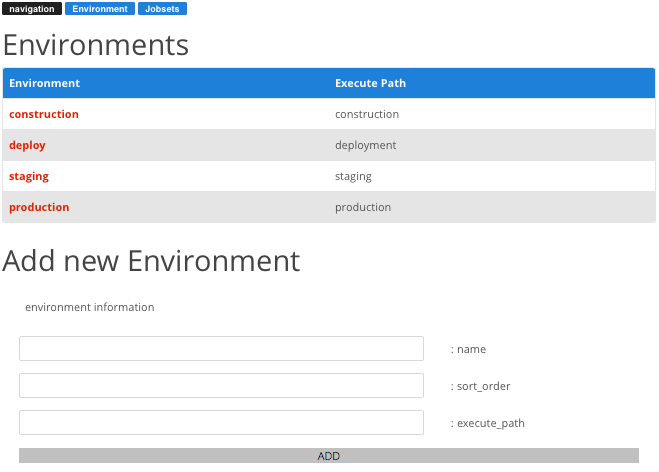
register environment to db.
Click environment button via top menu.
Add new Environment
name: constructiton
sort_order: 1
execute_path: constructiton
Add 3 more.
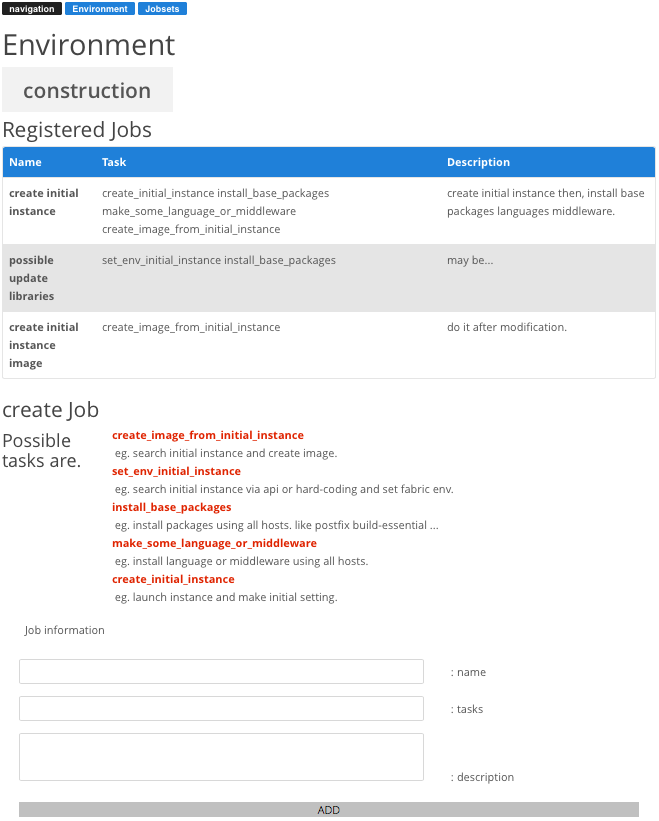
create job in each environments.
Click environment you created
Create new Job.
Click task from Possible tasks in order
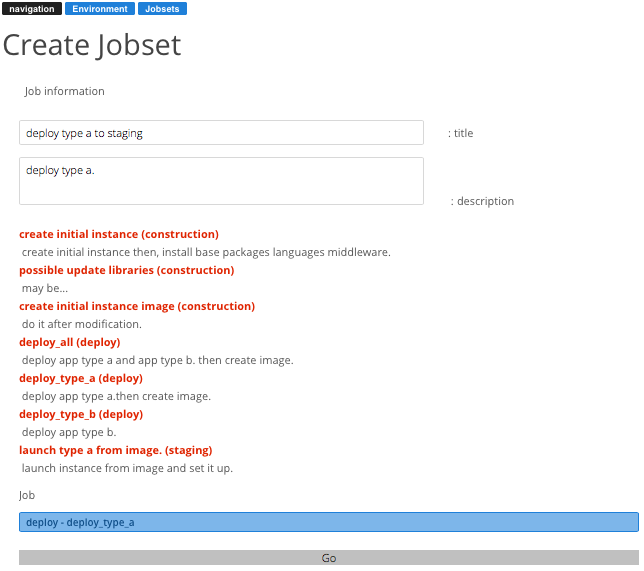
create jobset
Click jobset button via top menu.
Click jobs you’d like to execute once.
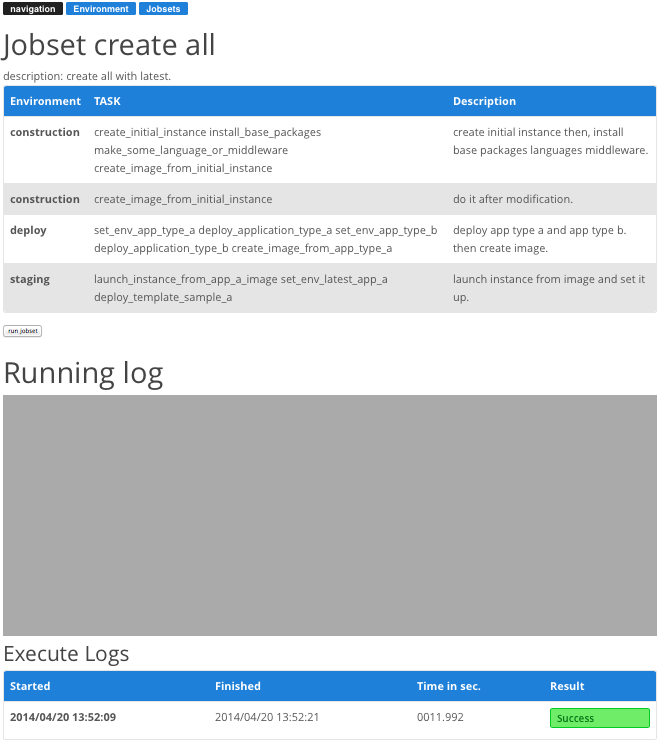
run jobset
Click navigation button or jobset button via top menu.
Click jobset you’d like to execute.
Click run jobset button.
Running log displays Running log.
Reload page when jobset done. or Go to top(via navigation button)
You see Execute Logs and show raw log when you click success (or fail).
How to create your own
Create common directory
Change directory your own oozappa.
$ mkdir devops
$ cd devops
Then run zappa command.
$ zappa init
Create common environment here? [y/N] : y
Sqlite database stored path. [/tmp/oozappa/data.sqlite] :
Log files stored path. [/tmp/oozappa] :
Create directory or exit? "/tmp/oozappa" [y/N] : y
created common directory. db/log file path and flask secret key are in common/vars.py.
How to change settings
Open common/vars.py and change settings.
OOZAPPA_DB
sqlite’s data store path.
OOZAPPA_LOG_BASEDIR
Jobset execute log store directory path.
Create environment
Run zappa command with names option.
$ zappa create_environment --names construction deployment
2014-04-20 16:43:26,543 INFO create environment : construction
2014-04-20 16:43:26,544 INFO create environment : deployment
Then you can write fabfile normally and execute via oozappa.
1 maintainer

Release files for oozappa 0.9.1
For a detailed explanation of source distributions (sdists) and built distributions (wheels), please see the package formats documentation.
Source distribution (sdist)
| File | Size | Uploaded | |
|---|---|---|---|
| oozappa-0.9.1.tar.gz | 41.8 kB | Details |
Built distribution (wheel)
| File | Interpreter | ABI | Platform | Reset |
|---|---|---|---|---|
| oozappa-0.9.1-py2.py3-none-any.whl | Python 2, Python 3 | none | any | Details |
Total release size: 94.4 kB
Release files / oozappa-0.9.1.tar.gz
| Download URL | oozappa-0.9.1.tar.gz |
|---|---|
| Size | 41.8 kB |
| Tags | Source |
|
SHA-256 checksum How to use checksums |
3a837d34704837825279be14e39412cf4fac828aae1c8214c21f736138f9cf42
|
|
BLAKE2b-256 checksum How to use checksums |
6d339b854ba15ba32f30b57703ee71c1e2d572feb5224a29bf3cb5062244fdbd
|
| Upload date | |
|
Uploaded using Trusted Publishing? What is trusted publishing? |
No |
Release files / oozappa-0.9.1-py2.py3-none-any.whl
| Download URL | oozappa-0.9.1-py2.py3-none-any.whl |
|---|---|
| Size | 52.5 kB |
| Tags | Python 2 Python 3 |
|
SHA-256 checksum How to use checksums |
5a040226fcab826c65852823cde36ce0d0401df9166515a73a66553b9ffb3250
|
|
BLAKE2b-256 checksum How to use checksums |
3060604535f55639471a2b39637eab8db4993a0d708eec59f66e2d3c673abf68
|
| Upload date | |
|
Uploaded using Trusted Publishing? What is trusted publishing? |
No |














