
OverBoard
OverBoard is a lightweight yet powerful dashboard to monitor your experiments.
Load remote experiments in real-time through SSH/FTP and others.
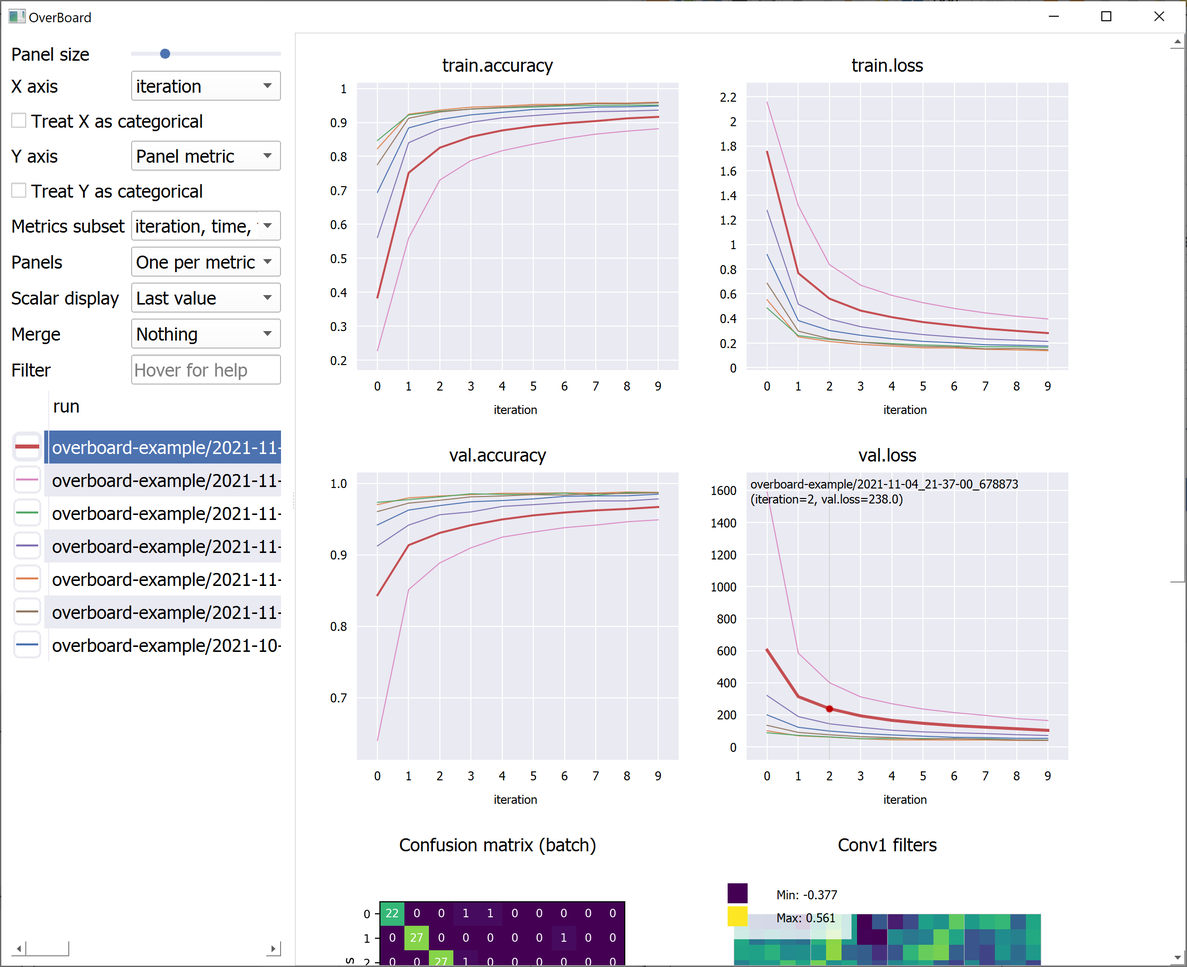
Custom visualisations (tensors and any custom plot with familiar MatPlotLib syntax).
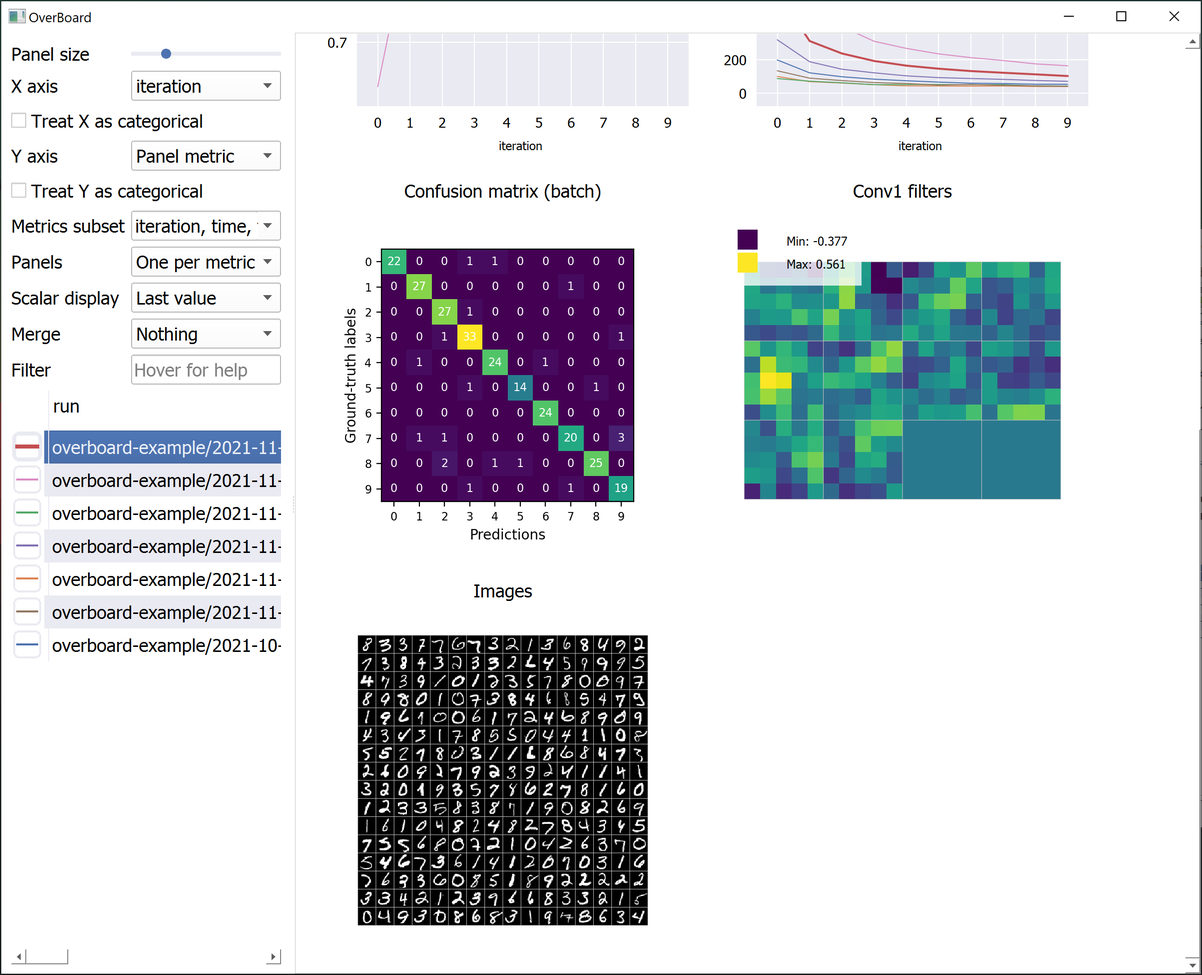
A sortable table of hyper-parameters with Python-syntax filtering.
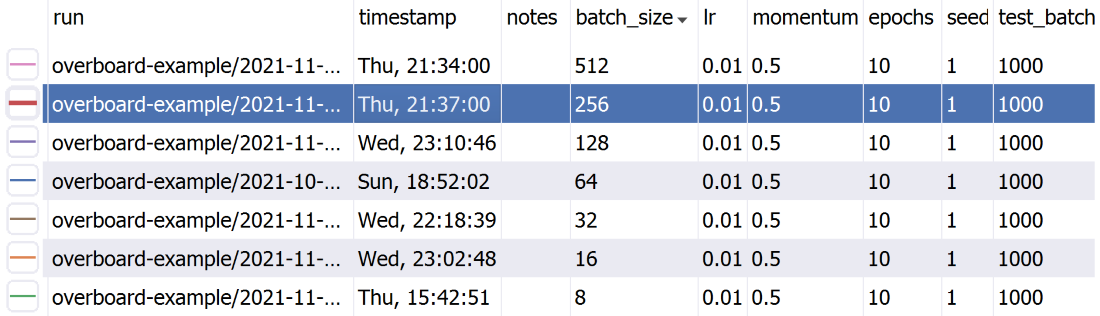
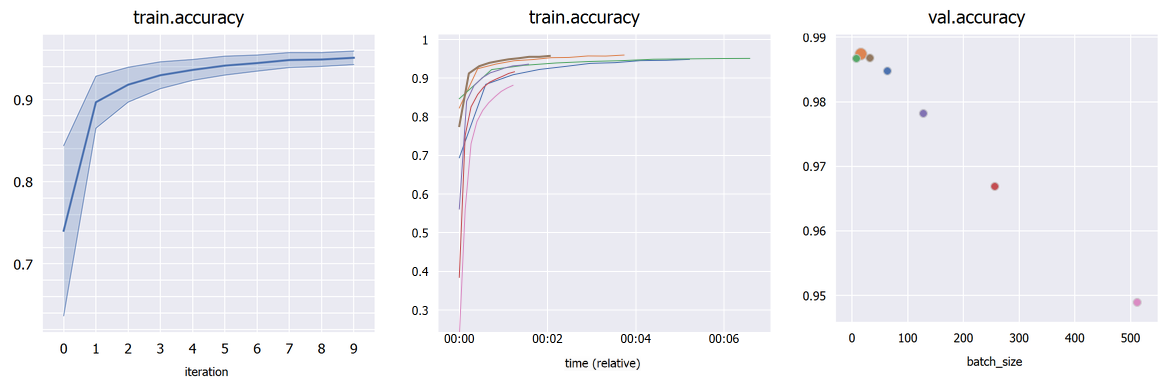
Plot percentile intervals (shaded plots), custom X/Y axes, and hyper-parameters (bubble plots).
Installation
You can install the dependencies with:
-
With Conda:
conda install pyqt=5.12 pyqtgraph=0.11 -c conda-forge -
With pip:
pip install pyqt5==5.12 pyqtgraph==0.11
Finally, OverBoard itself can be installed with: pip install fs==2.4 overboard
(Conda seems to be too strict when installing PyFileSystem/fs, so pip should be preferred.)
Optional:
-
pip install fs.sshfsto support remote files through SSH. -
PyOpenGL 3.1 (either through conda or pip) if you intend to use custom 3D plots with PyQtGraph.
-
MatPlotLib if you intend to use it for custom plots.
Installation - logger only
Your scripts can log data without installing the full GUI and its dependencies (so your remote GPU cluster does not need PyQt at all).
Just use: pip install overboard_logger
And remember to import overboard_logger instead of overboard in your scripts.
Usage
-
Main interface:
python3 -m overboard <logs-directory> -
Logging experiments is simple:
from overboard import Logger

with Logger('./logs') as logger:
  for iteration in range(100):
    logger.append({'loss': 0, 'error': 0})
You can also pass in a meta keyword argument, which can be a dict with hyper-parameters names and values (or other meta-data), to help organize your experiments. These will be displayed in a handy table, which supports sorting and filtering. The meta data can also be an argparse.Namespace, which is useful if your hyper-parameters are command-line arguments parsed with argparse.
By default a unique folder (using the current timestamp) is created for the logs. For full documentation on initialization arguments and other methods, type pydoc overboard on the command-line (Python built-in doc viewer).
You can also check the examples directory:
examples/basic.py: A minimal example. Generates some test logs.examples/mnist.py: The mandatory MNIST example. Also shows a custom MatPlotLib plot (a confusion matrix).examples/example_2d.py: Example custom 2D plot, with PyQtGraph (faster than MatPlotLib).examples/example_3d.py: Example custom 3D plot, with PyQtGraph. Requires PyOpenGL.
A note about importing: You can either import the Logger class from overboard or from overboard_logger. If you installed the "logger only" version as described above (no dependencies), then you can only import from overboard_logger.
Remote experiments
It's as simple as:
python -m overboard ssh://username:password@hostname/path-to-experiments
...replacing your SSH user name, password, host name/server, and the directory where OverBoard should look for experiments. The default port is 22, which you can override with :23 or another port number after the host name.
There are a number of other settings, which you can append after the path. For example, append ?keepalive=60&config_path=~/.ssh/config to set the keepalive packets interval to 60 seconds, and specify an OpenSSH configuration file path.
Other remote file systems are available by using appropriate prefixes (e.g. ftp://).
Interface tips & tricks
-
Click a plot title to hide it (moving it to the bottom) or to show it again.
-
Click a plot line to select that experiment in the table, and vice-versa.
-
Use the mouse wheel to zoom and drag to pan in a plot or custom visualization.
-
Click the "A" button in the bottom-left of a plot to reset the zoom/pan.
-
Choose an hyper-parameter as the "X axis" in the sidebar to compare different hyper-parameters graphically (bubble plot). Click a bubble to highlight that experiment. If the hyper-parameter is numerical but has wildly different orders of magnitude, check "Treat X as categorical". By default, each bubble's Y coordinate (e.g. accuracy) is taken from the last iteration; in "Scalar display" you can choose the maximum or minimum across iterations.
-
If you have multiple runs with different random seeds (stored as hyper-parameter "seed" for example), select "Merge: seed" in the sidebar to merge them into shaded plots (you can then select whether to show the mean, median, range or standard deviations).
-
You can split all experiments into different plots by selected "Panels: One per run" in the sidebar, and selecting a metric to plot in "Y axis". Similarly, they can be split by a hyper-parameter value (e.g. a different algorithm in each panel, but each has multiple plots/runs).
Author
João Henriques, Visual Geometry Group (VGG), University of Oxford
1 maintainer

Metadata
1 maintainer
Release files for overboard 1.0.1
For a detailed explanation of source distributions (sdists) and built distributions (wheels), please see the package formats documentation.
Source distribution (sdist)
| File | Size | Uploaded | Provenance | |
|---|---|---|---|---|
| overboard-1.0.1.tar.gz | 54.1 kB | Without provenance | Details |
Built distribution (wheel)
| File | Interpreter | ABI | Platform | Reset |
|---|---|---|---|---|
| overboard-1.0.1-py3-none-any.whl | Python 3 | none | any | Details |
Total release size: 110.9 kB
Release files / overboard-1.0.1.tar.gz
| Download URL | overboard-1.0.1.tar.gz |
|---|---|
| Size | 54.1 kB |
| Tags | Source |
|
SHA-256 checksum How to use checksums |
e4dc52c1a9d87d2edd2e35a9404454e9d0eca7f0ffa7b7fed7ec77ffef93edc7
|
|
BLAKE2b-256 checksum How to use checksums |
63ffc19cdc360225b537d4ea3f74685ad646b2f902f8146946b334f7d5245db2
|
| Upload date | |
|
Uploaded using Trusted Publishing? What is trusted publishing? |
No |
| Uploaded via |
twine/0.0.0 importlib_metadata/4.8.1 pkginfo/1.7.1 requests/2.26.0 requests-toolbelt/0.9.1 tqdm/4.62.3 CPython/3.9.7
|
Release files / overboard-1.0.1-py3-none-any.whl
| Download URL | overboard-1.0.1-py3-none-any.whl |
|---|---|
| Size | 56.8 kB |
| Tags | Python 3 |
|
SHA-256 checksum How to use checksums |
a4af043bc5c632f28e6d0c1cf9bb05348ea278e3bb3b27f93d6ec692db42e7a3
|
|
BLAKE2b-256 checksum How to use checksums |
31a7beb4a8edefe23701825145bed4232a637d3663c938da94f2bd611ad99c5f
|
| Upload date | |
|
Uploaded using Trusted Publishing? What is trusted publishing? |
No |
| Uploaded via |
twine/0.0.0 importlib_metadata/4.8.1 pkginfo/1.7.1 requests/2.26.0 requests-toolbelt/0.9.1 tqdm/4.62.3 CPython/3.9.7
|
Security for overboard 1.0.1
Provenance
Provenance describes where a file came from. On PyPI, provenance is shared via attestations, which provide a verifiable record of the build or publishing details. View details, limitations and caveats.
No provenance found
None of the files in this release were uploaded with provenance metadata.
A note on package security
PyPI is a repository for distributing packages, not a service for auditing them. While third-party security researchers and our staff do their best to detect and remove malicious packages, PyPI cannot guarantee the quality, security or suitability of any given package.














