
panosifier
panose data editor for fonts






About
panosifier is a Python 3.6+ command line application that edits panose data in fonts. The tool edits the OpenType specification OS/2 table panose fields.
Why do I need this tool?
In many cases, you can define these values in your type design source files and rely on the font compiler to write these values into your font instances. However, there are situations where this behavior is not well-defined and differs across font compilers.
An example is the approach to panose data writes in variable font format files. In this case, the OpenType specification is vague, environments where these data are essential are not well-defined, and compilers handle the source file defined panose data differently.
This tool allows you to modify build-time decisions in these situations.
Quick Start
- Install in a Python 3.6+ virtual environment with
pip install panosifier - Define your panose values with a comma-delimited panose value list using the
--panosecommand line option or individually with the ten available OpenType panose field options (seepanosifier --helpfor a list of available options)
See the documentation below for additional details.
Installation
This project requires a Python 3.6+ interpreter.
We recommend installation in a Python3 virtual environment.
Use any of the following installation approaches:
pip install from PyPI
$ pip3 install panosifier
pip install from source
$ git clone https://github.com/source-foundry/panosifier.git
$ cd panosifier
$ pip3 install -r requirements.txt .
Developer install from source
The following approach installs the project and associated optional developer dependencies so that source changes are available without the need for re-installation.
$ git clone https://github.com/source-foundry/panosifier.git
$ cd panosifier
$ pip3 install --ignore-installed -r requirements.txt -e ".[dev]"
Usage
panosifier supports two command line approaches to edit panose data in one or more command line defined font paths:
- Define all 10 OpenType panose fields with an ordered comma-delimited list of integers with the
--panoseoption - Define with individual command line options for one or more of the 10 OpenType panose fields
Comma-delimited list definition
You can define all panose fields at once with an ordered, comma-delimited list of all 10 OpenType panose values. These must be integer values.
The field order is:
- FamilyType
- SerifStyle
- Weight
- Proportion
- Contrast
- StrokeVariation
- ArmStyle
- LetterForm
- Midline
- XHeight
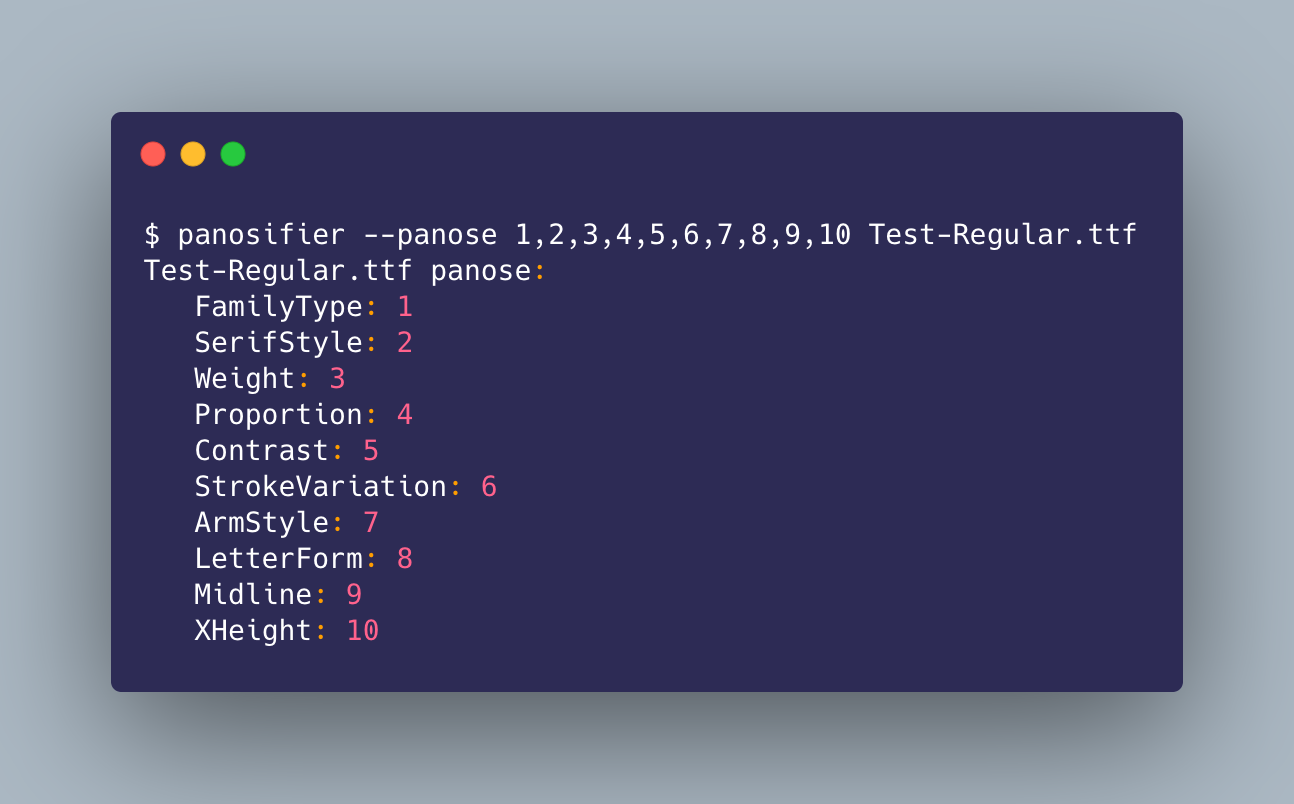
The following image exemplifies this order in the --panose option definition idiom. Note that the values in this example are not intended to be valid for a font, but rather to demonstrate how the definition order maps to panose definition fields.
Individual panose field options
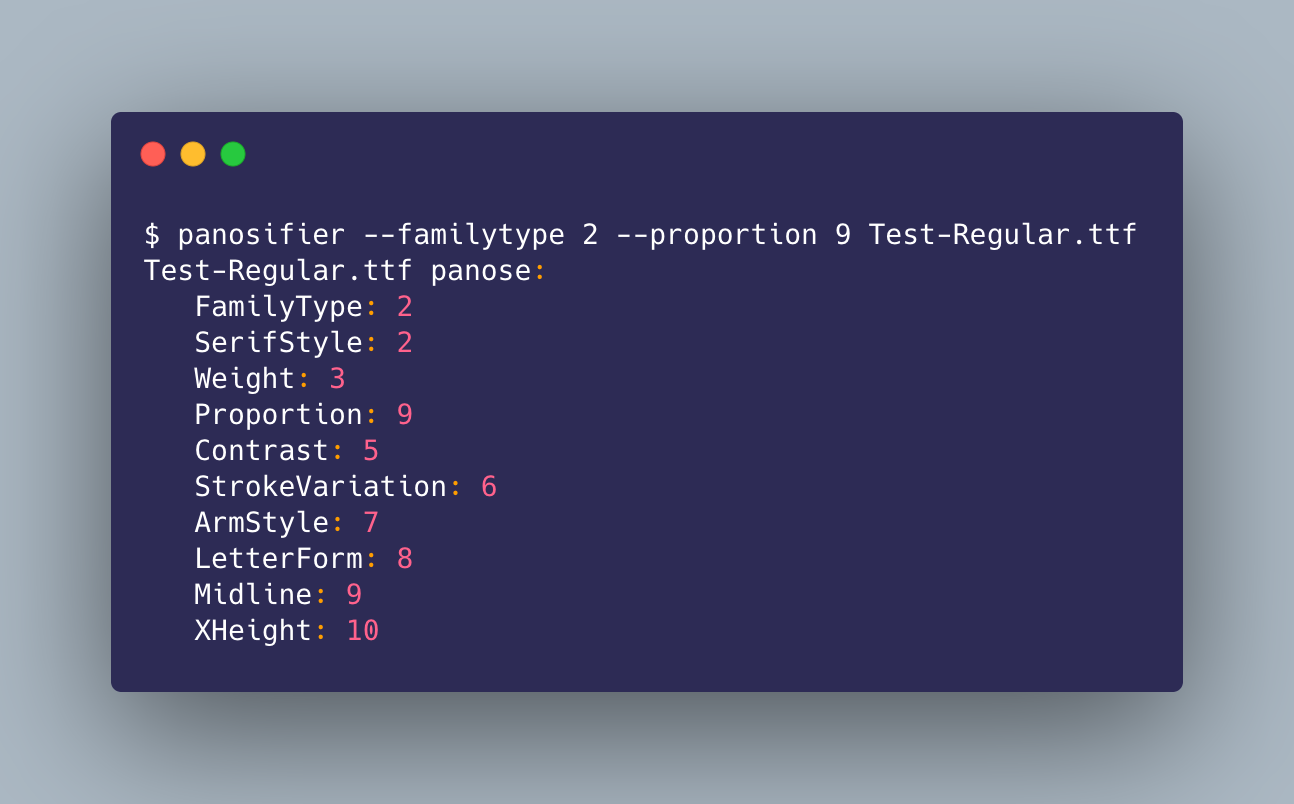
There are ten available OpenType panose definitions. Each panose field has a corresponding option in the panosifier tool. These options allow you to define each field individually and make panose definitions explicit in scripted build workflows. Define these options with integer values.
The example below modifies the panose data write in the comma-delimited list section above with new FamilyType and Proportion values of 2 and 9, respectively:
Use panosifier --help to view all available options.
Note: This tool does not perform sanity checks on your definitions and can be used to write invalid definitions in fonts. The tool assumes that you understand how to set these panose values. Please refer to the panose documentation for detailed background.
Reporting
panosifier reports panose data definitions in the standard output stream at the end of execution.
Contributing
Contributions are warmly welcomed. A development dependency environment can be installed in editable mode with the developer installation documentation above.
Please use the standard Github pull request approach to propose source changes.
Source file linting
We lint Python source files with flake8. See the Makefile test-lint target for details.
Testing
Continuous integration testing is performed on the GitHub Actions service with the pytest toolchain. Test modules are located in the tests directory of the repository.
Perform local Python interpreter version testing with the following command executed from the root of the repository:
$ tox -e [PYTHON INTERPRETER VERSION]
Please see the tox documentation for additional details.
Test coverage
We perform unit test coverage testing with the coverage tool. See the Makefile test-coverage target for details.
Acknowledgments
panosifier is built with the fantastic free fonttools Python library.
License
1 maintainer

Metadata
1 maintainer
Release files for panosifier 1.0.1
For a detailed explanation of source distributions (sdists) and built distributions (wheels), please see the package formats documentation.
Source distribution (sdist)
| File | Size | Uploaded | |
|---|---|---|---|
| panosifier-1.0.1.tar.gz | 12.0 kB | Details |
Built distribution (wheel)
| File | Interpreter | ABI | Platform | Reset |
|---|---|---|---|---|
| panosifier-1.0.1-py3-none-any.whl | Python 3 | none | any | Details |
Total release size: 23.1 kB
Release files / panosifier-1.0.1.tar.gz
| Download URL | panosifier-1.0.1.tar.gz |
|---|---|
| Size | 12.0 kB |
| Tags | Source |
|
SHA-256 checksum How to use checksums |
d11e6b50ae1ddfc210dfbc0cace621f63d5ab5cf13194c7fd346e54aaa0941f6
|
|
BLAKE2b-256 checksum How to use checksums |
2c9c02f15854a93bf931b4db5e1de61631743285774b19f7d31fe8b7cbc561da
|
| Upload date | |
|
Uploaded using Trusted Publishing? What is trusted publishing? |
No |
| Uploaded via |
twine/3.2.0 pkginfo/1.6.1 requests/2.25.0 setuptools/50.3.2 requests-toolbelt/0.9.1 tqdm/4.51.0 CPython/3.8.6
|
Release files / panosifier-1.0.1-py3-none-any.whl
| Download URL | panosifier-1.0.1-py3-none-any.whl |
|---|---|
| Size | 11.2 kB |
| Tags | Python 3 |
|
SHA-256 checksum How to use checksums |
85dfc27824e32bcd69022240214b11b6e478ff27225e7a9a7027dd58405a2b9d
|
|
BLAKE2b-256 checksum How to use checksums |
f1a702b8e6a337bc742b4505bd5a998d9583b2d13bfef8fc3e49f828160f2f69
|
| Upload date | |
|
Uploaded using Trusted Publishing? What is trusted publishing? |
No |
| Uploaded via |
twine/3.2.0 pkginfo/1.6.1 requests/2.25.0 setuptools/50.3.2 requests-toolbelt/0.9.1 tqdm/4.51.0 CPython/3.8.6
|














