
Parse2Excel
Simple CLI tool parsing text files with TextFSM and export to SQLite and Excel with own configuration file, also within configuration file custom SQLite commands can be executed to create custom tables.
Requirements
For Windows, select the Add Python 3.x to PATH checkbox during installation.
Installation
Option 1:
From Python Package Index (PyPI) Repo:
pip install parse2excel
Option 2:
Download project ZIP file and run below command:
pip install parse2excel-X.zip
Installation Check
After installation parse2excel command added to System Path and can be executed from any path easily as below:
> parse2excel -h
usage: parse2excel [-h] [configfile]

positional arguments:
  configfile   config yaml file path [e.g. srlinux_config_1.yaml] (OPTIONAL default: file=config.yaml, folder=P2E_CONFIGS)

options:
  -h, --help  show this help message and exit
Usage
Simple Usage
Run parse2excel command with Config File Path OR without argument "config.yaml" file used (single config file) OR without argument "P2E_CONFIGS" Folder used (multiple config files in folder) from any path after that check excel/SQLite output files in working directory.
parse2excel <Config_File_Path>
Config file
There are four type options in YAML config file:
- textfsm: Parse text files in folder with TextFSM template and export excel/SQLite.
- sqljoin: Run "SELECT" SQLite command and export excel/SQLite. (Python function supported) (Any SQLite command run with "sqlcommand_run")
- sqlfunction: Create SQLite Python functions for all sqljoin parts.
- excel: Import Excel file and convert to SQLite.
Example config.yaml file:
##
# Simple textfsm type, parse device config files in folders
# and create sqlite table & excel sheet (if NOT include "excel_export: none")
##
- type: textfsm
  db_name: my_p2e_excel
  table_name: my_interface_sheet
  # excel_export: none
  folders:
    - device_config_FOLDER
  template: |
    Value Required Interface (\S+)
    Value Interface_Description (\S+)
    Value Interface_Ip (\S+)
    Value Interface_Mask (\S+)

    Start
      ^interface ${Interface} -> Begin

    Begin
      ^ description ${Interface_Description}
      ^ ipv4 address ${Interface_Ip} ${Interface_Mask}
      ^! -> Record Start

##
# Simple sqljoin type, create table with select command and OPTIONAL function.
# Create also excel sheet (if NOT include "excel_export: none")
##
- type: sqljoin
  db_name: my_p2e_excel
  new_table: SecGW_CERT
  sqlcommand: select removetxt(Filename), Cert_Name, Cert_Start, Cert_End from certificate
  functions:
    - |
      def removetxt(d):
        return d.replace('.txt','')

##
# add python function for all sqljoin parts
# after that no need to add function for sqljoin explicitly.
##
- type: sqlfunction
  functions:
    - |
      def removetxt(d):
        return d.replace('.txt','')

##
# create "ports_with_vlan_desc" custom table with "SQLite Select" commands
# With "LEFT JOIN" add "vlan description" to ports table on match "Vlan Number"
##
- type: sqljoin
  db_name: my_p2e_excel
  new_table: ports_with_vlan_desc
  sqlcommand: |
    SELECT
      ports.*,
      vlans.Vlan_Desc_Name
    FROM
      ports
      LEFT JOIN vlans ON (
        ports.Hostname = vlans.Hostname
        AND ports.Interface_Vlan = vlans.Vlan_Number
      )

##
# only run any sqlite command for debug, delete table etc.
##
- type: sqljoin
  db_name: my_p2e_excel
  sqlcommand_run: select Service_ID from vprn_w_x

##
# import excel file to sqlite db-table
##
- type: excel
  db_name: from_excel
  excel_file: excel_file.xlsx
  # OPTIONAL, specify excel sheets
  # excel_sheets:
  #   - Sheet1
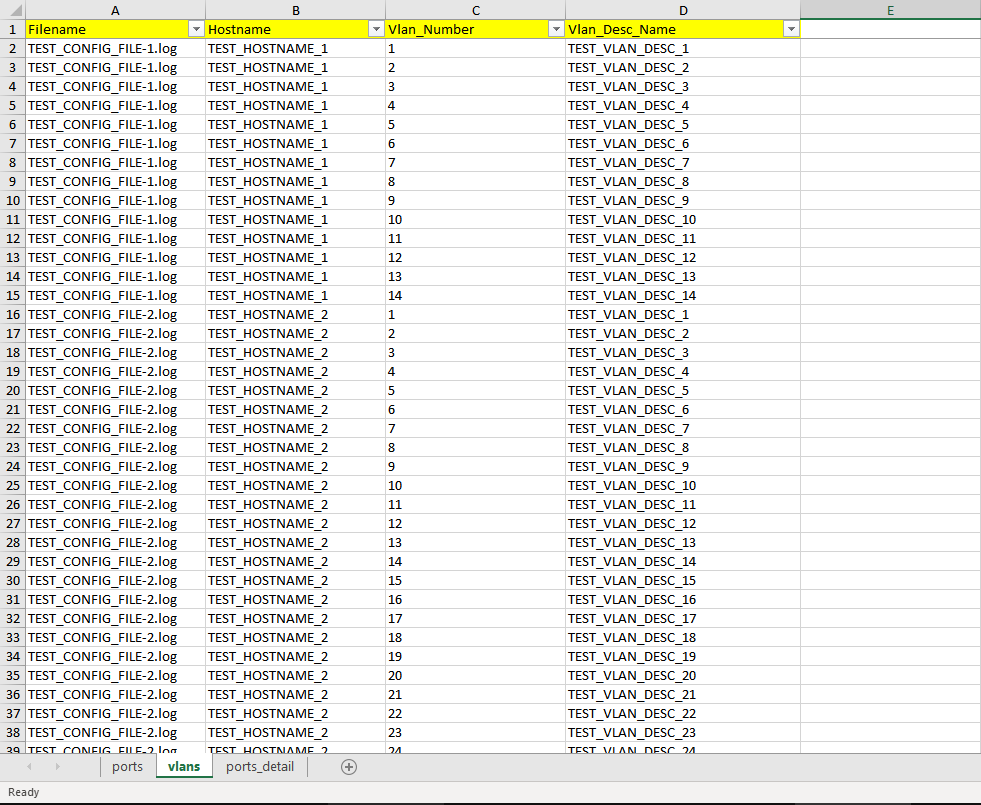
Output Excel File Example
-
As below example in seperate sheets "ports", "vlans" and "ports_detail" tables are created with "textfsm type".
-
In "vlans" sheet, "Filename - Hostname - Vlan Number - Vlan Description" are headers with multiple devices data.
1 maintainer

Metadata
1 maintainer
Release files for parse2excel 2022.9.1
For a detailed explanation of source distributions (sdists) and built distributions (wheels), please see the package formats documentation.
Source distribution (sdist)
| File | Size | Uploaded | Provenance | Actions |
|---|---|---|---|---|
| parse2excel-2022.9.1.tar.gz | 11.3 kB | Without provenance | Details for parse2excel-2022.9.1.tar.gz |
Built distribution (wheel)
| File | Interpreter | ABI | Platform | Actions Reset |
|---|---|---|---|---|
| parse2excel-2022.9.1-py3-none-any.whl | Python 3 | none | any | Details for parse2excel-2022.9.1-py3-none-any.whl |
Total release size: 21.3 kB
Release files / parse2excel-2022.9.1.tar.gz
| Download URL | parse2excel-2022.9.1.tar.gz |
|---|---|
| Size | 11.3 kB |
| Tags | Source |
|
SHA-256 checksum How to use checksums |
70d41940df53a5946af68a9760ab51b3119969f6351166d1bf2ec818c6fda955
|
|
BLAKE2b-256 checksum How to use checksums |
4cf4865754c5db3594a3f572c187e29ca1bf7a14694929270476dd5a76791f2f
|
| Upload date | |
|
Uploaded using Trusted Publishing? What is trusted publishing? |
No |
| Uploaded via |
twine/4.0.1 CPython/3.9.5
|
Release files / parse2excel-2022.9.1-py3-none-any.whl
| Download URL | parse2excel-2022.9.1-py3-none-any.whl |
|---|---|
| Size | 9.9 kB |
| Tags | Python 3 |
|
SHA-256 checksum How to use checksums |
3279a3ddd1d203ea930cd3acf0fcdeb79770ed5a5ef5a8c80efade7aadc5913a
|
|
BLAKE2b-256 checksum How to use checksums |
a018df44754681a834949de4736bb22a9fae05c799c9de8968ca4605a8b46699
|
| Upload date | |
|
Uploaded using Trusted Publishing? What is trusted publishing? |
No |
| Uploaded via |
twine/4.0.1 CPython/3.9.5
|
Security for parse2excel 2022.9.1
Provenance
Provenance describes where a file came from. On PyPI, provenance is shared via attestations, which provide a verifiable record of the build or publishing details. View details, limitations and caveats.
No provenance found
None of the files in this release were uploaded with provenance metadata.
A note on package security
PyPI is a repository for distributing packages, not a service for auditing them. While third-party security researchers and our staff do their best to detect and remove malicious packages, PyPI cannot guarantee the quality, security or suitability of any given package.
To learn more about protecting yourself from malicious actors, visit our package security documentation.














