
PartCAD


PartCAD is the programming language for manufacturable things.
A package is a Git repository with a partcad.yaml that declares parts (CAD scripts or files), assemblies,
materials and requirements. PartCAD renders, tests, simulates, analyses and documents them, and produces the
bill of materials, the sourcing and the assembly instructions from that same source. Everything is text, so it
is versioned, reviewed and generated like software, by people and by AI agents.
Documentation · Website · Demos · Discord
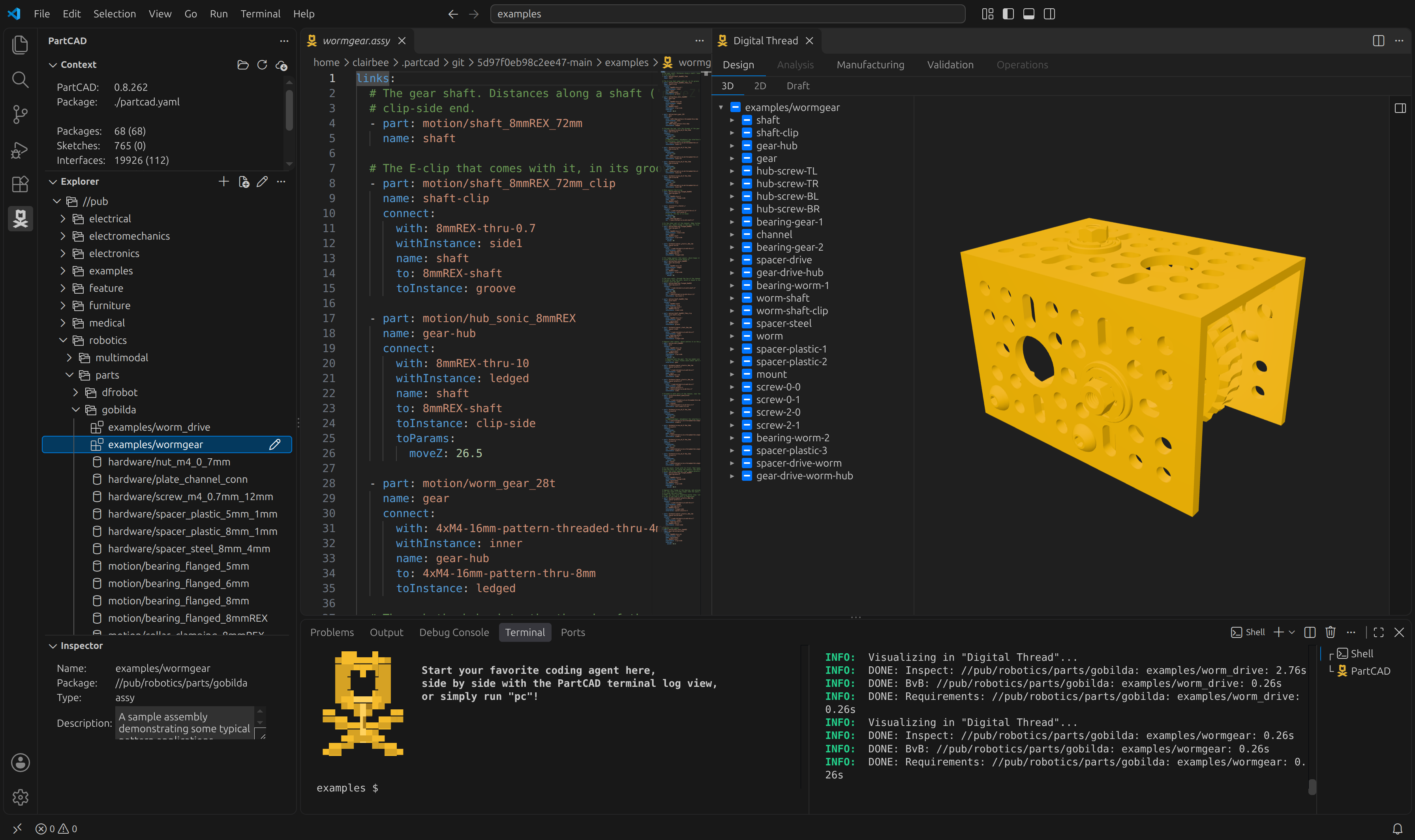
Install
Pick one. Every option ends up with the same pc command line tool and the same packages.
| You have | Install |
|---|---|
| Nothing yet | The PartCAD IDE: curl -fsSL https://raw.githubusercontent.com/partcad/partcad/main/install.sh | sh -s -- --ide, or the Windows and macOS installers on the releases page |
| Python | pip install -U partcad |
| Visual Studio Code | code --install-extension PartCAD.partcad-official (marketplace) |
| Claude Code | /plugin marketplace add partcad/partcad@plugin-dist, then /plugin install pc@partcad, then /pc:setup |
The standalone command line tools without Python, the snap, the FreeCAD add-on, the MCP server for other AI agents, and the per-OS notes are all in Installation.
Try it
pc init                      # a package in the current directory, with agent skills for Claude Code and Cursor
pc ide view my_part          # show it in the Digital Thread of the IDE or the extension
pc render my_part            # SVG, PNG, DXF... from any angle
pc test                      # the ports, interfaces, physics and simulations the objects declare
pc instructions my_assembly  # the assembly instruction book, PDF or HTML, with the bill of materials
Or, in Claude Code, /pc:gen a mounting bracket with four M4 holes: the agent writes the CAD script, renders
it and checks the result against what was asked.
The tutorial walks through a first package, and
examples/ has one directory per feature.
What it does
- Parts from CadQuery, build123d, OpenSCAD, Chili3D, SDF, STEP, BREP, IGES, STL, 3MF, OBJ, glTF, FreeCAD, Autodesk Fusion, SolidWorks, Autodesk Inventor, CATIA V5, ACIS and Creo View files, OpenUSD stages, KiCad EDA PCBs, and any format a plugin package adds (SolidCraft, Rhino).
- Assemblies and scenes in Assembly YAML, URDF, or a STEP, Autodesk Fusion or Creo View file, with interfaces and mating as objects.
- Outputs: STEP, BREP, STL, 3MF, OBJ, IGES, glTF, URDF, Gazebo and MuJoCo worlds, 2D projections, dimensioned drawings, Markdown documentation and PDF or HTML instruction books.
- Engineering: FEA, modal, thermal and CFD analysis (
pc cae), simulation in MuJoCo or Gazebo (pc sim), 2.5D toolpaths (pc cam), and materials and manufacturing methods carried into the bill of materials. - Supply chain: a Build vs Buy decision per line item, stock-based procurement for made parts, and automated purchasing from the command line.
- AI agents: Agent Skills for Claude Code and Cursor, an MCP server (
pc mcp), and plain-text--no-ansioutput on every command. - Caching in memory, on disk, in memcached and in S3, so a team or a CI fleet renders each model once.
The full list of what is supported, and what is still in progress, is in Supported formats and features.
Why
PartCAD is not a drawing tool. It is the layer under the drawing tools: the specification of a manufacturable product, kept in a form that a human, a CI job and an AI model can all read, change and verify. Keeping that specification on-prem, in Git, and portable between CAD tools and manufacturers is the point. See Introduction and Use cases.
Community
Questions and feedback go to Discord; bugs and ideas to GitHub issues. Follow LinkedIn, YouTube and Twitter/X for releases. To contribute, start with Contributing.
Licensed under Apache 2.0.
1 maintainer

Metadata
1 maintainer
Release files for partcad 0.9.20
For a detailed explanation of source distributions (sdists) and built distributions (wheels), please see the package formats documentation.
Source distribution (sdist)
| File | Size | Uploaded | Provenance | Actions |
|---|---|---|---|---|
| partcad-0.9.20.tar.gz | 2.4 MB | Without provenance | Details for partcad-0.9.20.tar.gz |
Built distribution (wheel)
| File | Interpreter | ABI | Platform | Actions Reset |
|---|---|---|---|---|
| partcad-0.9.20-py3-none-any.whl | Python 3 | none | any | Details for partcad-0.9.20-py3-none-any.whl |
Total release size: 5.1 MB
Release files / partcad-0.9.20.tar.gz
| Download URL | partcad-0.9.20.tar.gz |
|---|---|
| Size | 2.4 MB |
| Tags | Source |
|
SHA-256 checksum How to use checksums |
cbcc3388b289a2752f4e25e12f4eac72fea87d06db71e04d592f611fa6842e78
|
|
BLAKE2b-256 checksum How to use checksums |
afa882cc8ae19cb58e71ed6124d0be3da0e5c1abfd4fa113aaaf720c4e12008f
|
| Upload date | |
|
Uploaded using Trusted Publishing? What is trusted publishing? |
No |
| Uploaded via |
twine/7.0.0 CPython/3.13.16
|
Release files / partcad-0.9.20-py3-none-any.whl
| Download URL | partcad-0.9.20-py3-none-any.whl |
|---|---|
| Size | 2.7 MB |
| Tags | Python 3 |
|
SHA-256 checksum How to use checksums |
0544794aef61dfd7b671b2fb3c70feb96bfef1582c1e59467d4c3dffc42e5bb0
|
|
BLAKE2b-256 checksum How to use checksums |
35084a34276632f277a23dc698294a0659a30bc8102f88f632b56242529e9660
|
| Upload date | |
|
Uploaded using Trusted Publishing? What is trusted publishing? |
No |
| Uploaded via |
twine/7.0.0 CPython/3.13.16
|
Security for partcad 0.9.20
Provenance
Provenance describes where a file came from. On PyPI, provenance is shared via attestations, which provide a verifiable record of the build or publishing details. View details, limitations and caveats.
No provenance found
None of the files in this release were uploaded with provenance metadata.
A note on package security
PyPI is a repository for distributing packages, not a service for auditing them. While third-party security researchers and our staff do their best to detect and remove malicious packages, PyPI cannot guarantee the quality, security or suitability of any given package.
To learn more about protecting yourself from malicious actors, visit our package security documentation.














