

pastiche
A PyTorch-based Python implementation of Neural Style Transfer [1].
Features
- Support for saving intermediate images during optimization
- An option for preserving colors from the content image
- Multiple-device computation (
--supplemental-device) - Style transfers utilizing multiple style images
Installation
Requirements
- Python 3.6 or greater
Install
$ pip3 install pastiche
Update
$ pip3 install --upgrade pastiche
Usage
The program is intended to be used from the command line.
The general command line usage is shown below.
$ pastiche --content CONTENT --styles STYLE [STYLE ...] --output OUTPUT
CONTENT is the path to the content image, STYLE is the path to the style image, and OUTPUT is the path to save
the synthesized pastiche PNG file.
If the launcher script was not installed within a directory on your PATH, pastiche can be launched by passing its module name to Python.
$ python3 -m pastiche --content CONTENT --styles STYLE [STYLE ...] --output OUTPUT
There are various options, including but not limited to:
- Devices (GPU, CPU, and/or a multi-device assortment)
- Number of optimization iterations
- VGG layers to utilize
- Loss function term weights
For the full list of options and the corresponding documentation, see the source code or use --help.
$ pastiche --help
Example
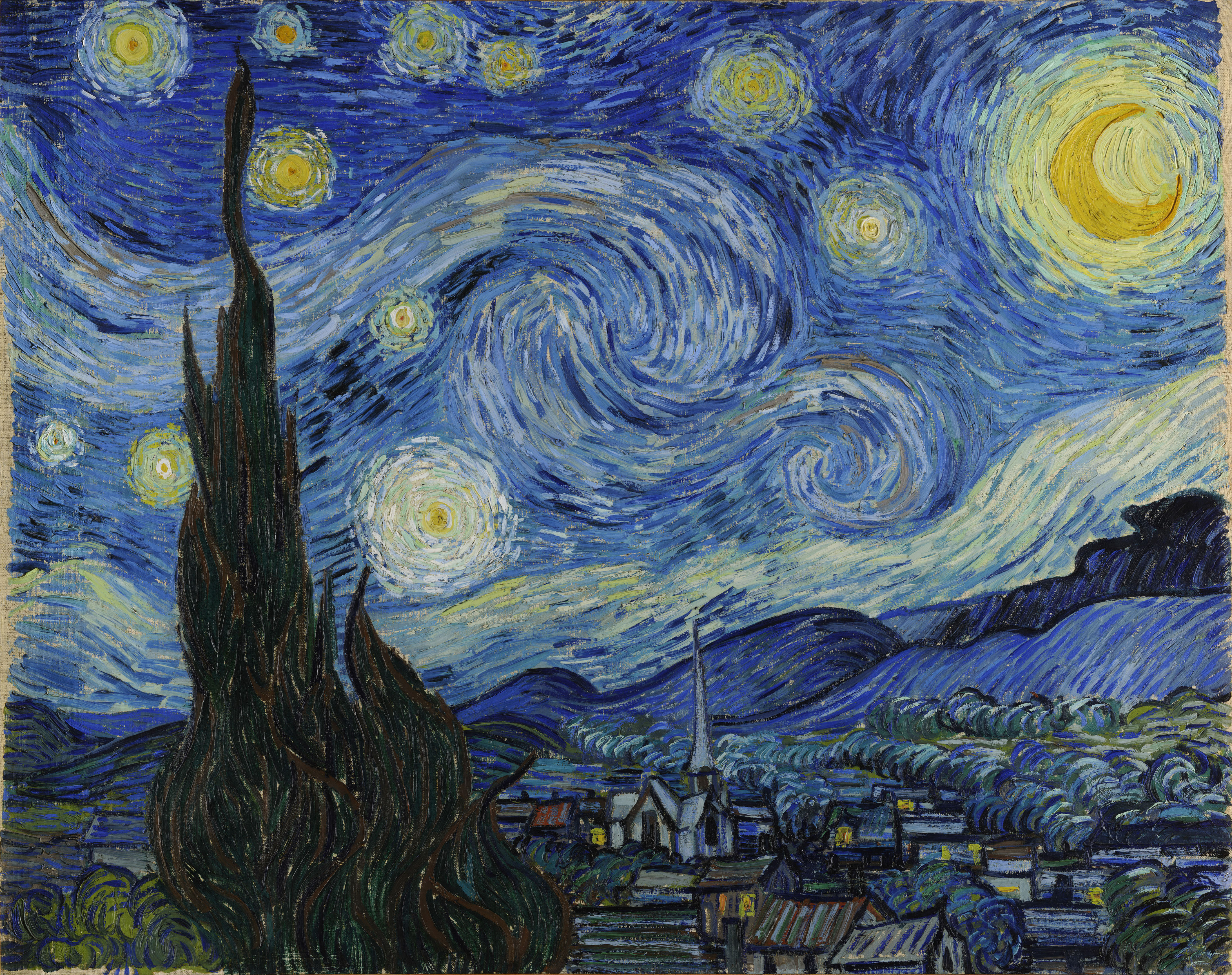
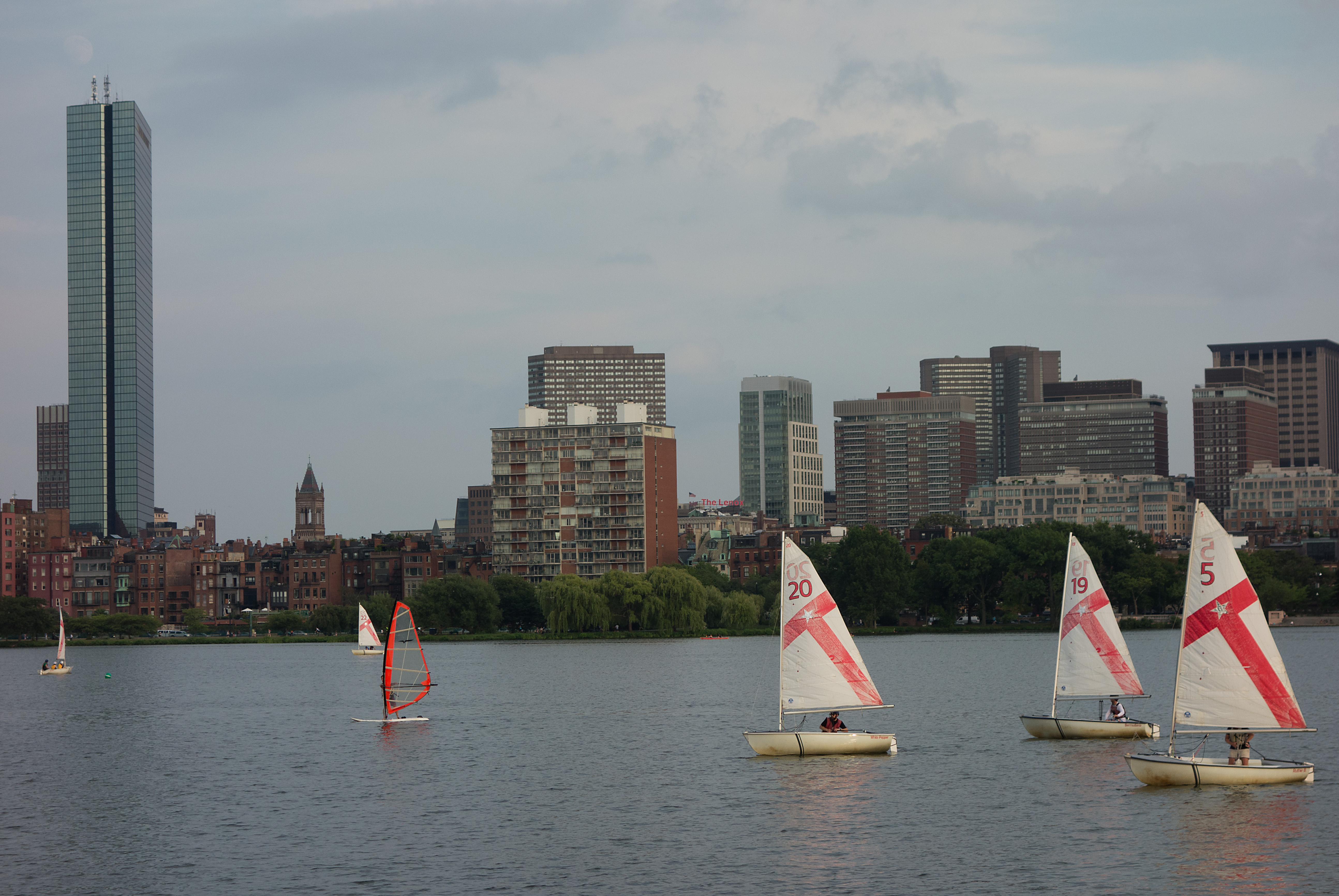
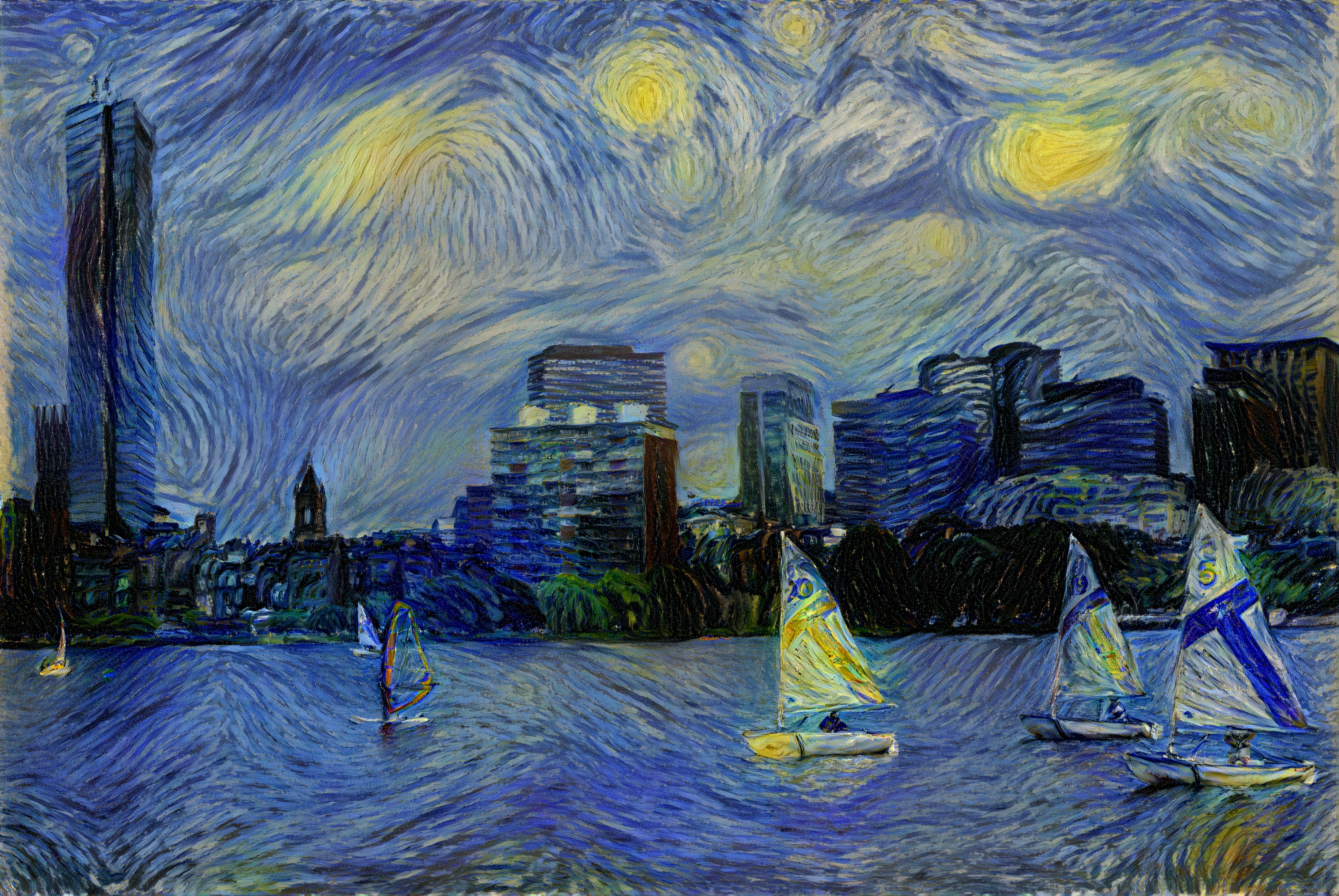
The image above was generated by applying the style from Vincent van Gogh's The Starry Night to a photo I took in
Boston in 2015. The high-resolution image was generated incrementally, with increasing resolution, using the
coarse-to-fine approach described in [2]. Example commands are shown below. Depending on GPU memory availability, the
commands may necessitate execution partially on a CPU (e.g., --device cuda:0 --supplemental-device cuda:1 10 --supplemental-device cpu 20 would configure GPU 0 for layers 0 through 9, GPU 1 for layers 10 through 19, and the
CPU for layers 20 through 36).
$ pastiche                            \
    --device cuda                     \
    --num-steps 2000                  \
    --content boston.jpg              \
    --styles vangogh_starry_night.jpg \
    --output pastiche0.png

$ pastiche                            \
    --device cuda                     \
    --size 1024                       \
    --num-steps 1000                  \
    --init pastiche0.png              \
    --content boston.jpg              \
    --styles vangogh_starry_night.jpg \
    --output pastiche1.png

# Split the computation across a GPU (layers 0 through 5 and 10 through 19), another GPU (layers 6
# through 9), and a CPU (layers 20 through 36). This device strategy is for the purpose of
# illustration. Tuning would be required for an actual device setup.
$ pastiche                            \
    --device cuda:0                   \
    --supplemental-device cuda:1 6    \
    --supplemental-device cuda:0 10   \
    --supplemental-device cpu 20      \
    --info-step 10                    \
    --size 2048                       \
    --num-steps 500                   \
    --init pastiche1.png              \
    --content boston.jpg              \
    --styles vangogh_starry_night.jpg \
    --output pastiche2.png

# Split the computation across a GPU (layers 0 through 3) and CPU (layers 4 through 36). This
# device strategy is for the purpose of illustration. Tuning would be required for an actual
# device setup.
$ pastiche                            \
    --device cuda                     \
    --supplemental-device cpu 4       \
    --info-step 1                     \
    --size 4096                       \
    --num-steps 100                   \
    --init pastiche2.png              \
    --content boston.jpg              \
    --styles vangogh_starry_night.jpg \
    --output pastiche3.png

$ convert pastiche3.png pastiche.jpg  # requires ImageMagick
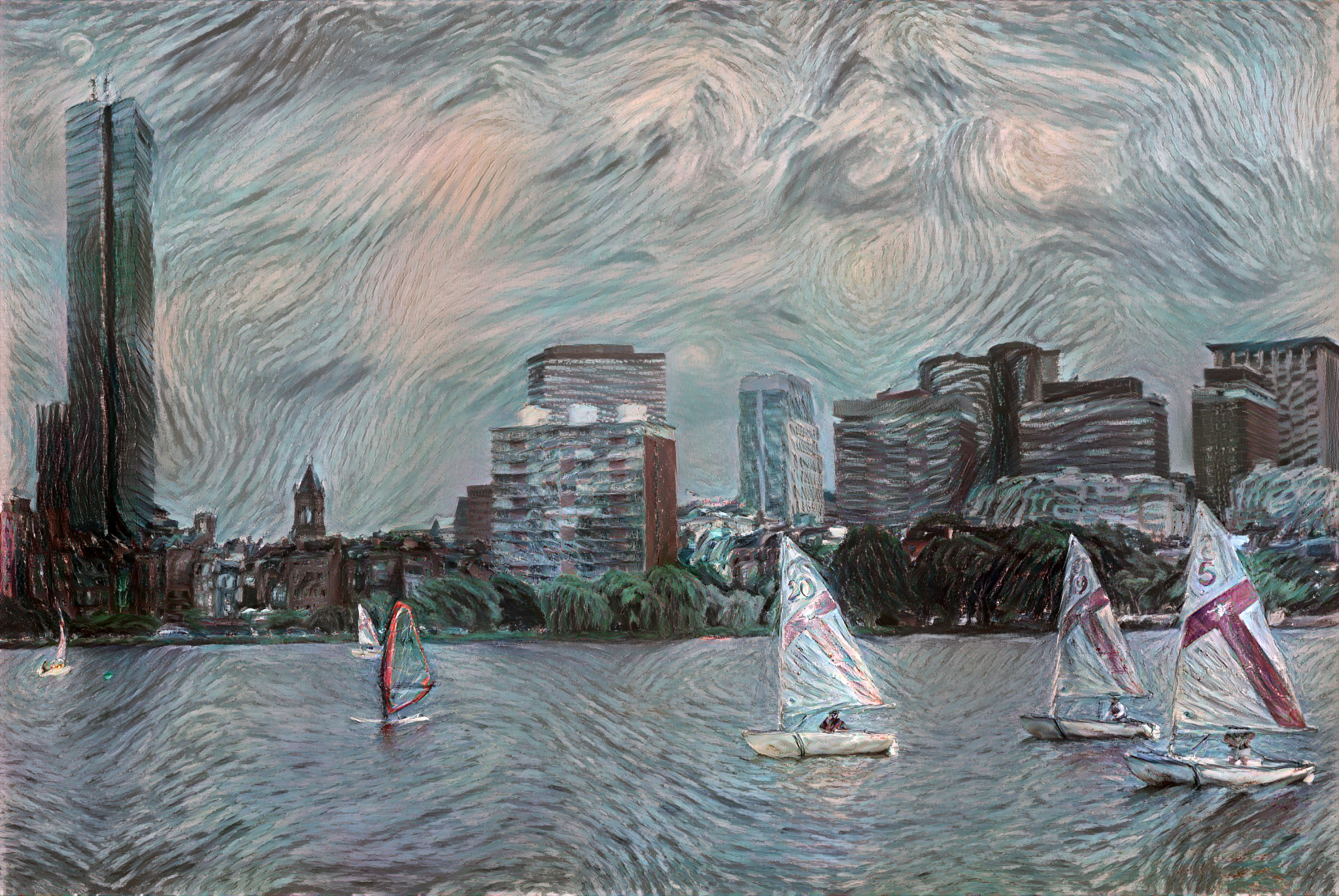
The --preserve-color option can be used to retain colors from the content image. The image below was generated
using the same commands as above (up to --size 2048), with the addition of --preserve-color.
License
The source code has an MIT License.
See LICENSE.
References
[1] Gatys, Leon A., Alexander S. Ecker, and Matthias Bethge. "A Neural Algorithm of Artistic Style." ArXiv:1508.06576 [Cs, q-Bio], August 26, 2015. http://arxiv.org/abs/1508.06576.
[2] Gatys, Leon A., Alexander S. Ecker, Matthias Bethge, Aaron Hertzmann, and Eli Shechtman. "Controlling Perceptual Factors in Neural Style Transfer." ArXiv:1611.07865 [Cs], November 23, 2016. http://arxiv.org/abs/1611.07865.
1 maintainer

Metadata
1 maintainer
Release files for pastiche 1.6.0
For a detailed explanation of source distributions (sdists) and built distributions (wheels), please see the package formats documentation.
Source distribution (sdist)
| File | Size | Uploaded | |
|---|---|---|---|
| pastiche-1.6.0.tar.gz | 18.5 MB | Details |
Built distribution (wheel)
| File | Interpreter | ABI | Platform | Reset |
|---|---|---|---|---|
| pastiche-1.6.0-py3-none-any.whl | Python 3 | none | any | Details |
Total release size: 37.0 MB
Release files / pastiche-1.6.0.tar.gz
| Download URL | pastiche-1.6.0.tar.gz |
|---|---|
| Size | 18.5 MB |
| Tags | Source |
|
SHA-256 checksum How to use checksums |
8880715790510048d0f3862a2c19f4d184377fe3c79fb1edd5745e914971730d
|
|
BLAKE2b-256 checksum How to use checksums |
bb0f5f8519e08aabf1807fc9a32801a783cd9dba4b8984344c1fdb0a5b8f3188
|
| Upload date | |
|
Uploaded using Trusted Publishing? What is trusted publishing? |
No |
| Uploaded via |
twine/5.0.0 CPython/3.12.3
|
Release files / pastiche-1.6.0-py3-none-any.whl
| Download URL | pastiche-1.6.0-py3-none-any.whl |
|---|---|
| Size | 18.5 MB |
| Tags | Python 3 |
|
SHA-256 checksum How to use checksums |
3ee4139038c5277defac88af79647f3283985b788338782fe8b9c061ccc96c44
|
|
BLAKE2b-256 checksum How to use checksums |
303bfebda1d97b9b9dec4adcfc394c72eee58c3fde84fd8e1264d172088afdef
|
| Upload date | |
|
Uploaded using Trusted Publishing? What is trusted publishing? |
No |
| Uploaded via |
twine/5.0.0 CPython/3.12.3
|














