




Patchwork automates development gruntwork like PR reviews, bug fixing, security patching, and more using a self-hosted CLI agent and your preferred LLMs. Try the hosted version here.
Key Components
- Steps: Reusable atomic actions like create PR, commit changes or call an LLM.
- Prompt Templates: Customizable LLM prompts optimized for a chore like library updates, code generation, issue analysis or vulnerability remediation.
- Patchflows: LLM-assisted automations such as PR reviews, code fixing, documentation etc. built by combining steps and prompts.
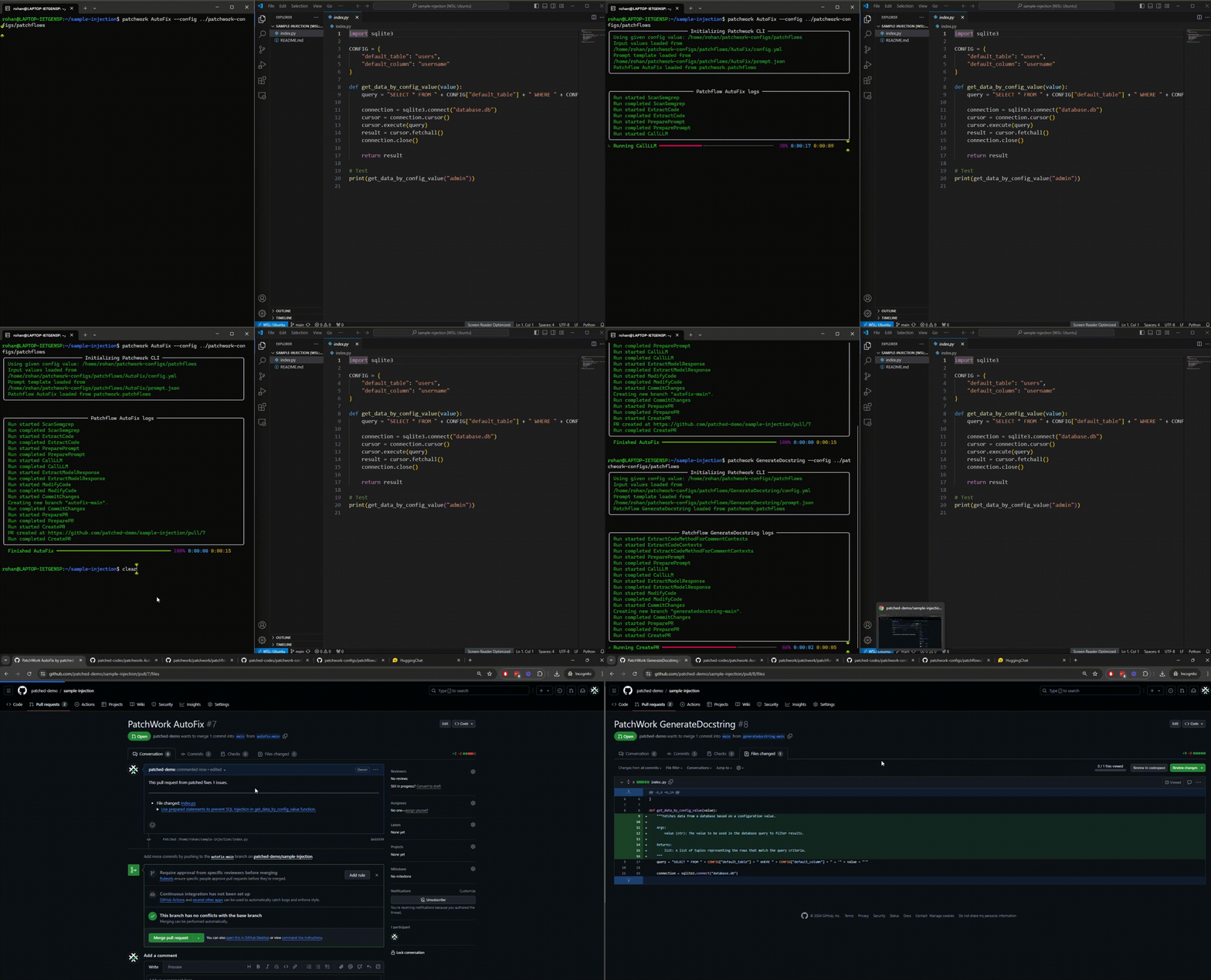
Patchflows can be run locally in your CLI and IDE, or as part of your CI/CD pipeline. There are several patchflows available out of the box, and you can always create your own.
Demo
Installation
Using Pip
Patchwork is available on PyPI and can be installed using pip:
pip install 'patchwork-cli[all]' --upgrade
The following optional dependency groups are available.
security: Installssemgrepanddepscanwithpip install 'patchwork-cli[security]'and is required for AutoFix and DependencyUpgrade patchflows.rag: Installschromadbwithpip install 'patchwork-cli[rag]'and is required for the ResolveIssue patchflow.notifications: Used by steps sending notifications, e.g. slack messages.all: installs everything.- Not specifying any dependency group (
pip install patchwork-cli) will install a core set of dependencies that are sufficient to run the GenerateDocstring, PRReview and GenerateREADME patchflows.
Using Poetry
If you'd like to build from source using poetry, please see detailed documentation here .
Patchwork CLI
The CLI runs Patchflows, as follows:
patchwork <PatchFlow> <?Arguments>
Where
- Arguments: Allow for overriding default/optional attributes of the Patchflow in the format of
key=value. Ifkeydoes not have any value, it is considered a booleanTrueflag.
Example
For an AutoFix patchflow which patches vulnerabilities based on a scan using Semgrep:
patchwork AutoFix openai_api_key=<YOUR_OPENAI_API_KEY> github_api_key=<YOUR_GITHUB_TOKEN>
The above command defaults to patching code in the current directory by running Semgrep to identify the vulnerabilities. You can view the default.yml file for the list of configurations you can set to manage the AutoFix patchflow. For more details on how you can use a personal access token from GitHub on CLI, can read this.
You can replace the OpenAI key with a key from our managed service by signing in at https://app.patched.codes/signin and generating an API key from the integrations tab. You can then call the patchflow with the key as follows:
patchwork AutoFix patched_api_key=<YOUR_PATCHED_API_KEY> github_api_key=<YOUR_GITHUB_TOKEN>
To use Google's models you can set the google_api_key and model, this is useful if you want to work with large contexts as the gemini-pro-1.5 model supports an input context length of 1 million tokens.
The patchwork-template repository contains the default configuration and prompts for all the patchflows. You can clone that repo and pass it as a flag to the CLI:
patchwork AutoFix --config /path/to/patchwork-configs/patchflows
Using open source models
Patchwork supports any OpenAI compatible endpoint, allowing use of any LLM from various providers like Groq, Together AI, or Hugging Face.
E.g. to use Llama 3.1 405B from Groq.com run:
patchwork AutoFix client_base_url=https://api.groq.com/openai/v1 openai_api_key=your_groq_key model=llama-3.1-405b-reasoning
You can also use a config file to do the same. To use Llama 3.1 405B from Hugging Face, create a config.yml file:
openai_api_key: your_hf_token
client_base_url: https://api-inference.huggingface.co/models/meta-llama/Meta-Llama-3.1-405B-Instruct-FP8/v1
model: Meta-Llama-3.1-405B-Instruct-FP8
And run as:
patchwork AutoFix --config=/path/to/config.yml
This allows you to run local models via llama.cpp, ollama, vllm or tgi. For instance, you can run Llama 3.1 8B locally using llama_cpp.server:
python -m llama_cpp.server --hf_model_repo_id bullerwins/Meta-Llama-3.1-8B-Instruct-GGUF --model 'Meta-Llama-3.1-8B-Instruct-Q4_K_M.gguf' --chat_format chatml
Then run your patchflow:
patchwork AutoFix client_base_url=http://localhost:8080/v1 openai_api_key=no_key_local_model
Patchflows
Patchwork comes with predefined patchflows, with more added over time. Sample patchflows include:
- GenerateDocstring: Generate docstrings for methods in your code.
- AutoFix: Generate and apply fixes to code vulnerabilities in a repository.
- PRReview: On PR creation, extract code diff, summarize changes, and comment on PR.
- GenerateREADME: Create a README markdown file for a given folder, to add documentation to your repository.
- DependencyUpgrade: Update your dependencies from vulnerable to fixed versions.
- ResolveIssue: Identify the files in your repository that need to be updated to resolve an issue (or bug) and create a PR to fix it.
Prompt Templates
Prompt templates are used by patchflows and passed as queries to LLMs. Templates contain prompts with placeholder variables enclosed by {{}} which are replaced by the data from the steps or inputs on every run.
Below is a sample prompt template:
{
  "id": "diffreview_summary",
    "prompts": [
      {
        "role": "user",
        "content": "Summarize the following code change descriptions in 1 paragraph. {{diffreviews}}"
      }
    ]
}
Each patchflow comes with an optimized default prompt template. But you can specify your own using the prompt_template_file=/path/to/prompt/template/file option.
Contributing
Contributions for new patchflows and steps, or to the core framework are welcome. Please look at open issues for details.
- To create a new patchflow, follow these instructions.
- To create a new step, follow these instructions.
We also provide a chat assistant to help you create new steps and patchflows easily.
- Patchwork Assistant on HuggingChat (based on Llama-3.1)
Roadmap
Short Term
- Expand patchflow library and integration options
- Patchflow debugger and validation module
- Bug fixing and performance improvements
- Refactor code and documentation
Long Term
- Support large-scale code embeddings in patchflows
- Support parallelization and branching
- Fine-tuned models that can be self-hosted
- Open-source GUI
License
Patchwork is licensed under AGPL-3.0 terms. However, custom patchflows and steps can be created and shared using the patchwork template repository which is licensed under Apache-2.0 terms.
1 maintainer

Release files for patchwork-cli 0.0.124
For a detailed explanation of source distributions (sdists) and built distributions (wheels), please see the package formats documentation.
Source distribution (sdist)
| File | Size | Uploaded | |
|---|---|---|---|
| patchwork_cli-0.0.124.tar.gz | 162.8 kB | Details |
Built distribution (wheel)
| File | Interpreter | ABI | Platform | Reset |
|---|---|---|---|---|
| patchwork_cli-0.0.124-py3-none-any.whl | Python 3 | none | any | Details |
Total release size: 442.7 kB
Release files / patchwork_cli-0.0.124.tar.gz
| Download URL | patchwork_cli-0.0.124.tar.gz |
|---|---|
| Size | 162.8 kB |
| Tags | Source |
|
SHA-256 checksum How to use checksums |
aef7a0eaf40d026adc87a41d45dcc1bbd1de31fa2b709a957e9af6e4cb65d271
|
|
BLAKE2b-256 checksum How to use checksums |
7fb92884d39e5a6d0614b9dcc632e7d5f3a9a56f1815218ee00e2d071f2cff63
|
| Upload date | |
|
Uploaded using Trusted Publishing? What is trusted publishing? |
No |
| Uploaded via |
poetry/2.1.2 CPython/3.11.11 Linux/6.8.0-1021-azure
|
Release files / patchwork_cli-0.0.124-py3-none-any.whl
| Download URL | patchwork_cli-0.0.124-py3-none-any.whl |
|---|---|
| Size | 280.0 kB |
| Tags | Python 3 |
|
SHA-256 checksum How to use checksums |
f8a62cfabb76bf6f89f3f591abc0d24420a17ba81fd0eab8aff451766e55dab4
|
|
BLAKE2b-256 checksum How to use checksums |
4cb2d74e5db8aecac5862714542ff49256c5727874ae3af07544366d2951e221
|
| Upload date | |
|
Uploaded using Trusted Publishing? What is trusted publishing? |
No |
| Uploaded via |
poetry/2.1.2 CPython/3.11.11 Linux/6.8.0-1021-azure
|














