
pbaa : Prompt-Based Automatic Annotation


Easy inference implementation of Grounded-SAM for Prompt-based automatic annotation
Table of Contents
Installation
Docker (Recommend)
git clone https://github.com/dh031200/pbaa.git
docker build docker -t pbaa:latest
docker run --gpus all -it --ipc=host -v `pwd`:/workspace -p 7860:7860 pbaa:latest
Without docker
The code requires python>=3.8, CUDA==11.7.
pip install pbaa
Usage
Options
Usage: pbaa [OPTIONS]

Options:
  --version                    Show the version and exit.
  -s, --src TEXT               Source image or directory path
  -p, --prompt <TEXT TEXT>...  Space-separated a pair of prompt and target
                               classe. (Multi)
  -b, --box_threshold FLOAT    Threshold for Object Detection (default: 0.25)
  -n, --nms_threshold FLOAT    Threshold for NMS (default: 0.8)
  -o, --output_dir TEXT        Path to result data (default: 'outputs')
  -g, --gradio                 Launch gradio app
  -h, --help                   Show this message and exit.
CLI
# pbaa -s <Source> -p <prompt> <class> -p <prompt> <class> ...

pbaa -s source_image.jpg -p "black dog" dog
pbaa -s source_image.jpg -p "black dog" dog -p "white cat" cat
Python
from pbaa import PBAA

annotator = PBAA()
# inference(<Source path>, <prompt:class dict>, box_threshold=0.25, nms_threshold=0.8, save=None, output_dir="outputs")
annotator("path/to/source_image.jpg", {"black dog": "dog", "white cat": "cat"})
Gradio
Run the gradio demo with a simple command
pbaa -g
Output
Launch gradio app
Running on local URL:  http://0.0.0.0:7860
You can now access Gradio demos using your browser. localhost:7860
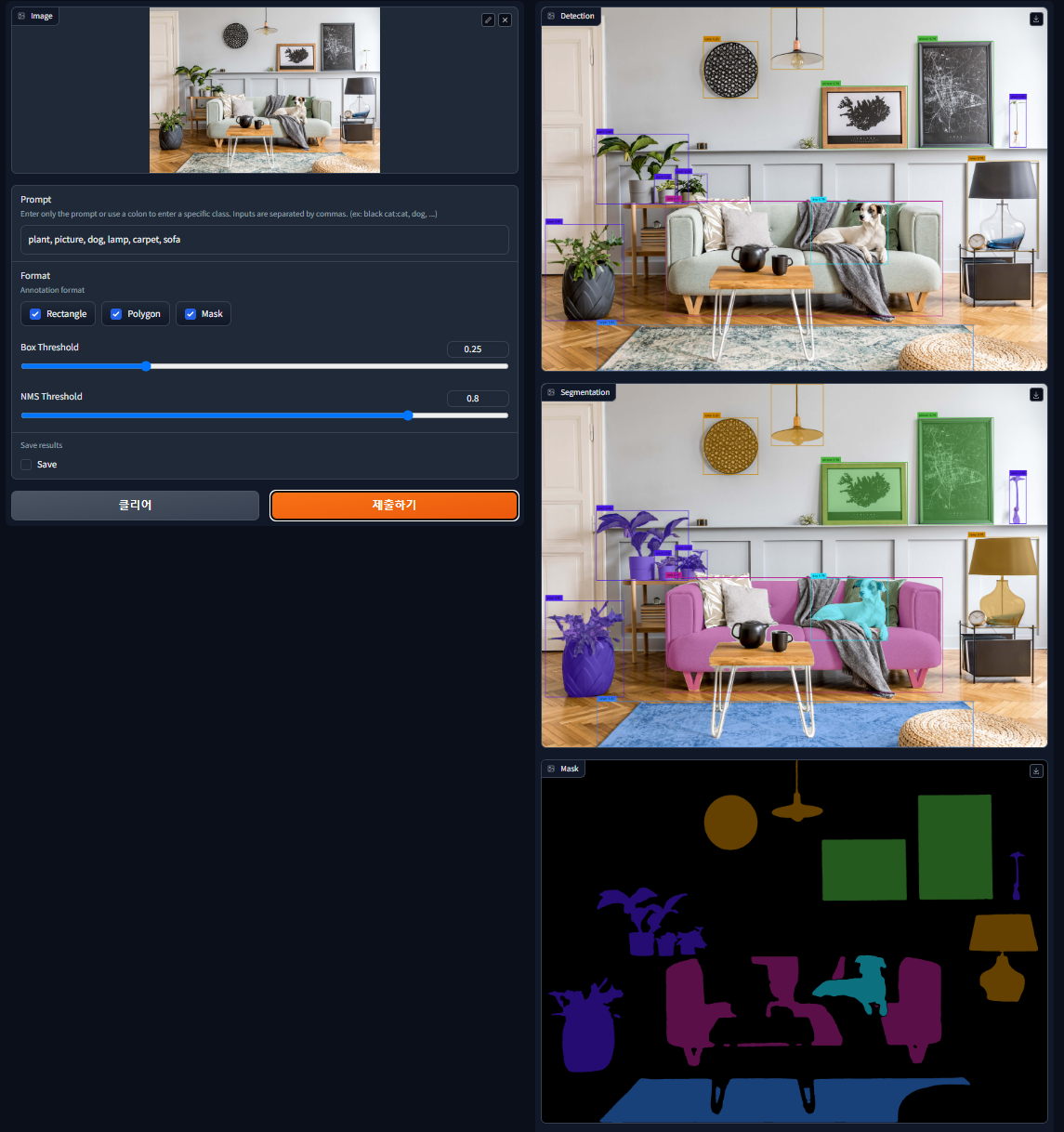
Demo
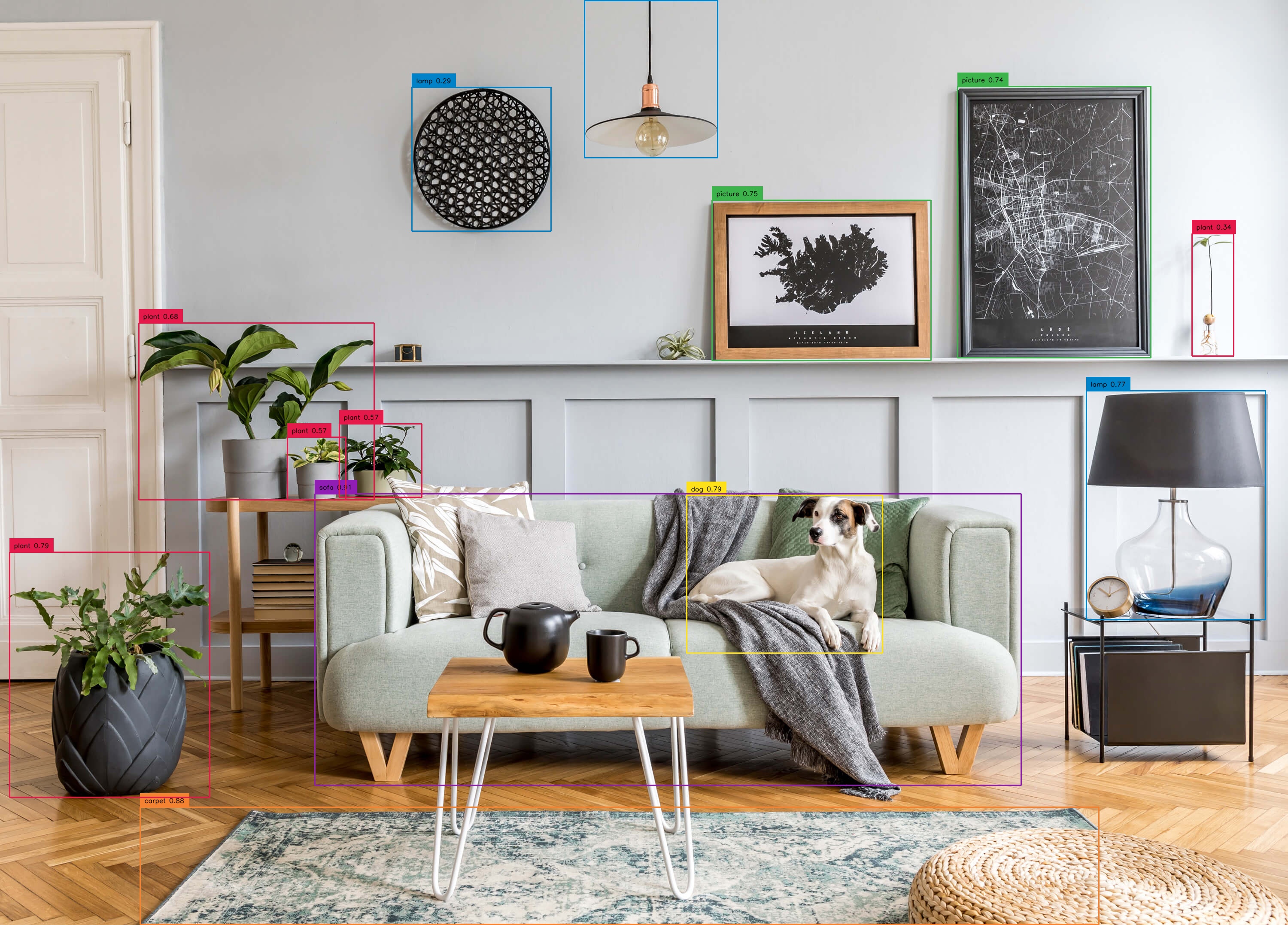
# Source : assets/demo9.jpg
# prompts : {"plant" : "plant", "picture" : "picture", "dog": "dog", "lamp" : "lamp", "carpet" : "carpet", "sofa" : "sofa"}

pbaa -s assets/demo9.jpg -p plant plant -p picture picture -p dog dog -p lamp lamp -p carpet carpet -p sofa sofa
| Origin | Detection | Segmentation |
|---|---|---|
 |
 |
 |
Result data
json structure

filename
prompt
index
  ├ cls : class name
  ├ conf : confidence score
  ├ box : bounding box coordinates
  └ poly : polygon coordinates
License
pbaa is distributed under the terms of the Apache-2.0 license.
Acknowledgements
Grounded-Segment-Anything : https://github.com/IDEA-Research/Grounded-Segment-Anything
Grounding DINO : https://github.com/IDEA-Research/GroundingDINO
Segment-anything : https://github.com/facebookresearch/segment-anything
1 maintainer

Metadata
1 maintainer
Release files for pbaa 1.0.4
For a detailed explanation of source distributions (sdists) and built distributions (wheels), please see the package formats documentation.
Source distribution (sdist)
| File | Size | Uploaded | Provenance | Actions |
|---|---|---|---|---|
| pbaa-1.0.4.tar.gz | 9.0 MB | Without provenance | Details for pbaa-1.0.4.tar.gz |
Built distribution (wheel)
| File | Interpreter | ABI | Platform | Actions Reset |
|---|---|---|---|---|
| pbaa-1.0.4-py3-none-any.whl | Python 3 | none | any | Details for pbaa-1.0.4-py3-none-any.whl |
Total release size: 9.0 MB
Release files / pbaa-1.0.4.tar.gz
| Download URL | pbaa-1.0.4.tar.gz |
|---|---|
| Size | 9.0 MB |
| Tags | Source |
|
SHA-256 checksum How to use checksums |
d5f599de03f5c3a7603f676af431264920e2df08fee3fc4927a15e2de60f5366
|
|
BLAKE2b-256 checksum How to use checksums |
920131d452675f8a7fc35238554a1bcc706c87644c516178711f39a8191e702d
|
| Upload date | |
|
Uploaded using Trusted Publishing? What is trusted publishing? |
No |
| Uploaded via |
twine/4.0.2 CPython/3.10.11
|
Release files / pbaa-1.0.4-py3-none-any.whl
| Download URL | pbaa-1.0.4-py3-none-any.whl |
|---|---|
| Size | 15.2 kB |
| Tags | Python 3 |
|
SHA-256 checksum How to use checksums |
d3e528fa2d2dee15a350dfde6c2c0feda6f1755ec4d9bdbd80f052b57aa19315
|
|
BLAKE2b-256 checksum How to use checksums |
a5a759955ecd6545dccb7277c76015bdddd8bc2dbecc1083f325bdbe594c4b91
|
| Upload date | |
|
Uploaded using Trusted Publishing? What is trusted publishing? |
No |
| Uploaded via |
twine/4.0.2 CPython/3.10.11
|
Security for pbaa 1.0.4
Provenance
Provenance describes where a file came from. On PyPI, provenance is shared via attestations, which provide a verifiable record of the build or publishing details. View details, limitations and caveats.
No provenance found
None of the files in this release were uploaded with provenance metadata.
A note on package security
PyPI is a repository for distributing packages, not a service for auditing them. While third-party security researchers and our staff do their best to detect and remove malicious packages, PyPI cannot guarantee the quality, security or suitability of any given package.
To learn more about protecting yourself from malicious actors, visit our package security documentation.














