
peepshow



Provides following utilities for debugging Python applications:
- show - lightweight function that prints name and value of your variable(s) to the console.
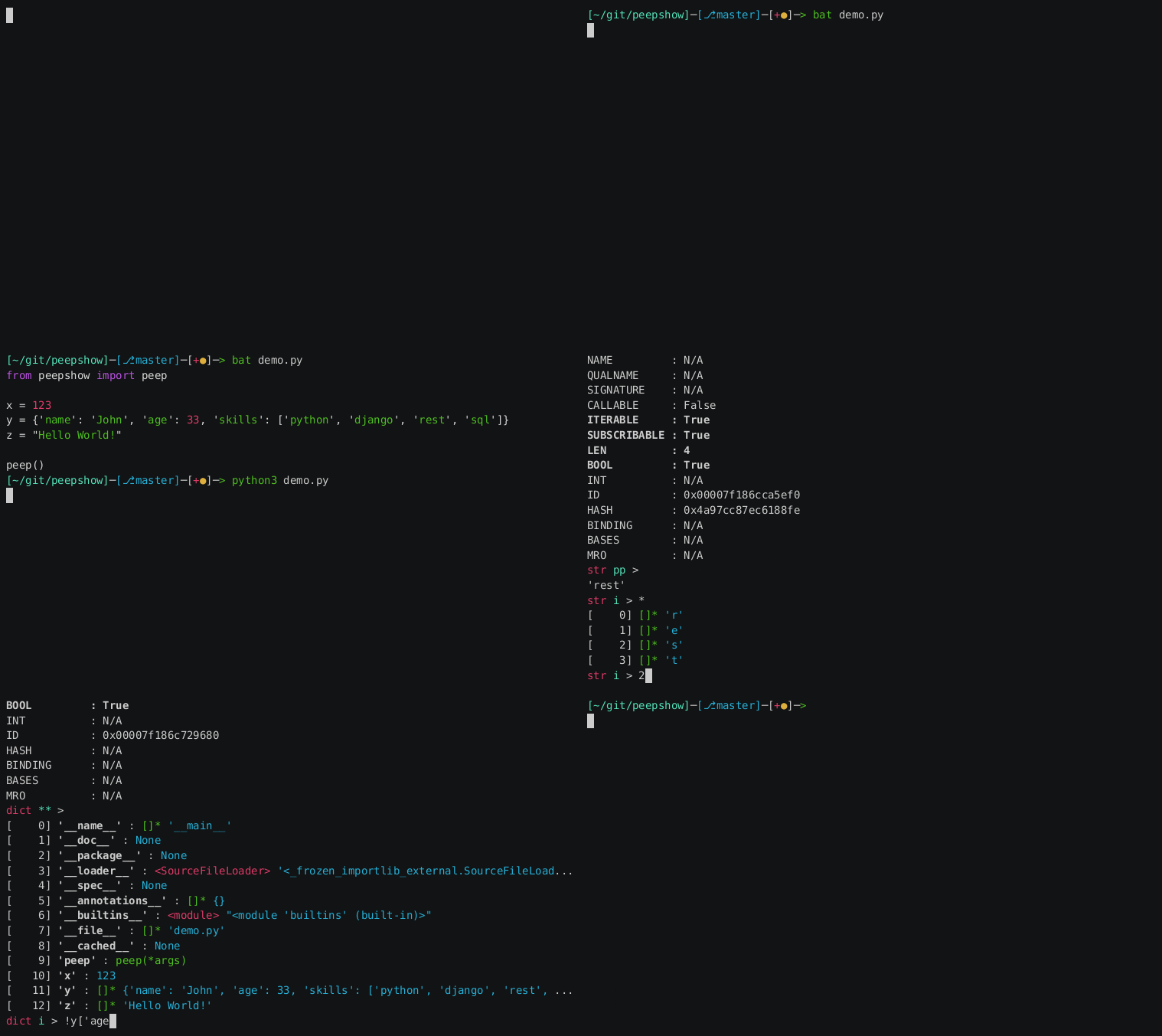
- peep - featured, interactive interface for data inspection.
Resources
- Documentation: https://gergelyk.github.io/peepshow
- Repository: https://github.com/gergelyk/peepshow
- Package: https://pypi.python.org/pypi/peepshow
- Author: Grzegorz Krasoń
- License: MIT
Installation
Install peepshow package:
pip install peepshow
PeepShow uses clear, vim, man commands which are available in most of Linux distributions. Users of other operating systems need to install them on their own.
Built-Ins
If you expect to use peepshow often, consider adding peep and show commands to Python's built-ins and enabling except hook. Edit either {site-packages}/sitecustomize.py or {user-site-packages}/usercustomize.py and append the following:
import peepshow
import builtins
builtins.peep = peepshow.peep
builtins.show = peepshow.show
builtins.peep_ = peepshow.peep_
builtins.show_ = peepshow.show_
peepshow.enable_except_hook(consider_env=True)
Breakpoint
It is also possible to invoke peep() as a result of calling built-in function breakpoint(). To enable such behavior use PYTHONBREAKPOINT system variable:
export PYTHONBREAKPOINT=peepshow.peep
Compatibility
- This software is expected to work with Python 3.6, 3.7, 3.8 and compatible.
- It has never been tested under operating systems other than Linux.
- It works fine when started in a plain Python script, in ipython or ptipython.
- In these environments like interactive python console, in pdb and ipdb, peep and show cannot infer names of the variables in the user context, so they need to be provided explicitly (e.g. use
peep_andshow_).
Usage
show
Running this script:
x = 123
y = {'name': 'John', 'age': 123}
z = "Hello World!"

# show all the variables in the scope
show()

# or only variables of your choice
show(x, y)

# you can also rename them
show(my_var=x)

# use 'show_' to specify variable names as a string
show_('x')

# expressions and renaming are also allowed
show_('x + 321', zet='z')
will result in following output:
x = 123
y = {'age': 123, 'name': 'John'}
z = 'Hello World!'
x = 123
y = {'age': 123, 'name': 'John'}
my_var = 123
x = 123
x + 321 = 444
zet = 'Hello World!'
peep
Try running the following script:
x = 123
y = {'name': 'John', 'age': 123}
z = "Hello World!"

# inspect dictionary that consists of all the variables in the scope
peep()

# or inspect variable of your choice directly
peep(x)

# use 'peep_' to specify variable name as a string
peep_('x')
When interactive interface pops up:
- Hit ENTER to see list of available variables.
- Type
10and hit ENTER to selecty. - Hit ENTER again to see items of your dictionary.
- Type
dirand hit ENTER to list attributes ofy(excluding built-ins). - Type
continueand hit ENTER to proceed or typequitand hit ENTER to terminate your script.
Note that all the commands have their short aliases. E.g. quit and q is the same.
For more help:
- Type
helpand hit ENTER to see list of available commands. - Type
manand hit ENTER to read the manual, hitqwhen you are done.
excepthook
Before running your script, set environment variable PYTHON_PEEP_EXCEPTIONS to 1. Now run the script and see what happens when an exception is raised.
Development
# Preparing environment
pip install --user poetry  # unless already installed
poetry install

# Testing with coverage
poetry run pytest --cov peepshow --cov tests

# Rendering documentation
poetry run mkdocs serve

# Building package
poetry build

# Releasing
poetry version minor  # increment selected component
git commit -am "bump version"
git push
git tag ${$(poetry version)[2]}
git push --tags
poetry build
poetry publish
poetry run mkdocs build
poetry run mkdocs gh-deploy -b gh-pages
Donations
If you find this software useful and you would like to repay author's efforts you are welcome to use following button:

1 maintainer

Metadata
1 maintainer
Release files for peepshow 0.3.0
For a detailed explanation of source distributions (sdists) and built distributions (wheels), please see the package formats documentation.
Source distribution (sdist)
| File | Size | Uploaded | Provenance | Actions |
|---|---|---|---|---|
| peepshow-0.3.0.tar.gz | 26.1 kB | Without provenance | Details for peepshow-0.3.0.tar.gz |
Built distribution (wheel)
| File | Interpreter | ABI | Platform | Actions Reset |
|---|---|---|---|---|
| peepshow-0.3.0-py3-none-any.whl | Python 3 | none | any | Details for peepshow-0.3.0-py3-none-any.whl |
Total release size: 56.9 kB
Release files / peepshow-0.3.0.tar.gz
| Download URL | peepshow-0.3.0.tar.gz |
|---|---|
| Size | 26.1 kB |
| Tags | Source |
|
SHA-256 checksum How to use checksums |
24c9d97da6fce7b0981c1d097cc4b20821bdc059d939d7cda97d28cf5e1e5676
|
|
BLAKE2b-256 checksum How to use checksums |
6195ecbf4be9dfbd0ab36128d6dcc10b3e3a82bce6effbfdebd3fcb729a00eaf
|
| Upload date | |
|
Uploaded using Trusted Publishing? What is trusted publishing? |
No |
| Uploaded via |
poetry/1.4.0 CPython/3.10.6 Linux/5.15.0-56-generic
|
Release files / peepshow-0.3.0-py3-none-any.whl
| Download URL | peepshow-0.3.0-py3-none-any.whl |
|---|---|
| Size | 30.8 kB |
| Tags | Python 3 |
|
SHA-256 checksum How to use checksums |
0fb4b6dd0c8ec30283d351927e7bf85e8bc10bd0a75a9b1c563b2d18763cf096
|
|
BLAKE2b-256 checksum How to use checksums |
61cb35d1ebc57b140e7a3e00157fd4af0d0b267e5d604c7d7c90bd195f39994e
|
| Upload date | |
|
Uploaded using Trusted Publishing? What is trusted publishing? |
No |
| Uploaded via |
poetry/1.4.0 CPython/3.10.6 Linux/5.15.0-56-generic
|
Security for peepshow 0.3.0
Provenance
Provenance describes where a file came from. On PyPI, provenance is shared via attestations, which provide a verifiable record of the build or publishing details. View details, limitations and caveats.
No provenance found
None of the files in this release were uploaded with provenance metadata.
A note on package security
PyPI is a repository for distributing packages, not a service for auditing them. While third-party security researchers and our staff do their best to detect and remove malicious packages, PyPI cannot guarantee the quality, security or suitability of any given package.
To learn more about protecting yourself from malicious actors, visit our package security documentation.














