
Avatar: A Plugin for Pelican




This plugin allows the inclusion of Libravatar or Gravatar user profile pictures, corresponding to the email address of the article's author.
Installation
This plugin can be installed via:
python -m pip install pelican-avatar
As long as you have not explicitly added a PLUGINS setting to your Pelican settings file, the newly-installed plugin should be detected and enabled automatically. Otherwise, you must add avatar to your existing PLUGINS list. For more information, please refer to the How to Use Plugins documentation.
Usage
Specifying the Author's Email Address
The default email address is taken from the AVATAR_AUTHOR_EMAIL variable in the Pelican settings file. This default value can be overridden on a per-article basis by specifying an email address in the article's metadata:
For reStructuredText:
:email: bart.simpson@example.com
For Markdown:
Email: bart.simpson@example.com
First, the plugin tries to find a corresponding avatar image for the specified email at Libravatar. If it is not found there, the plugin searches Gravatar. If an avatar is not found at either service, a default picture is shown. The “missing picture” default can be defined in the configuration variable AVATAR_MISSING.
Adjusting the Template
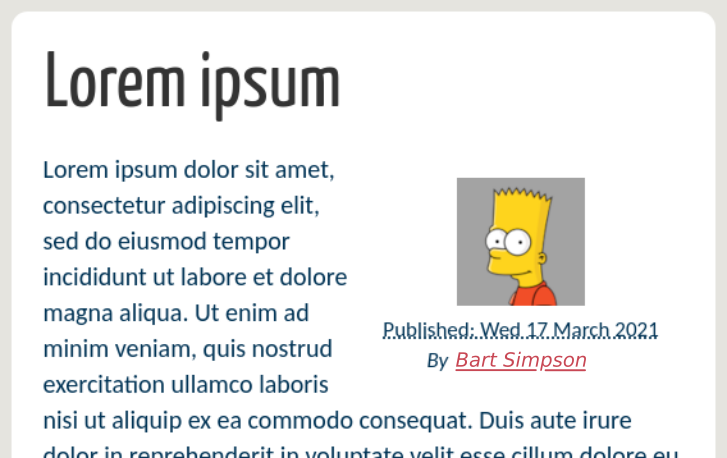
This plugin assigns the author_avatar variable to the avatar image URL and makes that variable available within the article's context. For instance, you can add the following code to a template file, such as the article_infos.html template file, just before the author information:
{% if article.author_avatar %}
<div align="center">
        <img src="{{ article.author_avatar }}">
</div>
{% endif %}
This will yield the following result (with the notmyidea theme):
Page templates work in a similar way:
{% if page.author_avatar %}
<div align="center">
        <img src="{{ page.author_avatar }}">
</div>
{% endif %}
To use in common templates, such as base.html, you can do something like this:
{% if author_avatar %}
<div align="center">
        <img src="{{ author_avatar }}">
</div>
{% endif %}
If you want to allow the email address to be overridden in articles or pages while still using the global configuration if neither is available, you can do so:
{% if article and article.author_avatar %}
  {% set author_avatar = article.author_avatar %}
{% elif page and page.author_avatar %}
  {% set author_avatar = page.author_avatar %}
{% endif %}
{% if author_avatar %}
<div align="center">
        <img src="{{ author_avatar }}">
</div>
{% endif %}
Configuration
The following variables can be configured in the Pelican settings file:
-
AVATAR_AUTHOR_EMAIL: The site-wide default for the author's email address. -
AVATAR_MISSING: The default for the missing picture. It can be either a URL (e.g.,"http://example.com/nobody.png") or the name of a logo library (e.g.,"wavatar". For the full set of alternatives, see the Libravatar API). -
AVATAR_SIZE: The size, in pixels, of the profile picture (it is always square, so the height is equal to the width). If not specified, the default size (80×80) is returned by Libravatar. -
AVATAR_USE_GRAVATAR: The plugin looks up avatars via the Libravatar service by default. Searching the Gravatar service can be forced by setting this configuration variable toTrue.
Credits
The inspiration for this plugin came from the Gravatar plugin.
Contributing
Contributions are welcome and much appreciated. Every little bit helps. You can contribute by improving the documentation, adding missing features, and fixing bugs. You can also help out by reviewing and commenting on existing issues.
To start contributing to this plugin, review the Contributing to Pelican documentation, beginning with the Contributing Code section.
Acknowledgments
Thanks to Justin Mayer for helping migrate of this plugin under the Pelican Plugins organization, to Troy Curtis for adding support for page and global generator context and for improving the Poetry workflow (even though we are now using PDM), to Lucas Cimon for fixing the test suite and providing CI support, and to Christian Clauss for the Python 3 port.
Author
Copyright (C) 2015, 2021-2025 Rafael Laboissière (rafael@laboissiere.net)
License
This project is licensed under the terms of the AGPL 3.0 license.
2 maintainers


Release files for pelican-avatar 1.0.11
For a detailed explanation of source distributions (sdists) and built distributions (wheels), please see the package formats documentation.
Source distribution (sdist)
| File | Size | Uploaded | |
|---|---|---|---|
| pelican_avatar-1.0.11.tar.gz | 142.5 kB | Details |
Built distribution (wheel)
| File | Interpreter | ABI | Platform | Reset |
|---|---|---|---|---|
| pelican_avatar-1.0.11-py3-none-any.whl | Python 3 | none | any | Details |
Total release size: 161.7 kB
Release files / pelican_avatar-1.0.11.tar.gz
| Download URL | pelican_avatar-1.0.11.tar.gz |
|---|---|
| Size | 142.5 kB |
| Tags | Source |
|
SHA-256 checksum How to use checksums |
ed0e14510e19f0905602af33091e4ef3795ea3b71f19f83f5153094f9ff5d911
|
|
BLAKE2b-256 checksum How to use checksums |
91bf79507be4222d7846dbdd29a77c1d60a13d8dbf77e1cc2781bf304bdd6487
|
| Upload date | |
|
Uploaded using Trusted Publishing? What is trusted publishing? |
Yes |
| Uploaded via |
twine/6.1.0 CPython/3.13.7
|
Provenance
Provenance describes where a file came from. On PyPI, provenance is shared via attestations, which provide a verifiable record of the build or publishing details. View details, limitations and caveats.


PyPI Publish Attestation
PyPI verified that this artifact, at this checksum, originated from the publisher listed below.
Signed by GitHub Actions, verified by PyPI on Nov 11, 2025.
Transparency logRelease files / pelican_avatar-1.0.11-py3-none-any.whl
| Download URL | pelican_avatar-1.0.11-py3-none-any.whl |
|---|---|
| Size | 19.2 kB |
| Tags | Python 3 |
|
SHA-256 checksum How to use checksums |
823cb7ec323ad4537ee7ffd6aef3472e49720558192fda187f6e59aa94065249
|
|
BLAKE2b-256 checksum How to use checksums |
b8cc57f5d199657c7b1f445ca4cc360f5cd4c0d3a2a9793f6cac44f52fb3391f
|
| Upload date | |
|
Uploaded using Trusted Publishing? What is trusted publishing? |
Yes |
| Uploaded via |
twine/6.1.0 CPython/3.13.7
|
Provenance
Provenance describes where a file came from. On PyPI, provenance is shared via attestations, which provide a verifiable record of the build or publishing details. View details, limitations and caveats.
PyPI Publish Attestation
PyPI verified that this artifact, at this checksum, originated from the publisher listed below.
Signed by GitHub Actions, verified by PyPI on Nov 11, 2025.
Transparency log













