
Webring


This Pelican plugin adds a webring or feed aggregation to your site from a list of web feeds.
It retrieves the latest posts from a list of web feeds and makes them available in templates, effectively creating a partial webring or feed aggregation. Posts are sorted from newer to older.
It is inspired by openring, a tool for generating an HTML file to include in your SSG from a template and a list of web feeds, and pelican-planet, a Pelican plugin for creating feed aggregations.
Installation
This plugin can be installed via:
python -m pip install pelican-webring
Settings
WEBRING_FEED_URLS = []
A list of web feeds in the form of a URL or local file.
WEBRING_MAX_ARTICLES = 3
The maximum number of articles.
WEBRING_ARTICLES_PER_FEED = 1
The maximum number of articles per feed.
WEBRING_SUMMARY_WORDS = 20
The maximum number of words of post summaries. If set to 0, truncation is disabled.
WEBRING_CLEAN_SUMMARY_HTML = True
Whether to clean html tags from post summaries or not.
Example
Let's suppose we have two blogs in our webring and want to show two articles per blog. We would also like to show a quite short summary.
WEBRING_FEED_URLS = [
    'https://justinmayer.com/feeds/all.atom.xml',
    'https://danluu.com/atom.xml'
]
WEBRING_ARTICLES_PER_FEED = 2
WEBRING_MAX_ARTICLES = 4
WEBRING_SUMMARY_LENGTH = 25
Templates
The plugin makes available the resulting web feed articles in the variable
webring_articles.
All existing date attributes are Pelican utils.SafeDatetime objects, which
can be used with Pelican's Jinja filter
strftime.
Each article contains all available properties in the original feed entry, for example:
article.title: The article title.article.link: The article URL.article.date: The article date as a Pelicanutils.SafeDatetimeobject.article.summary: The article summary, as provided in the web feed and modified according to this plugin's settings.article.description: The original article summary, without cleaning or truncation.
Articles also contain information about the source feed, which can be
accessed through source_ prefixed attributes:
source_title: The title of the web feed.source_link: A link to the web feed.source_id: An identification field provided in some web feeds.
If you access an attribute that is not present in the entry or source feed, an
empty string will be returned, except for dates (published, updated,
created and expired) that None is returned.
For a list of available entry and source feed attributes, read the feedparser reference document.
You can use webring_articles in any kind of content type, including pages
and articles. Read the following sections for examples on how to use this
variable in your templates.
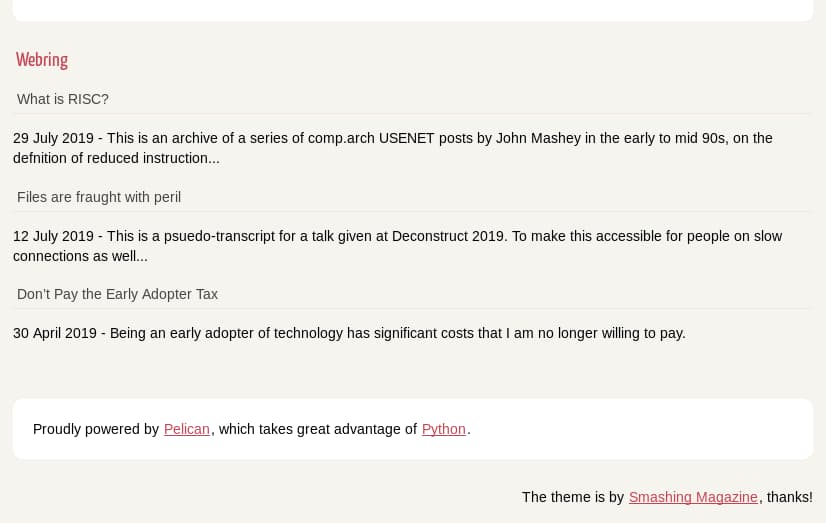
Adding a Webring section in the bottom of articles
Imagine we'd like to put our webring in the bottom of articles, using the default Pelican template (ie. notmyidea). To simplify, we'll use the existing CSS classes.
Edit the notmyidea/templates/base.html file and make it look like this:
        ...
        <section id="extras" class="body">
        {% if WEBRING_FEED_URLS %}
            <div class="webring">
                <h2>Webring</h2>
                {% for article in webring_articles %}
                <p><a href="{{ article.link }}">{{ article.title }}</a></p>
                <p>{{ article.date|strftime('%d %B %Y') }} - {{ article.summary}}</p>
                {% endfor %}
            </div>
        {% endif %}
        {% if LINKS %}
        ...
If there were no links or social widgets, the result would be like in the image below:
Adding a feed aggregation page
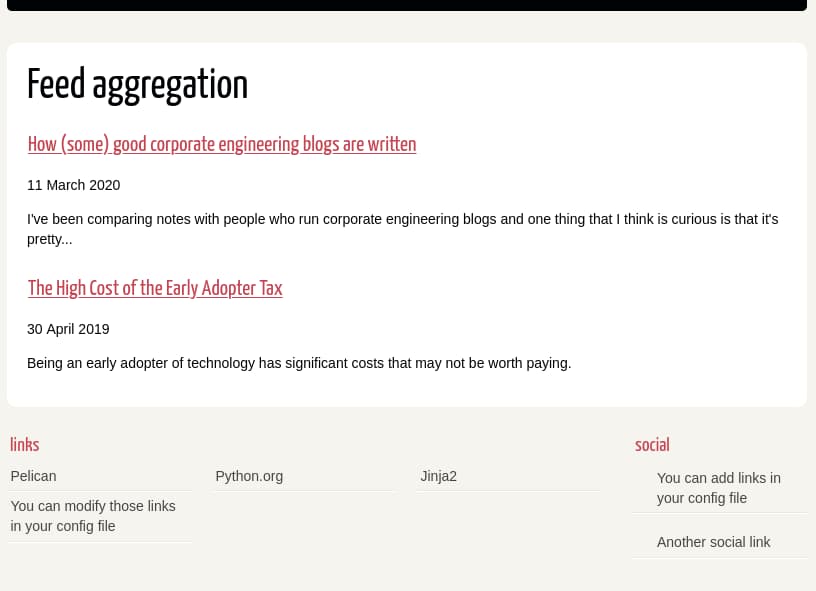
In this case, we'd like to generate a new page with all feed contents processed
by this plugin. For example, imagine we'd like to access that page as:
https://my-domain.com/feed-aggregation.
This objective can be accomplished in several ways in Pelican. We're showing here one that only requires a new HTML template.
The following is an example template file named feed-aggregation.html based on
page.html that should reside in your theme template directory:
{% extends "base.html" %}
{% block title %}Feed aggregation{% endblock %}

{% block content %}
<section id="content" class="body">
    <h1 class="entry-title">Feed aggregation</h1>

    {% if WEBRING_FEED_URLS %}
        {% for article in webring_articles %}
            <article class="hentry">
                <header>
                    <h2><a href="{{ article.link }}">{{ article.title }}</a></h2>
                </header>
                <p>{{ article.date|strftime('%d %B %Y') }}</p>
                <div class="entry-content">
                {{ article.summary}}
                </div>
            </article>
        {% endfor %}
    {% endif %}

</section>
{% endblock %}
Finally, in order for our template to be rendered in the wanted location, we add the following template page to our pelicanconf.py. Note that feed-aggregation.html is relative to your theme's template directory.
TEMPLATE_PAGES = { 'feed-aggregation.html': 'feed-aggregation/index.html' }
The final result would be as in the image below:
Contributing
Contributions are welcome and much appreciated. Every little bit helps. You can contribute by improving the documentation, adding missing features, and fixing bugs. You can also help out by reviewing and commenting on existing issues.
To start contributing to this plugin, review the Contributing to Pelican documentation, beginning with the Contributing Code section.
2 maintainers


Release files for pelican-webring 1.4.0
For a detailed explanation of source distributions (sdists) and built distributions (wheels), please see the package formats documentation.
Source distribution (sdist)
| File | Size | Uploaded | |
|---|---|---|---|
| pelican_webring-1.4.0.tar.gz | 25.9 kB | Details |
Built distribution (wheel)
| File | Interpreter | ABI | Platform | Reset |
|---|---|---|---|---|
| pelican_webring-1.4.0-py3-none-any.whl | Python 3 | none | any | Details |
Total release size: 50.7 kB
Release files / pelican_webring-1.4.0.tar.gz
| Download URL | pelican_webring-1.4.0.tar.gz |
|---|---|
| Size | 25.9 kB |
| Tags | Source |
|
SHA-256 checksum How to use checksums |
68518bd264d875e6eccc5fc97422069efed7944fab4a00a4a03f932804614940
|
|
BLAKE2b-256 checksum How to use checksums |
b5dac319b97e6e11d5db6c6aead675daaea4edd8c50aa20f2604094f1781f018
|
| Upload date | |
|
Uploaded using Trusted Publishing? What is trusted publishing? |
No |
| Uploaded via |
poetry/1.3.2 CPython/3.9.16 Linux/5.15.0-1031-azure
|
Release files / pelican_webring-1.4.0-py3-none-any.whl
| Download URL | pelican_webring-1.4.0-py3-none-any.whl |
|---|---|
| Size | 24.8 kB |
| Tags | Python 3 |
|
SHA-256 checksum How to use checksums |
e60bba7f2e314b069ab6bd5d3730b113c3bfd10f402fb89a506a144dec7e3e71
|
|
BLAKE2b-256 checksum How to use checksums |
30fa902a3e303cf69f3483ac7076011a21a3f004ef190f54e748195b15c1fded
|
| Upload date | |
|
Uploaded using Trusted Publishing? What is trusted publishing? |
No |
| Uploaded via |
poetry/1.3.2 CPython/3.9.16 Linux/5.15.0-1031-azure
|














