
PennyLane-Qulacs Plugin


The PennyLane-Qulacs plugin integrates the Qulacs quantum computing framework with PennyLane’s quantum machine learning capabilities.
PennyLane is a cross-platform Python library for quantum machine learning, automatic differentiation, and optimization of hybrid quantum-classical computations.
Qulacs is a software library for quantum computing, written in C++ and with GPU support.
The plugin documentation can be found here: https://docs.pennylane.ai/projects/qulacs.
Features
Provides access to Qulacs’ simulator backend via the qulacs.simulator device
Support for all PennyLane core functionality
Benchmarks
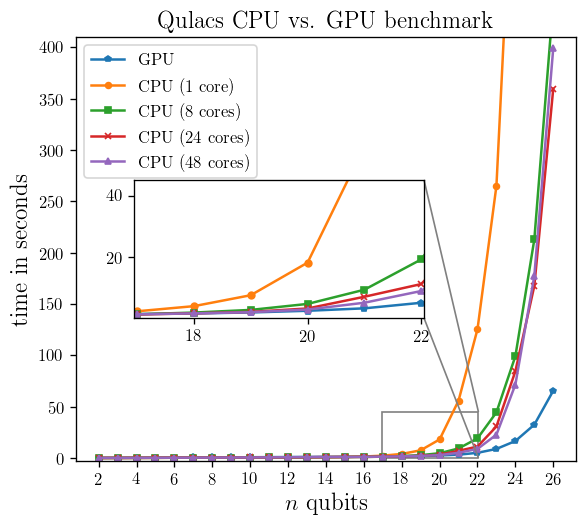
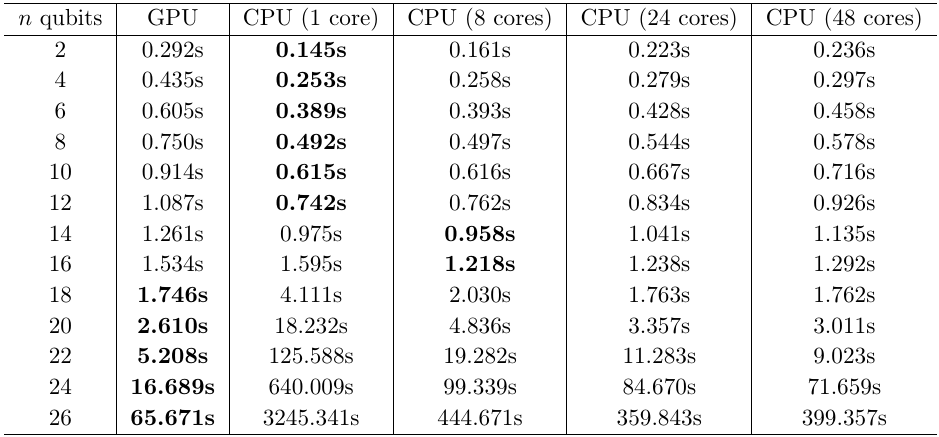
We ran a 100 executions of 4 layer quantum neural network strongly entangling layer and compared the runtimes between CPU and GPU.
Installation
This plugin requires Python version 3.6 or above, as well as PennyLane and Qulacs. Installation of this plugin, as well as all dependencies, can be done using pip:
$ pip install pennylane-qulacs["cpu"]Note that you need to include whether to install the CPU version (pennylane-qulacs["cpu"]) or the GPU version (pennylane-qulacs["gpu"]) of Qulacs for it to be installed correctly. Otherwise Qulacs will need to be installed independently:
pip install qulacs pennylane-qulacsAlternatively, you can install PennyLane-Qulacs from the source code by navigating to the top directory and running:
$ python setup.py installDependencies
PennyLane-Qulacs requires the following libraries be installed:
Python >= 3.6
as well as the following Python packages:
If you currently do not have Python 3 installed, we recommend Anaconda for Python 3, a distributed version of Python packaged for scientific computation.
Tests
To test that the PennyLane-Qulacs plugin is working correctly you can run
$ make testin the source folder.
Documentation
To build the HTML documentation, go to the top-level directory and run:
$ make docsThe documentation can then be found in the doc/_build/html/ directory.
Contributing
We welcome contributions - simply fork the repository of this plugin, and then make a pull request containing your contribution. All contributers to this plugin will be listed as authors on the releases.
We also encourage bug reports, suggestions for new features and enhancements, and even links to cool projects or applications built on PennyLane.
Support
Source Code: https://github.com/PennyLaneAI/pennylane-qulacs
Issue Tracker: https://github.com/PennyLaneAI/pennylane-qulacs/issues
PennyLane Forum: https://discuss.pennylane.ai
If you are having issues, please let us know by posting the issue on our Github issue tracker, or by asking a question in the forum.
License
The PennyLane-Qulacs plugin is free and open source, released under the Apache License, Version 2.0.
2 maintainers


Metadata
2 maintainers
Release files for pennylane-qulacs 0.32.0
For a detailed explanation of source distributions (sdists) and built distributions (wheels), please see the package formats documentation.
Built distribution (wheel)
| File | Interpreter | ABI | Platform | Actions Reset |
|---|---|---|---|---|
| pennylane_qulacs-0.32.0-py3-none-any.whl | Python 3 | none | any | Details for pennylane_qulacs-0.32.0-py3-none-any.whl |
Release files / pennylane_qulacs-0.32.0-py3-none-any.whl
| Download URL | pennylane_qulacs-0.32.0-py3-none-any.whl |
|---|---|
| Size | 13.9 kB |
| Tags | Python 3 |
|
SHA-256 checksum How to use checksums |
856f9205376c8cadbd7e53740915ac96f48255180c1445ff7d64600aeffd09bf
|
|
BLAKE2b-256 checksum How to use checksums |
d0630bdaf8e65bc8b70923baeae24a1862bd970ac89a0c85bc85b736ed595ec6
|
| Upload date | |
|
Uploaded using Trusted Publishing? What is trusted publishing? |
No |
| Uploaded via |
twine/4.0.2 CPython/3.11.5
|
Security for pennylane-qulacs 0.32.0
Provenance
Provenance describes where a file came from. On PyPI, provenance is shared via attestations, which provide a verifiable record of the build or publishing details. View details, limitations and caveats.
No provenance found
None of the files in this release were uploaded with provenance metadata.
A note on package security
PyPI is a repository for distributing packages, not a service for auditing them. While third-party security researchers and our staff do their best to detect and remove malicious packages, PyPI cannot guarantee the quality, security or suitability of any given package.
To learn more about protecting yourself from malicious actors, visit our package security documentation.














