














The pept Library
A Python library that integrates all the tools necessary to perform research using Positron Emission Particle Tracking (PEPT). It includes algorithms for the location, identification and tracking of particles, in addition to tools for visualisation and analysis, and utilities allowing the realistic simulation of PEPT data.
Positron Emission Particle Tracking
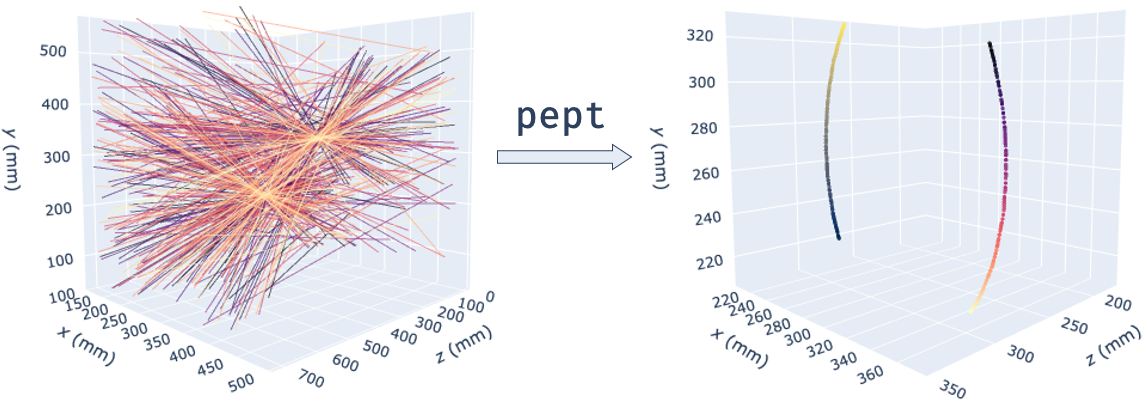
PEPT is a technique developed at the University of Birmingham which allows the non-invasive, three-dimensional tracking of one or more 'tracer' particles through particulate, fluid or multiphase systems. The technique allows particle or fluid motion to be tracked with sub-millimetre accuracy and sub-millisecond temporal resolution and, due to its use of highly-penetrating 511keV gamma rays, can be used to probe the internal dynamics of even large, dense, optically opaque systems - making it ideal for industrial as well as scientific applications.
PEPT is performed by radioactively labelling a particle with a positron-emitting radioisotope such as fluorine-18 (18F) or gallium-66 (66Ga), and using the back-to-back gamma rays produced by electron-positron annihilation events in and around the tracer to triangulate its spatial position. Each detected gamma ray represents a line of response (LoR).
Getting Started
These instructions will help you get started with PEPT data analysis.
Prerequisites
This package supports Python 3.7 and above - it is built and tested for Python 3.7, 3.8 and 3.9 on Windows, Linux and macOS (thanks to conda-forge, which is awesome!).
You can install it using the batteries-included Anaconda distribution or the bare-bones Python interpreter. You can also check out our Python and pept tutorials here.
Installation
The easiest and quickest installation, if you are using Anaconda:
conda install -c conda-forge pept
You can also install the latest release version of pept from PyPI:
pip install --upgrade pept
Or you can install the development version from the GitHub repository:
pip install --upgrade git+https://github.com/uob-positron-imaging-centre/pept
Tutorials
Some PEPT analysis example scripts are available on pept.readthedocs.io. A minimal script can read PEPT from an online location (e.g. the experiment shown above - two radioactive tracers rotating at 42 RPM), transform the lines of response into accurate tracer locations and plot them in a browser-based interactive 3D graph (live version available here):
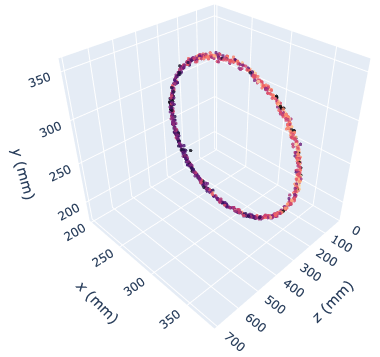
A more complete PEPT analysis script can track multiple tracers at the same time, produce "tight", separate trajectories and create multiple interactive Plotly subplots that are opened in a webpage (example live graph here). The resulting trajectories can then be post-processed to extract system-specific data - e.g. residence time distributions.
You can download some PEPT data samples from the UoB Positron Imaging Centre's Repository:
$> git clone https://github.com/uob-positron-imaging-centre/example_data
Documentation
An absurd amount of time was spent making sure than every function and class in the pept library is well-documented (and most have examples) and all code is explained through comments - no dragons shall be dwelling in the pept source code. The library API / reference can be found here - including a search function for quickly finding what you need.
A very fast-paced introduction to Python is available here; it is aimed at engineers whose background might be a few lines written MATLAB, as well as moderate C/C++ programmers.
A beginner-friendly tutorial for using the pept package is available here.
The links above point to Google Colaboratory, a Jupyter notebook-hosting website that lets you combine text with Python code, executing it on Google servers. Pretty neat, isn't it?
Library Architecture
The main purpose of the pept library is to provide a common, consistent foundation for PEPT-related algorithms, including tracer tracking, visualisation and post-processing tools - such that they can be used interchangeably, mixed and matched for different systems. Virtually any PEPT processing routine follows these steps:
- Convert raw gamma camera / scanner data into 3D lines (i.e. the captured gamma rays, or lines of response - LoRs).
- Take a sample of lines, locate tracer locations, then repeat for the next samples.
- Separate out individual tracer trajectories.
- Visualise and post-process trajectories.
For these algorithm-agnostic steps, pept provides five base data structures upon which the rest of the library is built:
pept.LineData: general 3D line samples, formatted as [time, x1, y1, z1, x2, y2, z2, extra...].pept.PointData: general 3D point samples, formatted as [time, x, y, z, extra...].pept.Pixels: single 2D pixellised space with physical dimensions, including fast line traversal.pept.Voxels: single 3D voxellised space with physical dimensions, including fast line traversal.
All the data structures above are built on top of NumPy and integrate natively with the rest of the Python / SciPy ecosystem. The rest of the pept library is organised into submodules:
pept.scanners: converters between native scanner data and the base classes.pept.tracking: radioactive tracer tracking algorithms, e.g. the Birmingham method, PEPT-ML, FPI.pept.plots: PEPT data visualisation subroutines.pept.utilities: general-purpose helpers, e.g.read_csv,traverse3d.pept.processing: PEPT-oriented post-processing algorithms, e.g.occupancy2d.
Performance
Significant effort has been put into making the algorithms in this package as fast as possible. The most computionally-intensive parts have been implemented in C / Cython and parallelised using joblib and concurrent.futures.ThreadPoolExecutor. For example, using the peptml subpackage, analysing 1,000,000 LoRs on the author's machine (mid 2012 MacBook Pro) takes about 26 s.
The tracking algorithms in pept.tracking successfully scaled up to hundreds of processors on BlueBEAR, the University of Birmingham's awesome supercomputer.
Help and Support
We recommend you check out our tutorials. If your issue is not suitably resolved there, please check the issues page on our GitHub. Finally, if no solution is available there, feel free to open an issue; the authors will attempt to respond as soon as possible.
Contributing
The pept library is not a one-man project; it is being built, improved and extended continuously (directly or indirectly) by an international team of researchers of diverse backgrounds - including programmers, mathematicians and chemical / mechanical / nuclear engineers. Want to contribute and become a PEPTspert yourself? Great, join the team!
There are multiple ways to help:
- Open an issue mentioning any improvement you think
peptcould benefit from. - Write a tutorial or share scripts you've developed that we can add to the
peptdocumentation to help other people in the future. - Share your PEPT-related algorithms - tracking, post-processing, visualisation, anything really! - so everybody can benefit from them.
Want to be a superhero and contribute code directly to the library itself? Grand - fork the project, add your code and submit a pull request (if that sounds like gibberish but you're an eager programmer, check this article). We are more than happy to work with you on integrating your code into the library and, if helpful, we can schedule a screen-to-screen meeting for a more in-depth discussion about the pept package architecture.
Naturally, anything you contribute to the library will respect your authorship - protected by the strong GPL v3.0 open-source license (see the "Licensing" section below). If you include published work, please add a pointer to your publication in the code documentation.
Citing
If you used this codebase or any software making use of it in a scientific publication, we ask you to cite the following paper:
Nicuşan AL, Windows-Yule CR. Positron emission particle tracking using machine learning. Review of Scientific Instruments. 2020 Jan 1;91(1):013329.
As pept is a project bringing together the expertise of many people, it hosts multiple algorithms that were developed and published in other papers. Please check the documentation of the pept algorithms you are using in your research and cite the original papers mentioned accordingly.
References
Papers presenting PEPT algorithms included in this library:
[1] Parker DJ, Broadbent CJ, Fowles P, Hawkesworth MR, McNeil P. Positron emission particle tracking-a technique for studying flow within engineering equipment. Nuclear Instruments and Methods in Physics Research Section A: Accelerators, Spectrometers, Detectors and Associated Equipment. 1993 Mar 10;326(3):592-607.
[2] Nicuşan AL, Windows-Yule CR. Positron emission particle tracking using machine learning. Review of Scientific Instruments. 2020 Jan 1;91(1):013329.
[3] Wiggins C, Santos R, Ruggles A. A feature point identification method for positron emission particle tracking with multiple tracers. Nuclear Instruments and Methods in Physics Research Section A: Accelerators, Spectrometers, Detectors and Associated Equipment. 2017 Jan 21;843:22-8.
Licensing
The pept package is GPL v3.0 licensed. In non-lawyer terms, the key points of this license are:
- You can view, use, copy and modify this code freely.
- Your modifications must also be licensed with GPL v3.0 or later.
- If you share your modifications with someone, you have to include the source code as well.
Essentially do whatever you want with the code, but don't try selling it saying it's yours :). This is a community-driven project building upon many other wonderful open-source projects (NumPy, Plotly, even Python itself!) without which pept simply would not have been possible. GPL v3.0 is indeed a very strong copyleft license; it was deliberately chosen to maintain the openness and transparency of great software and progress, and respect the researchers pushing PEPT forward. Frankly, open collaboration is way more efficient than closed, for-profit competition.
Copyright (C) 2021 the pept developers. Until now, this library was built directly or indirectly through the brain-time of:
- Andrei Leonard Nicusan (University of Birmingham)
- Dr. Kit Windows-Yule (University of Birmingham)
- Dr. Sam Manger (University of Birmingham)
- Matthew Herald (University of Birmingham)
- Chris Jones (University of Birmingham)
- Mark Al-Shemmeri (University of Birmingham)
- Prof. David Parker (University of Birmingham)
- Dr. Antoine Renaud (University of Edinburgh)
- Dr. Cody Wiggins (Virginia Commonwealth University)
- Dawid Michał Hampel
- Dr. Tom Leadbeater
1 maintainer

Metadata
1 maintainer
Release files for pept 0.5.1
For a detailed explanation of source distributions (sdists) and built distributions (wheels), please see the package formats documentation.
Source distribution (sdist)
| File | Size | Uploaded | |
|---|---|---|---|
| pept-0.5.1.tar.gz | 1.3 MB | Details |
Built distributions (wheels)
Total release size: 47.7 MB
Release files / pept-0.5.1.tar.gz
| Download URL | pept-0.5.1.tar.gz |
|---|---|
| Size | 1.3 MB |
| Tags | Source |
|
SHA-256 checksum How to use checksums |
899dd14da2bc678da12b34bdc26aea0fd4c8631e573db5bfdf0698a9614ce580
|
|
BLAKE2b-256 checksum How to use checksums |
50520719f65bddbdd77ea244a672c9939878da3fb1212bf454d544e5096a4907
|
| Upload date | |
|
Uploaded using Trusted Publishing? What is trusted publishing? |
No |
| Uploaded via |
twine/4.0.1 CPython/3.9.15
|
Release files / pept-0.5.1-cp310-cp310-win_amd64.whl
| Download URL | pept-0.5.1-cp310-cp310-win_amd64.whl |
|---|---|
| Size | 2.0 MB |
| Tags | CPython 3.10 Windows x86-64 |
|
SHA-256 checksum How to use checksums |
5a3aa16fb79ef15c49a86974381b817e20a71e4cb3ec34fb9f84771197e8cf66
|
|
BLAKE2b-256 checksum How to use checksums |
81c3d4a297bfa3ab8df7da7029ca4b4e009f446262118356088960dffc23a53f
|
| Upload date | |
|
Uploaded using Trusted Publishing? What is trusted publishing? |
No |
| Uploaded via |
twine/4.0.1 CPython/3.9.15
|
Release files / pept-0.5.1-cp310-cp310-win32.whl
| Download URL | pept-0.5.1-cp310-cp310-win32.whl |
|---|---|
| Size | 1.9 MB |
| Tags | CPython 3.10 Windows x86-32 |
|
SHA-256 checksum How to use checksums |
dc53b07b16defe2ab93f4c303e21037a603e4dc62ba78f9edf814dd807789655
|
|
BLAKE2b-256 checksum How to use checksums |
e4469907b1ce6c3c5c9b242f5271f3950803be5e36bb63d7f64dc5d97ac816de
|
| Upload date | |
|
Uploaded using Trusted Publishing? What is trusted publishing? |
No |
| Uploaded via |
twine/4.0.1 CPython/3.9.15
|
Release files / pept-0.5.1-cp310-cp310-manylinux_2_5_x86_64.manylinux1_x86_64.manylinux_2_12_x86_64.manylinux2010_x86_64.whl
| Download URL | pept-0.5.1-cp310-cp310-manylinux_2_5_x86_64.manylinux1_x86_64.manylinux_2_12_x86_64.manylinux2010_x86_64.whl |
|---|---|
| Size | 2.7 MB |
| Tags | CPython 3.10 Linux glibc 2.12+ x86-64 Linux glibc 2.5+ x86-64 |
|
SHA-256 checksum How to use checksums |
061ffc88eae76a97e50c7899cbd5988d7cbf5c735532f277f43e59a191262723
|
|
BLAKE2b-256 checksum How to use checksums |
a04da4d97648725273882252002ba28f44d430b1757b6adeb56b88a3d3332f78
|
| Upload date | |
|
Uploaded using Trusted Publishing? What is trusted publishing? |
No |
| Uploaded via |
twine/4.0.1 CPython/3.9.15
|
Release files / pept-0.5.1-cp310-cp310-manylinux_2_5_i686.manylinux1_i686.manylinux_2_12_i686.manylinux2010_i686.whl
| Download URL | pept-0.5.1-cp310-cp310-manylinux_2_5_i686.manylinux1_i686.manylinux_2_12_i686.manylinux2010_i686.whl |
|---|---|
| Size | 2.7 MB |
| Tags | CPython 3.10 Linux glibc 2.12+ x86-32 Linux glibc 2.5+ x86-32 |
|
SHA-256 checksum How to use checksums |
a9b65a917fe76eeed4a753f2ac2cf3bcb6427f3a5369cada945e0b5748f7878a
|
|
BLAKE2b-256 checksum How to use checksums |
36e0f7cf8e62cd0454007008a2475b837f10bc7d5df80f2f2f4732fd0b76ef28
|
| Upload date | |
|
Uploaded using Trusted Publishing? What is trusted publishing? |
No |
| Uploaded via |
twine/4.0.1 CPython/3.9.15
|
Release files / pept-0.5.1-cp310-cp310-macosx_10_9_x86_64.whl
| Download URL | pept-0.5.1-cp310-cp310-macosx_10_9_x86_64.whl |
|---|---|
| Size | 2.1 MB |
| Tags | CPython 3.10 macOS 10.9+ x86-64 |
|
SHA-256 checksum How to use checksums |
35abc002c3f1614349e1f7269ad9091e037a01b9f6959263f5cab00451e214af
|
|
BLAKE2b-256 checksum How to use checksums |
5a1b03ef95ea39b0f1902118d4c2dd64e27d56acb5a181f5b39d781fb9cf5fef
|
| Upload date | |
|
Uploaded using Trusted Publishing? What is trusted publishing? |
No |
| Uploaded via |
twine/4.0.1 CPython/3.9.15
|
Release files / pept-0.5.1-cp39-cp39-win_amd64.whl
| Download URL | pept-0.5.1-cp39-cp39-win_amd64.whl |
|---|---|
| Size | 2.0 MB |
| Tags | CPython 3.9 Windows x86-64 |
|
SHA-256 checksum How to use checksums |
25ab94341170fdcdf8475639c49164e93cae3e0eb03350a66984212e08c786e8
|
|
BLAKE2b-256 checksum How to use checksums |
13afcac7ba82aa90d22bb7ea49a0cdeee3567b150ec8a3a0cd6ce2a4e68d632a
|
| Upload date | |
|
Uploaded using Trusted Publishing? What is trusted publishing? |
No |
| Uploaded via |
twine/4.0.1 CPython/3.9.15
|
Release files / pept-0.5.1-cp39-cp39-win32.whl
| Download URL | pept-0.5.1-cp39-cp39-win32.whl |
|---|---|
| Size | 1.9 MB |
| Tags | CPython 3.9 Windows x86-32 |
|
SHA-256 checksum How to use checksums |
d0b8664497b412b86a79748ffe37d62b6981c6be75f765d8083777919c812a3c
|
|
BLAKE2b-256 checksum How to use checksums |
82815e01bba4de5993e7a21dda7110bd1af96096900381207db44f162f174db1
|
| Upload date | |
|
Uploaded using Trusted Publishing? What is trusted publishing? |
No |
| Uploaded via |
twine/4.0.1 CPython/3.9.15
|
Release files / pept-0.5.1-cp39-cp39-manylinux_2_5_x86_64.manylinux1_x86_64.manylinux_2_12_x86_64.manylinux2010_x86_64.whl
| Download URL | pept-0.5.1-cp39-cp39-manylinux_2_5_x86_64.manylinux1_x86_64.manylinux_2_12_x86_64.manylinux2010_x86_64.whl |
|---|---|
| Size | 2.7 MB |
| Tags | CPython 3.9 Linux glibc 2.12+ x86-64 Linux glibc 2.5+ x86-64 |
|
SHA-256 checksum How to use checksums |
b09d9a58e8c3c193a1db441eb923d1d9b8d4b1cb88d5240a93522c2c7a957ae5
|
|
BLAKE2b-256 checksum How to use checksums |
77e196e0839ad00f46b921cd803202d60c0dbb402152f3953611e1dd8503ab6c
|
| Upload date | |
|
Uploaded using Trusted Publishing? What is trusted publishing? |
No |
| Uploaded via |
twine/4.0.1 CPython/3.9.15
|
Release files / pept-0.5.1-cp39-cp39-manylinux_2_5_i686.manylinux1_i686.manylinux_2_12_i686.manylinux2010_i686.whl
| Download URL | pept-0.5.1-cp39-cp39-manylinux_2_5_i686.manylinux1_i686.manylinux_2_12_i686.manylinux2010_i686.whl |
|---|---|
| Size | 2.7 MB |
| Tags | CPython 3.9 Linux glibc 2.12+ x86-32 Linux glibc 2.5+ x86-32 |
|
SHA-256 checksum How to use checksums |
c0be68453d5eff7f5d6a1ed9bdf91341595abfa478eb02c7da7a47697eab55c0
|
|
BLAKE2b-256 checksum How to use checksums |
a555533d6d53dc62e16a0ca8883888ed86efbe1587d420e0dc158963d34ccdf0
|
| Upload date | |
|
Uploaded using Trusted Publishing? What is trusted publishing? |
No |
| Uploaded via |
twine/4.0.1 CPython/3.9.15
|
Release files / pept-0.5.1-cp39-cp39-macosx_10_9_x86_64.whl
| Download URL | pept-0.5.1-cp39-cp39-macosx_10_9_x86_64.whl |
|---|---|
| Size | 2.1 MB |
| Tags | CPython 3.9 macOS 10.9+ x86-64 |
|
SHA-256 checksum How to use checksums |
f4ee6777acff237841ebf50446944fd2e084f24e877685e0a1b8e5e81e6d5166
|
|
BLAKE2b-256 checksum How to use checksums |
1efdd91111ae622d6a0520547bcefc74e0ee2b9bf61066ff2643ff45c63f7618
|
| Upload date | |
|
Uploaded using Trusted Publishing? What is trusted publishing? |
No |
| Uploaded via |
twine/4.0.1 CPython/3.9.15
|
Release files / pept-0.5.1-cp38-cp38-win_amd64.whl
| Download URL | pept-0.5.1-cp38-cp38-win_amd64.whl |
|---|---|
| Size | 2.1 MB |
| Tags | CPython 3.8 Windows x86-64 |
|
SHA-256 checksum How to use checksums |
cc08f5c5bdd29159b4a0d96cd35b042e64c4e440fa8150338090438d20d58d30
|
|
BLAKE2b-256 checksum How to use checksums |
e793a4b5ef58c8d48f1ed857704dd40f0f8d01f72caf7d001a26b5eae0ff8233
|
| Upload date | |
|
Uploaded using Trusted Publishing? What is trusted publishing? |
No |
| Uploaded via |
twine/4.0.1 CPython/3.9.15
|
Release files / pept-0.5.1-cp38-cp38-win32.whl
| Download URL | pept-0.5.1-cp38-cp38-win32.whl |
|---|---|
| Size | 2.0 MB |
| Tags | CPython 3.8 Windows x86-32 |
|
SHA-256 checksum How to use checksums |
a4ed833a2a0b50673f1d1bf189d0de5f7d11812afe345cba9d428540d23d1948
|
|
BLAKE2b-256 checksum How to use checksums |
f2722d157e1361b3a90634d09c264e6a852923892798ee18f54dc568ee4bab71
|
| Upload date | |
|
Uploaded using Trusted Publishing? What is trusted publishing? |
No |
| Uploaded via |
twine/4.0.1 CPython/3.9.15
|
Release files / pept-0.5.1-cp38-cp38-manylinux_2_5_x86_64.manylinux1_x86_64.manylinux_2_12_x86_64.manylinux2010_x86_64.whl
| Download URL | pept-0.5.1-cp38-cp38-manylinux_2_5_x86_64.manylinux1_x86_64.manylinux_2_12_x86_64.manylinux2010_x86_64.whl |
|---|---|
| Size | 2.8 MB |
| Tags | CPython 3.8 Linux glibc 2.12+ x86-64 Linux glibc 2.5+ x86-64 |
|
SHA-256 checksum How to use checksums |
8d5770ac7663d07ce54a360563b63d1ad6ed69c0f8f2f8cbda2031dc9abbf580
|
|
BLAKE2b-256 checksum How to use checksums |
6a4de027f62e0b45372d857dbc5e69c6e8fa06eaa8a972473ad7282089594492
|
| Upload date | |
|
Uploaded using Trusted Publishing? What is trusted publishing? |
No |
| Uploaded via |
twine/4.0.1 CPython/3.9.15
|
Release files / pept-0.5.1-cp38-cp38-manylinux_2_5_i686.manylinux1_i686.manylinux_2_12_i686.manylinux2010_i686.whl
| Download URL | pept-0.5.1-cp38-cp38-manylinux_2_5_i686.manylinux1_i686.manylinux_2_12_i686.manylinux2010_i686.whl |
|---|---|
| Size | 2.8 MB |
| Tags | CPython 3.8 Linux glibc 2.12+ x86-32 Linux glibc 2.5+ x86-32 |
|
SHA-256 checksum How to use checksums |
8924b496bc8db44cea2150bcc72c1aef71a1b639426c15080331f93eb419a36f
|
|
BLAKE2b-256 checksum How to use checksums |
8246ac368b5e7c726f337b2f6b09e84fee5f7376afb428339654a16917b5f0e9
|
| Upload date | |
|
Uploaded using Trusted Publishing? What is trusted publishing? |
No |
| Uploaded via |
twine/4.0.1 CPython/3.9.15
|
Release files / pept-0.5.1-cp38-cp38-macosx_10_9_x86_64.whl
| Download URL | pept-0.5.1-cp38-cp38-macosx_10_9_x86_64.whl |
|---|---|
| Size | 2.1 MB |
| Tags | CPython 3.8 macOS 10.9+ x86-64 |
|
SHA-256 checksum How to use checksums |
d40357fdebc12b4918673a6be810f8a80768e9320532f5fcac8477c428da4d58
|
|
BLAKE2b-256 checksum How to use checksums |
db99ca4b131eab8166036496a7a2f1aaedf073c7cefbbda4acada5f974aa8fea
|
| Upload date | |
|
Uploaded using Trusted Publishing? What is trusted publishing? |
No |
| Uploaded via |
twine/4.0.1 CPython/3.9.15
|
Release files / pept-0.5.1-cp37-cp37m-win_amd64.whl
| Download URL | pept-0.5.1-cp37-cp37m-win_amd64.whl |
|---|---|
| Size | 2.1 MB |
| Tags | CPython 3.7 CPython 3.7 pymalloc Windows x86-64 |
|
SHA-256 checksum How to use checksums |
704222e1a1943554d749d0ef8865994d177123cd5351802805e464795dedd167
|
|
BLAKE2b-256 checksum How to use checksums |
4d362ea5521f008e747977819b7e42616dce411fd727f4d2e7477963edcb3f6f
|
| Upload date | |
|
Uploaded using Trusted Publishing? What is trusted publishing? |
No |
| Uploaded via |
twine/4.0.1 CPython/3.9.15
|
Release files / pept-0.5.1-cp37-cp37m-win32.whl
| Download URL | pept-0.5.1-cp37-cp37m-win32.whl |
|---|---|
| Size | 2.0 MB |
| Tags | CPython 3.7 CPython 3.7 pymalloc Windows x86-32 |
|
SHA-256 checksum How to use checksums |
88f38425f796c7a21c535eea81e43c370a979aae1631c2d9907c33b4199af63c
|
|
BLAKE2b-256 checksum How to use checksums |
fad970d5ad36474275d7b1b113ee38436b4c5a41e61e6d28301d96b5816e441c
|
| Upload date | |
|
Uploaded using Trusted Publishing? What is trusted publishing? |
No |
| Uploaded via |
twine/4.0.1 CPython/3.9.15
|
Release files / pept-0.5.1-cp37-cp37m-manylinux_2_5_x86_64.manylinux1_x86_64.manylinux_2_12_x86_64.manylinux2010_x86_64.whl
| Download URL | pept-0.5.1-cp37-cp37m-manylinux_2_5_x86_64.manylinux1_x86_64.manylinux_2_12_x86_64.manylinux2010_x86_64.whl |
|---|---|
| Size | 2.8 MB |
| Tags | CPython 3.7 CPython 3.7 pymalloc Linux glibc 2.12+ x86-64 Linux glibc 2.5+ x86-64 |
|
SHA-256 checksum How to use checksums |
6ab269ebeb3edb773e8ac5709376996d81f379bf62b895b58aaeae749ab8d4a9
|
|
BLAKE2b-256 checksum How to use checksums |
2ea8cc084af0c204cbe084f2dd8297ae2fe49dfdac17904cac9fcc9f9a2cf359
|
| Upload date | |
|
Uploaded using Trusted Publishing? What is trusted publishing? |
No |
| Uploaded via |
twine/4.0.1 CPython/3.9.15
|
Release files / pept-0.5.1-cp37-cp37m-manylinux_2_5_i686.manylinux1_i686.manylinux_2_12_i686.manylinux2010_i686.whl
| Download URL | pept-0.5.1-cp37-cp37m-manylinux_2_5_i686.manylinux1_i686.manylinux_2_12_i686.manylinux2010_i686.whl |
|---|---|
| Size | 2.8 MB |
| Tags | CPython 3.7 CPython 3.7 pymalloc Linux glibc 2.12+ x86-32 Linux glibc 2.5+ x86-32 |
|
SHA-256 checksum How to use checksums |
83d06e752f4543606b1e4dfdf401b8b398b827954813c284193d9b8b0c840d23
|
|
BLAKE2b-256 checksum How to use checksums |
6e903627d299620a6ea71e61b6713d06195b7ce37b9c605691dc0c1223b1b50a
|
| Upload date | |
|
Uploaded using Trusted Publishing? What is trusted publishing? |
No |
| Uploaded via |
twine/4.0.1 CPython/3.9.15
|
Release files / pept-0.5.1-cp37-cp37m-macosx_10_9_x86_64.whl
| Download URL | pept-0.5.1-cp37-cp37m-macosx_10_9_x86_64.whl |
|---|---|
| Size | 2.1 MB |
| Tags | CPython 3.7 CPython 3.7 pymalloc macOS 10.9+ x86-64 |
|
SHA-256 checksum How to use checksums |
2e804f6535723a5ee55a6de23e81e8fa3cbe07ad97c76c833dc0c549c771ba04
|
|
BLAKE2b-256 checksum How to use checksums |
76784490f6a078cf7cb9a00349732b6d8325a4839e5ecbfac404547f6714a05c
|
| Upload date | |
|
Uploaded using Trusted Publishing? What is trusted publishing? |
No |
| Uploaded via |
twine/4.0.1 CPython/3.9.15
|














