
Decline Curve Models petbox-dca
Petroleum Engineering Toolbox


Empirical analysis of production data requires implementation of several decline curve models spread over years and multiple SPE publications. Additionally, comprehensive analysis requires graphical analysis among multiple diagnostics plots and their respective plotting functions. While each model’s q(t) (rate) function may be simple, the N(t) (cumulative volume) may not be. For example, the hyperbolic model has three different forms (hyperbolic, harmonic, exponential), and this is complicated by potentially multiple segments, each of which must be continuous in the rate derivatives. Or, as in the case of the Power-Law Exponential model, the N(t) function must be numerically evaluated.
This library defines a single interface to each of the implemented decline curve models. Each model has validation checks for parameter values and provides simple-to-use methods for evaluating arrays of time to obtain the desired function output.
Additionally, we also define an interface to attach a GOR/CGR yield function to any primary phase model. We can then obtain the outputs for the secondary phase as easily as the primary phase.
Analytic functions are implemented wherever possible. When not possible, numerical evaluations are performed using scipy.integrate.cumulative_trapezoid on a dense log-spaced grid, achieving accuracy comparable to Gaussian quadrature at higher throughput.
Every time and rate argument accepts a scalar, a list, a tuple, a range, or a NumPy array of any float or integer width — the examples below use whichever is clearest — and always returns a 1-d float64 array. The package ships py.typed, so these signatures are checked in your own code, including under mypy --strict.
Primary Phase |
Transient Hyperbolic, Modified Hyperbolic, Hyperbolic, Generalized Hyperbolic, Inclining Hyperbolic, Power-Law Exponential, Stretched Exponential, Duong |
Secondary Phase |
|
Water Phase |
The following functions are exposed for use
Base Functions |
|
Interval Volumes |
|
Transient Hyperbolic |
transient_rate(t), transient_cum(t), transient_D(t), transient_beta(t), transient_b(t) |
Primary Phase |
|
Secondary Phase |
|
Water Phase |
|
Utility |
The transient_* functions evaluate the full Transient Hyperbolic Model (SPE-167242 Eq. 7) with scipy only. The exponential-integral terms use scipy.special.expi, and use the small-argument series late in time, where expi would underflow. They need no optional dependency. rate, cum, D, beta and b give the 3-segment approximation (URTeC-2903036), which is faster: on get_time(), rate takes 0.12 ms and transient_rate takes 3.9 ms. For the models in the test suite, the approximation’s 30-year cumulative is within 0.1% of the full model.
Getting Started
Install the library with pip:
pip install petbox-dcaA default time array of evenly-logspaced values over 5 log cycles is provided as a convenience.
>>> from petbox import dca
>>> t = dca.get_time()
>>> mh = dca.MH(qi=1000.0, Di=0.8, bi=1.8, Dterm=0.08)
>>> mh.rate(t)
array([974.874, 971.927, 968.651, ..., 0.000])
We can also attach secondary phase and water phase models, and evaluate the rate just as easily.
>>> mh.add_secondary(dca.PLYield(c=1.2, m0=0.0, m=0.6, t0=180.0, min=None, max=20.0))
>>> mh.secondary.rate(t)
array([1169.848, 1166.313, 1162.381, ..., 0.000])

>>> mh.add_water(dca.PLYield(c=2.0, m0=0.0, m=0.1, t0=90.0, min=None, max=10.0))
>>> mh.water.rate(t)
array([1949.747, 1943.855, 1937.302, ..., 0.000])
Note the units of c. The yield models resolve unit-magnitude inconsistencies by assuming Bbl for oil and water and Mscf for gas, so c for a GOR is in Mscf/Bbl: the c=1.2 above is a 1200 scf/Bbl GOR, and the secondary rate is in Mscf/day. No unit conversion is applied for you. The water phase c=2.0 is a WOR in Bbl/Bbl.
A yield model may also use an arbitrary number of segments, given as (t, m) breakpoint pairs. The anchor value c sits at the first breakpoint, m0 is the slope before it, and the yield function is continuous at every breakpoint.
>>> mh = dca.MH(qi=1000.0, Di=0.8, bi=1.8, Dterm=0.08)
>>> mh.add_secondary(dca.GeneralizedPLYield(c=1.2, m0=0.0, segments=(
...     dca.PLYieldSegment(180.0, m=0.6),
...     dca.PLYieldSegment(1095.0, m=-0.2)), max=20.0))
>>> mh.secondary.gor([90.0, 180.0, 365.0, 1095.0, 3650.0])
array([1.200, 1.200, 1.834, 3.545, 2.787])
The GOR is flat at c up to the anchor at 180 days because m0 is zero, rises as t**0.6 to the second breakpoint at 1095 days, then declines as t**-0.2. The two-segment PLYield is the single-breakpoint case of this model, i.e. PLYield(c, m0, m, t0) and GeneralizedPLYield(c, m0, (PLYieldSegment(t0, m=m),)) are equivalent.
Omitting a field means continuous from the previous segment, so PLYieldSegment(t) with no m carries the preceding slope forward. Supplying c instead steps the yield at that breakpoint — a GOR change at a workover, say — and restarts the curve from there. from_segments takes the same thing as plain (t, m) or (t, c, m) tuples.
>>> mh = dca.MH(qi=1000.0, Di=0.8, bi=1.8, Dterm=0.08)
>>> mh.add_secondary(dca.GeneralizedPLYield.from_segments(
...     1.2, 0.0, [(180.0, 0.6), (1095.0, 2.5, -0.2)], None, 20.0))
>>> mh.secondary.gor([1000.0, 1095.0, 2000.0])
array([3.358, 2.500, 2.216])
The GOR reaches 3.358 just before the workover, steps to the specified 2.5, then declines from there.
A step to zero is a shut-in of the associated phase, and zero is absorbing: the yield stays there until a later segment supplies a positive c. A zero model c shuts the phase in from the start, which is the only way to zero the branch before the first breakpoint, so c=0.0 with a first segment that names its own value is a phase that comes online late. min does not apply to a shut-in — the associated phase can be shut in while the primary still flows.
>>> mh = dca.MH(qi=1000.0, Di=0.8, bi=1.8, Dterm=0.08)
>>> mh.add_secondary(dca.GeneralizedPLYield.from_segments(
...     0.0, 0.0, [(90.0, 2.5, 0.6), (1095.0, 0.0, None)]))
>>> mh.secondary.gor([45.0, 90.0, 365.0, 1095.0, 2000.0])
array([0.000, 2.500, 5.791, 0.000, 0.000])
No gas is produced before 90 days, the GOR then starts at 2.5 and rises as t**0.6, and the shut-in at 1095 days holds it at zero for the rest of the forecast. PLYield keeps its c > 0 bound: both of its segments anchor at the same (t0, c), so a zero there is zero for all time with no way back — that is NullAssociatedPhase, not a shut-in period.
If a model was fit against the wrong first-production date, shift(dt) re-anchors it rather than requiring evaluation at negative time, where a power law is not real-valued:
>>> corrected = mh.secondary.shift(30.4) # true first prod was 30.4 days earlierThis moves the power law’s origin, so it is a re-anchoring and not a lossless transform. For PLYield the change in late-time yield is exactly (t0 / (t0 + dt)) ** m. For GeneralizedPLYield that holds only within the first segment: later segments re-anchor, and a segment that overrides c re-pins the value outright, so the shift can move late-time yield either way. A rigorous correction is a re-fit.
A primary phase model may use an arbitrary number of segments too. GeneralizedHyperbolic takes the initial conditions plus a list of segments, each of which is by default continuous in rate and decline with the one before it. Arity selects what a tuple specifies, with the hyperbolic exponent always last: (t, b) inherits both rate and decline, (t, D, b) prescribes the decline, and (t, q, D, b) sets both.
>>> gh = dca.GeneralizedHyperbolic.from_segments(
...     1000.0, 0.8, 2.0,
...     [(30.0, 1.2),                 # b only
...      (365.0, 0.3, 0.8),           # D and b
...      (730.0, 250.0, None, 0.5)],  # rate reset, decline inherited
...     Dterm=0.08)
>>> gh.rate([1.0, 30.0, 365.0, 730.0, 3650.0])
array([968.681, 580.137, 141.317, 250.000, 49.799])
>>> gh.b([1.0, 30.0, 365.0, 730.0, 3650.0])
array([2.000, 1.200, 0.800, 0.500, 0.500])
A rate of zero shuts the well in. The rate is zero from that breakpoint until a later segment states one, and the cumulative is flat across it — production already recovered cannot change when the rate does. D and b are forced to zero on a shut-in segment, which makes it an exponential of zero decline, so D, beta and b all answer across it without a special case. A restart must state its own decline, since inheriting the shut-in’s zero would give a flat rate for the rest of the forecast.
>>> gh = dca.GeneralizedHyperbolic.from_segments(
...     1000.0, 0.8, 1.5,
...     [(365.0, 0.0, None, None),     # shut in
...      (800.0, 500.0, 0.8, 1.5)])    # back on production
>>> gh.rate([100.0, 365.0, 799.0, 800.0, 1200.0])
array([411.578, 0.000, 0.000, 500.000, 94.612])
>>> gh.cum([100.0, 365.0, 799.0, 800.0, 1200.0])
array([60139.393, 132992.845, 132992.845, 132992.845, 202893.493])
The exponent steps at each breakpoint. Rate is continuous at 30 and 365 days, but the third segment resets it to 250 — a restimulation, say — while inheriting the decline. Cumulative volume is continuous at every breakpoint, including across that reset: production already recovered cannot change when the rate does.
Times are in days, and a per-segment D is a secant effective decline per year, matching Di and Dterm. The equivalent form using dataclasses is
>>> gh = dca.GeneralizedHyperbolic(1000.0, 0.8, 2.0, (
...     dca.HyperbolicSegment(30.0, b=1.2),
...     dca.HyperbolicSegment(365.0, D=0.3, b=0.8),
...     dca.HyperbolicSegment(730.0, q=250.0, b=0.5)), 0.08)
MH is the no-segment case of this model, i.e. MH(qi, Di, bi, Dterm) and GeneralizedHyperbolic(qi, Di, bi, (), Dterm) are equivalent wherever MH is constructible, terminal segment included. GeneralizedHyperbolic accepts strictly more: MH and THM require a Di that actually declines — a flat forecast is not a hyperbolic model — and cap b at 2, while this model permits a flat or inclining segment, an unbounded b, and a Dterm steeper than the initial decline. An exponent that increases between segments is permitted: THM requires bi >= bf >= bterm because its segments model one specific transient-to-boundary transition, but a restimulation genuinely raises b.
The point of this model is to express any series of Arps-style segments that is physically meaningful, so a segment may also be flat or inclining. A negative D inclines — the secant definition fixes the meaning exactly, so D = -0.5 is a 1.5x rate after a year and D = -9 a tenfold rise — and D = 0 holds the rate.
>>> gh = dca.GeneralizedHyperbolic.from_segments(1000.0, 0.8, 1.5, [(730.5, -0.3, -0.5)])
>>> gh.rate([1.0, 365.25, 730.5, 1095.75, 3652.5])
array([981.840, 200.000, 129.894, 168.863, 584.570])

>>> plateau = dca.GeneralizedHyperbolic.from_segments(1000.0, 0.8, 1.5, [(365.25, 0.0, 0.0)])
>>> plateau.rate([1.0, 365.25, 3652.5])
array([981.840, 200.000, 200.000])
The first declines for two years, then turns up — a restimulation. The second declines for a year, then holds 200 indefinitely.
Only the physically impossible is rejected: a negative rate, a decline of 100% per year or more, and a segment whose D and b disagree in sign. A segment either declines (D > 0, b >= 0) or inclines (D < 0, b <= 0), and a flat segment must have b = 0 — b is the rate of change of 1/D, so a b opposing its own D drives the decline through zero and out the other side, and a flat segment has no decline for a non-zero b to act on. The pair must agree even when one of them is inherited. Otherwise b is bounded only by being finite; MH and THM keep their [0, 2].
A terminal decline only caps a hyperbolic tail, whose decline falls until it reaches Dterm. If the last segment is exponential, flat, or inclining, its decline never reaches Dterm, so the cap is ignored and a RuntimeWarning says which case applied. For a flat tail that means the forecast produces volume forever.
Hyperbolic is the plain single-segment Arps hyperbolic — qi, Di, bi, and nothing else. Two other models express the same forecast, but only by omitting an argument — MH(qi, Di, bi) and GeneralizedHyperbolic(qi, Di, bi), both bit-for-bit identical to it. This one says so in its type. (THM cannot: bf and telf are required, and even bf = bi builds three segments rather than one. IncliningHyperbolic rejects a positive Di outright.)
>>> hyp = dca.Hyperbolic(qi=1000.0, Di=0.8, bi=1.5)
>>> hyp.rate([0.0, 365.25, 730.5, 3652.5])
array([1000.000, 200.000, 129.894, 45.568])
It takes no Dterm, which is the whole difference from MH: the decline falls forever rather than flattening onto a terminal exponential, so Hyperbolic(qi, Di, bi) is bit-for-bit MH(qi, Di, bi). Against an MH given a terminal decline the two agree exactly up to that model’s terminal time and diverge after it: MH(1000, 0.8, 1.5, 0.08) begins its terminal segment at 2884.43 days, where both have recovered 358,827.905; by 30 years it is 617,999 against 555,128, and the gap keeps widening.
Whether the uncapped tail leaves an EUR depends on bi. The cumulative volume converges to qi / ((1 - bi) * Dnom) for bi < 1 — 295,493.457 at Hyperbolic(1000.0, 0.8, 0.5) — but for bi >= 1 the integral of the tail does not converge and there is no EUR at all:
>>> dca.Hyperbolic(1000.0, 0.8, 0.5).cum([1e4 * 365.25, np.inf])
array([295469.553, 295493.457])
>>> dca.Hyperbolic(1000.0, 0.8, 1.5).cum([1e4 * 365.25, np.inf])
array([4918160.446, inf])
Use it for the segment you are actually fitting, MH when the tail has to terminate, or time_at_rate to find the economic limit that bounds it.
IncliningHyperbolic is the named case of a build-up: an Arps hyperbolic with both Di and bi negative, so the rate rises. It models one period — a well cleaning up after completion, ramping onto compression, or recovering from an offset frac hit.
>>> ih = dca.IncliningHyperbolic(qi=1000.0, Di=-0.5, bi=-1.0)
>>> ih.rate([0.0, 182.625, 365.25, 730.5])
array([1000.000, 1250.000, 1500.000, 2000.000])
It takes no Dterm: a rising rate never reaches a terminal decline, so there is nothing to cap, and both rate and cumulative volume are therefore unbounded — it has no EUR on its own. IncliningHyperbolic(qi, Di, bi) is exactly GeneralizedHyperbolic(qi, Di, bi, ()), so for the physical case — incline, peak, then decline — add a declining segment:
>>> peak = dca.GeneralizedHyperbolic.from_segments(
...     1000.0, -0.5, -1.0, [(730.5, 0.3, 0.8)], Dterm=0.08)
>>> peak.rate([0.0, 365.25, 730.5, 1095.75, 3652.5])
array([1000.000, 1500.000, 2000.000, 1400.000, 397.556])
Hyperbolic models also extrapolate backwards, so a forecast fit against a first-production date that was a month too late can be evaluated at negative time:
>>> mh = dca.MH(qi=1000.0, Di=0.8, bi=1.5)
>>> mh.rate([-30.0, -10.0, 0.0])
array([3339.899, 1243.364, 1000.000])
The first segment is extended backwards, so this is the same curve, not a re-anchoring — the distinction from PLYield.shift above. cum before t = 0 is negative, being the volume back to the t = 0 baseline as a signed offset. Far enough back the model reaches the pole at t = -1 / (b D); beyond it every output is nan. At the pole itself a declining segment diverges to inf and an inclining one goes to 0, since the exponent -1/b changes sign with b.
Once instantiated, the same functions and process for attaching a secondary phase work for any model.
>>> thm = dca.THM(qi=1000.0, Di=0.8, bi=2.0, bf=0.8, telf=30.0, bterm=0.03, tterm=10.0)
>>> thm.rate(t)
array([968.681, 965.058, 961.040, ..., 0.000])

>>> thm.add_secondary(dca.PLYield(c=1.2, m0=0.0, m=0.6, t0=180.0, min=None, max=20.0))
>>> thm.secondary.rate(t)
array([1162.417, 1158.069, 1153.248, ..., 0.000])

>>> ple = dca.PLE(qi=1000.0, Di=0.1, Dinf=0.00001, n=0.5)
>>> ple.rate(t)
array([904.828, 899.482, 893.853, ..., 0.000])

>>> ple.add_secondary(dca.PLYield(c=1.2, m0=0.0, m=0.6, t0=180.0, min=None, max=20.0))
>>> ple.secondary.rate(t)
array([1085.794, 1079.378, 1072.623, ..., 0.000])
Applying the above, we can easily evaluate each model against a data set.
>>> import matplotlib.pyplot as plt
>>> fig = plt.figure()
>>> ax1 = fig.add_subplot(121)
>>> ax2 = fig.add_subplot(122)

>>> ax1.plot(t_data, rate_data, 'o')
>>> ax2.plot(t_data, cum_data, 'o')

>>> ax1.plot(t, thm.rate(t))
>>> ax2.plot(t, thm.cum(t) * cum_data[-1] / thm.cum(t_data[-1]))  # normalization

>>> ax1.plot(t, ple.rate(t))
>>> ax2.plot(t, ple.cum(t) * cum_data[-1] / ple.cum(t_data[-1]))  # normalization

>>> ...

>>> plt.show()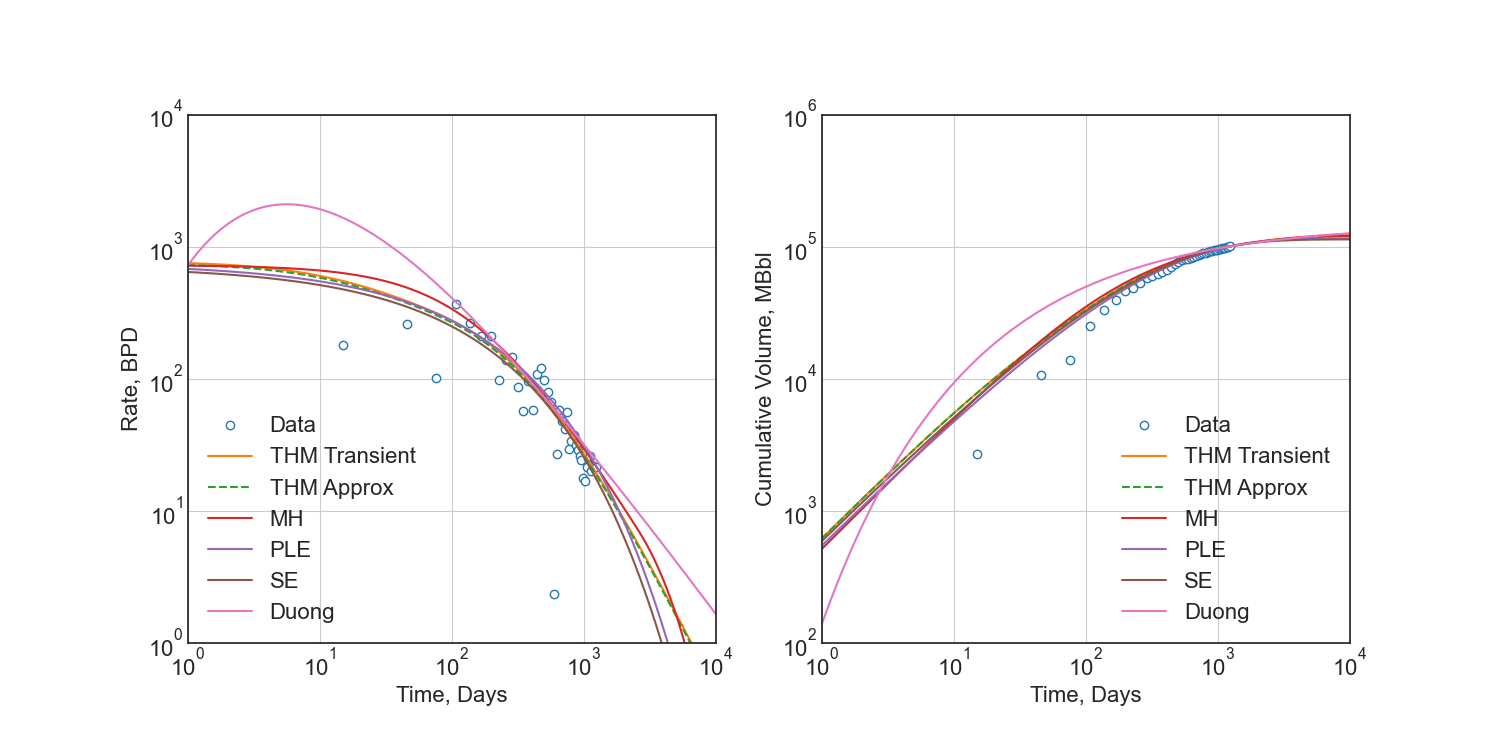
See the API documentation for a complete listing, detailed use examples, and model comparison.
Regression
No methods for regression are included in this library, as the models are simple enough to be implemented in any regression package. I recommend using scipy.optimize.least_squares.
For detailed derivation and argument for regression techniques, please see SPE-201404-MS – Optimization Methods for Time–Rate–Pressure Production Data Analysis using Automatic Outlier Filtering and Bayesian Derivative Calculations. Additionally, you may view my blog post on the topic. The Jupyter Notebook is available here.
The following is an example of how to use the THM model with scipy.optimize.least_squares.
from petbox import dca
import numpy as np
import scipy as sc

from scipy.optimize import least_squares

from typing import NamedTuple
from numpy.typing import NDArray


class Bounds(NamedTuple):
    qi: tuple[float, float]
    Di: tuple[float, float]
    bf: tuple[float, float]
    telf: tuple[float, float]


def load_data() -> tuple[NDArray[np.float64], NDArray[np.float64]]:
    ... # load your data here
    return rate, time


def filter_buildup(rate: NDArray[np.float64], time: NDArray[np.float64]) -> tuple[NDArray[np.float64], NDArray[np.float64]]:
    """Filter out buildup data"""
    idx = np.argmax(rate)
    return rate[idx:], time[idx:]


def jitter_rates(rate: NDArray[np.float64]) -> NDArray[np.float64]:
    """Add small jitter to rates to improve gradient descent"""
    # double-precion has at least 15 digits, so for rates in the 10_000s, this leaves a lot of room
    sd = 1e-6
    return rate * np.random.normal(1.0, sd, rate.shape)


def forecast_thm(params: NDArray[np.float64], time: NDArray[np.float64]) -> NDArray[np.float64]:
    """Forecast rates using the Transient Hyperbolic Model"""
    thm = dca.THM(
        qi=params[0],
        Di=params[1],
        bi=2.0,
        bf=params[2],
        telf=params[3],
        bterm=0.0,
        tterm=0.0
    )
    return thm.rate(time)


def log1sp(x: NDArray[np.float64]) -> NDArray[np.float64]:
    """Add small epsilon to avoid log(0) error"""
    return np.log(x + 1e-6)


def residuals(params: NDArray[np.float64], time: NDArray[np.float64], rate: NDArray[np.float64]) -> NDArray[np.float64]:
    """Residuals for scipy.optimize.least_squares"""
    forecast = forecast_thm(params, time)
    return log1sp(rate) - log1sp(forecast)


rate, time = load_data()
rate, time = filter_buildup(rate, time)  # filter out buildup data
rate = jitter_rates(rate)  # add small jitter to rates to improve gradient descent
bounds = Bounds(  # these ***are not general***, they must be calibrated to your data
    qi=   (10.0,  10000.0),
    Di=   (1e-6,      0.8),
    bf=   ( 0.5,      1.5),
    telf= ( 5.0,     50.0)
)
opt = least_squares(
    fun=lambda params, time, rate: residuals(params, time, rate),  # residuals function
    bounds=list(zip(*bounds)),  # unpack bounds into list of tuples
    x0=[np.mean(p) for p in bounds],  # initial guess, mean works well enough
    args=(time, rate),  # additional arguments to `fun`
    loss='soft_l1',  # robust loss function
    f_scale=.35  # affects outlier senstivity of the regression, larger values are more sensitive
)

# no terminal segment
# bterm = 0.0
# tterm = 0.0

# hyperbolic terminal segment
bterm = 0.3
tterm = 15.0  # years

# exponential terminal segment
# bterm = 0.06  # 6.0% secant effective decline / year
# tterm = 0.0

params = np.r_[np.insert(opt.x, 2, 2.0), bterm, tterm]  # insert bi=2.0 and terminal parameters
print(params)
Which would print something like the following:
[1177.57885, 0.793357559, 2.0, 0.666515071, 7.17744813, 0.3, 15.0]
And passed into the THM constructor as follows:
thm = dca.THM.from_params(params)Development
petbox-dca is maintained by David S. Fulford (@dsfulf). Please post an issue or pull request in this repo for any problems or suggestions!
1 maintainer

Metadata
1 maintainer
Release files for petbox-dca 2.3.1
For a detailed explanation of source distributions (sdists) and built distributions (wheels), please see the package formats documentation.
Source distribution (sdist)
| File | Size | Uploaded | |
|---|---|---|---|
| petbox_dca-2.3.1.tar.gz | 87.8 kB | Details |
Built distribution (wheel)
| File | Interpreter | ABI | Platform | Reset |
|---|---|---|---|---|
| petbox_dca-2.3.1-py3-none-any.whl | Python 3 | none | any | Details |
Total release size: 157.6 kB
Release files / petbox_dca-2.3.1.tar.gz
| Download URL | petbox_dca-2.3.1.tar.gz |
|---|---|
| Size | 87.8 kB |
| Tags | Source |
|
SHA-256 checksum How to use checksums |
e7a6ae1bad2af59df2bf68660025255c54516f0f0c686fdd58ee2de7ee295364
|
|
BLAKE2b-256 checksum How to use checksums |
4a3946aebfc2c4765f22055812adcfb7871a6a806189f8ff830d1b3e9f2791f2
|
| Upload date | |
|
Uploaded using Trusted Publishing? What is trusted publishing? |
No |
| Uploaded via |
twine/6.1.0 CPython/3.10.13
|
Release files / petbox_dca-2.3.1-py3-none-any.whl
| Download URL | petbox_dca-2.3.1-py3-none-any.whl |
|---|---|
| Size | 69.8 kB |
| Tags | Python 3 |
|
SHA-256 checksum How to use checksums |
dd58f38cca29d4e8e4ce6d43d19fac8476c3ccbb4985aac10c3f0a1d94cba9cd
|
|
BLAKE2b-256 checksum How to use checksums |
80a2fad4f09f1d93ef9b04c99c4fe92fb779536eb119c0528570b1df3543a258
|
| Upload date | |
|
Uploaded using Trusted Publishing? What is trusted publishing? |
No |
| Uploaded via |
twine/6.1.0 CPython/3.10.13
|














