
pganonymize
A commandline tool to anonymize PostgreSQL databases for DSGVO/GDPR purposes.
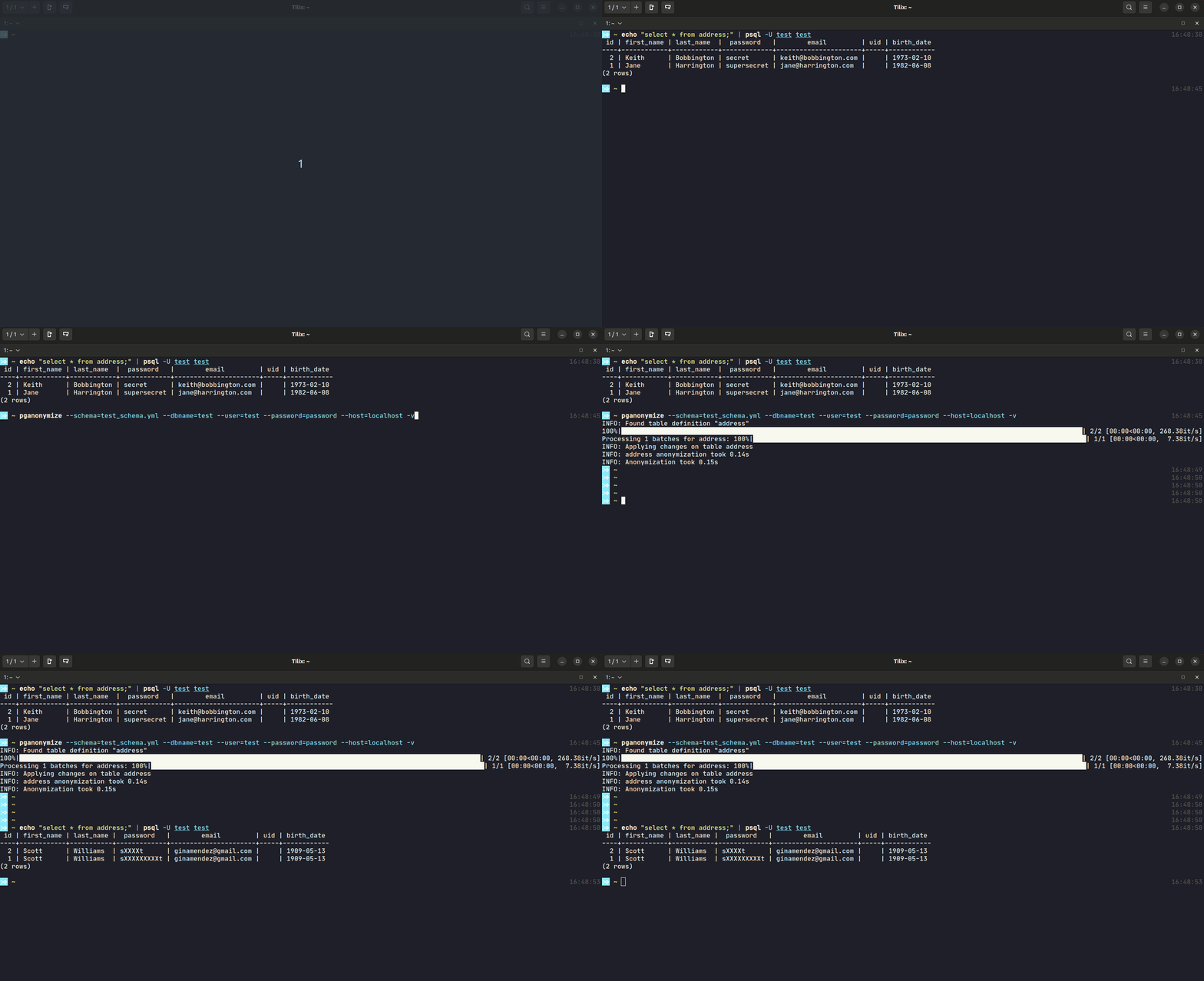
It uses a YAML file to define which tables and fields should be anonymized and provides various methods of anonymization. The tool requires a direct PostgreSQL connection to perform the anonymization.







Features
Intentionally compatible with Python 2.7 (for old, productive platforms)
Anonymize PostgreSQL tables on data level entry with various providers (some examples in the table below)
Exclude data for anonymization depending on regular expressions or SQL WHERE clauses
Truncate entire tables for unwanted data
Field |
Value |
Provider |
Output |
|---|---|---|---|
first_name |
John |
choice |
(Bob|Larry|Lisa) |
title |
Dr. |
clear |
|
street |
Irving St |
faker.street_name |
Miller Station |
password |
dsf82hFxcM |
mask |
XXXXXXXXXX |
credit_card |
1234-567-890 |
partial_mask |
1??????????0 |
md5 |
0cba00ca3da1b283a57287bcceb17e35 |
||
faker.unique.email |
|||
phone_num |
65923473 |
md5 as_number: True |
3948293448 |
ip |
157.50.1.20 |
set |
127.0.0.1 |
uuid_col |
00010203-0405-…… |
uuid4 |
f7c1bd87-4d…. |
Note: faker.unique.[provider] only supported on Python 3.6+ (Faker library min. supported python version)
Note: uuid4 - only for (native uuid4) columns
See the documentation for a more detailed description of the provided anonymization methods.
Installation
The default installation method is to use pip:
$ pip install pganonymizeUsage
usage: pganonymize [-h] [-v] [-l] [--schema SCHEMA] [--dbname DBNAME]
               [--user USER] [--password PASSWORD] [--host HOST]
               [--port PORT] [--dry-run] [--dump-file DUMP_FILE]

Anonymize data of a PostgreSQL database

optional arguments:
-h, --help            show this help message and exit
-v, --verbose         Increase verbosity
-l, --list-providers  Show a list of all available providers
--schema SCHEMA       A YAML schema file that contains the anonymization
                        rules
--dbname DBNAME       Name of the database
--user USER           Name of the database user
--password PASSWORD   Password for the database user
--host HOST           Database hostname
--port PORT           Port of the database
--dry-run             Don't commit changes made on the database
--dump-file DUMP_FILE
                      Create a database dump file with the given name
--dump-options DUMP_OPTIONS
                      Options to pass to the pg_dump command
--init-sql INIT_SQL   SQL to run before starting anonymization
--parallel            Data anonymization is done in parallel
Despite the database connection values, you will have to define a YAML schema file, that includes all anonymization rules for that database. Take a look at the schema documentation or the YAML sample schema.
Example calls:
$ pganonymize --schema=myschema.yml \
    --dbname=test_database \
    --user=username \
    --password=mysecret \
    --host=db.host.example.com \
    -v

$ pganonymize --schema=myschema.yml \
    --dbname=test_database \
    --user=username \
    --password=mysecret \
    --host=db.host.example.com \
    --init-sql "set search_path to non_public_search_path; set work_mem to '1GB';" \
    -v
Database dump
With the --dump-file argument it is possible to create a dump file after anonymizing the database. Please note, that the pg_dump command from the postgresql-client-common library is necessary to create the dump file for the database, e.g. under Linux:
$ sudo apt-get install postgresql-client-commonExample call:
$ pganonymize --schema=myschema.yml \
    --dbname=test_database \
    --user=username \
    --password=mysecret \
    --host=db.host.example.com \
    --dump-file=/tmp/dump.gz \
    -v
So that the password for dumping does not have to be entered manually, it can also be entered as an environment var PGPASSWORD:
$ PGPASSWORD=password pganonymize --schema=myschema.yml \
    --dbname=test_database \
    --user=username \
    --password=mysecret \
    --host=db.host.example.com \
    --dump-file=/tmp/dump.gz \
-vDocker
If you want to run the anonymizer within a Docker container you first have to build the image:
$ docker build -t pganonymize .After that you can pass a schema file to the container, using Docker volumes, and call the anonymizer:
$ docker run \
    -v <path to your schema>:/schema.yml \
    -it pganonymize \
    /usr/local/bin/pganonymize \
    --schema=/schema.yml \
    --dbname=<database> \
    --user=<user> \
    --password=<password> \
    --host=<host> \
-v1 maintainer

Metadata
1 maintainer
Release files for pganonymize 0.13.0
For a detailed explanation of source distributions (sdists) and built distributions (wheels), please see the package formats documentation.
Source distribution (sdist)
| File | Size | Uploaded | Provenance | |
|---|---|---|---|---|
| pganonymize-0.13.0.tar.gz | 24.8 kB | With provenance | Details |
Built distribution (wheel)
| File | Interpreter | ABI | Platform | Reset |
|---|---|---|---|---|
| pganonymize-0.13.0-py2.py3-none-any.whl | Python 2, Python 3 | none | any | Details |
Total release size: 41.0 kB
Release files / pganonymize-0.13.0.tar.gz
| Download URL | pganonymize-0.13.0.tar.gz |
|---|---|
| Size | 24.8 kB |
| Tags | Source |
|
SHA-256 checksum How to use checksums |
9dc1d7b6fca93de2c3b189198b0344234f0c0ee1385ec7bd48e97d4ef05af5cf
|
|
BLAKE2b-256 checksum How to use checksums |
047b3f72694cf96462a37bf5682e69fb8a9f431f64dbdca21c6eb293e4bb540b
|
| Upload date | |
|
Uploaded using Trusted Publishing? What is trusted publishing? |
Yes |
| Uploaded via |
twine/7.0.0 CPython/3.13.14
|
Provenance
Provenance describes where a file came from. On PyPI, provenance is shared via attestations, which provide a verifiable record of the build or publishing details. View details, limitations and caveats.


PyPI Publish Attestation
PyPI verified that this artifact, at this checksum, originated from the publisher listed below.
Signed by GitHub Actions, verified by PyPI on Aug 6, 2026.
Transparency logRelease files / pganonymize-0.13.0-py2.py3-none-any.whl
| Download URL | pganonymize-0.13.0-py2.py3-none-any.whl |
|---|---|
| Size | 16.1 kB |
| Tags | Python 2 Python 3 |
|
SHA-256 checksum How to use checksums |
0f81d2ad4cc18bd5cccfaed327716071ccaa34a6319bb62c5bc3144f14df00b8
|
|
BLAKE2b-256 checksum How to use checksums |
a228bcad30cd42e74c6c9b8b96ac8f40a4a860564077adf14e8704a2fe848a99
|
| Upload date | |
|
Uploaded using Trusted Publishing? What is trusted publishing? |
Yes |
| Uploaded via |
twine/7.0.0 CPython/3.13.14
|
Provenance
Provenance describes where a file came from. On PyPI, provenance is shared via attestations, which provide a verifiable record of the build or publishing details. View details, limitations and caveats.
PyPI Publish Attestation
PyPI verified that this artifact, at this checksum, originated from the publisher listed below.
Signed by GitHub Actions, verified by PyPI on Aug 6, 2026.
Transparency logSecurity for pganonymize 0.13.0
Provenance
Provenance describes where a file came from. On PyPI, provenance is shared via attestations, which provide a verifiable record of the build or publishing details. View details, limitations and caveats.
Full provenance
All 2 files in this release have been uploaded with provenance metadata.
Attestation for pganonymize-0.13.0.tar.gz
PyPI Publish Attestation
PyPI verified that this artifact, at this checksum, originated from the publisher listed below.
Signed by GitHub Actions, verified by PyPI on Aug 6, 2026.
Transparency logA note on package security
PyPI is a repository for distributing packages, not a service for auditing them. While third-party security researchers and our staff do their best to detect and remove malicious packages, PyPI cannot guarantee the quality, security or suitability of any given package.
To learn more about protecting yourself from malicious actors, visit our package security documentation.














