
pgsrip
Convert image-based Blu-ray subtitles (PGS) in .mkv, .mks, and .sup files to text .srt files, with OCR.





Why pgsrip
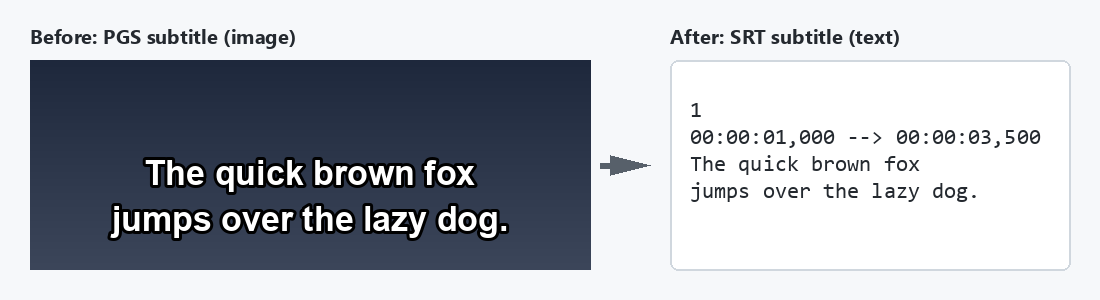
Blu-ray subtitles use the PGS format. A PGS subtitle is an image, not text. Many players, TVs, and subtitle editors cannot show or edit these images.
pgsrip reads the text in the images with tesseract OCR. When
tesseract is not installed, it uses RapidOCR (pgsrip[rapidocr]). Then it writes a .srt file next to your
video. It downloads the language data that it needs automatically.
Quick start
-
Install MKVToolNix and tesseract.
-
Install pgsrip:
uv tool install "pgsrip[rapidocr]"
-
Rip the subtitles of a video:
$ pgsrip mymedia.mkv
3 PGS subtitles collected from 1 file
Ripping subtitles  [####################################]  100%  mymedia.mkv [5:de]
3 PGS subtitles ripped from 1 file
To try pgsrip without installing it, use uvx --from "pgsrip[rapidocr]" pgsrip mymedia.mkv.
Installation
Install pgsrip
Use one of these commands:
| Command | When to use it |
|---|---|
uv tool install "pgsrip[rapidocr]" |
Recommended. uv also installs Python if necessary. |
pipx install "pgsrip[rapidocr]" |
You already use pipx. |
pip install "pgsrip[rapidocr]" |
You want to use pgsrip as a Python library. Python 3.11 or later. |
[rapidocr] also installs the RapidOCR engine. Without it, pgsrip uses only tesseract.
Remove [rapidocr] on a platform where ONNX Runtime has no wheel, for example Alpine Linux (musl) or an old
Linux with glibc before 2.28. On these platforms, the install with [rapidocr] fails.
To upgrade, use uv tool upgrade pgsrip or pipx upgrade pgsrip.
Install MKVToolNix and tesseract
pgsrip needs 2 programs: MKVToolNix and tesseract. uv, pipx, and pip do not install them.
Tesseract is optional when you installed pgsrip with [rapidocr]. Without tesseract, pgsrip uses RapidOCR for
all languages.
Ubuntu, Debian, and WSL
sudo apt-get install mkvtoolnix tesseract-ocr
The PPA below gives the latest tesseract 5. It is optional.
sudo add-apt-repository ppa:alex-p/tesseract-ocr5
sudo apt update
sudo apt-get install tesseract-ocr
Windows (with Chocolatey)
choco install mkvtoolnix tesseract-ocr
macOS (with Homebrew)
brew install mkvtoolnix tesseract
To make sure that all programs are installed, run pgsrip doctor.
Language data
You do not need to install it. pgsrip downloads the language data at the first rip. See Language data.
Docker
The Docker image contains pgsrip, MKVToolNix, tesseract, and all
languages. It also contains the RapidOCR PP-OCRv6 small model in /usr/src/rapidocr. You do not need to install
anything else:
docker run -it --rm -v /medias:/medias -u $(id -u):$(id -g) ratoaq2/pgsrip -l en /medias
To build the image from the source code:
git clone https://github.com/ratoaq2/pgsrip.git
cd pgsrip
docker build . -t pgsrip
Usage
Rip a .mkv, .mks, or .sup file:
pgsrip mymedia.mkv
pgsrip mymedia.mks
pgsrip mymedia.en.sup
Rip all the files in a directory, only in English and Brazilian Portuguese:
$ pgsrip -l en -l pt-BR ~/medias/
11 PGS subtitles collected from 9 files / 2 files filtered out
Ripping subtitles  [####################################]  100%  ~/medias/mymedia.mkv [4:en]
11 PGS subtitles ripped from 9 files
Rip only the forced subtitles:
pgsrip --with forced mymedia.mkv
When pgsrip does not rip a file, it tells you why:
$ pgsrip -l fr ~/medias/
~/medias/mymedia.mkv ignored: mkvmerge not found. Install MKVToolNix: https://mkvtoolnix.download/downloads.html
0 PGS subtitle collected from 0 file / 1 path ignored
pgsrip does not rip a subtitle again when its subtitle files exist. Use -f to rip it again. When a
file of one --format is missing, pgsrip writes only that file.
Main options
| Option | What it does |
|---|---|
-l, --language |
Rip only this language, for example en or pt-BR. You can use it more than one time. |
-f, --force |
Rip again and replace the subtitle files that exist. |
--format |
Output format. srt is the default and the only format. You can use it more than one time. |
--with FLAG |
Rip only the tracks with this flag, for example forced or sdh. |
--without FLAG |
Do not rip the tracks with this flag, for example commentary. |
--all |
Rip all the selected tracks. Do not remove duplicates. |
--one-per-language |
Rip only one track for each language. |
-a, --age |
Rip only the videos that are newer than this age, for example 12h or 1w2d. |
-A, --output-age |
With -f, do not replace a subtitle file that is newer than this age, for example 12h or 1w2d. |
-e, --encoding |
Write the subtitle files with this encoding. |
-w, --workers |
Number of OCR jobs that run at the same time, for example tesseract processes. The default is the number of CPUs, at most 4. --tesseract-workers overrides it for tesseract. |
--no-tesseract-download |
Do not download language data. Use only the installed languages. |
--engine NAME |
OCR engine: auto (default: tesseract, else RapidOCR), tesseract, rapidocr, openai (a vision model), or an engine of a plug-in. Use it more than one time for a chain. |
--log-file FILE |
Write a debug log to this file. |
Run pgsrip --help for all options. docs/usage.md gives more details.
Configuration file
A configuration file can contain the options of pgsrip rip. The keys are the option names, with _ in
place of -. For --with, --without, --all, and --format, use with_flags, without_flags,
all_tracks, and formats.
A section groups the options with the same prefix. For example, threshold in the tesseract section is
--tesseract-threshold.
language:
  - en
  - pt-BR
workers: 4
without_flags:
  - commentary
engine:
  - tesseract
tesseract:
  workers: 2
  threshold: 90
  repository: fast
  dir: /data/tessdata
  download: false
cleanit:
  tag:
    - no-sdh
pgsrip reads the configuration files in this order. A later file overrides an earlier file.
config.json,config.yml, orconfig.yamlin the pgsrip user configuration directory:- Linux:
~/.config/pgsrip/(or$XDG_CONFIG_HOME/pgsrip/) - macOS:
~/Library/Application Support/pgsrip/ - Windows:
%LOCALAPPDATA%\pgsrip\pgsrip\
- Linux:
pgsrip.json,pgsrip.yml, orpgsrip.yamlin the current directory.- Each file that you give with
--config, in the order of the command line.
An option on the command line overrides the configuration files. An unknown key is an error.
pgsrip doctor reads the same files. It uses only the OCR engine and post-processor sections, for example
tesseract and cleanit.
For the cleanit options (--cleanit-config, -t/--tag), see Post-processors.
Output file names
pgsrip writes the .srt file next to the video. The name contains the language and the flags of the track:
movie.en.srt              a plain English track
movie.en.sdh.srt          a hearing-impaired English track
movie.pt-BR.forced.srt    a forced Brazilian Portuguese track
For the rules, see File names.
Python API
from babelfish import Language
from pgsrip import Options, pending, prepare, rip, scan

options = Options(languages=frozenset({Language('eng')}), force=True)
subtitles = [
    subtitle
    for media in scan('/subtitle/path/mymedia.mkv', options).media
    for subtitle in pending(media.subtitles(options), options)
]
prepare(subtitles, options, reporter=print)
for subtitle in subtitles:
    rip(subtitle, options)
prepare gets the OCR engines ready for the languages of the subtitles. Call it before rip: without it,
RapidOCR does not read a track.
The OCR engines are an option too, in chain order. The default is auto (pgsrip.engines.auto): tesseract,
else RapidOCR, for each language. This example uses tesseract only:
from pgsrip.engines.tesseract import TesseractEngine

options = Options(engines=[TesseractEngine(workers=2, threshold=90)])
FAQ
What is PGS?
PGS (Presentation Graphic Stream) is the subtitle format of Blu-ray discs. Each subtitle is an image. A .sup
file contains only a PGS subtitle. A .mkv or .mks file can contain PGS subtitle tracks.
The text in the .srt file has errors. What can I do?
Make sure that the language of the track is correct. The default language data
(tessdata_best) gives the best quality. If the errors
continue, report a bug with a scrubbed sample.
Does pgsrip support DVD subtitles (VobSub, .sub/.idx)?
No. pgsrip supports only PGS subtitles.
Where does pgsrip store the language data? In a user cache directory. See Where pgsrip stores the data.
Report a bug
- Run
pgsrip doctorand copy the output. - Run
pgsrip scrub mymedia.mkv. It writes a copy of the subtitle without the images, so you do not share the content of your media. - Run
pgsrip --log-file pgsrip.log mymedia.mkv. - Fill in the bug report form and attach the files.
For more information, see docs/bug-reports.md.
Contributing
See CONTRIBUTING.md.
License
1 maintainer

Metadata
1 maintainer
Release files for pgsrip 0.3.0
For a detailed explanation of source distributions (sdists) and built distributions (wheels), please see the package formats documentation.
Source distribution (sdist)
| File | Size | Uploaded | Provenance | Actions |
|---|---|---|---|---|
| pgsrip-0.3.0.tar.gz | 295.3 kB | Without provenance | Details for pgsrip-0.3.0.tar.gz |
Built distribution (wheel)
| File | Interpreter | ABI | Platform | Actions Reset |
|---|---|---|---|---|
| pgsrip-0.3.0-py3-none-any.whl | Python 3 | none | any | Details for pgsrip-0.3.0-py3-none-any.whl |
Total release size: 368.3 kB
Release files / pgsrip-0.3.0.tar.gz
| Download URL | pgsrip-0.3.0.tar.gz |
|---|---|
| Size | 295.3 kB |
| Tags | Source |
|
SHA-256 checksum How to use checksums |
78181de4feb7843c7e98d47fd1cd7e9a2bdcbfd53ba3f6302f19089a6ec208c7
|
|
BLAKE2b-256 checksum How to use checksums |
59de0f21f3f85f787a718ae5a60b74edc7ed6a56a659797c218999710bd9d0ef
|
| Upload date | |
|
Uploaded using Trusted Publishing? What is trusted publishing? |
Yes |
| Uploaded via |
uv/0.12.20 {"installer":{"name":"uv","version":"0.12.20","subcommand":["publish"]},"python":null,"implementation":{"name":null,"version":null},"distro":{"name":"Ubuntu","version":"24.04","id":"noble","libc":null},"system":{"name":null,"release":null},"cpu":null,"openssl_version":null,"setuptools_version":null,"rustc_version":null,"ci":true}
|
Release files / pgsrip-0.3.0-py3-none-any.whl
| Download URL | pgsrip-0.3.0-py3-none-any.whl |
|---|---|
| Size | 73.0 kB |
| Tags | Python 3 |
|
SHA-256 checksum How to use checksums |
1e6aa8411fce36dc695521f969d1d01ba9682474eddb2a007a3888a6b1492d28
|
|
BLAKE2b-256 checksum How to use checksums |
df8968ab90384e054325b213963829742037996896d1f2576cd38b98c672ee33
|
| Upload date | |
|
Uploaded using Trusted Publishing? What is trusted publishing? |
Yes |
| Uploaded via |
uv/0.12.20 {"installer":{"name":"uv","version":"0.12.20","subcommand":["publish"]},"python":null,"implementation":{"name":null,"version":null},"distro":{"name":"Ubuntu","version":"24.04","id":"noble","libc":null},"system":{"name":null,"release":null},"cpu":null,"openssl_version":null,"setuptools_version":null,"rustc_version":null,"ci":true}
|
Security for pgsrip 0.3.0
Provenance
Provenance describes where a file came from. On PyPI, provenance is shared via attestations, which provide a verifiable record of the build or publishing details. View details, limitations and caveats.
No provenance found
None of the files in this release were uploaded with provenance metadata.
A note on package security
PyPI is a repository for distributing packages, not a service for auditing them. While third-party security researchers and our staff do their best to detect and remove malicious packages, PyPI cannot guarantee the quality, security or suitability of any given package.
To learn more about protecting yourself from malicious actors, visit our package security documentation.














