



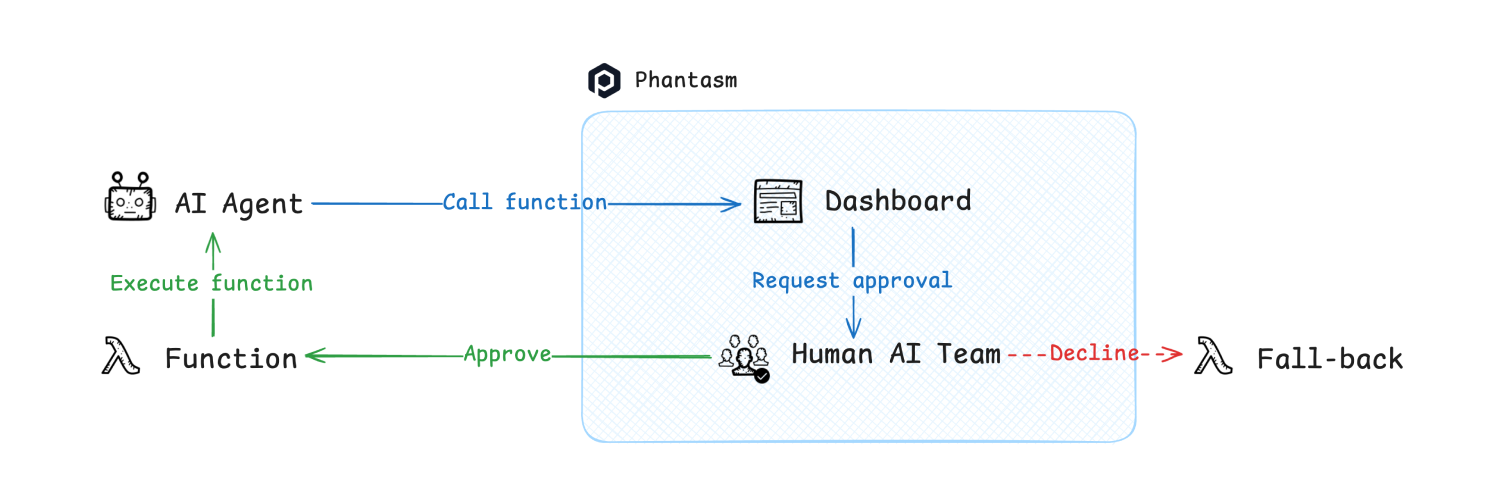
This client library allows you to interact with Phantasm's receiver server from your Python codebase. It provides a simple and easy-to-use interface complete with type hints and documentation. Here's a quick example to get you started adding an approval workflow to your function:
from phantasmpy import Phantasm
phantasm = Phantasm()

# Replace with your own function.
@phantasm.require_approval()
def schedule_meeting(...):
    pass

schedule_meeting(...)
Advanced Usage With LangChain
In real-world applications, you may want to use Phantasm with LangChain to utilize the full power of LangChain's features. For the sake of simplicity, we will be using OpenAI's GPT model as our language model. Here's how you can build a tool-powered AI agent with human-in-the-loop capabilities:
Requirements:
pip install langchain langchain-openai phantasmpy
import os
from langchain_core.tools import tool
from langchain_core.messages import AIMessage
from langchain_openai import ChatOpenAI
from phantasmpy import Phantasm

os.environ["OPENAI_API_KEY"] = "xxx"
llm = ChatOpenAI(model="gpt-4o-mini")

@tool
def publish_blog(topic: str):
    # Add code to draft and publish the blog post.
    print(f"A blog post ({topic}) is published.")

@tool
def send_email(to: str, subject: str, body: str):
    # Add code to send an email using an email API.
    print(f"An email is sent to {to}.")

tools = [publish_blog, send_email]
llm_with_tools = llm.bind_tools(tools)
phantasm = Phantasm()

def call_tools(message: AIMessage):
    tool_map = {tool.name: tool for tool in tools}
    for tool_call in message.tool_calls:
        name, args = tool_call["name"], tool_call["args"]
        response = phantasm.get_approval(name=name, parameters=args)

        if response.approved:
            tool_map[name].invoke(response.parameters)
        else:
            print(f"Tool call {name} is rejected.")

chain = llm_with_tools | call_tools
chain.invoke("Remind elon@x.com about the Monday meeting at 9AM")
1 maintainer

Metadata
1 maintainer
Release files for phantasmpy 0.1.3
For a detailed explanation of source distributions (sdists) and built distributions (wheels), please see the package formats documentation.
Source distribution (sdist)
| File | Size | Uploaded | |
|---|---|---|---|
| phantasmpy-0.1.3.tar.gz | 5.8 kB | Details |
Built distribution (wheel)
| File | Interpreter | ABI | Platform | Reset |
|---|---|---|---|---|
| phantasmpy-0.1.3-py3-none-any.whl | Python 3 | none | any | Details |
Total release size: 13.4 kB
Release files / phantasmpy-0.1.3.tar.gz
| Download URL | phantasmpy-0.1.3.tar.gz |
|---|---|
| Size | 5.8 kB |
| Tags | Source |
|
SHA-256 checksum How to use checksums |
0d7c0fde0270931fba482e416c8fe9244276c0b2e49a17bc7cc9b6cc116515cd
|
|
BLAKE2b-256 checksum How to use checksums |
f2de9c85fd75c9fbdcb2275c3a7a9440688c589cba083f8ed20514e0c0980dda
|
| Upload date | |
|
Uploaded using Trusted Publishing? What is trusted publishing? |
No |
| Uploaded via |
poetry/1.8.4 CPython/3.12.7 Linux/6.5.0-1025-azure
|
Release files / phantasmpy-0.1.3-py3-none-any.whl
| Download URL | phantasmpy-0.1.3-py3-none-any.whl |
|---|---|
| Size | 7.6 kB |
| Tags | Python 3 |
|
SHA-256 checksum How to use checksums |
571403d8f5cf366ad408a45fd63acfaa7896864352ec09fdf163b20adf45c923
|
|
BLAKE2b-256 checksum How to use checksums |
e755de0890668d07a4ac86d1806f63af65dcbfadd3387fe3fbb0e28112586975
|
| Upload date | |
|
Uploaded using Trusted Publishing? What is trusted publishing? |
No |
| Uploaded via |
poetry/1.8.4 CPython/3.12.7 Linux/6.5.0-1025-azure
|














