
PhenoBench Development Kit
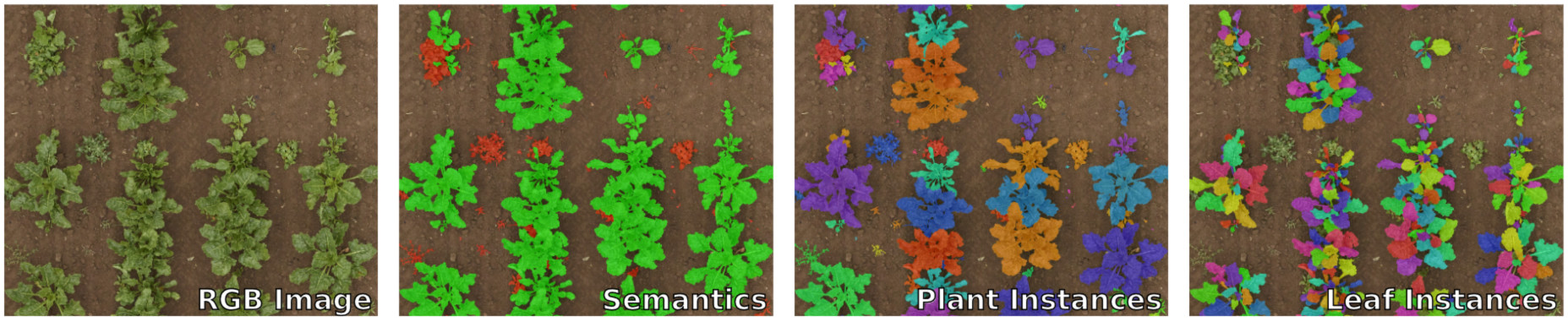
PhenoBench is a large dataset and benchmarks for the semantic interpretation of images of real agricultural fields. Together with the dataset, we provide a development kit that provides:
- a framework-agnostic data loader.
- visualization functions for drawing our data format.
- evaluation scripts,
phenobench-eval, for all tasks (also used on the CodaLab servers). - validator, called
phenobench-validator, checking CodaLab submission files for consistency
For more information on the dataset, please visit www.phenobench.org.
Getting started
- Download the dataset.
- Install the development kit:
pip install phenobench. - Explore the data with the tutorial notebook.
- See the code of our baselines as a starting point or train your own models.
- See the FAQ for common questions and troubleshooting.
If you discover a problem or have general questions regarding the dataset, don't hesitate to open an issues. We will try to resolve your issue as quickly as possible.
Evaluation scripts (phenobench-eval)
Important: Install all dependencies with pip install "phenobench[eval]".
For evaluating and computing the metrics for a specific task, you can run the phenobench-eval tool as follows:
$ phenobench-eval --task <task> --phenobench_dir <dir> --prediction_dir <dir> --split <split>
taskis one of the following options:semantics,panoptic,leaf_instances,plant_detection,leaf_detection, orhierarchical.phenobench_diris the root directory of the PhenoBench dataset, wheretrain,valdirectories are located.prediction_diris the directory containing the predictions as sub-folders, which depend on the specific tasks.splitis eithertrainorval.
Note that all ablation studies of your approach should run on the validation set. Thus, we also provide a comparably large validation set to enable a solid comparison of different settings of your approach.
CodaLab Submission Validator (phenobench-validator)
Before you submit a zip file to our CodaLab competitions, see also our available benchmarks, you can use the phenobench-validator to check your submission for consistency. The tool is also part of the pip package, therefore after installing the package via pip, you can call the phenobench-validator as follows:
$ phenobench-validator --task <task> --phenobench_dir <dir> --zipfile <zipfile>
taskis one of the following options:semantics,panoptic,leaf_instances,plant_detection,leaf_detection, orhierarchical.phenobench_diris the root directory of the PhenoBench dataset, wheretrain,valdirectories are located.zipfileis the zip file that you want to submit to the corresponding benchmark on CodaLab.
Frequently Asked Questions
Question: What are the usage restrictions of the PhenoBench dataset?
Answer: We distribute the dataset using the CC-BY-SA International 4.0 license, which allows research but also commercial usage as long as the dataset is properly attributed (via a citation of the corresponding paper) and distributed with the same license if altered or modified. See also our dataset overview page for the full license text, etc.
1 maintainer

Release files for phenobench 0.1.0
For a detailed explanation of source distributions (sdists) and built distributions (wheels), please see the package formats documentation.
Source distribution (sdist)
| File | Size | Uploaded | |
|---|---|---|---|
| phenobench-0.1.0.tar.gz | 20.9 kB | Details |
Built distribution (wheel)
| File | Interpreter | ABI | Platform | Reset |
|---|---|---|---|---|
| phenobench-0.1.0-py3-none-any.whl | Python 3 | none | any | Details |
Total release size: 48.5 kB
Release files / phenobench-0.1.0.tar.gz
| Download URL | phenobench-0.1.0.tar.gz |
|---|---|
| Size | 20.9 kB |
| Tags | Source |
|
SHA-256 checksum How to use checksums |
78a6800a0bcfc4ba221d9daebfe3789e5d00adcdc82747d2a60468375a70b1a7
|
|
BLAKE2b-256 checksum How to use checksums |
aa70541a9c381224a94e9758193e474a7b8b85c9f0002f1d2883d9d985158b6a
|
| Upload date | |
|
Uploaded using Trusted Publishing? What is trusted publishing? |
No |
| Uploaded via |
twine/4.0.2 CPython/3.10.6
|
Release files / phenobench-0.1.0-py3-none-any.whl
| Download URL | phenobench-0.1.0-py3-none-any.whl |
|---|---|
| Size | 27.6 kB |
| Tags | Python 3 |
|
SHA-256 checksum How to use checksums |
22c0e4af80985540ddfc7ae621837def6a0bcd321a7f598b848ce764b61fc14a
|
|
BLAKE2b-256 checksum How to use checksums |
afff527ef5515b0773e0e127a360e8bbbb743fd7bf6bcbdd4e9c391ee537c941
|
| Upload date | |
|
Uploaded using Trusted Publishing? What is trusted publishing? |
No |
| Uploaded via |
twine/4.0.2 CPython/3.10.6
|













