
Pianoputer
This library lets you to play your computer keyboard like a piano. Here is a video of it in action on a French azerty keyboard.
Play!
Pianoputer only works in python3 so make sure you are using python3
pip install pianoputer
pianoputer
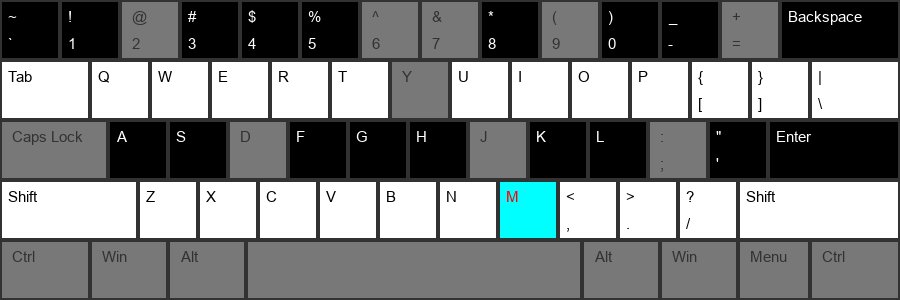
After a few seconds, the below image will appear in a window, indicating that the program is ready. The cyan key is the key that the sample wav file is assigned to. By default this is c4, the piano middle C at 261.6 hz All white and black keys are transposed up and down from the anchor cyan key.
Changing the sound file
You can provide your own sound file with
pianoputer --wav my_sound_file.wav
For example:
pianoputer -w audio_files/bowl_c6.wav
All white and black keys are transposed up and down from the anchor cyan key.
Changing the keyboard layout
Note that the default keyboard configuration (stored in file keyboards/qwerty_piano.txt) is for the most commonly used QWERTY keyboards. You can change the configuration so that it matches your keyboard, for instance using the alternative keyboards/azerty_typewriter.txt:
pianoputer -k keyboards/azerty_typewriter.txt
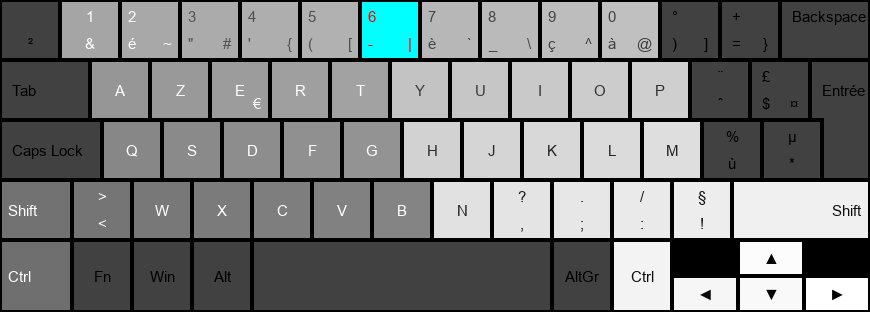
.txt files simply contain a sequence of key names and are easy to edit. For convenience this repository also provides a make_kb_file.py program:
python make_kb_file.py
This will let you press the keys in the order that you want, and create a new keyboard configuration file, by default my_keyboard.kb (just follow the instructions). You can then use the custom keyboard file with the --keyboard argument
Local Installation
python3 -m venv venv
source venv/bin/activate
# if you want to edit the program and have pianoputer use your edits
pip install -e .
# to install pianoputer separately in your virtual environment
pip install .
pianoputer
Attributions
- c4 piano sample from https://en.wikipedia.org/wiki/File:Middle_C.mid
Changelog
https://github.com/Zulko/pianoputer/tree/master/CHANGELOG.md


Release files for pianoputer 2.0.2
For a detailed explanation of source distributions (sdists) and built distributions (wheels), please see the package formats documentation.
Source distribution (sdist)
| File | Size | Uploaded | |
|---|---|---|---|
| pianoputer-2.0.2.tar.gz | 856.3 kB | Details |
Built distribution (wheel)
| File | Interpreter | ABI | Platform | Reset |
|---|---|---|---|---|
| pianoputer-2.0.2-py3-none-any.whl | Python 3 | none | any | Details |
Total release size: 1.7 MB
Release files / pianoputer-2.0.2.tar.gz
| Download URL | pianoputer-2.0.2.tar.gz |
|---|---|
| Size | 856.3 kB |
| Tags | Source |
|
SHA-256 checksum How to use checksums |
06d942afb24823de8607ea09f566976f8ea149edcf7ea4c266509631280423ef
|
|
BLAKE2b-256 checksum How to use checksums |
5d69e4bfb07cd726132e705e9cb2efeec6d72c002c3b3d6f7c26be1a876e73d6
|
| Upload date | |
|
Uploaded using Trusted Publishing? What is trusted publishing? |
No |
| Uploaded via |
twine/3.3.0 pkginfo/1.6.1 requests/2.25.1 setuptools/49.2.1 requests-toolbelt/0.9.1 tqdm/4.54.1 CPython/3.8.6
|
Release files / pianoputer-2.0.2-py3-none-any.whl
| Download URL | pianoputer-2.0.2-py3-none-any.whl |
|---|---|
| Size | 860.4 kB |
| Tags | Python 3 |
|
SHA-256 checksum How to use checksums |
17436000b10f999e03146201ff32b2cff77734b109827435b732f5a0df18dbd4
|
|
BLAKE2b-256 checksum How to use checksums |
29c15b9520b9ab411346437eff01d3e056adc2a4dc768cd47501cb9ca5e970a4
|
| Upload date | |
|
Uploaded using Trusted Publishing? What is trusted publishing? |
No |
| Uploaded via |
twine/3.3.0 pkginfo/1.6.1 requests/2.25.1 setuptools/49.2.1 requests-toolbelt/0.9.1 tqdm/4.54.1 CPython/3.8.6
|













