
2 functions that provide convenient and efficient ways to resize images to a square with custom backgrounds and convert images to the ICO format
pip install pic2square2icon
Tested against Windows 10 / Python 3.10 / Anaconda
The functions resize_with_background and pic2ico can be used by developers or individuals who work with image processing or need to manipulate images for various purposes. Here are some potential use cases for each function:
resize_with_background:
-
Graphic designers who want to resize an image to a specific size (square) while maintaining its aspect ratio and adding a background
-
Web developers who need to generate thumbnail images with a consistent size and background for their websites.
-
Content creators who want to resize and add a background to their images for social media posts (instagram or facebook timeline) or presentations.
pic2ico:
- Software developers who need to convert image files to the ICO (icon) format for use in applications or software interfaces.
- Designers who want to create custom icons from their existing image assets.
- System administrators or IT professionals who need to generate ICO files for use as desktop icons or shortcuts.
from pic2square2icon import resize_with_background, pic2ico
import cv2

test = 1
fg = r"C:\test\fg.png"
bg = r"C:\test\bg.png"
target_size = 512
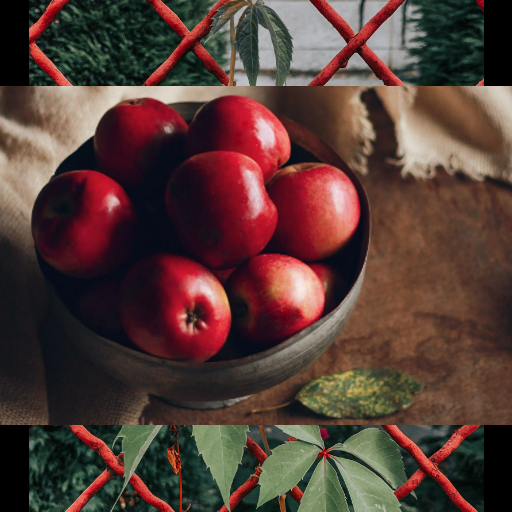
resized_image = resize_with_background(fg, target_size, bg)
pic2ico(src=resized_image, dst=rf"C:\test\{test}.ico")
resized_image.save(rf"C:\test\{test}.png")


test = 2
fg = r"C:\test\fg.png"
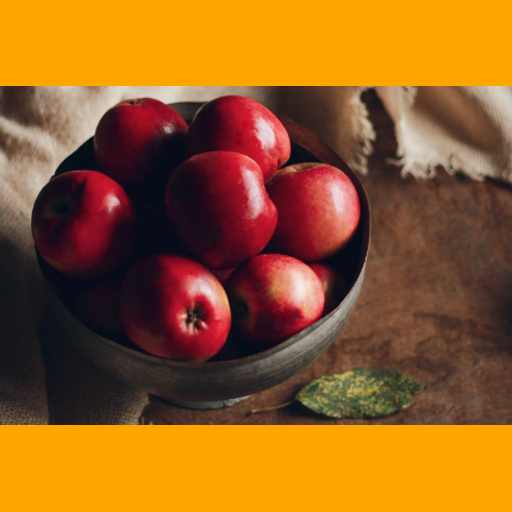
bg = "orange"
target_size = 512
resized_image = resize_with_background(fg, target_size, bg)
pic2ico(src=resized_image, dst=rf"C:\test\{test}.ico")
resized_image.save(rf"C:\test\{test}.png")

test = 3
fg = r"C:\test\fg.png"
bg = (255, 255, 0)
target_size = 512
resized_image = resize_with_background(fg, target_size, bg)
pic2ico(src=resized_image, dst=rf"C:\test\{test}.ico")
resized_image.save(rf"C:\test\{test}.png")

test = 4
fg = r"C:\test\bg.png"
bg = cv2.imread(r"C:\test\fg.png")
target_size = 512
resized_image = resize_with_background(fg, target_size, bg, background_ratio=2)
pic2ico(src=resized_image, dst=rf"C:\test\{test}.ico")
resized_image.save(rf"C:\test\{test}.png")

test = 5
fg = r"C:\test\fg.png"
bg = None
target_size = 512
resized_image = resize_with_background(fg, target_size, bg, background_ratio=2)
resized_image.save(rf"C:\test\{test}.png")
pic2ico(src=resized_image, dst=rf"C:\test\{test}.ico")
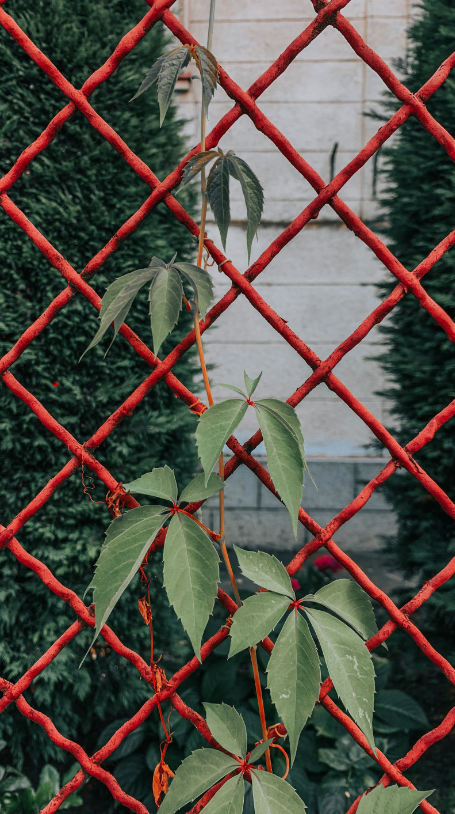
bg.png
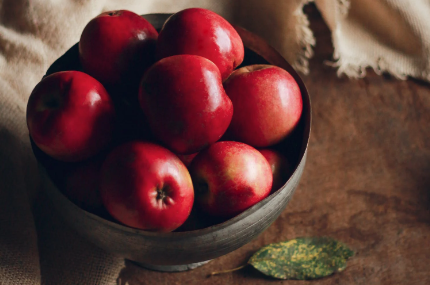
fg.png
1.png
2.png
3.png
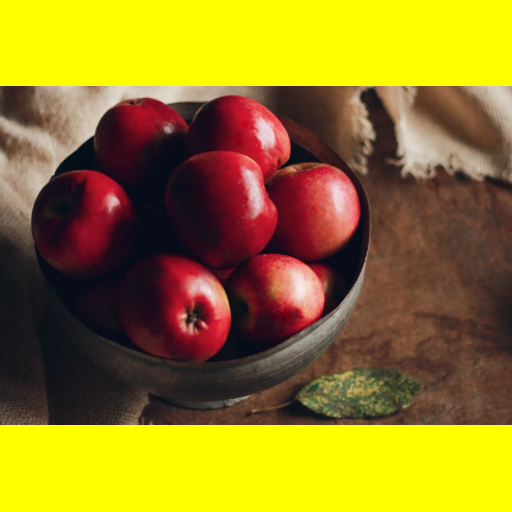
4.png
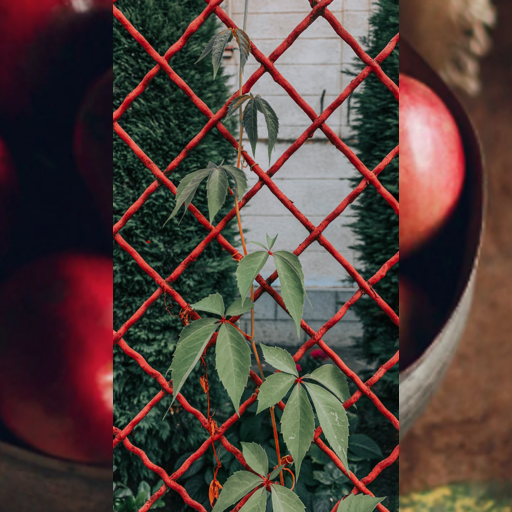
5.png
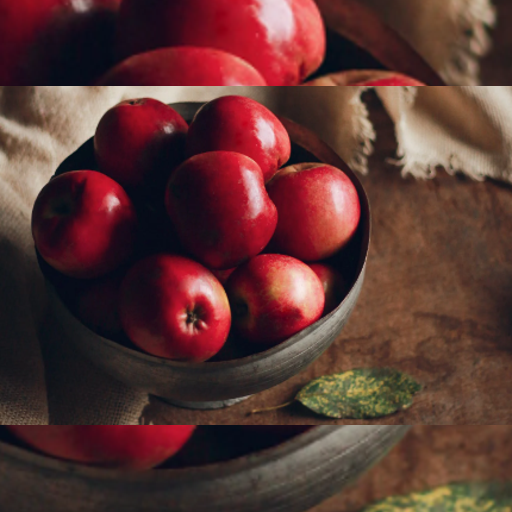
1 maintainer

Metadata
1 maintainer
Release files for pic2square2icon 0.11
For a detailed explanation of source distributions (sdists) and built distributions (wheels), please see the package formats documentation.
Source distribution (sdist)
| File | Size | Uploaded | Provenance | Actions |
|---|---|---|---|---|
| pic2square2icon-0.11.tar.gz | 24.4 kB | Without provenance | Details for pic2square2icon-0.11.tar.gz |
Built distribution (wheel)
| File | Interpreter | ABI | Platform | Actions Reset |
|---|---|---|---|---|
| pic2square2icon-0.11-py3-none-any.whl | Python 3 | none | any | Details for pic2square2icon-0.11-py3-none-any.whl |
Total release size: 49.2 kB
Release files / pic2square2icon-0.11.tar.gz
| Download URL | pic2square2icon-0.11.tar.gz |
|---|---|
| Size | 24.4 kB |
| Tags | Source |
|
SHA-256 checksum How to use checksums |
9fac99f3ff88041b56b6c9dde262d8c9b0d47a9fea9ccb53bd16ac7f0d7dee21
|
|
BLAKE2b-256 checksum How to use checksums |
17e00415f89970c1e12ea96cd3cc6be73cb6b6d8eb78ec1b199cf2369766cbfd
|
| Upload date | |
|
Uploaded using Trusted Publishing? What is trusted publishing? |
No |
| Uploaded via |
twine/4.0.2 CPython/3.10.10
|
Release files / pic2square2icon-0.11-py3-none-any.whl
| Download URL | pic2square2icon-0.11-py3-none-any.whl |
|---|---|
| Size | 24.8 kB |
| Tags | Python 3 |
|
SHA-256 checksum How to use checksums |
226274261bcf39bf9c0b2df7a9ea240930a2ea1a340af03da30883f114996da6
|
|
BLAKE2b-256 checksum How to use checksums |
c66999af96d22c484f21da14e3d0eb0fe5092ae0a8c1644e8897f42a16ce68ed
|
| Upload date | |
|
Uploaded using Trusted Publishing? What is trusted publishing? |
No |
| Uploaded via |
twine/4.0.2 CPython/3.10.10
|
Security for pic2square2icon 0.11
Provenance
Provenance describes where a file came from. On PyPI, provenance is shared via attestations, which provide a verifiable record of the build or publishing details. View details, limitations and caveats.
No provenance found
None of the files in this release were uploaded with provenance metadata.
A note on package security
PyPI is a repository for distributing packages, not a service for auditing them. While third-party security researchers and our staff do their best to detect and remove malicious packages, PyPI cannot guarantee the quality, security or suitability of any given package.
To learn more about protecting yourself from malicious actors, visit our package security documentation.














