


Picosnitch
- 🔔 Receive notifications whenever a new program connects to the network, or when it's modified
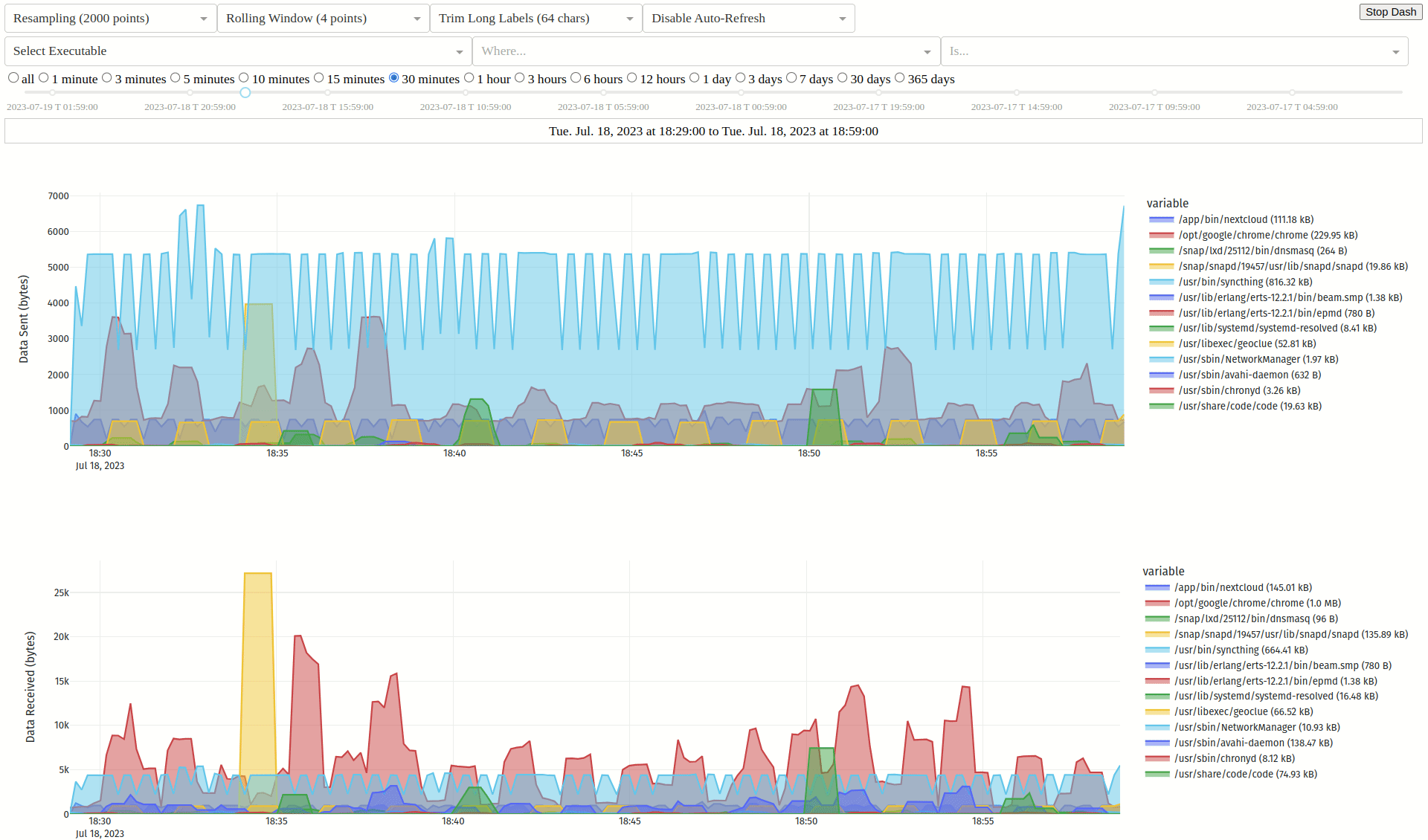
- 📈 Monitors your bandwidth, breaking down traffic by executable, hash, parent, domain, port, or user over time
- 🌍 Web and terminal interfaces with GeoIP lookups for each connection (IP Geolocation by DB-IP)
- 🛡️ Can optionally check hashes or executables using VirusTotal
- 🚀 Executable hashes are cached based on device + inode for improved performance, and works with applications running inside containers
- 🕵️ Uses BPF for accurate, low overhead bandwidth monitoring and fanotify to watch executables for modification
- 👨👦 Since applications can call others to send/receive data for them, the parent executable and hash is also logged for each connection
- 🧰 Pragmatic and minimalist design focussing on accurate detection with clear and reliable error reporting when it isn't possible
Installation
AUR for Arch and derivatives 
Details
- install
picosnitchmanually or using your preferred AUR helper
PPA for Ubuntu and derivatives 
Details
sudo add-apt-repository ppa:elesiuta/picosnitchsudo apt updatesudo apt install picosnitch- optionally install dash with pip or pipx
sudo apt install pipxpipx install dash
- you may require a newer version of BCC (unofficial PPA) since the version in the Ubuntu repos sometimes lags behind its supported kernel
OBS for Debian and derivatives 
Details
- visit the OBS picosnitch page and follow the instructions for your distribution
- optionally install dash with pip or pipx
sudo apt install pipxpipx install dash
- if you're having issues on bullseye, you may need a newer version of BCC
OBS for openSUSE Tumbleweed and derivatives 
Details
sudo zypper addrepo https://download.opensuse.org/repositories/home:elesiuta/openSUSE_Tumbleweed/home:elesiuta.reposudo zypper refreshsudo zypper install picosnitch
Copr for Fedora, Mageia, Mandriva, and derivatives 
Details
Nixpkgs for Nix 
Details
- install and enable using the picosnitch service option
- add
services.picosnitch.enable = true;to your Nix configuration file (typically/etc/nixos/configuration.nix) - run
sudo nixos-rebuild switch
- add
- workaround for "Failed to compile BPF module"
systemctl stop picosnitchsudo picosnitch start-no-daemonthen send SIGINT (ctrl + c)systemctl start picosnitch
PyPI for any Linux distribution with Python >= 3.8 
Details
- install the BPF Compiler Collection python package for your distribution
- it should be called
python-bccorpython-bpfcc
- it should be called
- install picosnitch using pip or pipx
pipx install "picosnitch[full]"
- create a service file for systemd to run picosnitch (recommended)
picosnitch systemd
- optional dependencies (will install from PyPI with
[full]if not already installed)
GitHub for installing from source 
Details
- clone the repo or download
picosnitch.pyandsetup.py - install the BPF Compiler Collection python package for your distribution
- it should be called
python-bccorpython-bpfcc
- it should be called
- install psutil
- install
python-setuptools - install picosnitch with
python setup.py install --user - see other options with
python setup.py [build|install] --help - you can also run the script
picosnitch.pydirectly
Usage
- Running picosnitch
- enable/disable autostart on reboot with
systemctl enable|disable picosnitch - start/stop/restart with
systemctl start|stop|restart picosnitch - or if you don't use systemd
picosnitch start|stop|restart
- enable/disable autostart on reboot with
- Web user interface for browsing past connections
- start with
picosnitch dash - visit http://localhost:5100 (you change this by setting the environment variables
HOSTandPORT)
- start with
- Terminal user interface for browsing past connections
- start with
picosnitch view space/enter: filter on entrybackspace: remove filterh/H: cycle through historyt/T: cycle time rangeu/U: cycle byte unitsr: refresh viewq: quit
- start with
- Show usage with
picosnitch help
Configuration
- Config is stored in
~/.config/picosnitch/config.json- restart picosnitch if it is currently running for any changes to take effect
{
  "DB retention (days)": 30, # How many days to keep connection logs in snitch.db
  "DB sql log": true, # Write connection logs to snitch.db (SQLite)
  "DB sql server": {}, # Write connection logs to a MariaDB, MySQL, or PostgreSQL server
  "DB text log": false, # Write connection logs to conn.log
  "DB write limit (seconds)": 10, # Minimum time between connection log entries
  # increasing it decreases disk writes by grouping traffic into larger time windows
  # reducing time precision, decreasing database size, and increasing hash latency
  "Dash scroll zoom": true, # Enable scroll zooming on plots
  "Dash theme": "", # Select a theme name from https://bootswatch.com/
  # requires installing https://pypi.org/project/dash-bootstrap-components/
  # and https://pypi.org/project/dash-bootstrap-templates/ with pip or pipx
  "Desktop notifications": true, # Try connecting to dbus to show notifications
  "Every exe (not just conns)": false, # Check every running executable with picosnitch
  # these are treated as "connections" with a port of -1
  # this feature is experimental but should work fairly well, errors should be expected as
  # picosnitch is unable to open file descriptors for some extremely short-lived processes
  # if you just want logs (no hashes) to trace process hierarchy, see execsnoop or forkstat
  "GeoIP lookup": true, # GeoIP lookup of IP addresses in user interface (terminal and web)
  "Log addresses": true, # Log remote addresses for each connection
  "Log commands": true, # Log command line args for each executable
  "Log ignore": [], # List of hashes (str), domains (str), IP subnets (str), or ports (int)
  # will omit connections that match any of these from the connection log
  # domains are in reverse domain name notation and will match all subdomains
  # the process name, executable, and hash will still be recorded in record.json
  "Perf ring buffer (pages)": 256, # Power of two number of pages for BPF program
  # only change this if it is giving you errors (e.g. missed events)
  # picosnitch opens a perf buffer for each event type, so this is multiplied by up to 18
  "Set RLIMIT_NOFILE": null, # Set the maximum number of open file descriptors (int)
  # it is used for caching process executables and hashes (typical system default is 1024)
  # this is good enough for most people since caching is based on executable device + inode
  # fanotify is used to detect if a cached executable is modified to trigger a hash update
  "VT API key": "", # API key for VirusTotal, leave blank to disable (str)
  "VT file upload": false, # Upload file if hash not found, only hashes are used by default
  "VT request limit (seconds)": 15 # Number of seconds between requests (free tier quota)
}
Logging
- A log of seen executables is stored in
~/.config/picosnitch/exe.log- this is a history of your notifications
- A record of seen executables is stored in
~/.config/picosnitch/record.json- this is used for determining whether to create a notification
- it contains known process name(s) by executable, executable(s) by process name, and sha256 hash(es) with VirusTotal results by executable
- Enable
DB sql log(default) to write the full connection log to~/.config/picosnitch/snitch.db- this is used for
picosnitch dash,picosnitch view, or something like DB Browser - note, connection times are based on when the group is processed, so they are accurate to within
DB write limit (seconds)at best, and could be delayed if the previous group is slow to hash - notifications are handled by a separate subprocess, so they are not subject to the same delays as the connection log
- this is used for
- Use
DB sql serverto write the full connection log to a MariaDB, MySQL, or PostgreSQL server- this is independent of
DB sql logand is used for providing an off-system copy to prevent tampering (use GRANT to assign privileges and see limitations for other caveats) - to configure, add the key
clienttoDB sql serverwith valuemariadb,psycopg,psycopg2, orpymysql, you can also optionally settable_name - assign remaining connection parameters for mariadb, psycopg, or pymysql to
DB sql serveras key/value pairs
- this is independent of
- Enable
DB text logto write the full connection log to~/.config/picosnitch/conn.log- this may be useful for watching with another program
- it contains the following fields, separated by commas (commas, newlines, and null characters are removed from values)
entry time, sent bytes, received bytes, executable path, process name, cmdline, sha256, parent executable, parent name, parent cmdline, parent sha256, user id, local port, remote port, local address, remote address, domain
- The error log is stored in
~/.config/picosnitch/error.log- errors will also trigger a notification and are usually caused by far too many or extremely short-lived processes/connections, or suspending your system while a new executable is being hashed
- while it is very unlikely for processes/connections to be missed (unless
Every exe (not just conns)is enabled), picosnitch was designed such that it should still detect this and log an error giving you some indication of what happened - for most people in most cases, this should raise suspicion that a program may be misbehaving
- a program should not be able to hide from picosnitch (either by omission or spoofing another program) without picosnitch reporting an error
- see limitations below for other sources of errors
Limitations
- Despite focussing on reliability and notable advantages over existing tools, picosnitch still has some limitations depending on its use case
- When used as a security/auditing tool, a program with the same privileges could modify picosnitch, some mitigations include
- use
DB sql serverto maintain an off-system copy of your logs - cross-checking with a standalone router/firewall to ensure all communication is accounted for
- use sandboxing such as flatpak
- use
- Detecting open sockets, monitoring traffic, and identifying the process is very reliable with BPF; however, the executable name and path may be vague or spoofed if malicious, as a solution, picosnitch hashes the executable as a reliable identifier
- only the process executable itself is hashed, leaving out shared libraries (e.g. LD_PRELOAD rootkits), extensions, or scripts which could become compromised
- some methods of protecting these files include using an immutable OS or tools such as AIDE, fs-verity, IMA/EVM, or debsums (with caveats)
- if a process is very short-lived, picosnitch may not be able to open a file descriptor in time in order to hash it (this is rare)
- the device and inode of the opened file descriptor are checked against what was reported by the BPF program to detect if the executable was replaced; however, BTRFS uses non-unique inodes, negating this protection (a negligible issue mentioned for completeness)
- if the executable fails to hash for any reason, the traffic will still be logged with all available information, and an error notification will be sent
- only the process executable itself is hashed, leaving out shared libraries (e.g. LD_PRELOAD rootkits), extensions, or scripts which could become compromised
- A large influx of new processes or connections may lead to some missed log entries as picosnitch preserves system traffic latency rather than impeding it to catch up with processing event callbacks
- this will be detected, logged as an error, and you will be notified
- you can mitigate this by increasing
Perf ring buffer (pages)
- In addition to bugs, please report any other limitations that may have been missed!
1 maintainer

Metadata
1 maintainer
Release files for picosnitch 0.14.0
For a detailed explanation of source distributions (sdists) and built distributions (wheels), please see the package formats documentation.
Source distribution (sdist)
| File | Size | Uploaded | Provenance | Actions |
|---|---|---|---|---|
| picosnitch-0.14.0.tar.gz | 50.2 kB | Without provenance | Details for picosnitch-0.14.0.tar.gz |
Built distribution (wheel)
| File | Interpreter | ABI | Platform | Actions Reset |
|---|---|---|---|---|
| picosnitch-0.14.0-py3-none-any.whl | Python 3 | none | any | Details for picosnitch-0.14.0-py3-none-any.whl |
Total release size: 100.5 kB
Release files / picosnitch-0.14.0.tar.gz
| Download URL | picosnitch-0.14.0.tar.gz |
|---|---|
| Size | 50.2 kB |
| Tags | Source |
|
SHA-256 checksum How to use checksums |
b58255a78a0bf652224ee22ca83137d75ea77b7eb1ad2d11159b56b6788f6201
|
|
BLAKE2b-256 checksum How to use checksums |
0f2e8a6136f2bc88a02ddb988dea51a6ea8a4d1b636090246e26fa0d46ec1d7c
|
| Upload date | |
|
Uploaded using Trusted Publishing? What is trusted publishing? |
No |
| Uploaded via |
twine/4.0.2 CPython/3.11.4
|
Release files / picosnitch-0.14.0-py3-none-any.whl
| Download URL | picosnitch-0.14.0-py3-none-any.whl |
|---|---|
| Size | 50.3 kB |
| Tags | Python 3 |
|
SHA-256 checksum How to use checksums |
81e0fdc20b18c05fac3ed1572d6240991727b548e123d88f36f3aab80abb6e76
|
|
BLAKE2b-256 checksum How to use checksums |
5fabad6cc7ce13c8fc6156d690db900817e236304075b3b7b4df3be09fe8f985
|
| Upload date | |
|
Uploaded using Trusted Publishing? What is trusted publishing? |
No |
| Uploaded via |
twine/4.0.2 CPython/3.11.4
|
Security for picosnitch 0.14.0
Provenance
Provenance describes where a file came from. On PyPI, provenance is shared via attestations, which provide a verifiable record of the build or publishing details. View details, limitations and caveats.
No provenance found
None of the files in this release were uploaded with provenance metadata.
A note on package security
PyPI is a repository for distributing packages, not a service for auditing them. While third-party security researchers and our staff do their best to detect and remove malicious packages, PyPI cannot guarantee the quality, security or suitability of any given package.
To learn more about protecting yourself from malicious actors, visit our package security documentation.














