

The pih2o project attempts to provide an automatic plant watering application out-of-the-box in pure Python for Raspberry Pi. The watering is triggered for all plants depending on the number of plants which need water.
Requirements
The requirements listed below are the one used for the development of pih2o, but other configuration may work fine.
The pump can be replaced by an electro valve if the tank water is upper than the plants (watering by gravity). The number of soil moisture sensors can be easily adapted from 1 to 4. The transistor is optional, the sensors can be directly connected to the 5V pin in order to power them continuously (but it accelerate their corrosion).
Hardware
1 Raspberry Pi 2 Model B (or higher)
1 pump and its power supply 12V DC (or electro valve)
1 to 4 soil moisture sensors (Arduino TE215)
1 Analog-to-Digital Converter (ADS1015 or ADS1115 4 Channel I2C)
2 transistors NPN (type BC237B)
1 transistor PNP high power switch (type BDX34)
1 zener diode (type 1N4007)
2 resistors of 1.5k Ohm
1 resistor of 10k Ohm
Software
Python 3.5.3
RPi.GPIO 0.6.3
adafruit-ads1x15 1.0.2
croniter 0.3.23
blinker 1.4
flask 1.0.2
flask-restful 0.3.6
flask-sqlalchemy 2.3.2
Install
A brief description on how to set-up a Raspberry Pi to use this software.
Download latest Raspbian image and set-up an SD-card. You can follow these instructions .
Insert the SD-card into the Raspberry Pi and fire it up. Use the raspi-config tool that is shown automatically on the first boot to configure your system (e.g., expand partition, change hostname, password, enable SSH, configure to boot into GUI, etc.).
Reboot and open a terminal. Install the latest firmware version:
$ sudo rpi-update
Upgrade all installed software:
$ sudo apt-get update
$ sudo apt-get upgrade
Install pih2o from the pypi repository:
$ sudo pip3 install pih2o
Run
Start the automatic plant watering application using the command:
$ pih2o
The application acts as a daemon running on the Raspberry Pi. It can be controlled thanks to an RESTful API.
The pih2o is scheduled to wake up every given interval, power the soil moisture sensors and take humidity measurement (or threshold if no analog input available). Finally the sensors are powered off to extend their lifespan.
Define the record interval
The record interval (i.e. time between each humidity measurement) is defined in the Configuration using the crontab syntax which is summarized here:
                  ┌───────────── minute (0 - 59)
                  │ ┌───────────── hour (0 - 23)
                  │ │ ┌───────────── day of month (1 - 31)
                  │ │ │ ┌───────────── month (1 - 12)
                  │ │ │ │ ┌───────────── day of week (0 - 6) (Sunday to Saturday)
                  │ │ │ │ │
                  │ │ │ │ │
record_interval = * * * * *
Pump triggering strategy
The watering time is defined in the Configuration. The rational to dissociate the pump stop from the humidity level measured is the soil slow absorption and we want to avoid floor flooding.
Three strategies are defined to detect if watering is required by your plants depending on your configuration and the number of sensors connected.
[GENERAL][watering_strategy] = majority means the pump is triggered if half of sensors are triggered.
[GENERAL][watering_strategy] = first means the pump is triggered if at least one sensor is triggered.
[GENERAL][watering_strategy] = last means the pump is triggered if all sensors are triggered.
Install developing version
If you want to use an unofficial version of the pih2o application, you need to work from a clone of this git repository. Replace the step 5. of the Install procedure above by the following actions:
clone from github
$ git clone https://github.com/anxuae/piH2O.git
go in the cloned directory
$ cd pih2o
install pih2o in editable mode
$ sudo pip3 install -e .
start the application exactly in the same way as installed from pypi. All modifications performed in the cloned repository are taken into account when the application starts.
Configuration
At the first run, a configuration file is generated in ~/.config/pih2o/pih2o.cfg which permits to configure the behavior of the application. The configuration can be easily edited using the command:
$ pih2o --config
The default configuration can be restored with the command (strongly recommended when upgrading pih2o):
$ pih2o --reset
See the default configuration file for further details.
Circuit diagram
Soil moisture sensor specification used for this project (the number is up to you but the following diagram is for up to 4 max):
Parameter |
Value |
|---|---|
Input Voltage |
3.3 – 5V |
Output Voltage |
0 – 4.2V |
Input Current |
35mA |
Output Signal |
Both Analog (A0) and Digital (D0) |
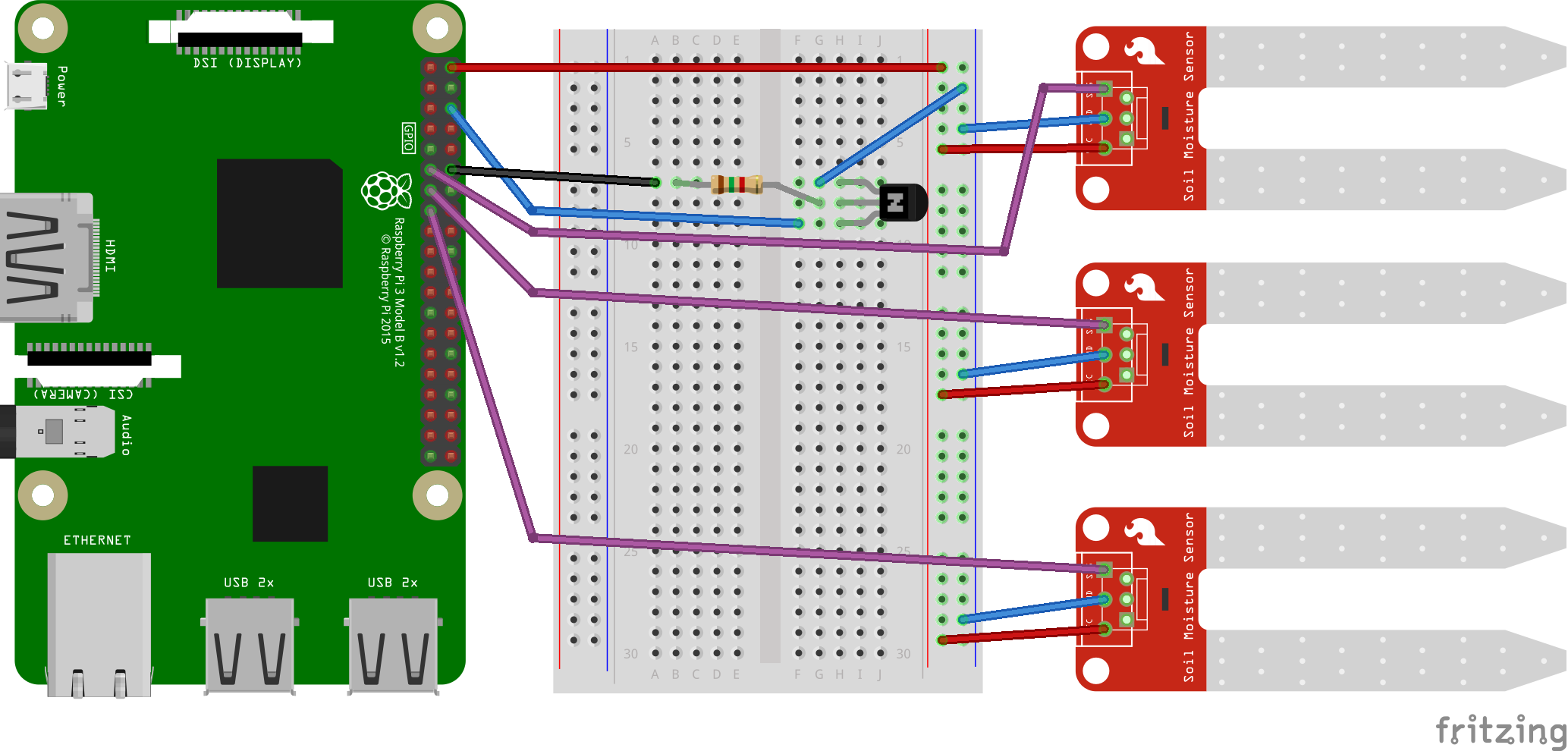
Digital sensors
Here is the diagram for digital sensors (rise to high on dry soil). Depending on the sensor type, an signal amplifier may be necessary (not represented on this diagram).
Analog sensors
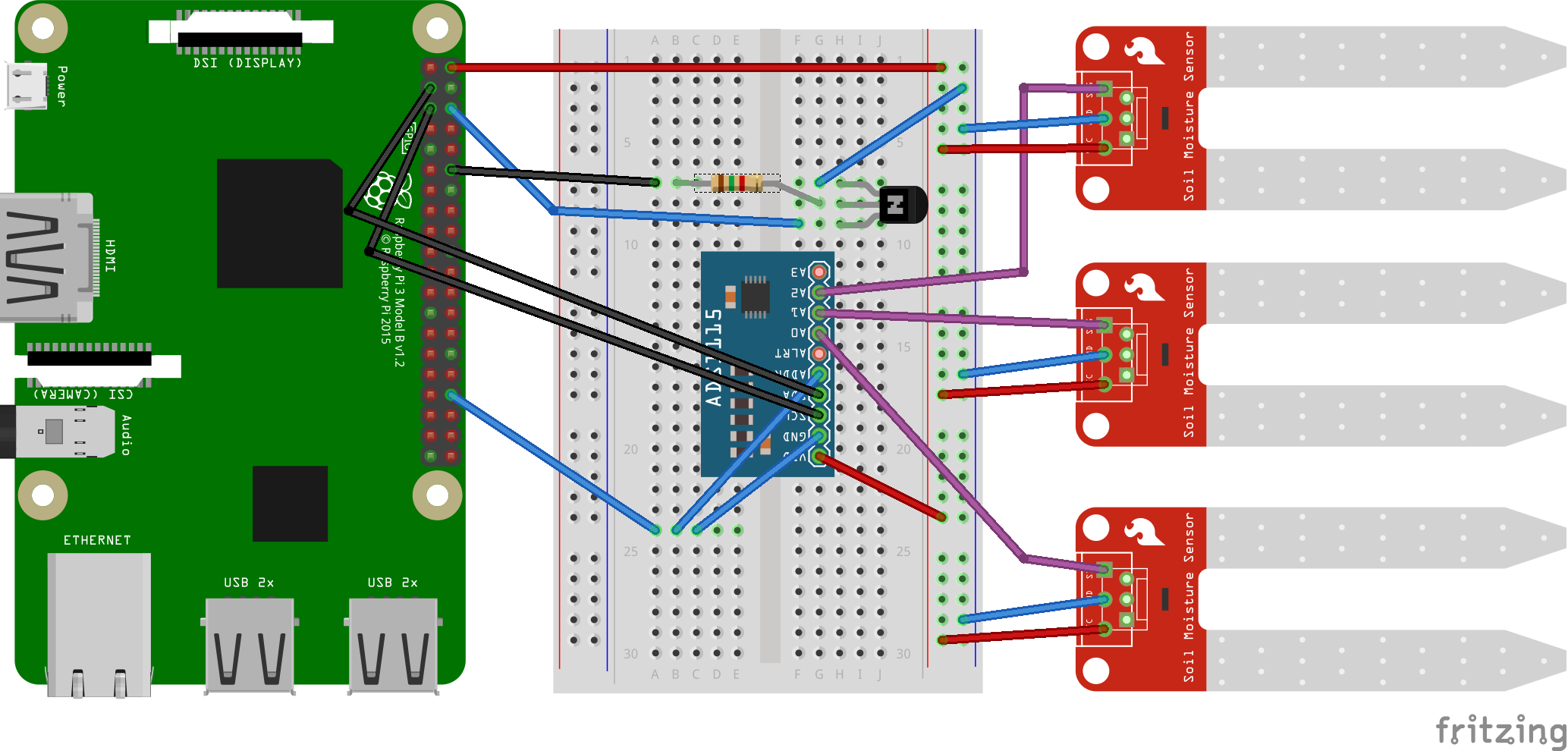
Here is the diagram for analog sensors connected to an ADC1115 to measure humidity level.
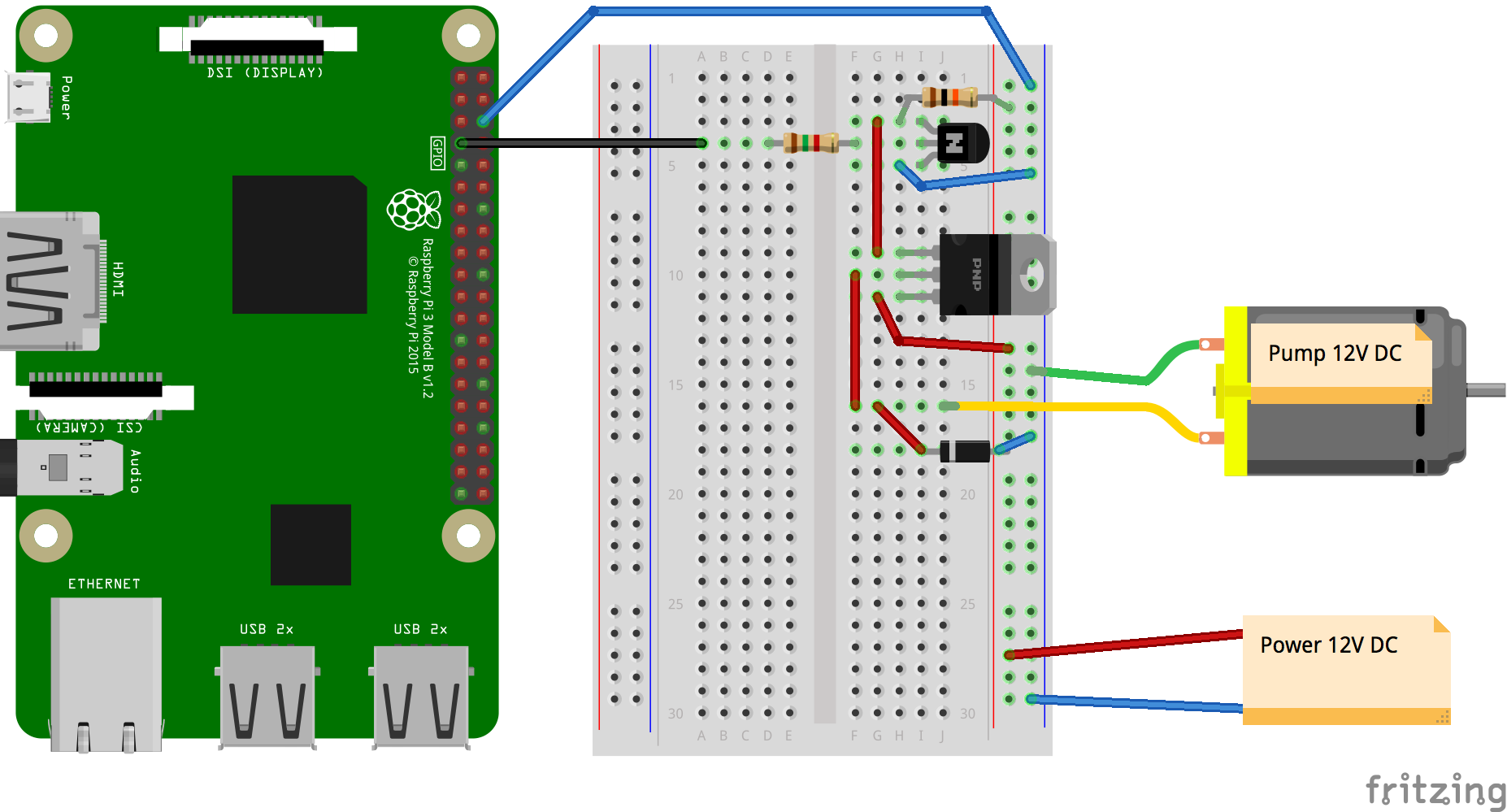
Pump
Here is the diagram for the pump (or electro valve). For better understanding the sensors are not represented here.
1 maintainer

Metadata
1 maintainer
Release files for pih2o 1.0.3
For a detailed explanation of source distributions (sdists) and built distributions (wheels), please see the package formats documentation.
Built distribution (wheel)
| File | Interpreter | ABI | Platform | Actions Reset |
|---|---|---|---|---|
| pih2o-1.0.3-py2.py3-none-any.whl | Python 3, Python 2 | none | any | Details for pih2o-1.0.3-py2.py3-none-any.whl |
Release files / pih2o-1.0.3-py2.py3-none-any.whl
| Download URL | pih2o-1.0.3-py2.py3-none-any.whl |
|---|---|
| Size | 18.6 kB |
| Tags | Python 2 Python 3 |
|
SHA-256 checksum How to use checksums |
c738b757217d0037618e3ec4bc1792ec2e1ff27fb8329940d90e0831725c7942
|
|
BLAKE2b-256 checksum How to use checksums |
ea3c48dc9ae48e818dcbdc699dd8fc1686d180d374c7978427a11e99488a6161
|
| Upload date | |
|
Uploaded using Trusted Publishing? What is trusted publishing? |
No |
| Uploaded via |
twine/1.9.1 pkginfo/1.4.1 requests/2.18.4 setuptools/38.5.1 requests-toolbelt/0.8.0 tqdm/4.19.4 CPython/2.7.10
|
Security for pih2o 1.0.3
Provenance
Provenance describes where a file came from. On PyPI, provenance is shared via attestations, which provide a verifiable record of the build or publishing details. View details, limitations and caveats.
No provenance found
None of the files in this release were uploaded with provenance metadata.
A note on package security
PyPI is a repository for distributing packages, not a service for auditing them. While third-party security researchers and our staff do their best to detect and remove malicious packages, PyPI cannot guarantee the quality, security or suitability of any given package.
To learn more about protecting yourself from malicious actors, visit our package security documentation.














