
PIP Chill - Make requirements with only the packages you need




Like pip freeze but lists only the packages that are not dependencies of installed packages.
Free software: GNU General Public License v3
Documentation: https://pip-chill.readthedocs.io.
Features
Generates a requirements file without any packages that depend on other packages in the file.
Usage
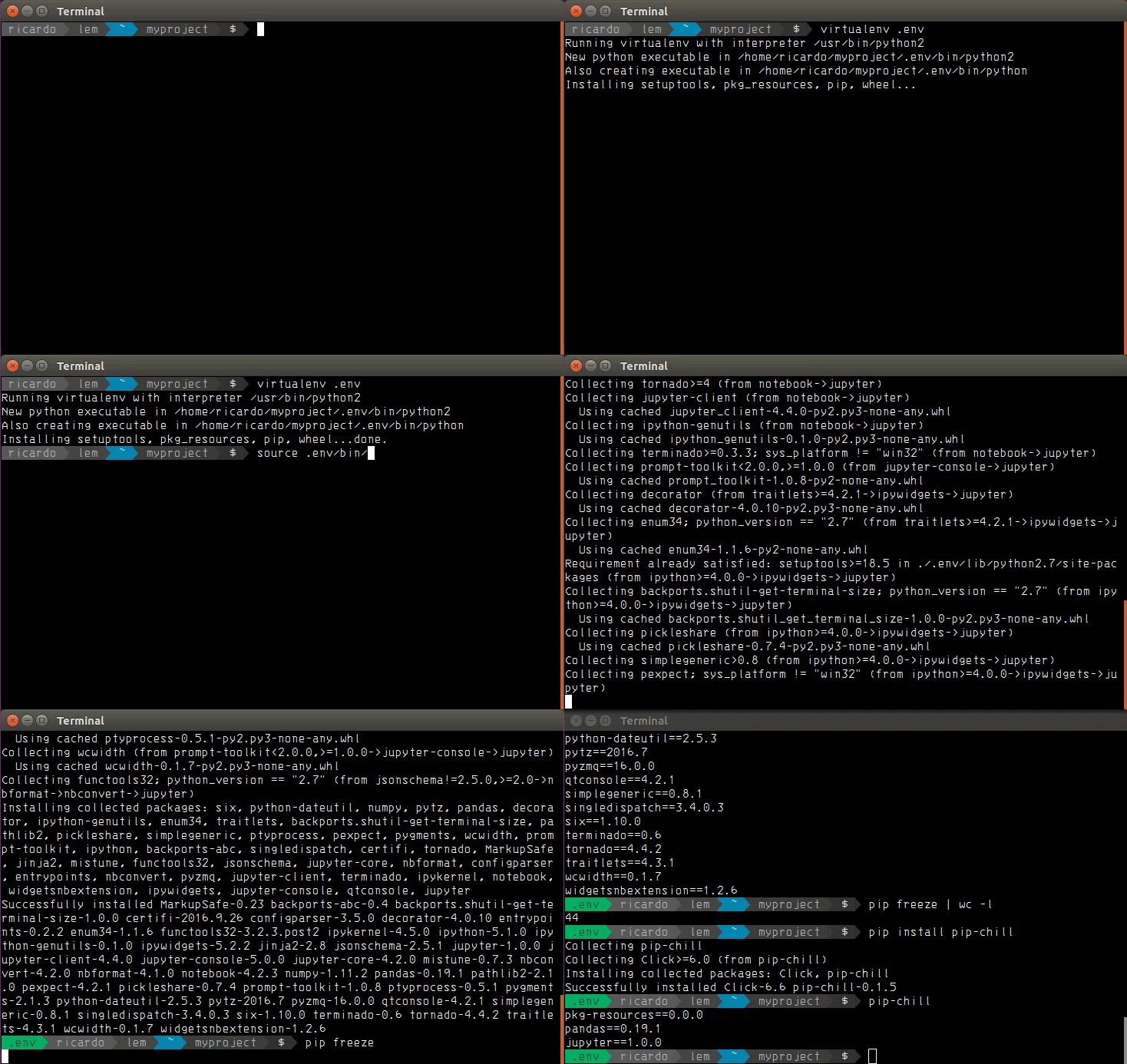
Suppose you have installed in your virtualenv a couple packages. When you run pip freeze, you’ll get a list of all packages installed, with all dependencies. If one of the packages you installed ceases to depend on an already installed package, you have to manually remove it from the list. The list also makes no distinction about the packages you actually care about and packages your packages care about, making the requirements file bloated and, ultimately, inaccurate.
On your terminal, run:
$ pip-chill
asciitree==0.3.1
autopep8==1.2.4
beautifulsoup4==4.4.0
bleach==1.4.1
cookiecutter==1.4.0
coverage==3.7.1
django-argonauts==1.0.1
...
Or, if you want it without version numbers:
$ pip-chill --no-version
asciitree
autopep8
beautifulsoup4
bleach
cookiecutter
coverage
django-argonauts
...
Or, if you want to list package dependencies too:
$ pip-chill -v
asciitree==0.3.1
autopep8==1.2.4
beautifulsoup4==4.4.0
bleach==1.4.1
cookiecutter==1.4.0
coverage==3.7.1
django-argonauts==1.0.1
# arrow==0.10.0 # Installed as dependency for jinja2-time
# binaryornot==0.4.4 # Installed as dependency for cookiecutter
# chardet==3.0.4 # Installed as dependency for binaryornot
# click==6.7 # Installed as dependency for cookiecutter
# django==1.11.5 # Installed as dependency for django-argonauts
# future==0.16.0 # Installed as dependency for cookiecutter
# html5lib==0.999999999 # Installed as dependency for bleach
# jinja2==2.9.6 # Installed as dependency for jinja2-time, cookiecutter
# jinja2-time==0.2.0 # Installed as dependency for cookiecutter
# markupsafe==1.0 # Installed as dependency for jinja2
# pep8==1.7.0 # Installed as dependency for autopep8
# poyo==0.4.1 # Installed as dependency for cookiecutter
# python-dateutil==2.6.1 # Installed as dependency for arrow
# pytz==2017.2 # Installed as dependency for django
# six==1.11.0 # Installed as dependency for python-dateutil, html5lib, bleach
# webencodings==0.5.1 # Installed as dependency for html5lib
# whichcraft==0.4.1 # Installed as dependency for cookiecutter
...
Credits
This package was created with Cookiecutter and the audreyr/cookiecutter-pypackage project template.
History
0.1.8 (2018-08-20)
Fixes, compatibility with Python 2.7, 3.6, 3.7
0.1.7 (2018-01-22)
Added a verbose command-line switch (fixed #3)
0.1.6 (2016-11-23)
Added pkg-resources to packages not shown by default.
0.1.5 (2016-11-05)
Added an –all switch.
Do not show wheel and setuptools unless –all is invoked.
0.1.4 (2016-11-05)
Better testing, more of the cookiecutter infrastructure enabled.
0.1.3 (2016-10-06)
Added a –no-version switch.
0.1.0 (2016-10-03)
First release on PyPI.
1 maintainer

Metadata
1 maintainer
Release files for pip-chill 0.1.9
For a detailed explanation of source distributions (sdists) and built distributions (wheels), please see the package formats documentation.
Source distribution (sdist)
| File | Size | Uploaded | Provenance | Actions |
|---|---|---|---|---|
| pip-chill-0.1.9.linux-x86_64.tar.gz | 5.9 kB | Without provenance | Details for pip-chill-0.1.9.linux-x86_64.tar.gz |
Release files / pip-chill-0.1.9.linux-x86_64.tar.gz
| Download URL | pip-chill-0.1.9.linux-x86_64.tar.gz |
|---|---|
| Size | 5.9 kB |
| Tags | Source |
|
SHA-256 checksum How to use checksums |
b89ac739bede84bda9b66ef5bb73f37b62c8db9aee8b08d8a28a7b35324cd2af
|
|
BLAKE2b-256 checksum How to use checksums |
b67e1c5a2e7da9497313d2cfd4c1fad0b37c2fd58a0c6e032b06b4adb4be20b8
|
| Upload date | |
|
Uploaded using Trusted Publishing? What is trusted publishing? |
No |
| Uploaded via |
twine/1.13.0 pkginfo/1.5.0.1 requests/2.22.0 setuptools/40.8.0 requests-toolbelt/0.9.1 tqdm/4.32.2 CPython/3.7.3
|
Security for pip-chill 0.1.9
Provenance
Provenance describes where a file came from. On PyPI, provenance is shared via attestations, which provide a verifiable record of the build or publishing details. View details, limitations and caveats.
No provenance found
None of the files in this release were uploaded with provenance metadata.
A note on package security
PyPI is a repository for distributing packages, not a service for auditing them. While third-party security researchers and our staff do their best to detect and remove malicious packages, PyPI cannot guarantee the quality, security or suitability of any given package.
To learn more about protecting yourself from malicious actors, visit our package security documentation.














