
<div align="center">
**For updates, questions and more:**
<a href="https://t.me/iamnayam">
<img src="https://user-images.githubusercontent.com/25067102/209297095-a3db856f-b760-40bb-a68e-f3a3086e18c7.png" width="300px" />
</a>
</div>
<h1 align="center">🙏 Please - New Tab Page for your Terminal 🙏</h1>
<h4 align="center">Get a beautifully formatted minimalistic new tab page with a greeting, date and time, inspirational quotes, your personal tasks and to-do list everytime you open the terminal with Please CLI.</h4>
<p align="center"><img src="https://user-images.githubusercontent.com/25067102/173348894-09190c99-baff-477a-9b48-b4d3cff0f029.gif"></img></center>
# [Version 0.3.1 is out now!](https://github.com/NayamAmarshe/please/releases/tag/0.3.1)
### Upgrade with `pip3 install please-cli --upgrade`
# 📖 Table of Contents
- [🚀 Installation](#-installation)
- [1️⃣ Method 1](#method-1)
- [2️⃣ Method 2](#method-2)
- [🚑 Troubleshooting](#-troubleshooting)
- [👨💻 Commands](#-commands)
- [🧰 Additional Optional Configuration](#-additional-optional-configuration)
- [🚮 Uninstalling](#-uninstalling)
- [❤ Credits](#-credits)
# 🚀 Installation
### Method 1:
1. Make sure you have Python 3 installed on your computer.
2. Open your terminal and paste the command below:
```bash
pip install please-cli
# If you get an error about 'pip not found', just replace pip with pip3.
```
3. To run **please** everytime you open the terminal:
```bash
# FOR BASH
echo 'please' >> ~/.bashrc
# FOR ZSH
echo 'please' >> ~/.zshrc
# FOR FISH
set fish_greeting please
```
4. That's it! Check if `please` command works in your terminal.
### Method 2:
1. Go to the releases section.
2. Download the latest release WHL file.
3. Open terminal and paste the command below:
```bash
pip install --user ~/Downloads/please_cli*
# If you get an error about 'pip not found', just replace pip with pip3.
```
Change the path of the file if you downloaded it elsewhere.
4. To run **please** everytime you open the terminal:
```bash
# FOR BASH
echo 'please' >> ~/.bashrc
# FOR ZSH
echo 'please' >> ~/.zshrc
# FOR FISH
set fish_greeting please
```
5. That's it! Check if `please` command works in your terminal.
###### Having trouble with installation or have any ideas? Please create an issue ticket :)
# 🚑 Troubleshooting
Getting a `command not found: please` error? That means the Python modules installation folder is not in PATH.
To fix this:
```bash
echo 'export PATH="$PATH:$HOME/.local/bin"' >> ~/.bashrc
```
and restart the terminal.
# 👨💻 Commands
```bash
# Show time, quotes and tasks
please
# Add a task
please add "TASK NAME"
# Delete a task
please delete <TASK NUMBER>
# Mark task as done
please do <TASK NUMBER>
# Edit task name
please edit <TASK NUMBER> <NEW NAME>
# Mark task as undone
please undo <TASK NUMBER>
# Show tasks even if all tasks are marked as done
please showtasks
# Move task to specified position
please move <OLD NUMBER> <NEW NUMBER>
# Toggle Time between 24 hours and 12 hours format
please changetimeformat
# Change your name
please callme "NAME"
# Delete all done tasks
please clean
# Reset all settings and tasks
please setup
```
# 🧰 Additional Optional Configuration
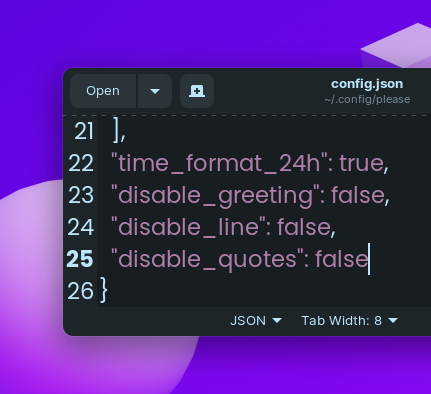
## Remove Greeting in please's output
1.Navigate to `~/.config/please`
2. Open config.json
3. Change `"diable_greeting": false` to `"diable_greeting": true` (All lowercase).
## Remove Horizontal Line in please's output
1.Navigate to `~/.config/please`
2. Open config.json
3. Change `"diable_line": false` to `"diable_line": true` (All lowercase).
## Remove Quotes in please's output
1.Navigate to `~/.config/please`
2. Open config.json
3. Change `"diable_quotes": false` to `"diable_quotes": true` (All lowercase).
# 💻 Local Development
1. To get started, first install poetry:
```bash
curl -sSL https://install.python-poetry.org | python3 -
```
2. Clone this project
3. `cd` to the project directory and run virtual environment:
```bash
poetry shell
# OR THIS, IF 'poetry shell' doesn't work
. "$(dirname $(poetry run which python))/activate"
```
4. Install all dependencies:
```bash
poetry install
```
- `please` will be available to use as a command in the virtual environment after using `poetry install`.
5. Finally, run the python script with:
```bash
python please/please.py
```
6. To build a WHL package:
```bash
poetry build
```
- The package will be generated in **dist** folder, you can then use pip to install the WHL file.
# 🚮 Uninstalling
Open your terminal and type:
```bash
pip uninstall please-cli
```
and also edit your **.zshrc** or **.bashrc** file and remove the line that says `please` at the end of the file.
# ♥ Credits
- Thanks to @CodePleaseRun & @guedesfelipe for their contributions.
- Thanks to @lukePeavey for the quotes.json file taken from quotable.io
#
<h4 align="center"> Made by TGS963 and NayamAmarshe with ⌨ and 🖱 </h4>
1 maintainer

Metadata
1 maintainer
Release files for please-cli 0.3.1
For a detailed explanation of source distributions (sdists) and built distributions (wheels), please see the package formats documentation.
Source distribution (sdist)
| File | Size | Uploaded | Provenance | |
|---|---|---|---|---|
| please_cli-0.3.1.tar.gz | 48.8 kB | Without provenance | Details |
Built distribution (wheel)
| File | Interpreter | ABI | Platform | Reset |
|---|---|---|---|---|
| please_cli-0.3.1-py3-none-any.whl | Python 3 | none | any | Details |
Total release size: 96.2 kB
Release files / please_cli-0.3.1.tar.gz
| Download URL | please_cli-0.3.1.tar.gz |
|---|---|
| Size | 48.8 kB |
| Tags | Source |
|
SHA-256 checksum How to use checksums |
f25df4375bdcd12e33c4ba2e22c6eec794495d633393b4415a3c2551bddd52f8
|
|
BLAKE2b-256 checksum How to use checksums |
a112703c84c14ea9d1b40c321020d36c24b996632f69ad1a5363788b209c2218
|
| Upload date | |
|
Uploaded using Trusted Publishing? What is trusted publishing? |
No |
| Uploaded via |
poetry/1.3.2 CPython/3.8.10 Linux/5.15.0-60-generic
|
Release files / please_cli-0.3.1-py3-none-any.whl
| Download URL | please_cli-0.3.1-py3-none-any.whl |
|---|---|
| Size | 47.3 kB |
| Tags | Python 3 |
|
SHA-256 checksum How to use checksums |
badda3366d29a6c851e8b2e775d4026172cb7a1ce1466d699b4c1b510494a875
|
|
BLAKE2b-256 checksum How to use checksums |
80affc7159fc536bb7838c97d3120cf70cfea3f65b4d55e57ba151b2cef27483
|
| Upload date | |
|
Uploaded using Trusted Publishing? What is trusted publishing? |
No |
| Uploaded via |
poetry/1.3.2 CPython/3.8.10 Linux/5.15.0-60-generic
|
Security for please-cli 0.3.1
Provenance
Provenance describes where a file came from. On PyPI, provenance is shared via attestations, which provide a verifiable record of the build or publishing details. View details, limitations and caveats.
No provenance found
None of the files in this release were uploaded with provenance metadata.
A note on package security
PyPI is a repository for distributing packages, not a service for auditing them. While third-party security researchers and our staff do their best to detect and remove malicious packages, PyPI cannot guarantee the quality, security or suitability of any given package.
To learn more about protecting yourself from malicious actors, visit our package security documentation.














