
Plotxel
Control your plots down to the pixel!
Ever have trouble moving a chart to the right? Moving your axis up? Getting rid of ticks? Then try out Plotxel!
It's wordy, slow, and unnecessary 99% of the time. But that 1%, you'll be glad you have Plotxel.
Installation
pip3 install plotxel
Example
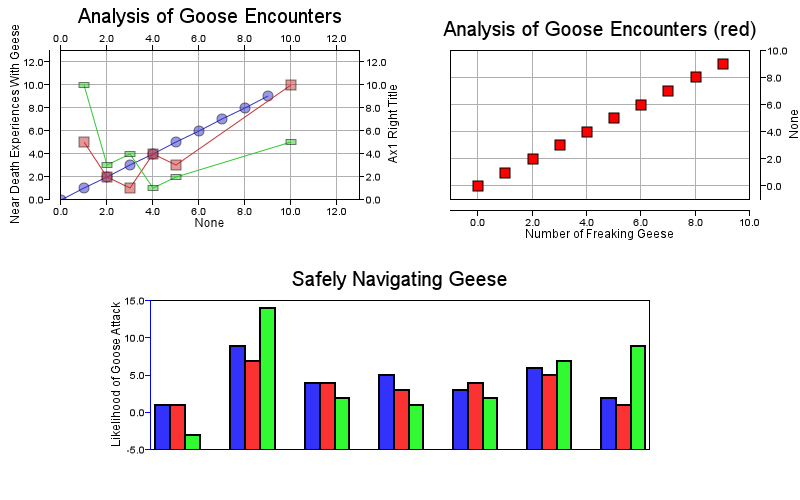
from plotxel import Plotxel, Axis

x = Plotxel()  # our main drawing canvas in x, y

# add some data as a series. The series name, the x data, and y data
series1 = [i for i in range(10)]
x.add_data('series1', series1, series1)
x.add_data('series2', [1, 2, 3, 4, 5, 10], [5, 2, 1, 4, 3, 10])
x.add_data('series3', [10, 5, 4, 3, 2, 1], [5, 2, 1, 4, 3, 10])

# left plot -- its name, type, and data it's linked to
plot1 = x.add_drawable("plot1", "Scatter", ["series1", 'series2', 'series3'])
plot1.title = 'Analysis of Goose Encounters'
plot1.pos = [60, 50]
plot1.title_offset = 23
plot1.marker_opacity = {.5}  # this must be a set so it can iterate through data. Will make this more intuitive

# right plot and its position. Same data as plot1
plot2 = x.add_drawable("plot2", "Scatter", "series1")
# set a bunch of attributes at once!
plot2.setattrs(
    ylim=[-1, 10],
    xlim=[-1, 10],
    pos=[450, 50],
    marker_shape='square',
    marker_fill_color=(255, 0, 0),
    title='Analysis of Goose Encounters (red)',
    line_width = 0
)

# add some axes, and link them to our plots. It will copy the size, position, scale, and limits of whichever plot it is linked to
ax1 = x.add_drawable("ax1", 'YAxis', link_to="plot1")
ax1.axis_offset = 10
ax1.title_offset = 25  # distance from the ticks. Will have an auto feature in the future!
ax1.title = "Near Death Experiences With Geese"

# all other axes, let's put them flush with the graph by changing the default
# defaults are copied at the time the object is initialized, so this won't affect ax1
Axis.defaults['axis_offset'] = -1
ax1b = x.add_drawable('ax1b', 'XAxis', link_to='plot1')

# you can keep setting attributes in bulk
ax1r = x.add_drawable('ax1r', 'YAxis', link_to='plot1', title_offset=20)
ax1r.setattrs(
    side='right',
    title_offset=20,
    title='Ax1 Right Title'
)

ax1t = x.add_drawable('ax1t', 'XAxis', link_to='plot1')
ax1t.setattrs(
    side='top',
    title=''
)

# or use the constructor!
x.add_drawable("ax2", 'YAxis', link_to="plot2", title_offset=20, side='right', axis_offset=10)

ax3 = x.add_drawable("ax3", 'XAxis', link_to="plot2")
ax3.setattrs(
    side='bottom',
    axis_offset=10,
    title="Number of Freaking Geese",
)


# I think I would prefer axes to be blue!
Axis.defaults['color'] = (0, 0, 255)

# let's add some bar chart data. Since it's a vertical bar chart, we will pull Y data
# the labels aren't implemented quite yet
x.add_data('bar_data', ['Sunday', 'Monday', 'Tuesday', 'Wednesday', 'Thursday', 'Friday', 'Saturday'], [1, 9, 4, 5, 3, 6, 2])
x.add_data('bar_data2', ['Sunday', 'Monday', 'Tuesday', 'Wednesday', 'Thursday', 'Friday', 'Saturday'], [1, 7, 4, 3, 4, 5, 1])
x.add_data('bar_data3', ['Sunday', 'Monday', 'Tuesday', 'Wednesday', 'Thursday', 'Friday', 'Saturday'], [-3, 14, 2, 1, 2, 7, 9])

plot3 = x.add_drawable('bar1', 'Bar', ['bar_data', 'bar_data2', 'bar_data3'])
# or unpack a dict
plot3_attrs = {
    'pos': (150, 300),
    'dim': (500, 150),
    'ylim': [-5, 15],
    'group_spacing': 30,
    'bar_spacing': 0,
    'title': 'Safely Navigating Geese'
}
plot3.setattrs(**plot3_attrs)

x.add_drawable('ax4', 'YAxis', link_to="bar1", title='Likelihood of Goose Attack', title_offset=25)
# x.add_drawable('ax5', 'XAxis', link_to='bar1', title='Day of Week', title_offset=5)

# coming soon, Jupyter magic!
# x.anti_aliasing=False
x.show()

# or for SVG
# svg_html = x.draw()

# or for image  in BytesIO / save to filename
# x.render(filename='example2.png')
This program is being developed based on my own needs, and unfortunately I don't do a lot of plotting today, therefore I don't need a lot of features.
In any case, I'll be prioritizing features, up next is bar charts and histograms!
1 maintainer

Metadata
1 maintainer
Release files for plotxel 0.0.9
For a detailed explanation of source distributions (sdists) and built distributions (wheels), please see the package formats documentation.
Source distribution (sdist)
| File | Size | Uploaded | Provenance | Actions |
|---|---|---|---|---|
| plotxel-0.0.9.tar.gz | 15.6 kB | Without provenance | Details for plotxel-0.0.9.tar.gz |
Built distribution (wheel)
| File | Interpreter | ABI | Platform | Actions Reset |
|---|---|---|---|---|
| plotxel-0.0.9-py3-none-any.whl | Python 3 | none | any | Details for plotxel-0.0.9-py3-none-any.whl |
Total release size: 32.1 kB
Release files / plotxel-0.0.9.tar.gz
| Download URL | plotxel-0.0.9.tar.gz |
|---|---|
| Size | 15.6 kB |
| Tags | Source |
|
SHA-256 checksum How to use checksums |
503e3d12b48eb4a4f400126b95317a254b9dd399942bfb5e1a01142dee61573a
|
|
BLAKE2b-256 checksum How to use checksums |
1eb827ba6cf9f7a86fdf4dbf1c0db7c854e64656ad9dfa256de775e21a907a82
|
| Upload date | |
|
Uploaded using Trusted Publishing? What is trusted publishing? |
No |
| Uploaded via |
twine/1.13.0 pkginfo/1.5.0.1 requests/2.18.4 setuptools/41.0.0 requests-toolbelt/0.9.1 tqdm/4.31.1 CPython/3.6.4
|
Release files / plotxel-0.0.9-py3-none-any.whl
| Download URL | plotxel-0.0.9-py3-none-any.whl |
|---|---|
| Size | 16.5 kB |
| Tags | Python 3 |
|
SHA-256 checksum How to use checksums |
2e0bf3f0df70da613620fe6074197dc67f9c5e6268511fbf53c95a2056360a9b
|
|
BLAKE2b-256 checksum How to use checksums |
53476d3ff2a6766ac216a0d8cbb2162c9aaf4a8ceae9045086f4cc13b81e2378
|
| Upload date | |
|
Uploaded using Trusted Publishing? What is trusted publishing? |
No |
| Uploaded via |
twine/1.13.0 pkginfo/1.5.0.1 requests/2.18.4 setuptools/41.0.0 requests-toolbelt/0.9.1 tqdm/4.31.1 CPython/3.6.4
|
Security for plotxel 0.0.9
Provenance
Provenance describes where a file came from. On PyPI, provenance is shared via attestations, which provide a verifiable record of the build or publishing details. View details, limitations and caveats.
No provenance found
None of the files in this release were uploaded with provenance metadata.
A note on package security
PyPI is a repository for distributing packages, not a service for auditing them. While third-party security researchers and our staff do their best to detect and remove malicious packages, PyPI cannot guarantee the quality, security or suitability of any given package.
To learn more about protecting yourself from malicious actors, visit our package security documentation.














