
Plover Dictionary Builder
Add new vocabulary to your dictionaries faster than ever before
Release Notes
v0.1.0
Add option to have a translation per line.
Add option to transform text to upper or lowercase.
How to Use
Part 1: Selecting Text
Get a word list or article to scan for vocabulary.
Paste your text into the dictionary builder.
For building up with word lists or phrases, you can select “Treat each line as one translation”.
Select whether you’d like to see words that are already defined in your dictionary. If you only want to see new words, leave this unchecked.
Apply a text transformation if you’d like to avoid being case-sensitive or must work in all caps.
Click “Start Building”.
Part 2: Building
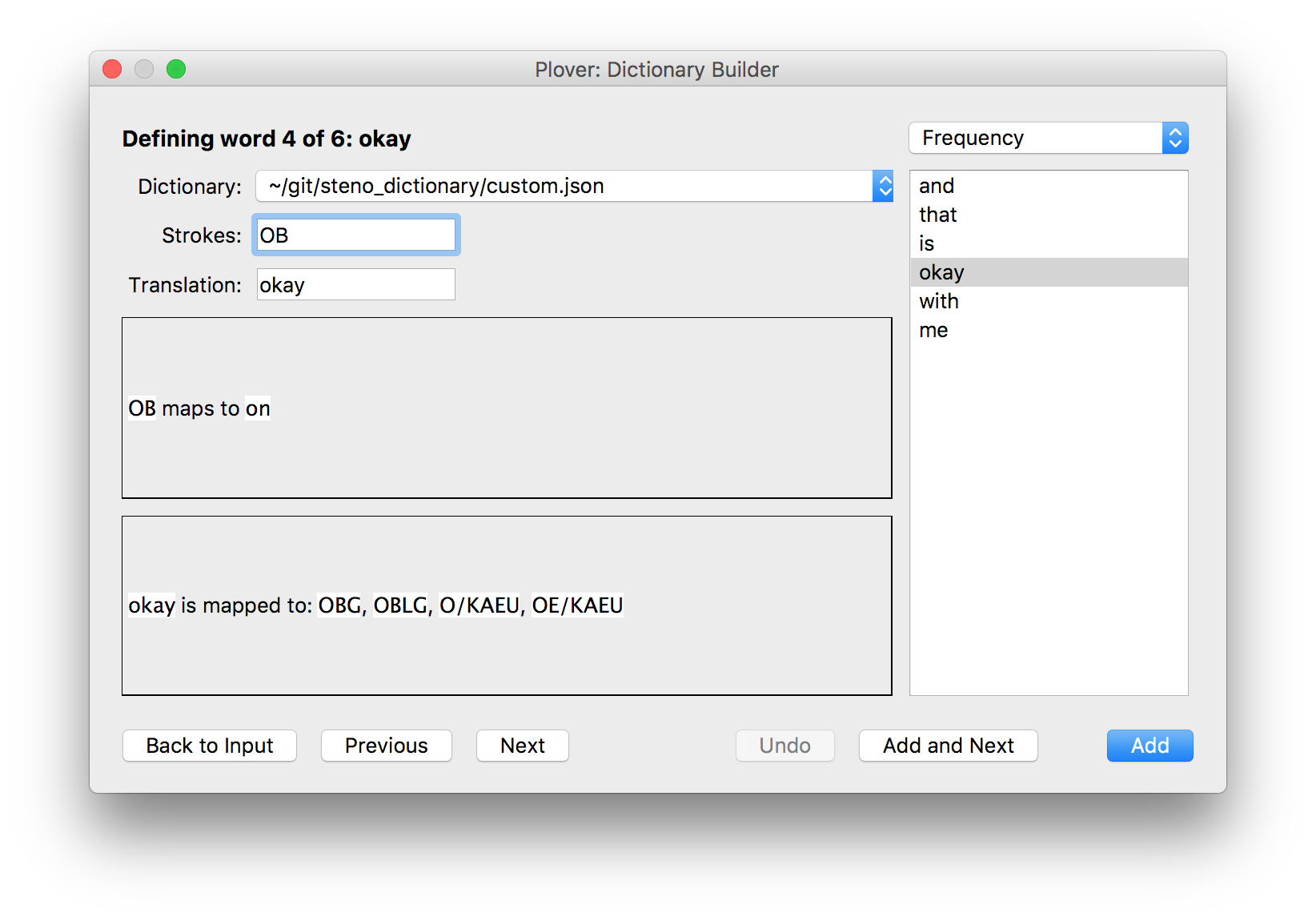
See the various parts of the builder:
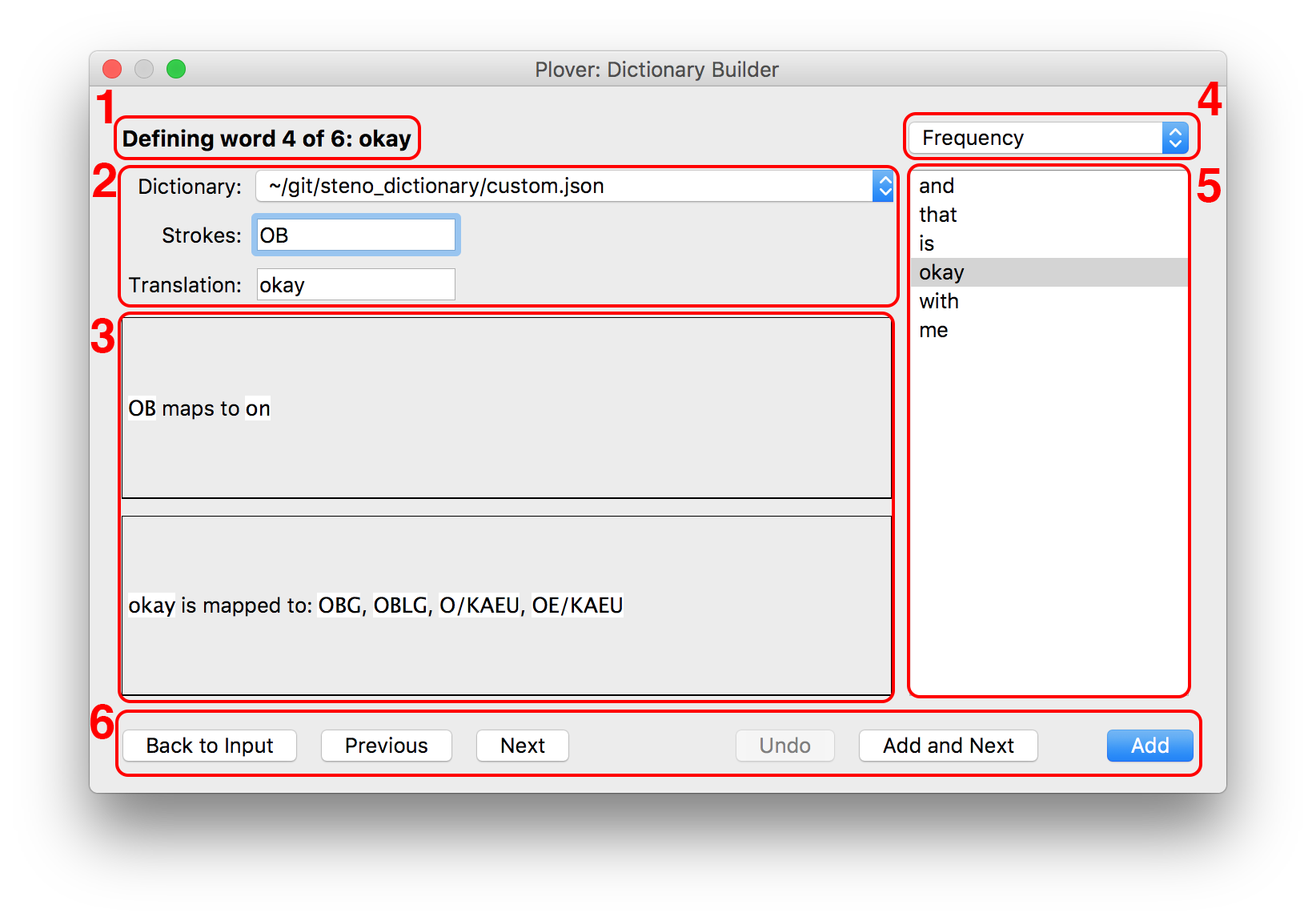
Progress indicator
Entry definer:
Dictionary: the dictionary that the next stroke will go into on “Add”.
Strokes: Your steno machine will write with raw steno into the strokes box. This is how you will define your desired strokes.
Translation: auto-filled as you go through words, but can be edited if needed.
What’s in your dictionary:
The first box contains what your current steno maps to in your dictionaries.
The second box shows you how it’s currently possible to write the target word.
Both these boxes update as you create new strokes.
The word order. You can tackle words from your text in several orders, which should help with different kinds of texts you might be working on. The options are:
Frequency: most frequently used words in the text appear first.
Order of Appearance: unique words in the order that they appear in the text.
Alphabetical: unique words sorted alphabetically.
The word list. The selected word is the current one being defined. You can clicked on any word to jump to it.
The controls:
Back to Input: stop building and go back to the text-entry
Keyboard shortcut: Escape, close button, or Ctrl W
Previous: change “Translation” to previous word
Keyboard shortcut: Up
Next: change “Translation” to next word
Keyboard shortcut: Down
Undo: remove the last definition you made
Keyboard shortcut: Ctrl Z (you might need to make sure you aren’t in a text box for this shortcut to activate)
Add and Next: add the strokes and translation to the selected dictionary then go to the next word
Keyboard shortcut: Ctrl S
Add: add the strokes and translation to the selected dictionary and keep the current word for another definition
Keyboard shortcut: Return/Enter
All changes you make in the dictionary builder are saved automatically as you go.
License
This plugin is licensed under GPLv2, or any later version.
1 maintainer

Metadata
1 maintainer
Release files for plover-dictionary-builder 0.1.0
For a detailed explanation of source distributions (sdists) and built distributions (wheels), please see the package formats documentation.
Source distribution (sdist)
| File | Size | Uploaded | |
|---|---|---|---|
| plover_dictionary_builder-0.1.0.tar.gz | 11.1 kB | Details |
Built distribution (wheel)
| File | Interpreter | ABI | Platform | Reset |
|---|---|---|---|---|
| plover_dictionary_builder-0.1.0-py3-none-any.whl | Python 3 | none | any | Details |
Total release size: 23.2 kB
Release files / plover_dictionary_builder-0.1.0.tar.gz
| Download URL | plover_dictionary_builder-0.1.0.tar.gz |
|---|---|
| Size | 11.1 kB |
| Tags | Source |
|
SHA-256 checksum How to use checksums |
1c62308f6cd0f9ea8c05d9e324830883128c1983a89974ae968202f6ec1b3ac9
|
|
BLAKE2b-256 checksum How to use checksums |
feaf08a6fceb7d3d78b96b812768c0cd774d7f15d455c36310d55f343c645b17
|
| Upload date | |
|
Uploaded using Trusted Publishing? What is trusted publishing? |
No |
| Uploaded via |
twine/1.12.1 pkginfo/1.5.0.1 requests/2.21.0 setuptools/40.5.0 requests-toolbelt/0.9.1 tqdm/4.31.1 CPython/3.6.8
|
Release files / plover_dictionary_builder-0.1.0-py3-none-any.whl
| Download URL | plover_dictionary_builder-0.1.0-py3-none-any.whl |
|---|---|
| Size | 12.1 kB |
| Tags | Python 3 |
|
SHA-256 checksum How to use checksums |
9e612203266e4a4094f530e7cee8e11860cc9ed0ca263012351020de10966cea
|
|
BLAKE2b-256 checksum How to use checksums |
434ed970ffb67185cca704e7442301e870bc30c17c6ba069167898a5c6f33e86
|
| Upload date | |
|
Uploaded using Trusted Publishing? What is trusted publishing? |
No |
| Uploaded via |
twine/1.12.1 pkginfo/1.5.0.1 requests/2.21.0 setuptools/40.5.0 requests-toolbelt/0.9.1 tqdm/4.31.1 CPython/3.6.8
|














