
pmenu
Sleek dmenu alternative written in Python and powered by curses.
pip install pmenu-lib


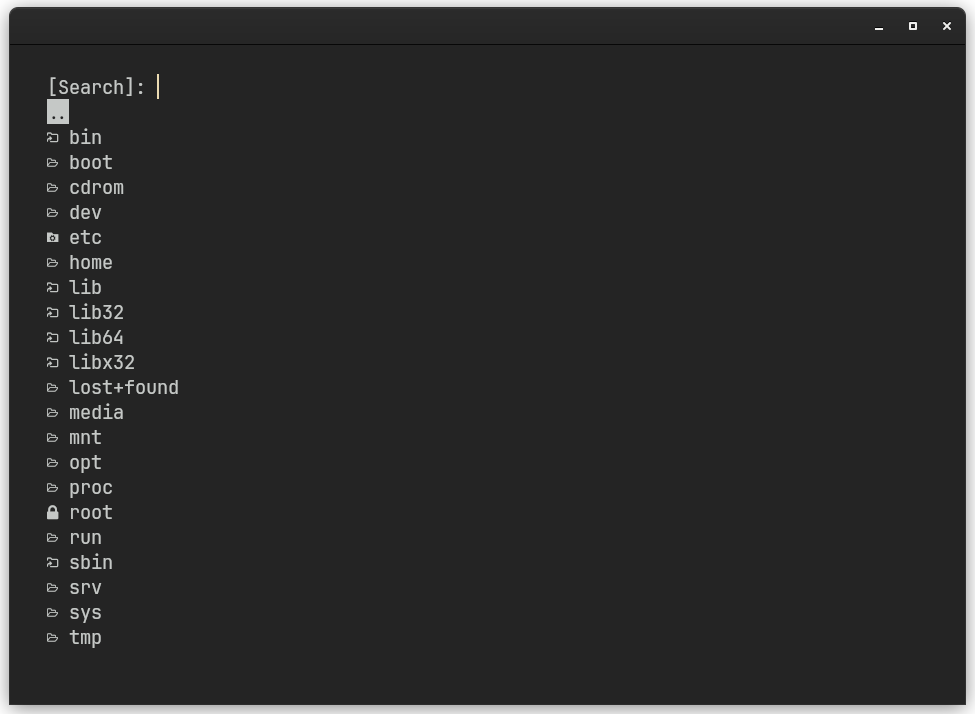
This package provides both a command-line tool and a Python library for creating interactive terminal menus.
Usage
Library Usage
The pmenu(list_of_options) function displays a menu and returns the selected option as a str, or None if the menu is closed without selecting an option.
from pmenu_lib import pmenu

options = ["Option 1", "Option 2", "Option 3"]
selected_option = pmenu(options)

if selected_option:
    print(f"You selected: {selected_option}")
else:
    print("No option selected")
CLI Usage
After installation, you can use pmenu from the command line:
pmenu "line1\nline2\nline3..."
Or pass multiple arguments:
pmenu "option1" "option2" "option3"
The selected option will be written to /tmp/pmenu (or equivalent temp directory on Windows).
Exit Codes
0: Option selected successfully1: Menu closed without selection (ESC pressed)2: Invalid usage (no arguments provided)
Menu Bindings
- Up arrow: Highlight the previous menu entry
- Down arrow: Highlight the next menu entry
- Type to search: Filter options in real-time
- Backspace: Delete search characters
- Enter: Select the highlighted entry
- Esc: Close the menu without selecting
pmenu_fm: A Practical Use Case (Linux)
The pmenu_fm script included in this repository is an example of how pmenu can be integrated into a bash script to implement a simple file selector.
It uses lsd, a modern ls replacement, to get the list of files in the current directory and their associated icons. The list is then passed to pmenu, which displays a menu in the terminal window.
You can highlight a directory with the Up and Down keys, and change to the selected directory or xdg-open the selected file with the Enter key. The menu can be closed with the Esc key.
1 maintainer

Metadata
1 maintainer
Release files for pmenu-lib 1.2.2
For a detailed explanation of source distributions (sdists) and built distributions (wheels), please see the package formats documentation.
Source distribution (sdist)
| File | Size | Uploaded | Provenance | Actions |
|---|---|---|---|---|
| pmenu_lib-1.2.2.tar.gz | 11.8 kB | Without provenance | Details for pmenu_lib-1.2.2.tar.gz |
Built distribution (wheel)
| File | Interpreter | ABI | Platform | Actions Reset |
|---|---|---|---|---|
| pmenu_lib-1.2.2-py3-none-any.whl | Python 3 | none | any | Details for pmenu_lib-1.2.2-py3-none-any.whl |
Total release size: 24.6 kB
Security for pmenu-lib 1.2.2
Provenance
Provenance describes where a file came from. On PyPI, provenance is shared via attestations, which provide a verifiable record of the build or publishing details. View details, limitations and caveats.
No provenance found
None of the files in this release were uploaded with provenance metadata.
A note on package security
PyPI is a repository for distributing packages, not a service for auditing them. While third-party security researchers and our staff do their best to detect and remove malicious packages, PyPI cannot guarantee the quality, security or suitability of any given package.
To learn more about protecting yourself from malicious actors, visit our package security documentation.














