
Poem Plugins


A set of plugins for Poetry.
How to use
Make sure you have Poetry version 1.4.0 or above. Read below for instructions to install it if you haven't.
Install Poem Plugins
Install this plugin to your Poetry:
poetry self add poem-plugins
Version Plugin
The poetry plugin for project versioning allows users to specify
the version of their project via the provider other than the default pyproject.toml file.
This can be useful for users who prefer to set the project version based on a git tag, for example.
Plugin can be configured via a section in the pyproject.toml file.
To use the plugin, you will need to add a section to your pyproject.toml
file that specifies the provider.
Here's an example of how you might configure the plugin in your pyproject.toml file:
[tool.poem-plugins.version]
provider = "git"
Likewise, you can specify a number of optional arguments to control the plugin behavior. Here are some of the arguments that you can use:
| Name | description | Default |
|---|---|---|
update_pyproject |
plugin will not only use version from provider for building, but save it in pyproject.toml |
false |
update_pyproject_place |
place to update version in pyproject.toml. Use project with PEP 621 compatability |
tool.poetry |
write_version_file |
plugin will create a file version.py inside a module, with version information |
false |
version_file_quotes |
plugin will replace default quotes in version.py file with provided by: ' or " |
unset |
You can specify provider-specific settings in your configuration.
To specify provider-specific settings, you can use the tool.poem-plugins.version.{provider} section.
Here are some of the arguments that you can use for git provider:
| Name | description | Default |
|---|---|---|
version_prefix |
filter tags only starts with this prefix | v |
format |
plugin will use commit hash (long) or not (short) to build a project version | short |
Example:
[tool.poem-plugins.version.git]
version_prefix = "v"
format = "short"
To build your project, run the poetry build command.
The plugin will build the version via provider and use it to set the version for the project.
$ git tag -a v0.1 -m 'tag description'
$ poetry build
poem-plugins: Setting version to: 0.1.0
Building awesome_package (0.1.0)
  - Building sdist
  - Built awesome_package-0.1.0.tar.gz
  - Building wheel
  - Built awesome_package-0.1.0-py3-none-any.whl
How to develop
Before getting started with development, you'll need to have poetry installed.
Once you have poetry installed, you can create a virtual environment for the project by running:
poetry install
This will also install all the dependencies required for the project.
Pre-commit hooks
This project uses pre-commit to automatically run
simple formatter gray before committing changes.
To set up the pre-commit hooks, run the following
command in the project root:
poetry run pre-commit install
Type checking
This project uses mypy for type checking.
You can run the type checker
with the following command:
poetry run mypy poem_plugins
Linting
This project uses pylama for linting.
You can run the linter
with the following command:
poetry run pylama poem_plugins
Tests
We use pytest for running tests.
You can run the tests
with the following command:
poetry run pytest
Please make sure that all tests pass and linter and type checker does not report any issues before submitting a pull request.
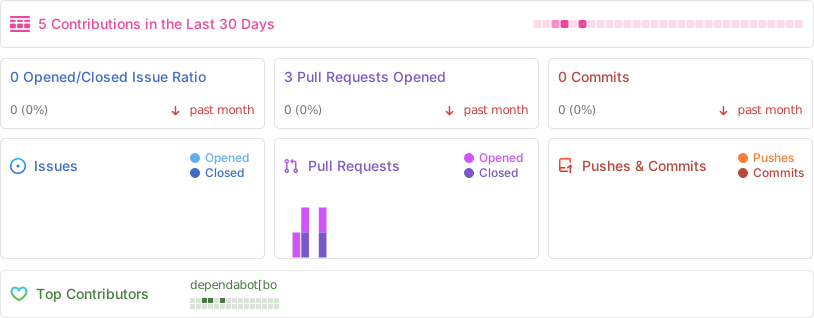
Repo Activity


Release files for poem-plugins 1.2.0
For a detailed explanation of source distributions (sdists) and built distributions (wheels), please see the package formats documentation.
Source distribution (sdist)
| File | Size | Uploaded | |
|---|---|---|---|
| poem_plugins-1.2.0.tar.gz | 9.6 kB | Details |
Built distribution (wheel)
| File | Interpreter | ABI | Platform | Reset |
|---|---|---|---|---|
| poem_plugins-1.2.0-py3-none-any.whl | Python 3 | none | any | Details |
Total release size: 21.6 kB
Release files / poem_plugins-1.2.0.tar.gz
| Download URL | poem_plugins-1.2.0.tar.gz |
|---|---|
| Size | 9.6 kB |
| Tags | Source |
|
SHA-256 checksum How to use checksums |
2e4347de6124e7a0b58a1c8a90d72f3fe02a90e9cf2c809a1b01b54aef3f3c29
|
|
BLAKE2b-256 checksum How to use checksums |
209465a98b36412d1a67a1e42fd4ebc59e5003f8782007bfe61f221067bf8106
|
| Upload date | |
|
Uploaded using Trusted Publishing? What is trusted publishing? |
No |
| Uploaded via |
poetry/1.8.3 CPython/3.12.0 Darwin/24.2.0
|
Release files / poem_plugins-1.2.0-py3-none-any.whl
| Download URL | poem_plugins-1.2.0-py3-none-any.whl |
|---|---|
| Size | 12.0 kB |
| Tags | Python 3 |
|
SHA-256 checksum How to use checksums |
9015e3755390fcfd288e19d324c1b6e18fdf9b0d2d5dc5cf8be9ccaa8cb27184
|
|
BLAKE2b-256 checksum How to use checksums |
e41a0e315082f620c643eaccfbe168eda6f881c722b10315d5d15380fea50c97
|
| Upload date | |
|
Uploaded using Trusted Publishing? What is trusted publishing? |
No |
| Uploaded via |
poetry/1.8.3 CPython/3.12.0 Darwin/24.2.0
|














