
Analyze large datasets of point clouds recorded over time in an efficient way

Project description
Analyze large datasets of point clouds recorded over time in an efficient way.








Features
Handles point clouds over time
Directly read ROS files and many pointcloud file formats.
Generate a dataset from multiple pointclouds. For example from thousands of .las files.
Building complex pipelines with a clean and maintainable code
newpointcloud = pointcloud.limit("x",-5,5).filter("quantile","reflectivity", ">",0.5)Apply arbitrary functions to datasets of point clouds
def isolate_target(frame: PointCloud) -> PointCloud:
   return frame.limit("x",0,1).limit("y",0,1)

def diff_to_pointcloud(pointcloud: PointCloud, to_compare: PointCloud) -> PointCloud:
   return pointcloud.diff("pointcloud", to_compare)

result = dataset.apply(isolate_target).apply(diff_to_pointcloud, to_compare=dataset[0])
Includes powerful aggregation method agg similar to pandas
dataset.agg(["min","max","mean","std"])Support for large files with lazy evaluation and parallel processing

Support for numerical data per point (intensity, range, noise …)
Interactive 3D visualisation
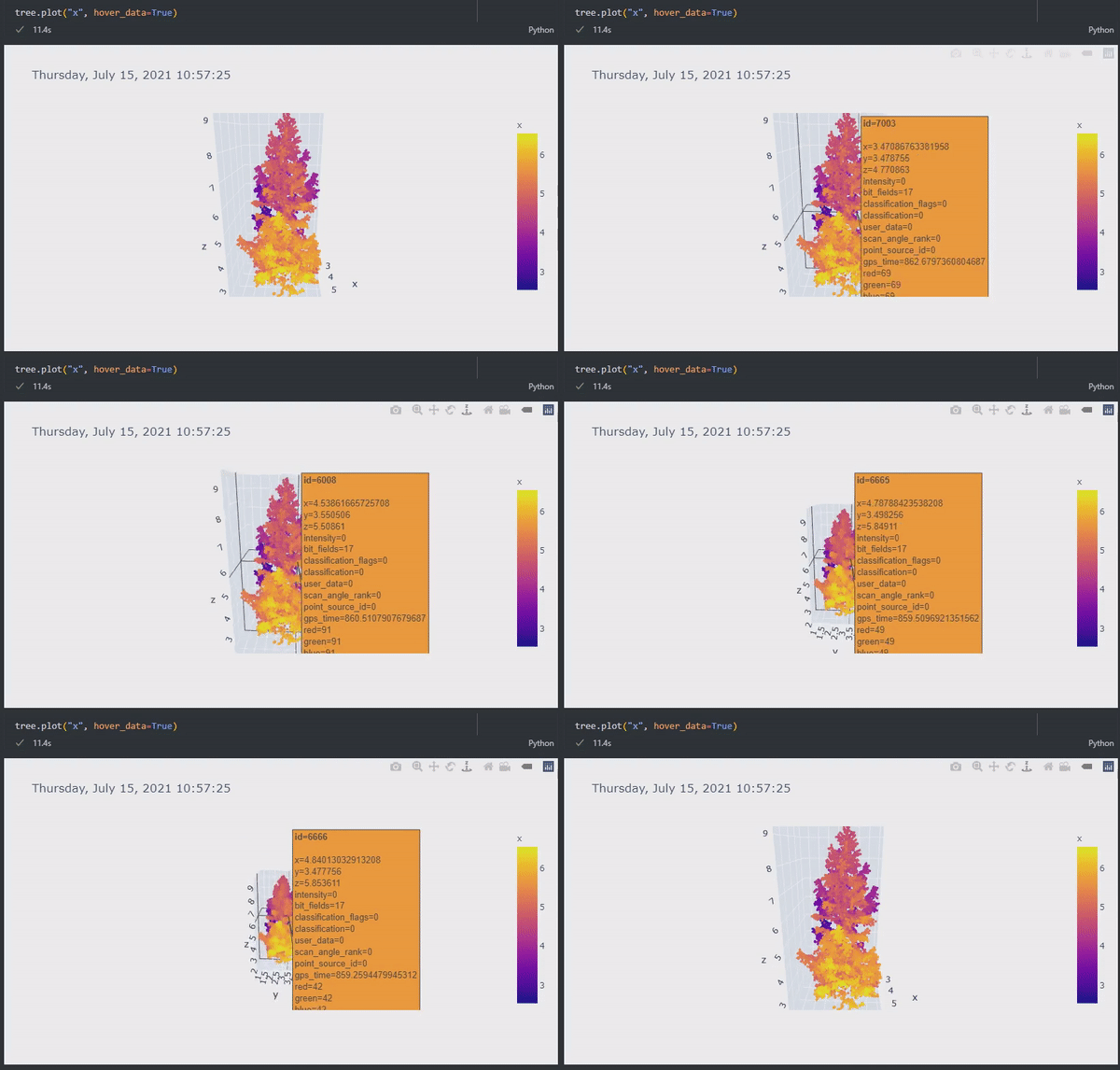
High level processing based on dask, pandas, scipy, scikit-learn
Docker image is available
Optimised - but not limited to - automotive lidar
A command line tool to convert ROS 1 & 2 files
Use case examples
Post processing and analytics of a lidar dataset recorded by ROS
A collection of multiple lidar scans from a terrestrial laser scanner
Comparison of multiple point clouds to a ground truth
Analytics of point clouds over time
Developing algorithms on a single frame and then applying them to huge datasets
Installation with pip
Install python package with pip:
pip install pointcloudsetOptional extras
For faster clustering on large point clouds, install the optional numba extra to enable JIT-accelerated union-find in PointCloud.get_cluster():
pip install pointcloudset[numba]Without this extra, a pure-Python fallback is used automatically with no change in behaviour.
Installation with Docker
The easiest way to get started is to use the pre-build docker tgoelles/pointcloudset.
Quickstart
Reading ROS1 or ROS2 files:
import pointcloudset as pcs
from pathlib import Path
import urllib.request

urllib.request.urlretrieve(
   "https://github.com/virtual-vehicle/pointcloudset/raw/master/tests/testdata/test.bag", "test.bag"
)

dataset = pcs.Dataset.from_file(Path("test.bag"), topic="/os1_cloud_node/points", keep_zeros=False)
pointcloud = dataset[1]
pointcloud.plot("x", hover_data=True)
You can also generate a dataset from multiple pointclouds from formats like las, pcd, csv, and xyz.
PointCloud.to_file(...) currently writes csv, xyz, las, and pcd. For text formats, csv defaults to writing a header and also supports header=False; xyz defaults to headerless output and also supports header=True. When reading files, PointCloud.from_file(...) supports normalize_xyz (default False). If a file uses uppercase coordinate headers X, Y, Z, reading fails unless you pass normalize_xyz=True. This makes the conversion explicit while keeping internal processing consistent with lowercase x, y, z.
import pointcloudset as pcs
from pathlib import Path
import urllib.request

urllib.request.urlretrieve(
   "https://github.com/virtual-vehicle/pointcloudset/raw/master/tests/testdata/las_files/test_tree.las",
   "test_tree.las",
)
urllib.request.urlretrieve(
   "https://github.com/virtual-vehicle/pointcloudset/raw/master/tests/testdata/pcd_files/test_tree.pcd",
   "test_tree.pcd",
)

las_pc = pcs.PointCloud.from_file(Path("test_tree.las"), normalize_xyz=True)
pcd_pc = pcs.PointCloud.from_file(Path("test_tree.pcd"))
dataset = pcs.Dataset.from_instance("pointclouds", [las_pc, pcd_pc])
pointcloud = dataset[1]

pointcloud.plot("z", hover_data=True)
Read the html documentation.
Have a look at the tutorial notebooks in the documentation folder
For even more usage examples you can have a look at the tests
CLI to convert ROS1 and ROS2 files: pointcloudset convert
The package includes a CLI to convert pointclouds in ROS1 and ROS2 files into pointcloudset directories or native file formats. It currently writes csv, xyz, las, and pcd files and handles both mcap and db3 ROS2 inputs.
pointcloudset convert test.bag --output-format las --output-dir converted_las
You can view PointCloud2 messages with
pointcloudset topics test.bagTipp: If you have uv installed you can simply run:
uvx pointcloudset --helpCitation and contact

Please cite our JOSS paper if you use pointcloudset.
@article{Goelles2021,
  doi = {10.21105/joss.03471},
  url = {https://doi.org/10.21105/joss.03471},
  year = {2021},
  publisher = {The Open Journal},
  volume = {6},
  number = {65},
  pages = {3471},
  author = {Thomas Goelles and Birgit Schlager and Stefan Muckenhuber and Sarah Haas and Tobias Hammer},
  title = {`pointcloudset`: Efficient Analysis of Large Datasets of Point Clouds Recorded Over Time},
  journal = {Journal of Open Source Software}
}Release history Release notifications | RSS feed


Download files
Download the file for your platform. If you're not sure which to choose, learn more about installing packages.
Source Distribution
Built Distribution
Filter files by name, interpreter, ABI, and platform.
If you're not sure about the file name format, learn more about wheel file names.
Copy a direct link to the current filters
File details
Details for the file pointcloudset-0.14.0.tar.gz.
File metadata
- Download URL: pointcloudset-0.14.0.tar.gz
- Upload date:
- Size: 38.8 kB
- Tags: Source
- Uploaded using Trusted Publishing? No
- Uploaded via: uv/0.11.13 {"installer":{"name":"uv","version":"0.11.13","subcommand":["publish"]},"python":null,"implementation":{"name":null,"version":null},"distro":{"name":"Ubuntu","version":"24.04","id":"noble","libc":null},"system":{"name":null,"release":null},"cpu":null,"openssl_version":null,"setuptools_version":null,"rustc_version":null,"ci":true}
File hashes
| Algorithm | Hash digest | |
|---|---|---|
| SHA256 |
e545d0612b3c9e672d8403049c03976703f8ab6bf12ccd1da3174e072257acc8
|
|
| MD5 |
178cce458f3a793af90c5a57b7357451
|
|
| BLAKE2b-256 |
0eb837d9692250ff0865b413fa50a973eb55e11368ad6b0a0db7ff415b334989
|
File details
Details for the file pointcloudset-0.14.0-py3-none-any.whl.
File metadata
- Download URL: pointcloudset-0.14.0-py3-none-any.whl
- Upload date:
- Size: 53.9 kB
- Tags: Python 3
- Uploaded using Trusted Publishing? No
- Uploaded via: uv/0.11.13 {"installer":{"name":"uv","version":"0.11.13","subcommand":["publish"]},"python":null,"implementation":{"name":null,"version":null},"distro":{"name":"Ubuntu","version":"24.04","id":"noble","libc":null},"system":{"name":null,"release":null},"cpu":null,"openssl_version":null,"setuptools_version":null,"rustc_version":null,"ci":true}
File hashes
| Algorithm | Hash digest | |
|---|---|---|
| SHA256 |
19e28de85d0e2d7179b89020c6d4f554754f581e157ad8f505f36cca4f4399f0
|
|
| MD5 |
b16ff9c7f3ea494c68ac327ac8d4dd8e
|
|
| BLAKE2b-256 |
a62bfef335381272fc5b8a68cd1ae5e1e89794d9651ad063105ff93f75be28a1
|






