
================================================= PolyMaze - Create mazes from a variety of sources =================================================
This utility converts several different kinds of inputs into mazes.
Allowed Inputs:
Aspect ratio (height / width) of a rectangular maze
Text - convert the content of the string into a maze / mazes
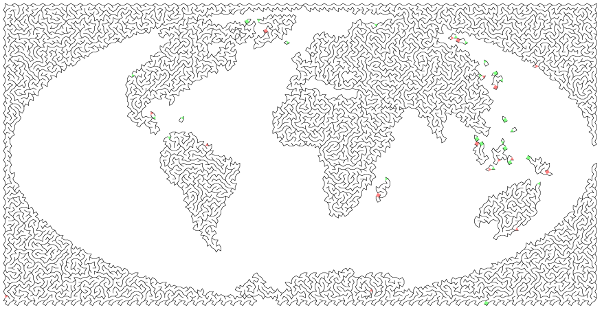
Image - convert the dark parts of an image into a maze / mazes
Options:
Height / Width - adjust the difficulty (measured in polygon side lengths)
Complexity - adjust the difficulty (measured in polygon density)
Font - use your own font when making a String maze (especially for unicode strings)
Shape - explicitly choose the type of tesselation used in the maze

Installation:
polymaze should work with Py2 or Py3.
pip install polymazeIf you get the error decoder zip not available when using it, then probably PILLOW did not install completely. Try to upgrade or reinstall PILLOW and make sure it says png support was installed.
Commandline Usage:
To make a generic rectangular maze, at the command line:
polymaze
To see all options:
polymaze -hFor example, to make a string into a maze with some extra options (note the n gets converted to a real newline internally):
polymaze --text "Happy\nBirthday!" --complexity 10 --shape Polycat
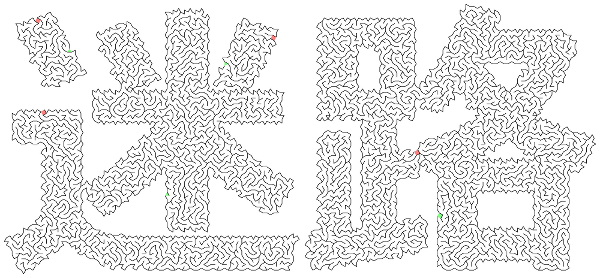
polymaze -t 迷路 -c 10 -s OctaDiamond --font meiryob.ttc
Everything above assumes the command line entry point (named polymaze) works after installation. If not, then you will need to navigate to the root package directory and use:
python cli_runner.py [--options...]Library Usage:
Please see demo.py for examples of how to use the components. You can also run it simply with:
python demo.pyThe primary components are PolyGrid (the geometric core of the whole package), and PolyMaze which converts a PolyGrid into a maze.
Extension:
If anyone is interested, I can document how to specify new tessellations.
Background and Feedback:
I developed this to regain some basic trigonometry skills which I have lost over the years.
If you find this useful or have any feedback, please let me know! Specifically I have only tested this on Windows so please make an issue if it doesn’t work in Linux, etc.
License:
MIT. See LICENSE
Bundled Noto CJK Font:
SIL Open Font License, Version 1.1. See polymaze/font/LICENSE_CJK.txt
1 maintainer

Metadata
1 maintainer
Release files for polymaze 0.7.0
For a detailed explanation of source distributions (sdists) and built distributions (wheels), please see the package formats documentation.
Source distribution (sdist)
| File | Size | Uploaded | Provenance | |
|---|---|---|---|---|
| polymaze-0.7.0.zip | 15.9 MB | Without provenance | Details |
Built distribution (wheel)
| File | Interpreter | ABI | Platform | Reset |
|---|---|---|---|---|
| polymaze-0.7.0-py2.py3-none-any.whl | Python 2, Python 3 | none | any | Details |
Total release size: 31.7 MB
Release files / polymaze-0.7.0.zip
| Download URL | polymaze-0.7.0.zip |
|---|---|
| Size | 15.9 MB |
| Tags | Source |
|
SHA-256 checksum How to use checksums |
4723ddfa1cf80d65884ebb7c47755e69aab9da31a0aac313f9328f75895ac1ca
|
|
BLAKE2b-256 checksum How to use checksums |
5bf3ca5c113a31e658f3bc1b43138f0b8b9e4fb10ce1d2b93f9081301d4963dd
|
| Upload date | |
|
Uploaded using Trusted Publishing? What is trusted publishing? |
No |
Release files / polymaze-0.7.0-py2.py3-none-any.whl
| Download URL | polymaze-0.7.0-py2.py3-none-any.whl |
|---|---|
| Size | 15.8 MB |
| Tags | Python 2 Python 3 |
|
SHA-256 checksum How to use checksums |
5446ef6212a54cc5ac403c05db8ee70211c44d699cde4c0de33f03596efa08f1
|
|
BLAKE2b-256 checksum How to use checksums |
f4391bbb6507d81d1b9c2612de75ca3517f00dfae04790ecfebfbc2eec00c414
|
| Upload date | |
|
Uploaded using Trusted Publishing? What is trusted publishing? |
No |
Security for polymaze 0.7.0
Provenance
Provenance describes where a file came from. On PyPI, provenance is shared via attestations, which provide a verifiable record of the build or publishing details. View details, limitations and caveats.
No provenance found
None of the files in this release were uploaded with provenance metadata.
A note on package security
PyPI is a repository for distributing packages, not a service for auditing them. While third-party security researchers and our staff do their best to detect and remove malicious packages, PyPI cannot guarantee the quality, security or suitability of any given package.
To learn more about protecting yourself from malicious actors, visit our package security documentation.














