
pprintjson




A json pretty printer for Python 🐍.
Installation
Install with the standard json JSON encoder
$ pip install pprintjson
Install with the premier simplejson JSON encoder
$ pip install pprintjson[simplejson]
Usage
usage: pprintjson.py [-h] [-i num] [-o file] [-c cmd] [-v] [file]

A pretty-printing function for json.

positional arguments:
  file                    json <file> to pretty-print

optional arguments:
  -h, --help              show this help message and exit
  -i num, --indent num    indent <num> number of spaces at each level (default: 4)
  -o file, --output file  write output to <file> instead of stdout (default: stdout)
  -c cmd, --command cmd   json <cmd> to pretty-print
  -v, --version           show program's version number and exit
Script
Pretty print JSON from a file using the pprintjson CLI.
$ pprintjson "./path/to/file.json"
Pretty print JSON from a stdin using the pprintjson CLI.
$ echo '{ "a": 1, "b": "string", "c": true }' | pprintjson
Pretty print JSON from a string using the pprintjson CLI.
$ pprintjson -c '{ "a": 1, "b": "string", "c": true }'
Pretty print JSON from a string with an indent of 1.
$ pprintjson -c '{ "a": 1, "b": "string", "c": true }' -i 1
Pretty print JSON from a string and save output to a file output.json.
$ pprintjson -c '{ "a": 1, "b": "string", "c": true }' -o ./output.json
Module
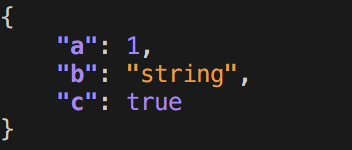
Pretty print JSON from a dict using the pprintjson module.
# 1. import the "pprintjson" function.
from pprintjson import pprintjson as ppjson

# 2. pretty print JSON.
obj = { "a": 1, "b": "string", "c": True }

ppjson(obj)
License
MIT © Travis Clarke
1 maintainer

Metadata
1 maintainer
Release files for pprintjson 1.4.2
For a detailed explanation of source distributions (sdists) and built distributions (wheels), please see the package formats documentation.
Source distribution (sdist)
| File | Size | Uploaded | |
|---|---|---|---|
| pprintjson-1.4.2.tar.gz | 4.3 kB | Details |
Built distribution (wheel)
| File | Interpreter | ABI | Platform | Reset |
|---|---|---|---|---|
| pprintjson-1.4.2-py3-none-any.whl | Python 3 | none | any | Details |
Total release size: 9.9 kB
Release files / pprintjson-1.4.2.tar.gz
| Download URL | pprintjson-1.4.2.tar.gz |
|---|---|
| Size | 4.3 kB |
| Tags | Source |
|
SHA-256 checksum How to use checksums |
21de6b471eb13c08e726065e18061bcfafd5f5f352e02fb6e7410d87b2f8b22d
|
|
BLAKE2b-256 checksum How to use checksums |
816694589d66848e879589e3082a3aeb38f64ea56d59668f9302a5e50d69e192
|
| Upload date | |
|
Uploaded using Trusted Publishing? What is trusted publishing? |
No |
| Uploaded via |
twine/1.13.0 pkginfo/1.5.0.1 requests/2.22.0 setuptools/46.0.0 requests-toolbelt/0.9.1 tqdm/4.32.1 CPython/3.7.7
|
Release files / pprintjson-1.4.2-py3-none-any.whl
| Download URL | pprintjson-1.4.2-py3-none-any.whl |
|---|---|
| Size | 5.7 kB |
| Tags | Python 3 |
|
SHA-256 checksum How to use checksums |
5ae1300302db2d377c2de239c0a0ea8835e77232ad293bcbcfb0c90f872d7103
|
|
BLAKE2b-256 checksum How to use checksums |
b82ba09d9b693b8880bbaeac6892eb159bdc97ccae660ccd62249eb356aff852
|
| Upload date | |
|
Uploaded using Trusted Publishing? What is trusted publishing? |
No |
| Uploaded via |
twine/1.13.0 pkginfo/1.5.0.1 requests/2.22.0 setuptools/46.0.0 requests-toolbelt/0.9.1 tqdm/4.32.1 CPython/3.7.7
|














