
prettyqr
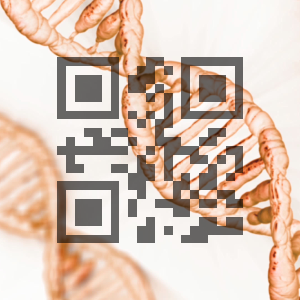
Create QR codes merged with images.
Installation
pip install prettyqr
Example usage
Take a background image:

And a URL or some other text:
foo.com
Combine them:
prettyqr --qr-opacity 150 --outfile img/dna-qr.png foo.com img/dna-orig.png
Command-line options
usage: prettyqr [-h] [--border BORDER] [--out-file OUT_FILE]
                [--qr-opacity QR_OPACITY] [--qr-red QR_RED]
                [--qr-green QR_GREEN] [--qr-blue QR_BLUE]
                DATA IMAGE-FILE

Make pretty QR codes.

positional arguments:
  DATA                  Data to encode (e.g., "http://example.com").
  IMAGE-FILE            Image file to composite (e.g., "lena.jpg").

optional arguments:
  -h, --help            show this help message and exit
  --border BORDER       Size of border (in multiples of QR module size).
                        Defaults to 4. Can be zero if the QR code is intended
                        for printing or use on a light background.
  --out-file OUT_FILE   Path to write composite image file to. Extension will
                        determine the output format. Defaults to
                        "prettyqr.png".
  --qr-opacity QR_OPACITY
                        Opacity of the QR code modules, between 0 (invisible)
                        and 255 (opaque). Default is 200.
  --qr-red QR_RED       Red element of the QR module color, between 0 and 255.
                        Default is 0.
  --qr-green QR_GREEN   Green element of the QR module color, between 0 and
                        255. Default is 0.
  --qr-blue QR_BLUE     Blue element of the QR module color, between 0 and
                        255. Default is 0.
Limitations
prettyqr is a fairly raw proof-of-concept, and currently has an assortment of limitations:
Only supports square images.
Only supports square QR modules.
Doesn’t support complex color changes in the source image.
It will work best with sources where the focus of the image is not central, and doesn’t handle black backgrounds very well.
All of these issues are fairly tractable; patches are welcome.
1 maintainer

Metadata
1 maintainer
Release files for prettyqr 0.0.2
For a detailed explanation of source distributions (sdists) and built distributions (wheels), please see the package formats documentation.
Source distribution (sdist)
| File | Size | Uploaded | |
|---|---|---|---|
| prettyqr-0.0.2.tar.gz | 4.1 kB | Details |
Release files / prettyqr-0.0.2.tar.gz
| Download URL | prettyqr-0.0.2.tar.gz |
|---|---|
| Size | 4.1 kB |
| Tags | Source |
|
SHA-256 checksum How to use checksums |
0e12b75a20e62eec0640fd0b7de7fd16198773910f761293d8b869c68bf6d7c8
|
|
BLAKE2b-256 checksum How to use checksums |
a99bbdf54f0e964d06cbbd40a07553df87a80d0100146f0f10ae295ae87ee393
|
| Upload date | |
|
Uploaded using Trusted Publishing? What is trusted publishing? |
No |














