


ProtCHOIR
This pipeline was devised to create homo-oligomeric structures based on selected subsets of the PDB databank.
With ProtCHOIR you can supply either a sequence in FASTA format or a protomeric structure in the PDB format to obtain homo-oligomeric models based on homologues.
Prerequisites
The following packages and external programs are used by ProtCHOIR scripts and must be installed and in either the binaries path or python path.
Python packages
progressbar2
pandas
biopython
pathlib
parasail
networkx
jinja2
numpy
matplotlib
External software (must be installed separately)
Note: PISA, GESAMT and MolProbity may be installed as part of the CCP4 Software Suite
Installation
The scripts are available as a PyPi project. Just install them with:
pip install ProtCHOIR
Initial Setup
If that is the first time you are running ProtCHOIR and you do not provide a configuration file (with –conf), the program will ask whether you desire the configuration file to be created. This configuration file simply has the paths to all the external software that are necessary.
The file also contains the path to a locally generated database (referred to as “choirdb”) in which it will look for possible homo-oligomeric proteins to serve as templates for modelling.
Make sure that the directory to which the choirdb variable is pointing actually exists.
The choirdb must be created locally and is a lengthy process whose total duration will depend on the processing capabilities of your machine. In the process, the whole pdb database will be downloaded, analysed and sorted in the expected directories.
Initial creation of the local database can be done with:
ProtCHOIR -v -u --conf conf_file
Subsequent updates will not re-download and re-analyse the whole PDB database, but only the new (or updated) entries.
Usage
After the initial database set-up, you may run the program normally via command line, by invoking the ProtCHOIR executable and providing an input file either in PDB or FASTA format.
ProtCHOIR -v -f protomer.pdb --conf conf_file
If no conf file is yet in place, ProtCHOIR will ask you whether you want a default one to be generated, just run:
ProtCHOIR
And then modify the generated configuration file to match your environment.
To generate a full html report with detailed model analysis as output, run the program with:
ProtCHOIR -v -f protomer.pdb --generate-report --conf conf_file
To expose all available runtime options, run:
ProtCHOIR -h
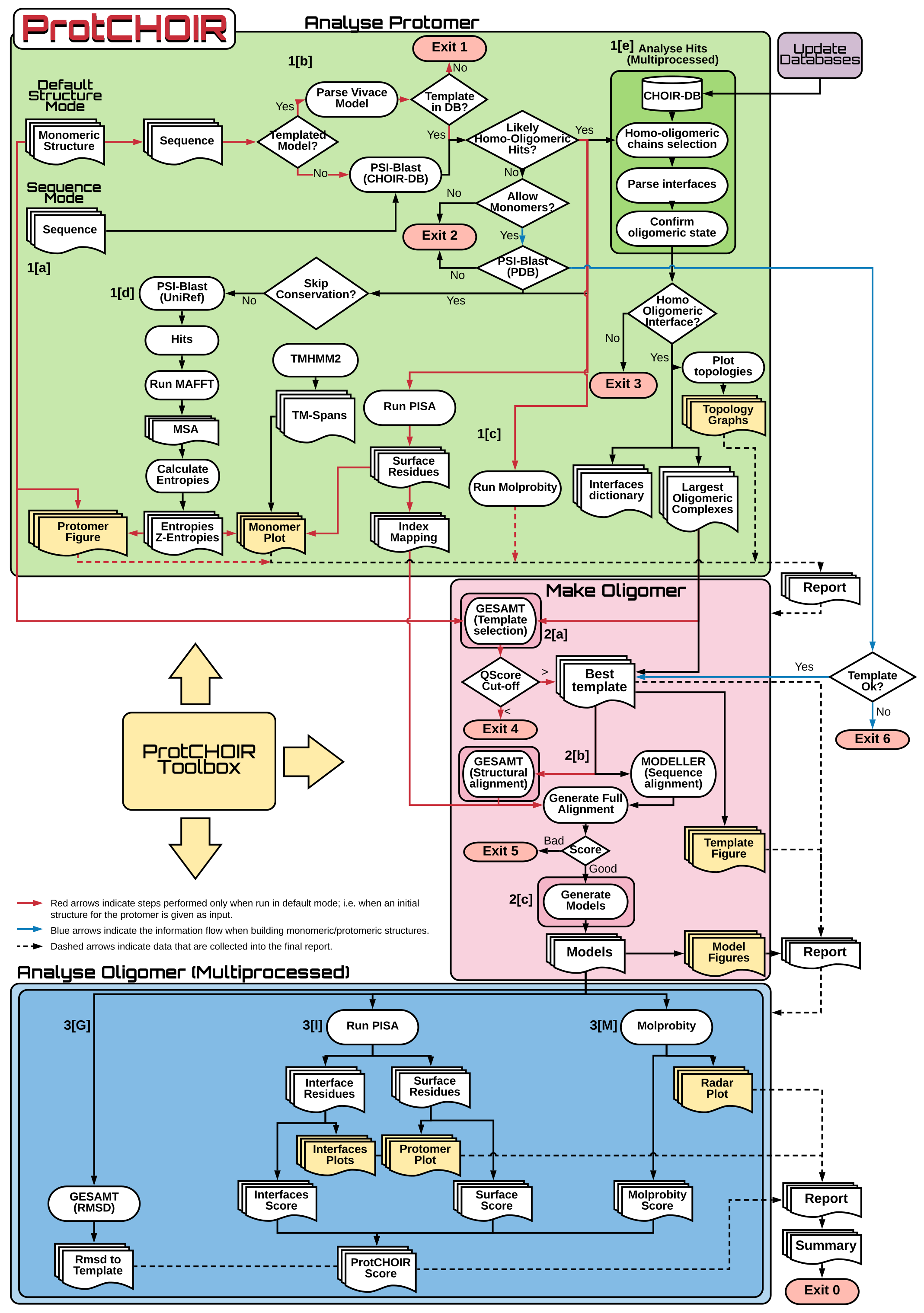
Methodology Flowchart
The image below summarizes the approach used by ProtCHOIR to build the homo-oligomeric proteins.
License
This project is licensed under Creative Commons license (CC-BY-4.0), provided along with the package - see LICENSE.

1 maintainer

Metadata
1 maintainer
Release files for ProtCHOIR 1.2.25
For a detailed explanation of source distributions (sdists) and built distributions (wheels), please see the package formats documentation.
Built distribution (wheel)
| File | Interpreter | ABI | Platform | Reset |
|---|---|---|---|---|
| ProtCHOIR-1.2.25-py3-none-any.whl | Python 3 | none | any | Details |
Release files / ProtCHOIR-1.2.25-py3-none-any.whl
| Download URL | ProtCHOIR-1.2.25-py3-none-any.whl |
|---|---|
| Size | 102.5 kB |
| Tags | Python 3 |
|
SHA-256 checksum How to use checksums |
7be8a9835089039a1ca956a1aeb95e19bbc8d906ffe8546060c31a70b3318b72
|
|
BLAKE2b-256 checksum How to use checksums |
9796034026a2b5fbf337d0dc01bcc2dc97641cf9e225ae39be11677fb24eabb4
|
| Upload date | |
|
Uploaded using Trusted Publishing? What is trusted publishing? |
No |
| Uploaded via |
twine/4.0.2 CPython/3.10.9
|














