
ptpython



A better Python REPL
pip install ptpython
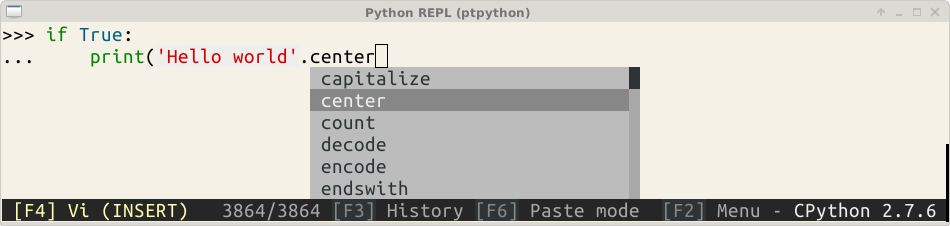
Ptpython is an advanced Python REPL. It should work on all Python versions from 2.6 up to 3.9 and work cross platform (Linux, BSD, OS X and Windows).
Note: this version of ptpython requires at least Python 3.6. Install ptpython 2.0.5 for older Python versions.
Installation
Install it using pip:
pip install ptpython
Start it by typing ptpython.
Features
Syntax highlighting.
Multiline editing (the up arrow works).
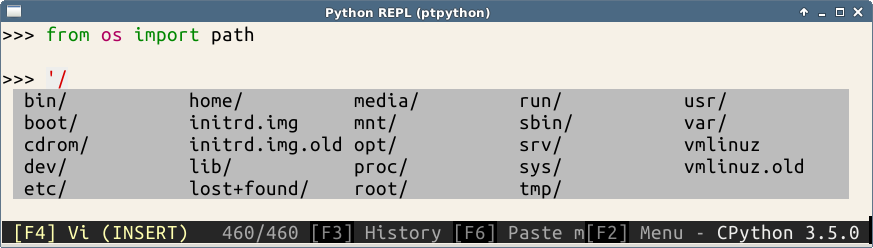
Autocompletion.
Mouse support. [1]
Support for color schemes.
Support for bracketed paste [2].
Both Vi and Emacs key bindings.
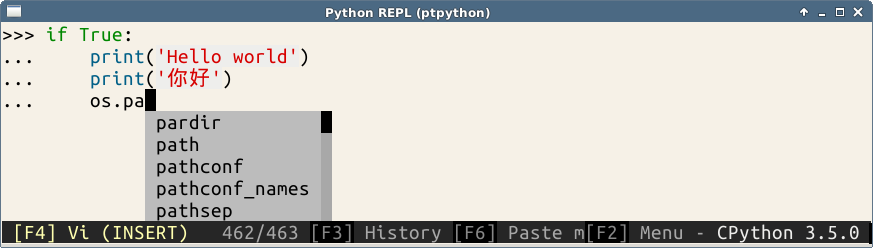
Support for double width (Chinese) characters.
… and many other things.
[1] Disabled by default. (Enable in the menu.)
[2] If the terminal supports it (most terminals do), this allows pasting without going into paste mode. It will keep the indentation.
__pt_repr__: A nicer repr with colors
When classes implement a __pt_repr__ method, this will be used instead of __repr__ for printing. Any prompt_toolkit “formatted text” can be returned from here. In order to avoid writing a __repr__ as well, the ptpython.utils.ptrepr_to_repr decorator can be applied. For instance:
from ptpython.utils import ptrepr_to_repr
from prompt_toolkit.formatted_text import HTML

@ptrepr_to_repr
class MyClass:
    def __pt_repr__(self):
        return HTML('<yellow>Hello world!</yellow>')
More screenshots
The configuration menu:

The history page and its help:

Autocompletion:
Embedding the REPL
Embedding the REPL in any Python application is easy:
from ptpython.repl import embed
embed(globals(), locals())
You can make ptpython your default Python REPL by creating a PYTHONSTARTUP file containing code like this:
import sys
try:
    from ptpython.repl import embed
except ImportError:
    print("ptpython is not available: falling back to standard prompt")
else:
    sys.exit(embed(globals(), locals()))
Multiline editing
Multi-line editing mode will automatically turn on when you press enter after a colon.
To execute the input in multi-line mode, you can either press Alt+Enter, or Esc followed by Enter. (If you want the first to work in the OS X terminal, you have to check the “Use option as meta key” checkbox in your terminal settings. For iTerm2, you have to check “Left option acts as +Esc” in the options.)
Syntax validation
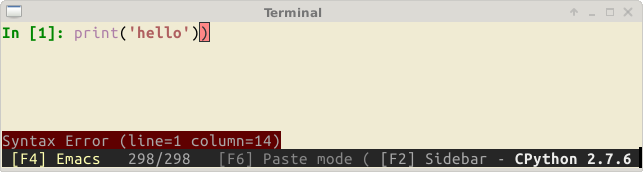
Before execution, ptpython will see whether the input is syntactically correct Python code. If not, it will show a warning, and move the cursor to the error.
Additional features
Running system commands: Press Meta-! in Emacs mode or just ! in Vi navigation mode to see the “Shell command” prompt. There you can enter system commands without leaving the REPL.
Selecting text: Press Control+Space in Emacs mode or V (major V) in Vi navigation mode.
Configuration
It is possible to create a config.py file to customize configuration. ptpython will look in an appropriate platform-specific directory via appdirs <https://pypi.org/project/appdirs/>. See the appdirs documentation for the precise location for your platform. A PTPYTHON_CONFIG_HOME environment variable, if set, can also be used to explicitly override where configuration is looked for.
Have a look at this example to see what is possible: config.py
IPython support
Run ptipython (prompt_toolkit - IPython), to get a nice interactive shell with all the power that IPython has to offer, like magic functions and shell integration. Make sure that IPython has been installed. (pip install ipython)
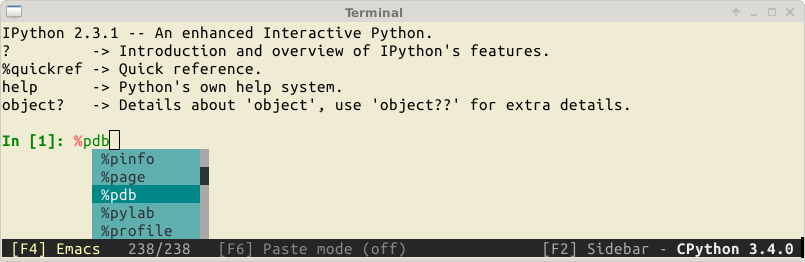
This is also available for embedding:
from ptpython.ipython.repl import embed
embed(globals(), locals())
Django support
django-extensions has a shell_plus management command. When ptpython has been installed, it will by default use ptpython or ptipython.
PDB
There is an experimental PDB replacement: ptpdb.
Windows support
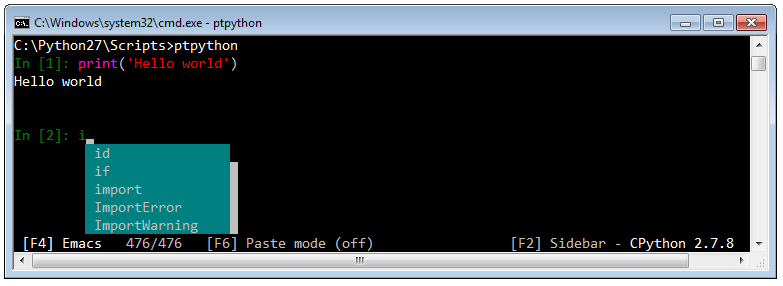
prompt_toolkit and ptpython works better on Linux and OS X than on Windows. Some things might not work, but it is usable:
FAQ
Q: The Ctrl-S forward search doesn’t work and freezes my terminal.
A: Try to run stty -ixon in your terminal to disable flow control.
Q: The Meta-key doesn’t work.
A: For some terminals you have to enable the Alt-key to act as meta key, but you can also type Escape before any key instead.
Alternatives
If you find another alternative, you can create an issue and we’ll list it here. If you find a nice feature somewhere that is missing in ptpython, also create a GitHub issue and maybe we’ll implement it.
Special thanks to
Pygments: Syntax highlighter.
Jedi: Autocompletion library.
wcwidth: Determine columns needed for a wide characters.
prompt_toolkit for the interface.
1 maintainer

Metadata
1 maintainer
Release files for ptpython 3.0.12
For a detailed explanation of source distributions (sdists) and built distributions (wheels), please see the package formats documentation.
Source distribution (sdist)
| File | Size | Uploaded | Provenance | Actions |
|---|---|---|---|---|
| ptpython-3.0.12.tar.gz | 60.8 kB | Without provenance | Details for ptpython-3.0.12.tar.gz |
Built distribution (wheel)
| File | Interpreter | ABI | Platform | Actions Reset |
|---|---|---|---|---|
| ptpython-3.0.12-py2.py3-none-any.whl | Python 3, Python 2 | none | any | Details for ptpython-3.0.12-py2.py3-none-any.whl |
Total release size: 117.4 kB
Release files / ptpython-3.0.12.tar.gz
| Download URL | ptpython-3.0.12.tar.gz |
|---|---|
| Size | 60.8 kB |
| Tags | Source |
|
SHA-256 checksum How to use checksums |
cb110955be0ad0eb197f3f07f5ecdce44bd7467b03d519f4cc2b856c4782bf5d
|
|
BLAKE2b-256 checksum How to use checksums |
ea10f241fc42493e54aa1ea2c54ce8f93c9fe22c7e6b755a679a40d3ba4b1b2d
|
| Upload date | |
|
Uploaded using Trusted Publishing? What is trusted publishing? |
No |
| Uploaded via |
twine/3.3.0 pkginfo/1.7.0 requests/2.25.1 setuptools/49.1.3 requests-toolbelt/0.9.1 tqdm/4.56.0 CPython/3.9.0
|
Release files / ptpython-3.0.12-py2.py3-none-any.whl
| Download URL | ptpython-3.0.12-py2.py3-none-any.whl |
|---|---|
| Size | 56.6 kB |
| Tags | Python 2 Python 3 |
|
SHA-256 checksum How to use checksums |
cb884f72448cf49c46675c7f34ff1a52aa27be9a712cbab620af6df7689ca066
|
|
BLAKE2b-256 checksum How to use checksums |
8a2b0ec701239afc5e49cd25496ce95cb8937e32436551af8a08fc2cb40a5a84
|
| Upload date | |
|
Uploaded using Trusted Publishing? What is trusted publishing? |
No |
| Uploaded via |
twine/3.3.0 pkginfo/1.7.0 requests/2.25.1 setuptools/49.1.3 requests-toolbelt/0.9.1 tqdm/4.56.0 CPython/3.9.0
|
Security for ptpython 3.0.12
Provenance
Provenance describes where a file came from. On PyPI, provenance is shared via attestations, which provide a verifiable record of the build or publishing details. View details, limitations and caveats.
No provenance found
None of the files in this release were uploaded with provenance metadata.
A note on package security
PyPI is a repository for distributing packages, not a service for auditing them. While third-party security researchers and our staff do their best to detect and remove malicious packages, PyPI cannot guarantee the quality, security or suitability of any given package.
To learn more about protecting yourself from malicious actors, visit our package security documentation.














