
ptwit: A Command-line Twitter Client
Introduction
ptwit is a simple command-line-based Twitter client.
Screenshots
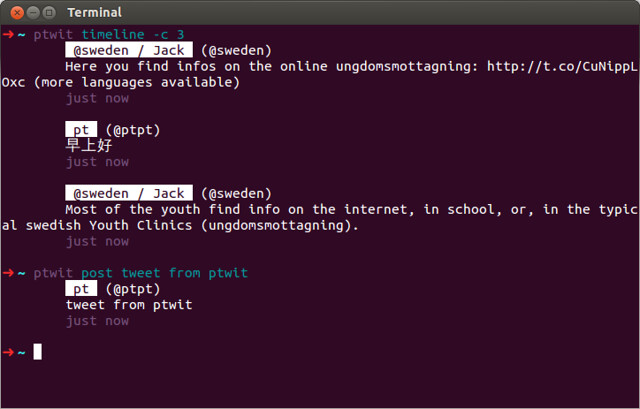
Requirements
A Twitter account
A Twitter application registered at https://dev.twitter.com/apps
Installation
To install ptwit, simply:
pip install ptwitUsage
Usage: ptwit.py [OPTIONS] COMMAND [ARGS]...

Options:
  -a, --account TEXT  Use this account instead of the default one.
  --text              Print entries as human-readable text.
  --json              Print entires as JSON objects.
  --help              Show this message and exit.

Commands:
  timeline*   List timeline.
  accounts    List all accounts.
  faves       List favourite tweets of a user.
  follow      Follow users.
  followers   List your followers.
  followings  List who you are following.
  login       Log into an account.
  mentions    List mentions.
  messages    List messages.
  pop         Edit or delete the latest tweet.
  post        Post a tweet.
  replies     List replies.
  search      Search Twitter.
  send        Send a message to a user.
  tweets      List user's tweets.
  unfollow    Unfollow users.
  whois       Show user profiles.
LICENSE
ptwit is under the MIT License. See LICENSE file for full license text.
1 maintainer

Metadata
1 maintainer
Release files for ptwit 0.2
For a detailed explanation of source distributions (sdists) and built distributions (wheels), please see the package formats documentation.
Source distribution (sdist)
| File | Size | Uploaded | |
|---|---|---|---|
| ptwit-0.2.tar.gz | 8.7 kB | Details |
Release files / ptwit-0.2.tar.gz
| Download URL | ptwit-0.2.tar.gz |
|---|---|
| Size | 8.7 kB |
| Tags | Source |
|
SHA-256 checksum How to use checksums |
ee388fe068145e9e88946e4485df235e0953a9824ab945b0cbdf2dd69fe56f94
|
|
BLAKE2b-256 checksum How to use checksums |
08e9b2d4ab7f1590d1ebb5c8a8f19704e5cb7ce8765398cf0dfec57a7ef3a10b
|
| Upload date | |
|
Uploaded using Trusted Publishing? What is trusted publishing? |
No |














