


PuDB is a full-screen, console-based visual debugger for Python.
Its goal is to provide all the niceties of modern GUI-based debuggers in a more lightweight and keyboard-friendly package. PuDB allows you to debug code right where you write and test it–in a terminal. If you’ve worked with the excellent (but nowadays ancient) DOS-based Turbo Pascal or C tools, PuDB’s UI might look familiar.
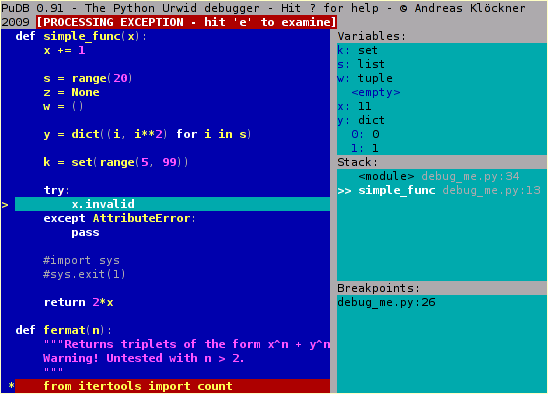
Here’s a screenshot:
You may watch a screencast, too.
Features
Syntax-highlighted source, the stack, breakpoints and variables are all visible at once and continuously updated. This helps you be more aware of what’s going on in your program. Variable displays can be expanded, collapsed and have various customization options.
Simple, keyboard-based navigation using single keystrokes makes debugging quick and easy. PuDB understands cursor-keys and Vi shortcuts for navigation. Other keys are inspired by the corresponding pdb commands.
Use search to find relevant source code, or use “m” to invoke the module browser that shows loaded modules, lets you load new ones and reload existing ones.
Breakpoints can be set just by pointing at a source line and hitting “b” and then edited visually in the breakpoints window. Or hit “t” to run to the line under the cursor.
Drop to a Python shell in the current environment by pressing “!”.
PuDB places special emphasis on exception handling. A post-mortem mode makes it easy to retrace a crashing program’s last steps.
IPython integration (see wiki)
Should work with Python 2.6 and newer, including Python 3.
Links
PuDB also has a mailing list that you may use to submit patches and requests for help. You can also send a pull request to the GitHub repository
Development Version
You may obtain the development version using the Git version control tool.:
git clone http://git.tiker.net/trees/pudb.git
You may also browse the code online.
The repository is also mirrored at GitHub.
1 maintainer

Metadata
1 maintainer
Release files for pudb 2018.1
For a detailed explanation of source distributions (sdists) and built distributions (wheels), please see the package formats documentation.
Source distribution (sdist)
| File | Size | Uploaded | Provenance | Actions |
|---|---|---|---|---|
| pudb-2018.1.tar.gz | 56.8 kB | Without provenance | Details for pudb-2018.1.tar.gz |
Release files / pudb-2018.1.tar.gz
| Download URL | pudb-2018.1.tar.gz |
|---|---|
| Size | 56.8 kB |
| Tags | Source |
|
SHA-256 checksum How to use checksums |
8d8b974641b7a7a2a721af01c9dce5eac8e05a2ceebc2680725ba8eef1ca876e
|
|
BLAKE2b-256 checksum How to use checksums |
d1e9d27fb1a5f00c722247b8003c9a81240e49c01dfa6f7fb510d19355a48679
|
| Upload date | |
|
Uploaded using Trusted Publishing? What is trusted publishing? |
No |
Security for pudb 2018.1
Provenance
Provenance describes where a file came from. On PyPI, provenance is shared via attestations, which provide a verifiable record of the build or publishing details. View details, limitations and caveats.
No provenance found
None of the files in this release were uploaded with provenance metadata.
A note on package security
PyPI is a repository for distributing packages, not a service for auditing them. While third-party security researchers and our staff do their best to detect and remove malicious packages, PyPI cannot guarantee the quality, security or suitability of any given package.
To learn more about protecting yourself from malicious actors, visit our package security documentation.














