
pulsemixer
CLI and curses mixer for PulseAudio
Requirements
Python>= 3.3PulseAudio>= 1.0
Installation
Pulsemixer is a self-sufficient single-file python app that doesn't require any extra libraries. You can simply download pulsemixer manually, do chmod +x ./pulsemixer and put it anywhere you want.
Below are some more convenient ways to install pulsemixer:
curl
curl https://raw.githubusercontent.com/GeorgeFilipkin/pulsemixer/master/pulsemixer > pulsemixer && chmod +x ./pulsemixer
pip
pip install pulsemixer
Interactive mode
Interactive mode is used if no arguments are given (except --color and --server)
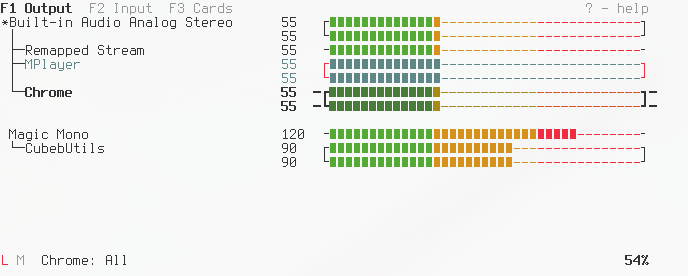
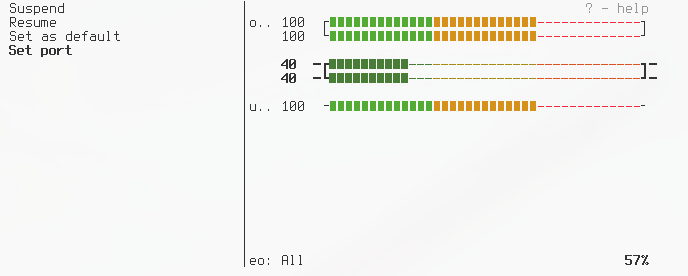
Interactive controls:
 j k   ↑ ↓               Navigation
 h l   ← →               Change volume
 H L   Shift←  Shift→    Change volume by 10
 1 2 3 .. 8 9 0          Set volume to 10%-100%
 m                       Mute/Unmute
 Space                   Lock/Unlock channels
 Enter                   Context menu
 F1 F2 F3                Change modes
 Tab   Shift Tab         Next/Previous mode
 Mouse click             Select device or mode
 Mouse wheel             Volume change
 Esc q                   Quit
Via context menu it is possible to set-default-sink, set-default-source, move-sink-input, move-source-output, suspend-sink, suspend-source, set-sink-port, set-source-port, kill-client, kill-sink-input, kill-source-output, set-card-profile. See man pactl for details on these features.
CLI
Usage of pulsemixer:
  -h, --help            show this help message and exit
  -v, --version         print version
  -l, --list            list everything
  --list-sources        list sources
  --list-sinks          list sinks
  --id ID               specify ID, default sink is used if no ID specified
  --get-volume          get volume for ID
  --set-volume n        set volume for ID
  --set-volume-all n:n  set volume for ID, for every channel
  --change-volume +-n   change volume for ID
  --max-volume n        set volume to n if volume is higher than n
  --get-mute            get mute for ID
  --mute                mute ID
  --unmute              unmute ID
  --toggle-mute         toggle mute for ID
  --server              choose the server to connect to
  --color n             0 no color, 1 color currently selected, 2 full-color
  --no-mouse            disable mouse support
  --create-config       generate configuration file
CLI examples
Pulsemixer follows PulseAudio's terminology:
- Sink - an output device.
- Source - an input device.
- Sink input - a stream that is connected to an output device, i.e. an input for a sink.
- Source output - a stream that is connected to an input device, i.e. an output of a source.
$ pulsemixer --list
Sink:          ID: sink-1, Name: Built-in Stereo, Mute: 0, Channels: 2, Volumes: ['60%', '60%'], Default
Sink:          ID: sink-3, Name: HDMI Audio (HDMI 2), Mute: 0, Channels: 2, Volumes: ['50%', '50%']
Sink input:    ID: sink-input-663, Name: Firefox, Mute: 0, Channels: 2, Volumes: ['60%', '60%']
Sink input:    ID: sink-input-686, Name: mocp, Mute: 0, Channels: 2, Volumes: ['60%', '60%']
Source:        ID: source-1, Name: HDMI Audio (HDMI 2), Mute: 0, Channels: 2, Volumes: ['100%', '100%']
Source:        ID: source-2, Name: Built-in Stereo, Mute: 0, Channels: 2, Volumes: ['40%', '40%'], Default
Source output: ID: source-output-7, Name: arecord, Mute: 0, Channels: 1, Volumes: ['40%]
Print volume of the default sink, decrease by 5, print new volume:
$ pulsemixer --get-volume --change-volume -5 --get-volume
60 60
55 55
Toggle mute of source-1, print mute status:
$ pulsemixer --id source-1 --toggle-mute --get-mute
1
Set volume of sink-input-663 to 50, then set volume of sink-3 to 10 (left channel) and 30 (right channel):
$ pulsemixer --id sink-input-663 --set-volume 50 --id sink-3 --set-volume-all 10:30
Increase volume of sink-input-686 by 10 but don't get past 100:
$ pulsemixer --id sink-input-686 --change-volume +10 --max-volume 100
Configuration
Optional.
The config file will not be created automatically. Do pulsemixer --create-config or copy-paste it from here.
;; Goes into ~/.config/pulsemixer.cfg, $XDG_CONFIG_HOME respected
;; Everything that starts with "#" or ";" is a comment
;; For the option to take effect simply uncomment it

[general]
step = 1
step-big = 10
; server =

[keys]
;; To bind "special keys" such as arrows see "Key constant" table in
;; https://docs.python.org/3/library/curses.html#constants
; up        = k, KEY_UP, KEY_PPAGE
; down      = j, KEY_DOWN, KEY_NPAGE
; left      = h, KEY_LEFT
; right     = l, KEY_RIGHT
; left-big  = H, KEY_SLEFT
; right-big = L, KEY_SRIGHT
; top       = g, KEY_HOME
; bottom    = G, KEY_END
; mode1     = KEY_F1
; mode2     = KEY_F2
; mode3     = KEY_F3
; next-mode = KEY_TAB
; prev-mode = KEY_BTAB
; mute      = m
; lock      = ' '  ; 'space', quotes are stripped
; quit      = q, KEY_ESC

[ui]
; hide-unavailable-profiles = no
; hide-unavailable-ports = no
; color = 2    ; same as --color, 0 no color, 1 color currently selected, 2 full-color
; mouse = yes

[style]
;; Pulsemixer will use these characters to draw interface
;; Single characters only
; bar-top-left       = ┌
; bar-left-mono      = ╶
; bar-top-right      = ┐
; bar-right-mono     = ╴
; bar-bottom-left    = └
; bar-bottom-right   = ┘
; bar-on             = ▮
; bar-on-muted       = ▯
; bar-off            = -
; arrow              = ' '
; arrow-focused      = ─
; arrow-locked       = ─
; default-stream     = *
; info-locked        = L
; info-unlocked      = U
; info-muted         = M  ; 🔇
; info-unmuted       = M  ; 🔉

[renames]
;; Changes stream names in interactive mode, regular expression are supported
;; https://docs.python.org/3/library/re.html#regular-expression-syntax
; 'default name example' = 'new name'
; '(?i)built-in .* audio' = 'Audio Controller'
; 'AudioIPC Server' = 'Firefox'
The old environment variable PULSEMIXER_BAR_STYLE is still supported.
To change the volume bar's appearance in (e.g.) zsh without creating the config file:
export PULSEMIXER_BAR_STYLE="╭╶╮╴╰╯◆◇· ──"
See also
python-pulse-control - Python high-level interface and ctypes-based bindings for PulseAudio.
1 maintainer

Metadata
1 maintainer
Release files for pulsemixer 1.5.1
For a detailed explanation of source distributions (sdists) and built distributions (wheels), please see the package formats documentation.
Source distribution (sdist)
| File | Size | Uploaded | Provenance | Actions |
|---|---|---|---|---|
| pulsemixer-1.5.1.tar.gz | 23.0 kB | Without provenance | Details for pulsemixer-1.5.1.tar.gz |
Built distribution (wheel)
| File | Interpreter | ABI | Platform | Actions Reset |
|---|---|---|---|---|
| pulsemixer-1.5.1-py3-none-any.whl | Python 3 | none | any | Details for pulsemixer-1.5.1-py3-none-any.whl |
Total release size: 45.1 kB
Release files / pulsemixer-1.5.1.tar.gz
| Download URL | pulsemixer-1.5.1.tar.gz |
|---|---|
| Size | 23.0 kB |
| Tags | Source |
|
SHA-256 checksum How to use checksums |
11dad404a3a658d5741169194e438177061ee6e4fcb9b0ed2c9c248caacdadd5
|
|
BLAKE2b-256 checksum How to use checksums |
2e0dc29d2f97691b85e7b59dc66f3fdced0df2e581b73220a89cfe881d743b4b
|
| Upload date | |
|
Uploaded using Trusted Publishing? What is trusted publishing? |
No |
| Uploaded via |
twine/3.1.1 pkginfo/1.5.0.1 requests/2.21.0 setuptools/46.1.3 requests-toolbelt/0.9.1 tqdm/4.40.0 CPython/3.7.3
|
Release files / pulsemixer-1.5.1-py3-none-any.whl
| Download URL | pulsemixer-1.5.1-py3-none-any.whl |
|---|---|
| Size | 22.2 kB |
| Tags | Python 3 |
|
SHA-256 checksum How to use checksums |
5537b5f52717325ebc5358a95db965bbc2c1ae1e4e240c25e2d920acf8e0e160
|
|
BLAKE2b-256 checksum How to use checksums |
7044c52c47954e43dd70b226c552553b8788262b2a82741a9a3ae778a588173a
|
| Upload date | |
|
Uploaded using Trusted Publishing? What is trusted publishing? |
No |
| Uploaded via |
twine/3.1.1 pkginfo/1.5.0.1 requests/2.21.0 setuptools/46.1.3 requests-toolbelt/0.9.1 tqdm/4.40.0 CPython/3.7.3
|
Security for pulsemixer 1.5.1
Provenance
Provenance describes where a file came from. On PyPI, provenance is shared via attestations, which provide a verifiable record of the build or publishing details. View details, limitations and caveats.
No provenance found
None of the files in this release were uploaded with provenance metadata.
A note on package security
PyPI is a repository for distributing packages, not a service for auditing them. While third-party security researchers and our staff do their best to detect and remove malicious packages, PyPI cannot guarantee the quality, security or suitability of any given package.
To learn more about protecting yourself from malicious actors, visit our package security documentation.














