



A python library and CLI for the LanguageTool JSON API.
LanguageTool is an open source spellchecking platform. It supports a large variety of languages and has advanced grammar support.
Installation
pyLanguagetool can be installed with pip/pipenv:
pip install pylanguagetool
# or via pipenv
pipenv install pylanguagetool
Basic Usage
# pipe text to pylanguagetool
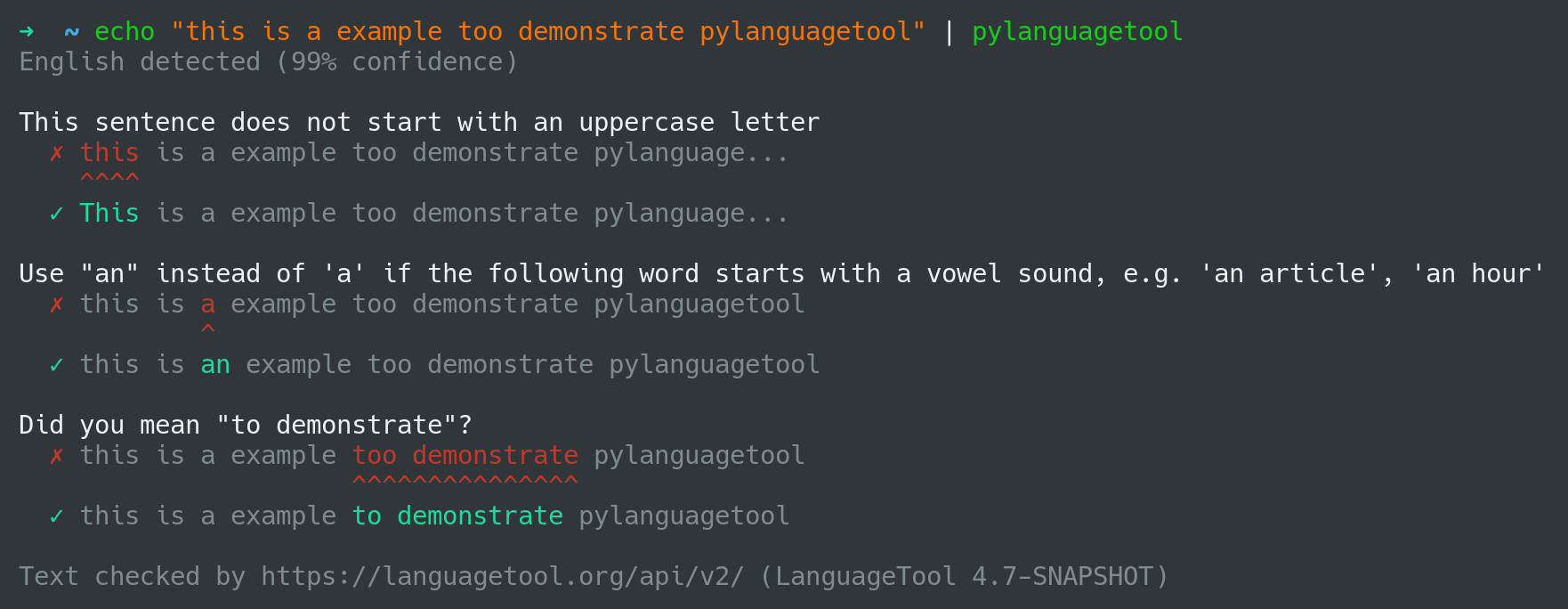
echo "This is a example" | pylanguagetool

# read text from a file
pylanguagetool textfile.txt

# read text from stdin
pylanguagetool < textfile.txt

# read text from the systems clipboard
pylanguagetool -c # get text from system clipboard
All samples above will return a list of detected errors and possible replacements.
# Use "an" instead of 'a' if the following word starts with a vowel sound, e.g. 'an article', 'an hour'
#   ✗ This is a example
#             ^
#   ✓ This is an example
Configuration
All LanguageTool API parameters can be set via command line arguments, environment variables or a configuration file (~/.config/pyLanguagetool.conf) For more information about the configuration file syntax, read the ConfigArgParse documentation.
Privacy
By default, pyLanguagetool sends all text via HTTPS to the LanguageTool server (see their privacy policy). You can also set up your own server and use it by changing the --api-url attribute.
Parameters
$ pylanguagetool --help
usage: pylanguagetool [-h] [-V] [-v] [-a API_URL] [--no-color] [-c] [-s]
                      [-t {txt,html,md,markdown,rst,ipynb,json,xliff}] [-u]
                      [-r] [--rule-categories] [-l LANG] [-m MOTHER_TONGUE]
                      [-p PREFERRED_VARIANTS] [-e ENABLED_RULES]
                      [-d DISABLED_RULES]
                      [--enabled-categories ENABLED_CATEGORIES]
                      [--disabled-categories DISABLED_CATEGORIES]
                      [--enabled-only] [--picky] [-U USERNAME] [-P API_KEY]
                      [--pwl PWL]
                      [input files ...]

positional arguments:
  input files           input file(s)

options:
  -h, --help            show this help message and exit
  -V, --version         print version and exit
  -v, --verbose         verbose output [env var: VERBOSE]
  -a, --api-url API_URL
                        the URL of the v2 languagetool API, should end with
                        '/v2/' [env var: API_URL]
  --no-color            don't color output [env var: NO_COLOR]
  -c, --clipboard       get text from system clipboard [env var: CLIPBOARD]
  -s, --single-line     check every line on its own [env var: SINGLE_LINE]
  -t, --input-type {txt,html,md,markdown,rst,ipynb,json,xliff}
                        if not plaintext [env var: INPUT_TYPE]
  -u, --explain-rule    print URLs with more information about rules [env var:
                        EXPLAIN_RULE]
  -r, --rules           show the matching rules [env var: RULES]
  --rule-categories     show the the categories of the matching rules [env
                        var: RULE_CATEGORIES]
  -l, --lang LANG       A language code like en or en-US, or auto to guess the
                        language automatically (see preferredVariants below).
                        For languages with variants (English, German,
                        Portuguese) spell checking will only be activated when
                        you specify the variant, e.g. en-GB instead of just
                        en. [env var: TEXTLANG]
  -m, --mother-tongue MOTHER_TONGUE
                        A language code of the user's native language,
                        enabling false friends checks for some language pairs.
                        [env var: MOTHER__TONGUE]
  -p, --preferred-variants PREFERRED_VARIANTS
                        Comma-separated list of preferred language variants.
                        The language detector used with language=auto can
                        detect e.g. English, but it cannot decide whether
                        British English or American English is used. Thus this
                        parameter can be used to specify the preferred
                        variants like en-GB and de-AT. Only available with
                        language=auto. [env var: PREFERRED_VARIANTS]
  -e, --enabled-rules ENABLED_RULES
                        IDs of rules to be enabled, comma-separated [env var:
                        ENABLED_RULES]
  -d, --disabled-rules DISABLED_RULES
                        IDs of rules to be disabled, comma-separated [env var:
                        DISABLED_RULES]
  --enabled-categories ENABLED_CATEGORIES
                        IDs of categories to be enabled, comma-separated [env
                        var: ENABLED_CATEGORIES]
  --disabled-categories DISABLED_CATEGORIES
                        IDs of categories to be disabled, comma-separated [env
                        var: DISABLED_CATEGORIES]
  --enabled-only        enable only the rules and categories whose IDs are
                        specified with --enabled-rules or --enabled-categories
  --picky               if enabled, additional rules will be activated
  -U, --username USERNAME
                        For languagetool.org Premium API. Your username/email
                        as used to log in at languagetool.org [env var:
                        USERNAME]
  -P, --api-key API_KEY
                    For languagetool.org Premium API. [env var: API_KEY]
  --pwl, --personal-word-list PWL
                        File name of personal dictionary. A private dictionary
                        can be used to add special words that would otherwise
                        be marked as spelling errors. [env var:
                        PERSONAL_WORD_LIST]

Args that start with '--' can also be set in a config file
(~/.config/pyLanguagetool.conf). Config file syntax allows: key=value,
flag=true, stuff=[a,b,c] (for details, see syntax at
https://pypi.org/project/ConfigArgParse/). In general, command-line values
override environment variables which override config file values which
override defaults.1 maintainer

Release files for pyLanguagetool 0.11.0
For a detailed explanation of source distributions (sdists) and built distributions (wheels), please see the package formats documentation.
Source distribution (sdist)
| File | Size | Uploaded | |
|---|---|---|---|
| pylanguagetool-0.11.0.tar.gz | 14.0 kB | Details |
Built distribution (wheel)
| File | Interpreter | ABI | Platform | Reset |
|---|---|---|---|---|
| pylanguagetool-0.11.0-py3-none-any.whl | Python 3 | none | any | Details |
Total release size: 27.4 kB
Release files / pylanguagetool-0.11.0.tar.gz
| Download URL | pylanguagetool-0.11.0.tar.gz |
|---|---|
| Size | 14.0 kB |
| Tags | Source |
|
SHA-256 checksum How to use checksums |
e17cedd7454e0d6c11dab5ee9b1ff5be21cefb4846c3cf6560ad0767d1d1ad38
|
|
BLAKE2b-256 checksum How to use checksums |
189feee81d70fbe3721e76ba4c4a9d66dd721fc29ff95054b9fcaf055fd42749
|
| Upload date | |
|
Uploaded using Trusted Publishing? What is trusted publishing? |
No |
| Uploaded via |
poetry/2.1.1 CPython/3.13.2 Linux/6.12.17-amd64
|
Release files / pylanguagetool-0.11.0-py3-none-any.whl
| Download URL | pylanguagetool-0.11.0-py3-none-any.whl |
|---|---|
| Size | 13.4 kB |
| Tags | Python 3 |
|
SHA-256 checksum How to use checksums |
0b0aa5179e878e63940790731310f06f88314c9ca4d037ab6480c4c1a34acd1a
|
|
BLAKE2b-256 checksum How to use checksums |
4fbd0506dad57b4a8f64e8d8071c76da83340a8c74601cfe32cbe9917aeb2dcb
|
| Upload date | |
|
Uploaded using Trusted Publishing? What is trusted publishing? |
No |
| Uploaded via |
poetry/2.1.1 CPython/3.13.2 Linux/6.12.17-amd64
|














