
Webcam WebControl panel build with flask & vue to record / see live and other things designed for linux.

Project description
PyWebCamWebMonitor
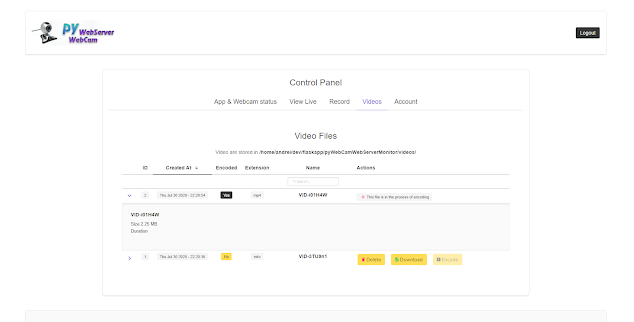
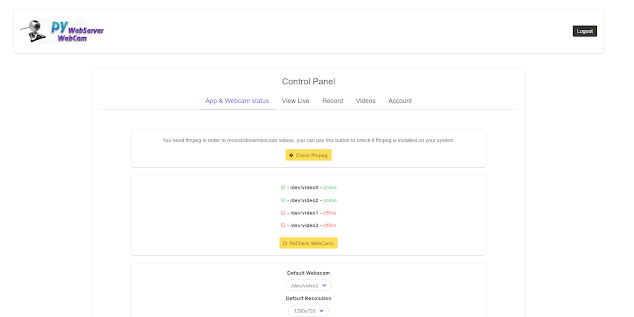
This is an app made in Flask and Vue that can help you control your webcams from a web panel, you can see the webcams installed, view them live, setting video resolution, record videos either encoded or unencoded and stream the video( see the video and recording the video in the same time), download recording and view recordings of encoded videos.
Requirments
- A Linux Distribution
- FFmpeg program installed( it's available in most distros, example Ubuntu
apt-get install ffmpeg) - Some python packages
- python > 3.6
If you install this app using pip the python packages should be installed automatically.
These packages are included in the requirements.txt of the git repo
Installing the app
Method 1 using pip
run either
pip3 install pyWebCamWebServerMonitor
Method 2 using git clone
git clone https://gitlab.flashsoft.eu/python/flask-pyWebCamWebMonitor
then you can install using the setup.py:
cd flask-pyWebCamWebMonitor
python3 setup install
or
pip3 -r requirements.txt
Installing notes
The app should work both under a normal Linux user or root, if you want to install it under root you should use sudo on the install commands( pip3 install or python3 setup install)
If you install under normal user be sure that the python bin files are in your environment path, this can be done by adding this in your .profile file:
# set PATH so it includes user's private bin if it exists
if [ -d "$HOME/.local/bin" ] ; then
    PATH="$HOME/.local/bin:$PATH"
fi
Using the App
After installing it, if you installed using pip or setup.py you can use the command pyWebCamMonitorCtl provided by the package to either start/stop the app by using pyWebCamMonitorCtl start - pyWebCamMonitorCtl stop or you can use pyWebCamMonitorCtl install-service(with admin rights) to install the app as a service.
Using the pyWebCamMonitorCtl with no command will print the help of the tool with all possible configurations.
By default the app will be listening on http://0.0.0.0:6345, you can change the port and the listening IP ( either 127.0.0.1 or 0.0.0.0 ) by using pyWebCamMonitorCtl
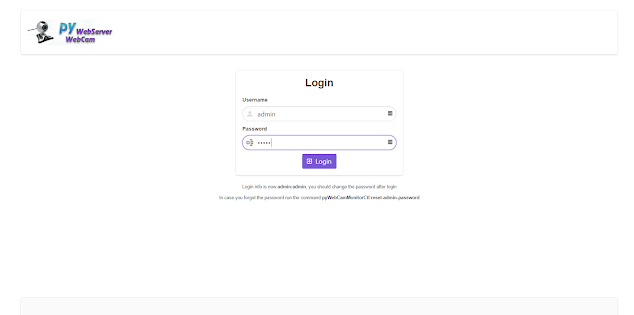
The web login user and password are admin:admin you can change them after you logged in. Settings and the admin user are stored in an SQLite database, in case of database corruption, the database will be recreated using the default user and settings, if admin user has the default password, a notification will be shown at the login screen, to let you know you should change the password.
If you installed using the git command you can run the cmds.py file which is the file that implements the pyWebCamMonitorCtl so you can control the app as with pyWebCamMonitorCtl the cmds.py is located outside of the main python package, in the root of the git repo.
Important Notes
This app was designed in mind to work on small Linux devices that don't have much CPU power, so you can use an orange pi, or Raspberry pi or any low-end Linux device as a controller for your webcam.
That's why it is recommended to record only in unencoded mode with a small frame rate ( 10-20 ) to require the least possible CPU power.
On small devices having the CPU at 100% for a long period can freeze your OS due to temperature safety measures.
Also, unencoded videos aren't yet supported by web browsers but they can be seen in programs like VLC and you can use VLC to encode them, using this app to encode a video will also use a lot of CPU if your device is the low end/embedded.
If your device is mid-end it should support all functions without consuming much CPU.
Some Screenshots
Release history Release notifications | RSS feed


Download files
Download the file for your platform. If you're not sure which to choose, learn more about installing packages.
Source Distribution
Built Distribution
Filter files by name, interpreter, ABI, and platform.
If you're not sure about the file name format, learn more about wheel file names.
Copy a direct link to the current filters
File details
Details for the file pyWebCamWebServerMonitor-0.0.14.tar.gz.
File metadata
- Download URL: pyWebCamWebServerMonitor-0.0.14.tar.gz
- Upload date:
- Size: 3.5 MB
- Tags: Source
- Uploaded using Trusted Publishing? No
- Uploaded via: twine/3.2.0 pkginfo/1.5.0.1 requests/2.22.0 setuptools/49.2.0 requests-toolbelt/0.9.1 tqdm/4.48.0 CPython/3.8.2
File hashes
| Algorithm | Hash digest | |
|---|---|---|
| SHA256 |
416271e27b0300fbf0925a859a988ff6a8a55f2631ab915c5aafb09483b36e86
|
|
| MD5 |
c9fa61ac134257a32b60940a797aea56
|
|
| BLAKE2b-256 |
b3f56927734a1f9a01d86e9d752ce856541c132bb81771f25a3f52367bc01073
|
File details
Details for the file pyWebCamWebServerMonitor-0.0.14-py3-none-any.whl.
File metadata
- Download URL: pyWebCamWebServerMonitor-0.0.14-py3-none-any.whl
- Upload date:
- Size: 3.5 MB
- Tags: Python 3
- Uploaded using Trusted Publishing? No
- Uploaded via: twine/3.2.0 pkginfo/1.5.0.1 requests/2.22.0 setuptools/49.2.0 requests-toolbelt/0.9.1 tqdm/4.48.0 CPython/3.8.2
File hashes
| Algorithm | Hash digest | |
|---|---|---|
| SHA256 |
ec123d67c133f64656dd4d52a5b969474a3ff72fbdae58ebc749515f2569cb5d
|
|
| MD5 |
571eb22e824c08c87a5e066ae8e1e17e
|
|
| BLAKE2b-256 |
39aabd6769b743b8aa6da4438ee76abae004a4c73f0f0fc3cb13d8dfc171cc98
|






