
A Python 3 library for programmatically accessing Anova WiFi-enabled sous vide cookers through the Anova API.

Project description
pyanova-api
A Python 3 library for programmatically accessing WiFi-enabled Anova sous vide cookers through the Anova API.
NOTE: This library uses the Anova REST API and has been tested with the Anova Precision Cooker Pro. Make sure your Anova cooker supports WiFi and is already connected. pyanova-api does not support communication over Bluetooth.
Installation
pyanova-api can be installed from either PyPi or can be installed manually by cloning the GitHub repository.
TL;DR installation
pip install pyanova-api
Manual installation
First, clone the GitHub repository:
git clone https://github.com/ammarzuberi/pyanova-api.git
Enter the newly created pyanova-api directory and run:
pip install .
This should install pyanova-api on your system. You can use it in your own Python scripts like so:
import anova
Cooker ID
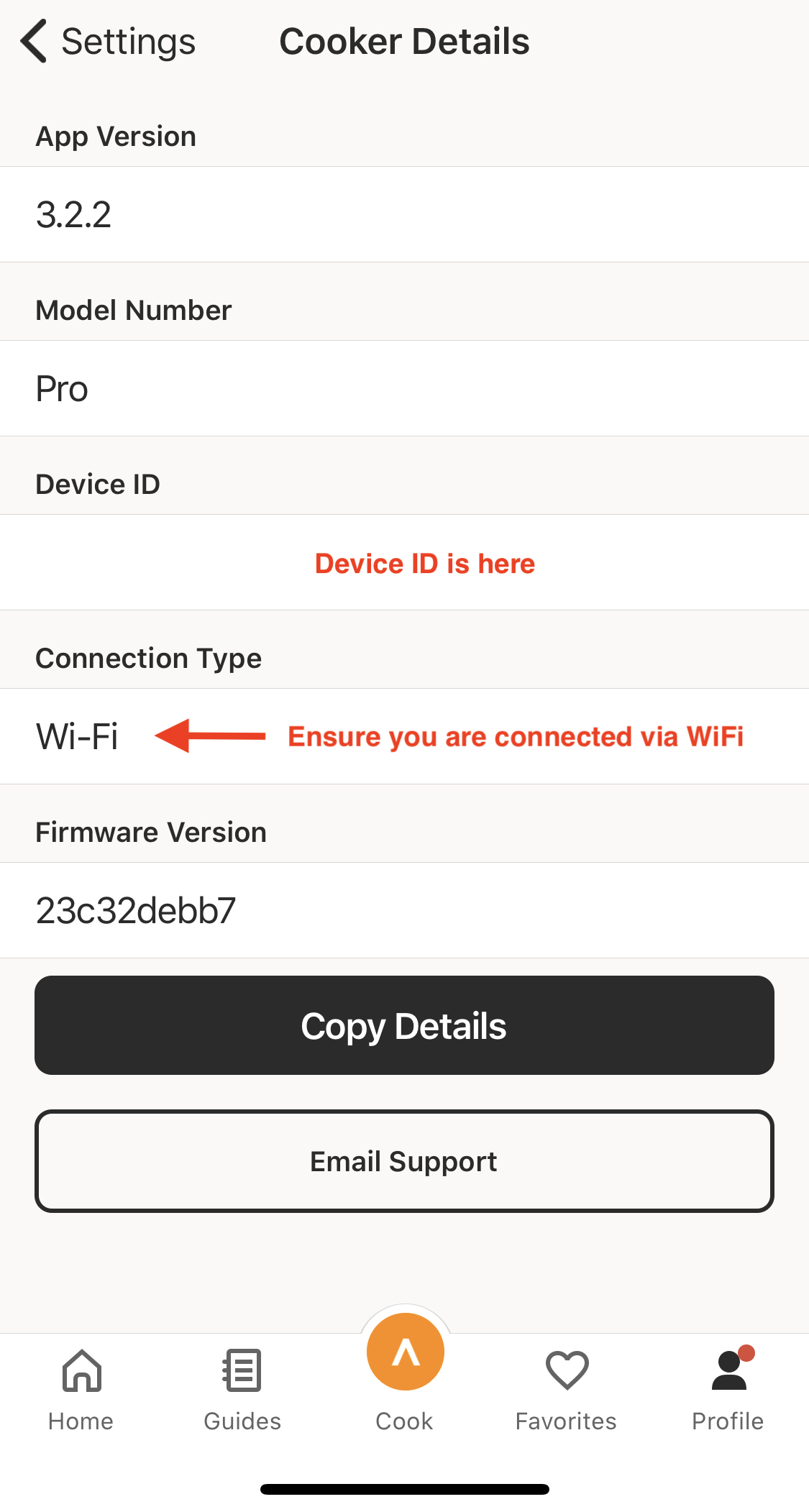
You will need your cooker ID to use pyanova-api. This can be easily found in the Anova app when your cooker is connected to WiFi.
On the profile page, click the settings button (top right of the page, cog icon) and choose "Cooker Details."
Usage
To get started, first import the AnovaCooker class from anova.
Initializing
from anova import AnovaCooker
cooker = AnovaCooker('your device ID goes here')
The code above initializes the cooker into the cooker variable. Simply initializing the cooker object with cooker state does not require authentication with the Anova API, and as such can be used to obtain information about any cooker as long as you have the cooker ID.
Setting cooker state
There are four state variables that can be modified and pushed to the cooker:
- Cooker on/off (
bool) - Cook time (in seconds,
int) - Target temperature (in Celcius,
float) - Temperature display unit (
CorF)
Before setting the cooker state, you must authenticate with the Anova API. In the current version of pyanova-api, only email/password authentication is supported. You can authenticate yourself in pyanova-api like so:
cooker.authenticate('your email address goes here', 'your password goes here')
Once you're authenticated, starting a new cook that will last 2 hours at 55 degrees Celcius will look like this:
cooker.cook = True
cooker.cook_time = 60 * 60 * 2 # 2 hours in seconds
cooker.target_temp = 55.0

cooker.save()
The cooker.save() method calls the Anova API and starts the cook.
The cooker's display unit is the unit used to display temperature in the Anova app and on the cooker itself. This can be changed like so:
cooker.temp_display_unit = 'F'
cooker.save()
NOTE: The target temperature is always in Celcius. Changing the display temperature does not change this.
Getting cooker state
In addition to the four state variables that can be modified, there are multiple other state variables that can be accessed via the API but are read-only.
Before checking the values of state variables, always make sure they are the most current by calling cooker.update_state(). Calling update_state() after modifying one of the mutable variables but before calling save() will cause the changes to be overwritten with the values from the API.
All the available state variables are:
| Variable | Type | Description |
|---|---|---|
job_status |
str | The status of the current job, for example, PREHEATING. |
job_time_remaining |
int | The number of seconds remaining in the job. |
heater_duty_cycle |
float | The heater's percentage duty cycle. |
motor_duty_cycle |
float | The motor's percentage duty cycle. |
wifi_connected |
bool | The cooker's WiFi connection status. |
wifi_ssid |
str | The SSID of the network the cooker is connected to. |
device_safe |
bool | Is the device is safe to operate? |
water_leak |
bool | Is there a water leak? |
water_level_critical |
bool | Is the water level too low for operation? |
water_level_low |
bool | Is the water level low? |
heater_temp |
float | The heater's temperature in Celcius. |
triac_temp |
float | The triac's (like a relay) temperature in Celcius. |
water_temp |
float | The water's temperature in Celcius. |
These state variables can be accessed like so:
cooker.update_state()

wifi_ssid = cooker.wifi_ssid
water_temp = cooker.water_temp
Release history Release notifications | RSS feed

Download files
Download the file for your platform. If you're not sure which to choose, learn more about installing packages.
Source Distribution
Built Distribution
Filter files by name, interpreter, ABI, and platform.
If you're not sure about the file name format, learn more about wheel file names.
Copy a direct link to the current filters
File details
Details for the file pyanova-api-0.0.1.tar.gz.
File metadata
- Download URL: pyanova-api-0.0.1.tar.gz
- Upload date:
- Size: 4.8 kB
- Tags: Source
- Uploaded using Trusted Publishing? No
- Uploaded via: twine/3.1.1 pkginfo/1.5.0.1 requests/2.21.0 setuptools/41.0.1 requests-toolbelt/0.9.1 tqdm/4.41.0 CPython/3.7.4
File hashes
| Algorithm | Hash digest | |
|---|---|---|
| SHA256 |
69b15739c7233f18658171cf5ace30ddc4db9c367233053ce7f8ddf15f5d2ee3
|
|
| MD5 |
48788936aa5c40c2100de12418892e8b
|
|
| BLAKE2b-256 |
fed25563181df7db4b289088156554d35ab90a112c8ab64724eae30fbad06994
|
File details
Details for the file pyanova_api-0.0.1-py3-none-any.whl.
File metadata
- Download URL: pyanova_api-0.0.1-py3-none-any.whl
- Upload date:
- Size: 5.9 kB
- Tags: Python 3
- Uploaded using Trusted Publishing? No
- Uploaded via: twine/3.1.1 pkginfo/1.5.0.1 requests/2.21.0 setuptools/41.0.1 requests-toolbelt/0.9.1 tqdm/4.41.0 CPython/3.7.4
File hashes
| Algorithm | Hash digest | |
|---|---|---|
| SHA256 |
1d4f3a629cd43f9453c20a4a21e7739f4ef0f4588a6776540e5544d6720f5280
|
|
| MD5 |
902a26f5b96a02e7d54b29d25ad19e61
|
|
| BLAKE2b-256 |
5613d96c746f13428042a164482849eebb6a663a39ba97b196e64c2a68207200
|






