
pybart



Real time BART (Bay Area Rapid Transit) information in your terminal!
Features
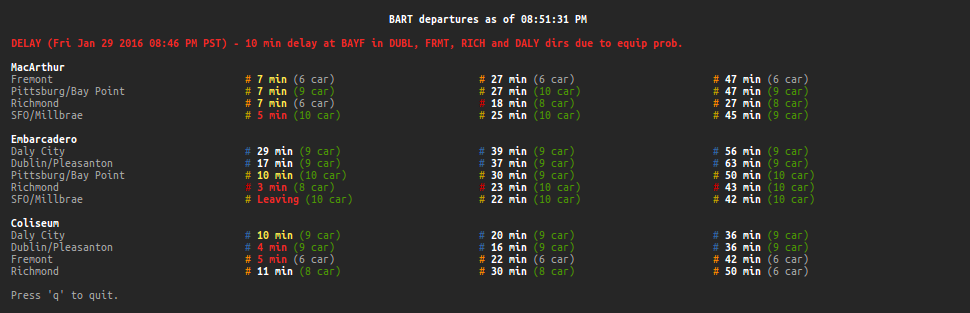
Real time estimates and service advisories
Curses-based TUI with auto-refreshing and resizing
View multiple stations at the same time
Colors indicating transit lines, estimate times, and train lengths
Ability to configure a default set of stations
Other non-TUI commands like opening a map and getting the fare for a trip
Includes a low-level Python wrapper for the full BART API
No dependencies; built with only standard libraries
Requirements
Python 2.6+ or Python 3.0+ with the curses module installed (i.e. not Windows)
Terminal with 256 color support to correctly display the Richmond-Fremont line as orange (magenta otherwise)
Note: this usually involves setting the TERM environment variable to xterm-256color
Installation
pip install pybart
Usage
usage: bart [-h] [-v] {map,list,est,fare} ...

Display real time BART estimates.

optional arguments:
  -h, --help           show this help message and exit
  -v, --version        show program's version number and exit

commands:
  {map,list,est,fare}
    map                open station map in web browser
    list               show list of stations and their abbreviations
    est                display estimates for specified stations
    fare               show fare for a trip between two stations

examples:
  bart                 get estimates for $BART_STATIONS
  bart map             open station map
  bart list            list all stations
  bart est mcar        get estimates for MacArthur station
  bart est embr cols   get estimates for Embarcadero and Coliseum stations
  bart fare conc sfia  get fare for a trip between Concord and SFO stations
Configuration
The following (optional) environment variables can be used to configure pybart:
BART_STATIONS - a comma-separated string (e.g. mcar,embr,cols) specifying the default stations to use when running bart with no arguments.
BART_API_KEY - the BART API key to use when fetching information. A public one is used by default, but you can get your own here.
API
Even though it doesn’t use everything, pybart includes a low-level Python wrapper for the full BART API with pybart.api.BART. Every call by default returns the root element of the XML response using ElementTree. JSON is also supported but the format is currently in beta.
Example usage:
>>> from pybart.api import BART
>>> bart = BART()  # Uses the public API key by default
>>> root = bart.stn.stninfo('dbrk')
>>> station = root.find('stations').find('station')
>>> print(station.find('address').text + ', ' + station.find('city').text)
2160 Shattuck Avenue, Berkeley
>>> print(bart.version().find('apiVersion').text)
3.10
>>> bart = BART(json_format=True)  # Now with JSON
>>> root = bart.stn.stninfo('dbrk')
>>> station = root['stations']['station']
>>> print(station['address'] + ', ' + station['city'])
2160 Shattuck Avenue, Berkeley
License
1 maintainer

Metadata
1 maintainer
Release files for pybart 1.5.1
For a detailed explanation of source distributions (sdists) and built distributions (wheels), please see the package formats documentation.
Source distribution (sdist)
| File | Size | Uploaded | |
|---|---|---|---|
| pybart-1.5.1.tar.gz | 8.9 kB | Details |
Built distribution (wheel)
| File | Interpreter | ABI | Platform | Reset |
|---|---|---|---|---|
| pybart-1.5.1-py2.py3-none-any.whl | Python 3, Python 2 | none | any | Details |
Total release size: 22.1 kB
Release files / pybart-1.5.1.tar.gz
| Download URL | pybart-1.5.1.tar.gz |
|---|---|
| Size | 8.9 kB |
| Tags | Source |
|
SHA-256 checksum How to use checksums |
bd2654977cfcdc31d1958029afdfb3f769b8ec4f6152f2dbb506be73422139c1
|
|
BLAKE2b-256 checksum How to use checksums |
11b5f3288318971b8815875473e5e7a440a8a90505fbf4df8a6a555719d0a0a0
|
| Upload date | |
|
Uploaded using Trusted Publishing? What is trusted publishing? |
No |
Release files / pybart-1.5.1-py2.py3-none-any.whl
| Download URL | pybart-1.5.1-py2.py3-none-any.whl |
|---|---|
| Size | 13.1 kB |
| Tags | Python 2 Python 3 |
|
SHA-256 checksum How to use checksums |
7be6d84d023e6f2e690767a1b8c1a46789086cae916395567064b56f02eb3a94
|
|
BLAKE2b-256 checksum How to use checksums |
fd3439ba1ff6ce03699a9ac2a1e9a9a3d4d36969e92ebb283b68c3674f51b9d4
|
| Upload date | |
|
Uploaded using Trusted Publishing? What is trusted publishing? |
No |














