
Python exception notifier for Airbrake

Installation
pybrake requires Python 3.6+.
pip install -U pybrake
Configuration
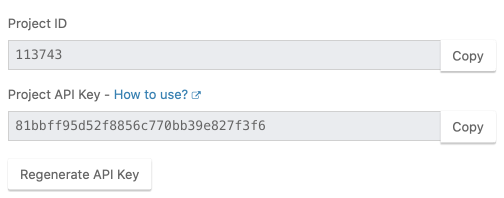
You must set both project_id & project_key.
To find your project_id and project_key navigate to your project's
Settings and copy the values from the right sidebar.
import pybrake

notifier = pybrake.Notifier(project_id=123,
                            project_key='FIXME',
                            environment='production')
Sending errors to Airbrake
try:
    raise ValueError('hello')
except Exception as err:
    notifier.notify(err)
Sending errors synchronously
By default, the notify function sends errors asynchronously using
ThreadPoolExecutor and returns a concurrent.futures.Future, a synchronous
API is also made available with the notify_sync function:
notice = notifier.notify_sync(err)
if 'id' in notice:
    print(notice['id'])
else:
    print(notice['error'])
Adding custom params
To set custom params you can build and send notice in separate steps:
notice = notifier.build_notice(err)
notice['params']['myparam'] = 'myvalue'
notifier.send_notice(notice)
You can also add custom params to every error notice before it's sent to Airbrake
with the add_filter function.
def my_filter(notice):
    notice['params']['myparam'] = 'myvalue'
    return notice

notifier.add_filter(my_filter)
Ignoring notices
There may be some notices/errors thrown in your application that you're not
interested in sending to Airbrake, you can ignore these using the add_filter
function.
def my_filter(notice):
    if notice['context']['environment'] == 'development':
        # Ignore notices in development environment.
        return None
    return notice

notifier.add_filter(my_filter)
Filtering keys
With keys_blocklist option you can specify list of keys containing sensitive information that must be filtered out, e.g.:
notifier = pybrake.Notifier(
    ...
    keys_blocklist=[
        'password',           # exact match
        re.compile('secret'), # regexp match
    ],
)
Logging integration
pybrake provides a logging handler that sends your logs to Airbrake.
import logging
import pybrake


airbrake_handler = pybrake.LoggingHandler(notifier=notifier,
                                          level=logging.ERROR)

logger = logging.getLogger('test')
logger.addHandler(airbrake_handler)

logger.error('something bad happened')
Disabling pybrake logs
The pybrake logger can be silenced by setting the logging level to
logging.CRITICAL.
import logging


logging.getLogger("pybrake").setLevel(logging.CRITICAL)
Sending route stats
notifier.routes.notify allows sending route stats to Airbrake. The library
provides integrations with Django and Flask. (your routes are tracked
automatically). You can also use this API manually:
from pybrake import RouteMetric

metric = RouteMetric(method=request.method, route=route)
metric.status_code = response.status_code
metric.content_type = response.headers.get("Content-Type")
metric.end_time = time.time()

notifier.routes.notify(metric)
Sending route breakdowns
notifier.routes.breakdowns.notify allows sending performance breakdown stats
to Airbrake. You can use this API manually:
from pybrake import RouteMetric

metric = RouteMetric(
    method=request.method,
    route='/things/1',
    status_code=200,
    content_type=response.headers.get('Content-Type'))
metric._groups = {'db': 12.34, 'view': 56.78}
metric.end_time=time.time()

notifier.routes.breakdowns.notify(metric)
Sending query stats
notifier.queries.notify allows sending SQL query stats to Airbrake. The
library provides integration with Django (your queries are tracked
automatically). You can also use this API manually:
notifier.queries.notify(
    query="SELECT * FROM foos",
    method=request.method,
    route=route,
    function="test",
    file="test",
    line=10,
    start_time=time.time(),
    end_time=time.time(),
)
Sending queue stats
notifier.queues.notify allows sending queue (job) stats to Airbrake. The
library provides integration with Celery (your queues are tracked
automatically). You can also use this API manually:
from pybrake import QueueMetric

metric = QueueMetric(queue="foo_queue")
metric._groups = {'redis': 24.0, 'sql': 0.4}
notifier.queues.notify(metric)
Framework Integration
Pybrake provides a ready-to-use solution with minimal configuration for python frameworks.
- AIOHTTP
- BottlePy
- Celery
- CherryPy
- Django
- FastAPI
- Falcon
- Flask
- Hug
- Masonite
- Pycnic
- Pyramid
- Sanic
- Starlette
- Tornado
- Turbogears2
Development
Running the tests
pip install -r requirements.txt
pip install -r test-requirements.txt
pytest
Uploading to PyPI
python setup.py sdist upload
Remote configuration
Every 10 minutes the notifier issues an HTTP GET request to fetch remote
configuration. This might be undesirable while running tests. To suppress this
HTTP call, you need to pass remote_config=False to the notifier.
2 maintainers


Release files for pybrake 1.10.1
For a detailed explanation of source distributions (sdists) and built distributions (wheels), please see the package formats documentation.
Source distribution (sdist)
| File | Size | Uploaded | |
|---|---|---|---|
| pybrake-1.10.1.tar.gz | 102.7 kB | Details |
Release files / pybrake-1.10.1.tar.gz
| Download URL | pybrake-1.10.1.tar.gz |
|---|---|
| Size | 102.7 kB |
| Tags | Source |
|
SHA-256 checksum How to use checksums |
df87930919109ef3559e44d8bfddf783b094de840f3cab2718f83b97b96b0e76
|
|
BLAKE2b-256 checksum How to use checksums |
e1b660cc1574170587a6e26d22a461a4b1c204a6e68ebeef3fafb1b933425254
|
| Upload date | |
|
Uploaded using Trusted Publishing? What is trusted publishing? |
No |
| Uploaded via |
twine/4.0.0 CPython/3.10.2
|














